2010 FORD ESCAPE transmission
[x] Cancel search: transmissionPage 216 of 345

The BRAKE warning lamp in the
instrument cluster illuminates and
remains illuminated (when the
ignition is turned on) until the
parking brake is released.
WARNING:If the parking brake is fully released, but the brake
warning lamp remains illuminated, the brakes may not be
working properly. See your authorized dealer.
WARNING:Always set the parking brake fully and make sure
that the gearshift is securely latched in P (Park) (automatic
transmission) or in 1 (First) (manual transmission).
The parking brake is not recommended to stop a moving vehicle.
However, if the normal brakes fail, the parking brake can be used to stop
your vehicle in an emergency. Since the parking brake applies only the
rear brakes, the vehicle’s stopping distance will increase greatly and the
handling of your vehicle will be adversely affected.
Pull the release lever to release the
brake. Driving with the parking
brake on will cause the brakes to
wear out quickly and reduce fuel
economy.
P!
BRAKE
Driving
216
2010 Escape(204)
Owners Guide, 1st Printing
USA(fus)
Page 224 of 345

2. Using a screwdriver or similar
tool, carefully pry out the small
Brake Transmission Shift Interlock
(BTSI) cover cap located to the
right of the gearshift lever.
3. Insert a screwdriver or similar
tool straight down into the access
hole and press downward while
pulling the gearshift lever out of the
P (Park) position and into the N
(Neutral) position.
4. Remove tool and reinstall the
BTSI cover cap.
5. Start the vehicle and release the
parking brake.
WARNING:Do not drive your vehicle until you verify that the
brakelamps are working.
WARNING:Always set the parking brake fully and make sure
the gearshift is latched in P (Park). Turn the ignition to the off
position and remove the key whenever you leave your vehicle.
WARNING:If the parking brake is fully released, but the brake
warning lamp remains illuminated, the brakes may not be
working properly. See your authorized dealer as soon as possible.
AUTOMATIC TRANSMISSION OPERATION (IF EQUIPPED)
Automatic Transmission Adaptive Learning
Your transmission is equipped with an adaptive learning strategy found in
the vehicle computer. This feature is designed to increase durability and
provide consistent shift feel over the life of the vehicle. A new vehicle or
transmission may have firm and/or soft shifts. This operation is
Driving
224
2010 Escape(204)
Owners Guide, 1st Printing
USA(fus)
Page 225 of 345

considered normal and will not affect function or durability of the
transmission. Over time, the adaptive learning process will fully update
transmission operation. Additionally, whenever the battery is
disconnected or a new battery installed, the strategy must be relearned.
Understanding the gearshift positions of the 6–speed automatic
transmission
Your vehicle has been designed to improve fuel economy by reducing
fuel usage while coasting or decelerating. When you take your foot off
the accelerator pedal and the vehicle begins to slow down the torque
converter clutch locks up and aggressively shuts off fuel flow to the
engine while decelerating. This fuel economy benefit may be perceived
as a light to medium braking sensation when removing your foot from
the accelerator pedal.
P (Park)
This position locks the transmission
and prevents the front wheels from
turning.
To put your vehicle in gear:
1. Press the brake pedal.
2. Move the gearshift lever into the
desired gear.
To put your vehicle in P (Park):
1. Come to a complete stop.
2. Move the gearshift lever and
securely latch it in P (Park).
WARNING:Always set the parking brake fully and make sure
the gearshift is latched in P (Park). Turn the ignition to the off
position and remove the key whenever you leave your vehicle.
R (Reverse)
With the gearshift lever in R (Reverse), the vehicle will move backward.
Always come to a complete stop before shifting into and out of R
(Reverse).
Driving
225
2010 Escape(204)
Owners Guide, 1st Printing
USA(fus)
Page 226 of 345

N (Neutral)
With the gearshift lever in N (Neutral), the vehicle can be started and is
free to roll. Hold the brake pedal down while in this position.
D (Drive) with Overdrive
The normal driving position for the best fuel economy. Transmission
operates in gears one through six.
D (Drive) with Grade Assist
Pressing the transmission control
switch on the side of the gearshift
lever activates grade assist and
cancels overdrive.
•Provides additional grade
(engine) braking and extends
lower gear operation on uphill
climbs for hilly terrain or
mountainous areas.
•Provides additional engine
braking through the automatic
transmission shift strategy which
reacts to vehicle inputs (vehicle
acceleration, accelerator pedal,
brake pedal and vehicle speed).
•Allows the transmission to select
gears that will provide the desired engine braking based on the vehicle
inputs mentioned above. This will increase engine RPM during engine
braking.
•The grade assist lamp in the
instrument cluster is illuminated.
Grade assist is designed to aid the
driver with optimal gear selection in
hilly terrain or mountainous areas
but is not intended for normal operation. It is recommended that you
return to O/D (overdrive mode) on flat terrain to provide the best fuel
economy and transmission function.
To return to normal D (Drive) position (with O/D), press the
transmission control switch again.
•The grade assist lamp in the instrument cluster will not be illuminated.
•The transmission will operate in gears one through six.
Driving
226
2010 Escape(204)
Owners Guide, 1st Printing
USA(fus)
Page 227 of 345

O/D (overdrive mode) is automatically returned each time the engine is
turned off.
L (Low)
•Provides maximum engine braking.
•Will downshift to the lowest available gear for the current vehicle
speed; allows for first gear when vehicle reaches slower speeds.
If your vehicle gets stuck in mud or snow
If your vehicle gets stuck in mud or snow, it may be rocked out by
shifting between forward and reverse gears, stopping between shifts in a
steady pattern. Press lightly on the accelerator in each gear.
Do not rock the vehicle if the engine is not at normal operating
temperature or damage to the transmission may occur.
Do not rock the vehicle for more than a minute or damage to the
transmission and tires may occur, or the engine may overheat.
MANUAL TRANSMISSION OPERATION (IF EQUIPPED)
Using the clutch
Manual transmission vehicles have a starter interlock that prevents
cranking the engine unless the clutch pedal is fully pressed.
To start the vehicle:
1. Make sure the parking brake is fully set.
2. Press the clutch pedal to the
floor, then put the gearshift lever in
the neutral position.
3. Start the engine.
4. Press the brake pedal and move
the gearshift lever to the desired
gear; 1 (First) or R (Reverse).
5. Release the parking brake, then slowly release the clutch pedal while
slowly pressing on the accelerator.
During each shift, the clutch pedal must be fully pressed to the floor.
Make sure the floor mat is properly positioned so it doesn’t interfere with
the full extension of the clutch pedal.
Failure to fully press the clutch pedal to the floor may cause
increased shift efforts, prematurely wear transmission
components or damage the transmission.
Driving
227
2010 Escape(204)
Owners Guide, 1st Printing
USA(fus)
Page 228 of 345

Do not drive with your foot resting on the clutch pedal or use the
clutch pedal to hold your vehicle at a standstill while waiting on a
hill. These actions will severely reduce the life of the clutch and
could nullify a clutch warranty claim.
Recommended shift speeds
Upshift according to the following charts for best fuel economy:
Upshifts during light to moderate accelerations and cruises
(for best fuel economy)
Shift from:
1-2 10 mph (16 km/h)
2-3 20 mph (32 km/h)
3-4 32 mph (52 km/h)
4-5 37 mph (60 km/h)
Reverse
Make sure that your vehicle is at a complete stop before you shift
into R (Reverse). Failure to do so may damage the transmission.
1. Hold the clutch pedal down and
move the gearshift lever into the
neutral position.
2. From the neutral position, move
the gearshift lever all the way to the
right, then move it down into the R
(Reverse) position.
Note:The gearshift lever can only
be moved into R (Reverse) by moving it from left of 3 (Third) and 4
(Fourth) before shifting into R (Reverse). This is a lockout feature that
protects the transmission from accidentally being shifted into R
(Reverse) from 5 (Fifth).
If R (Reverse) is not fully engaged, press the clutch pedal down and
return the gearshift to the neutral position. Release the clutch pedal for
a moment, then press it down and shift to R (Reverse) again.
Parking your vehicle
1. Apply the brake and shift into the neutral position.
2. Fully apply the parking brake, then shift into 1 (First).
3. Turn the ignition off.
Driving
228
2010 Escape(204)
Owners Guide, 1st Printing
USA(fus)
Page 231 of 345
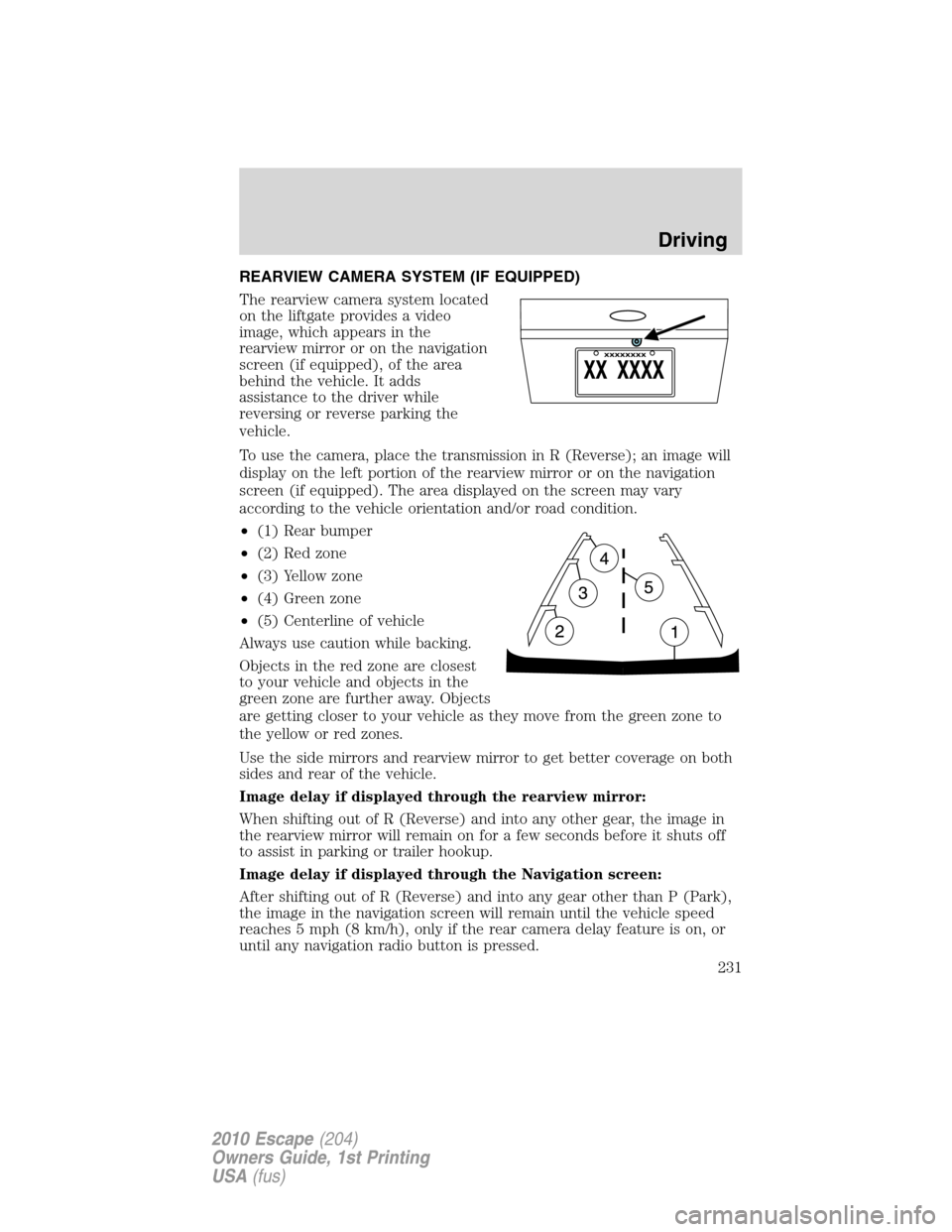
REARVIEW CAMERA SYSTEM (IF EQUIPPED)
The rearview camera system located
on the liftgate provides a video
image, which appears in the
rearview mirror or on the navigation
screen (if equipped), of the area
behind the vehicle. It adds
assistance to the driver while
reversing or reverse parking the
vehicle.
To use the camera, place the transmission in R (Reverse); an image will
display on the left portion of the rearview mirror or on the navigation
screen (if equipped). The area displayed on the screen may vary
according to the vehicle orientation and/or road condition.
•(1) Rear bumper
•(2) Red zone
•(3) Yellow zone
•(4) Green zone
•(5) Centerline of vehicle
Always use caution while backing.
Objects in the red zone are closest
to your vehicle and objects in the
green zone are further away. Objects
are getting closer to your vehicle as they move from the green zone to
the yellow or red zones.
Use the side mirrors and rearview mirror to get better coverage on both
sides and rear of the vehicle.
Image delay if displayed through the rearview mirror:
When shifting out of R (Reverse) and into any other gear, the image in
the rearview mirror will remain on for a few seconds before it shuts off
to assist in parking or trailer hookup.
Image delay if displayed through the Navigation screen:
After shifting out of R (Reverse) and into any gear other than P (Park),
the image in the navigation screen will remain until the vehicle speed
reaches 5 mph (8 km/h), only if the rear camera delay feature is on, or
until any navigation radio button is pressed.
Driving
231
2010 Escape(204)
Owners Guide, 1st Printing
USA(fus)
Page 237 of 345

Why doesn’t APA position the vehicle where I want in the space?
•The driver allows the vehicle to roll in the opposite direction of the
transmission (such as rolling forward when R (Reverse) gear is
selected.
•You may be driving in R (Reverse). APA can only look for a parking
space while moving forward.
•There may be an irregular curb along the parking space. APA might
not be able to align the vehicle to curbs that are damaged, very
shallow or covered with material such as debris, leaves, snow, or tarps.
•The vehicles or objects bordering the space may not be positioned
appropriately.
•The vehicle was steered more that usual while driving by the space.
APA performs best when you drive the same distance from the
parking space the entire length of the space.
•The tires may not be installed and maintained correctly. For example,
one or more tires may not be inflated correctly, may not be of the
same size, or may not be authorized for use on this vehicle.
•The vehicle had a repair or alteration that is not authorized by the
manufacturer.
•One of the parked vehicles has a high altitude attachment (i.e. salt
sprayer, snow plow, moving truck high bed, etc.) High altitude
attachments may not be detected by the system.
•The parking space length or parked objects position have changed
after the vehicle has passed the parking space.
•The temperature around your vehicle changed quickly such as you
just drove from a heated garage into the cold or just left a car wash.
As a result, the outside air temperature displayed in the vehicle may
not be close enough to the actual temperature. APA relies on a
correctly sensing the temperature outside for precisely positioning the
vehicle.
Driving
237
2010 Escape(204)
Owners Guide, 1st Printing
USA(fus)