2010 FIAT PUNTO EVO page 201
[x] Cancel search: page 201Page 28 of 270
CONTENTS TECHNICAL
SPECIFICATIONS SERVICING
AND CARE IN AN
EMERGENCY WARNING LIGHTS
AND MESSAGES STARTING
AND DRIVING SAFETY
KNOWING
YOUR
VEHICLE
27
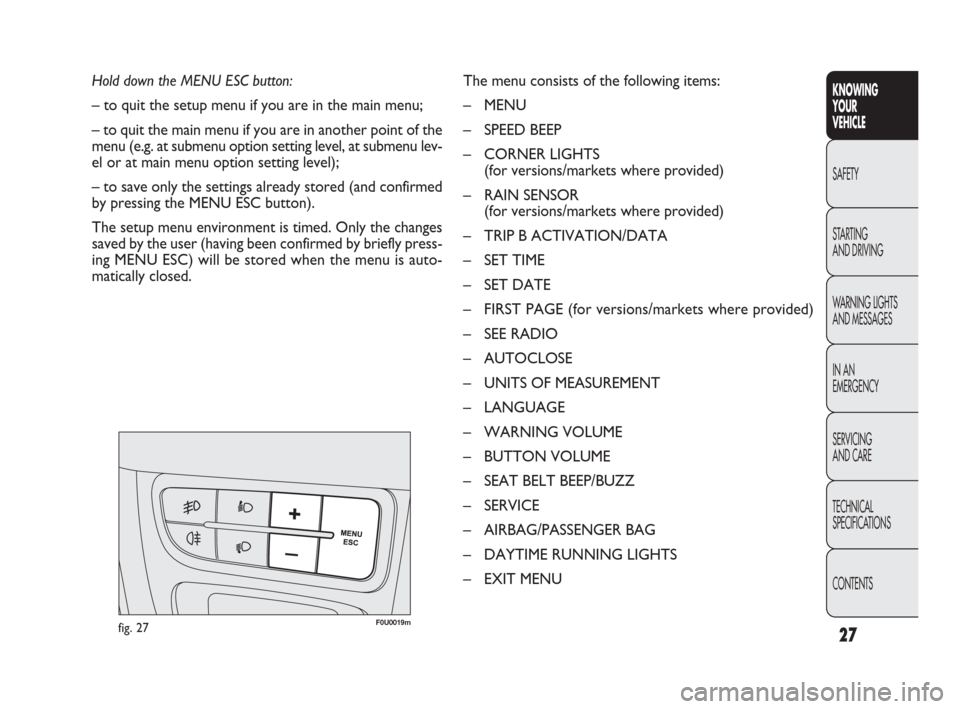
Hold down the MENU ESC button:
– to quit the setup menu if you are in the main menu;
– to quit the main menu if you are in another point of the
menu (e.g. at submenu option setting level, at submenu lev-
el or at main menu option setting level);
– to save only the settings already stored (and confirmed
by pressing the MENU ESC button).
The setup menu environment is timed. Only the changes
saved by the user (having been confirmed by briefly press-
ing MENU ESC) will be stored when the menu is auto-
matically closed.The menu consists of the following items:
– MENU
– SPEED BEEP
– CORNER LIGHTS
(for versions/markets where provided)
– RAIN SENSOR
(for versions/markets where provided)
– TRIP B ACTIVATION/DATA
– SET TIME
– SET DATE
– FIRST PAGE (for versions/markets where provided)
– SEE RADIO
– AUTOCLOSE
– UNITS OF MEASUREMENT
– LANGUAGE
– WARNING VOLUME
– BUTTON VOLUME
– SEAT BELT BEEP/BUZZ
– SERVICE
– AIRBAG/PASSENGER BAG
– DAYTIME RUNNING LIGHTS
– EXIT MENU
fig. 27F0U0019m
001-036 PUNTO FL EN 4ed 18-01-2010 12:21 Pagina 27
Page 32 of 270

31
KNOWING
YOUR
VEHICLE
SAFETY
STARTING
AND DRIVING
WARNING LIGHTS
AND MESSAGES
IN AN
EMERGENCY
SERVICING
AND CARE
TECHNICAL
SPECIFICATIONS
CONTENTS
NB Each time the +or –buttons are pressed there is an
increase or decrease of one unit. Hold the button down
to increase/decrease the setting rapidly. Complete the set-
ting with single presses of the button when you approach
the required setting.
– briefly press the MENU ESC button to go back to the
menu screen or hold the button down to go back to the
standard screen without saving.
FIRST PAGE
(information displayed on the main screen)
(for versions/markets where available)
This function allows you to choose the information you
would like to see on the main screen. You can choose
to display the date or the turbocharger boost pressure.
To make your choice, proceed as follows:
– briefly press MENU ESC: “First page” will appear on
the display;
– briefly press MENU ESC again to show the display op-
tions: “Date” and “Engine info”;
– press +or –to select the information you wish to see
on the main page of the display; When you have made the required adjustments, briefly
press button MENU ESC to go back to the submenu
screen or hold the button down to go back to the main
menu screen without saving.
– hold down MENU ESC again to go back to the standard
screen or main menu, depending on which point in the
menu you have reached.
Set date
(Setting the date)
Using this function it is possible to change the date (day –
month – year).
To update, proceed as follows:
– briefly press MENU ESC: the day (dd) will flash on the
display;
– press +or –to set the value;
– briefly press MENU ESC: the month (mm) will flash on
the display;
– press +or –to set the value;
– briefly press MENU ESC: the year (yyyy) will flash on the
display;
– press the+oppure –button to make the adjustment.
001-036 PUNTO FL EN 4ed 18-01-2010 12:22 Pagina 31
Page 33 of 270

32
KNOWING
YOUR
VEHICLE
SAFETY
STARTING
AND DRIVING
WARNING LIGHTS
AND MESSAGES
IN AN
EMERGENCY
SERVICING
AND CARE
TECHNICAL
SPECIFICATIONS
CONTENTS
AUTOCLOSE
(Automatic central locking with car moving)
When activated (On), this function automatically locks the
doors when the car speed exceeds 20 km/h.
To activate (On) or deactivate (Off) this function, proceed
as follows:
– press the MENU ESC button briefly: the display will show
a submenu;
– briefly press MENU ESC: On or Off will flash on the dis-
play (depending on previous setting);
– press +or –to make your choice;
– briefly press the MENU ESC button to go back to the
submenu screen or hold the button down to go back to
the main menu screen without saving;
– hold down MENU ESC again to go back to the standard
screen or main menu, depending on which point in the
menu you have reached. – briefly press the MENU ESC button to go back to the
menu screen or hold the button down to go back to the
standard screen without saving.
When the key is turned to MAR and the initial check stage
is over, the display will show the information selected via
the “First page” menu function.
SEE RADIO
(Relaying audio information)
With this function the display shows information relevant
to the sound system.
– Radio: selected radio station frequency or RDS message,
automatic tuning activation or AutoSTore;
– CD, MP3: track number;
– CD Changer: CD number and track number;
To show the sound system information in the display (On)
or clear it (Off), proceed as follows:
– briefly press MENU ESC: On or Off will flash on the dis-
play (depending on previous setting);
– press +or –to make your choice;
– briefly press the MENU ESC button to go back to the
menu screen or hold the button down to go back to the
standard screen without saving.
001-036 PUNTO FL EN 4ed 18-01-2010 12:22 Pagina 32
Page 264 of 270

263
KNOWING
YOUR
VEHICLE
SAFETY
STARTING
AND DRIVING
WARNING LIGHTS
AND MESSAGES
IN AN
EMERGENCY
SERVICING
AND CARE
TECHNICAL
SPECIFICATIONS
CONTENTS
– blade replacement ....................... 230
– rear window washer fluid
specifications ................................. 252
Reconfigurable multifunctional
display ................................................. 24
– control buttons ............................ 25
– setup menu ................................... 26
– standard screen ............................ 24
Regular checks .................................... 216
Remote control .................................. 6
– additional remote controls ........ 8
– battery replacement .................... 7
– opening/closing doors
remotely ........................................ 6
– opening the tail gate .................... 6
Replacing battery of key with
remote control ................................. 7
Rev counter ......................................... 15
Reverse light
– bulb replacement ......................... 194
Right hand drive version ................... 265
Roof bar attachments ........................ 99
Roof rack/ski rack (capacity for) ..... 99
Rubber tubes ....................................... 229
Safety ................................................... 129
Satellite navigation socket ................. 124
SBR system .......................................... 130
Scheduled servicing plan ......... 212-214
Scrappage ............................................. 255
Seat belt pretensioners ..................... 131
– load limiters .................................. 131
Seat belts .............................................. 129
– carrying children safely ............... 134– general information ..................... 132
– load limiters .................................. 131
– maintenance .................................. 225
– pretensioners ................................ 131
– SBR ................................................. 130
– using the seat belts ...................... 129
Seat heating .......................................... 41
Servicing and care......................... 211
– checking fluid levels ..................... 217
– heavy-duty use of the car ........... 216
– regular checks .............................. 216
– scheduled servicing plan..... 212-214
Setting the clock ..........................21-30
Side bags
–
side bag / window bag ... 144-145-146
– general information ..................... 147
Side lights/taillights
– front bulb replacement ............... 189
– rear bulb replacement ................ 193
– switching on .................................. 61
Smart washing
(windscreen wipers) ........................ 64
Snow chains ......................................... 159
Sockets .................................................. 80
Spare wheel ......................................... 176
– technical specifications ............... 244
Spark plugs (type) .....................238-239
Speedometer ....................................... 15
– standard screen ............................ 23
Start&Stop system .............................. 115
Starting and driving...................... 149
Starting the engine ............................. 149
– emergency starting ...................... 175
– ignition switch .............................. 11
– procedure for diesel versions.... 150– procedure for petrol versions .... 149
– stopping the engine ..................... 151
– warming the engine ..................... 151
Steering lock ........................................ 12
Steering system
– technical specifications ............... 241
–
steering wheel adjustment lever.... 43
Steering wheel
– adjustment lever .......................... 43
– turning circle ................................. 241
Steering wheel stalks ................... 61-63
Stereo (wiring)..................................... 122
Storage compartments ...................... 74
Sun visors ............................................. 79
Suspensions .......................................... 241
Switching ceiling lights on/off ........... 68
Symbols ................................................. 4
Tail gate
– emergency unlocking from
the inside ....................................... 94
– unlocking with remote control .. 6
Technical specifications.............. 235
Third brake light ................................. 194
Topping up engine oil ........................ 220
– specifications ................................. .251
Tow hook
– installing ........................................ 207
Towing the car .................................... 208
Towing trailers .................................... 156
Trailer (towing) ................................... 156
– installing the tow hook ............... 157
Transmission
– technical specifications ............... 240
Trip computer ..................................... 37
259-268 PUNTO FL EN 4ed 18-01-2010 12:29 Pagina 263