2010 DODGE NITRO maintenance
[x] Cancel search: maintenancePage 205 of 498

A loose, improperly installed, or damaged fuel filler cap
may also turn on the Malfunction Indicator Light (MIL).
noFUSE
If the vehicle diagnostic system determines that the
Ignition Off Draw (IOD) fuse is improperly installed, or
damaged, a “noFUSE” message will display in the odom-
eter display area. For further information on fuses and
fuse locations refer to “Fuses” in “Maintaining Your
Vehicle”.
CHAngE OIL Message
Your vehicle is equipped with an engine oil change
indicator system. The “CHAngE OIL” message will flash
in the instrument cluster odometer for approximately
12 seconds after a single chime has sounded to indicate
the next scheduled oil change interval. The engine oil
change indicator system is duty cycle based, which
means the engine oil change interval may fluctuate
dependent upon your personal driving style. Unlessreset, this message will continue to display each time you
turn the ignition switch to the ON/RUN position. To turn
off the message temporarily, press and release the TRIP
ODOMETER button on the instrument cluster. To reset
the oil change indicator system (after performing the
scheduled maintenance), refer to the following proce-
dure:
1. Turn the ignition switch to the ON position. Do not
start the engine.
2. Fully depress the accelerator pedal slowly three
times within 10 seconds.
3. Turn the ignition switch to the OFF/LOCK position.
NOTE: If the indicator message illuminates when you
start the vehicle, the oil change indicator system did not
reset. If necessary, repeat this procedure.
204 UNDERSTANDING YOUR INSTRUMENT PANEL
Page 215 of 498

•Right rear low pressure (with a single chime). Refer to
“Tire Pressure Monitoring System” in “Starting And
Operating”.
•Check TPM System (with a single chime). Refer to
“Tire Pressure Monitoring System” in “Starting And
Operating”.
•Check Gascap (refer to “Adding Fuel” in “Starting
And Operating”).
•Oil change required (with a single chime).
•Park Assist Disabled
•Service Park Assist System (with a single chime)
•ECO (Fuel Saver Indicator) — if equipped
Oil Change Required
Your vehicle is equipped with an engine oil change
indicator system. The “Oil Change Required” messagewill flash in the EVIC display for approximately 10 sec-
onds after a single chime has sounded to indicate the next
scheduled oil change interval. The engine oil change
indicator system is duty cycle based, which means the
engine oil change interval may fluctuate dependent upon
your personal driving style. Unless reset, this message
will continue to display each time you turn the ignition
switch to the ON/RUN position. To turn off the message
temporarily, press and release the MENU button. To reset
the oil change indicator system (after performing the
scheduled maintenance) refer to the following procedure.
1. Turn the ignition switch to the ON position. (Do not
start the engine).
2. Fully depress the accelerator pedal slowly three times
within 10 seconds.
3. Turn the ignition switch to the OFF/LOCK position.
214 UNDERSTANDING YOUR INSTRUMENT PANEL
Page 275 of 498

CD Player
Press the top of the switch once to go to the next track on
the CD. Press the bottom of the switch once to go to the
beginning of the current track or to the beginning of the
previous track, if it is within one second after the current
track begins to play.
If you press the switch up or down twice it plays the
second track, three times, it will play the third, etc.
The button in the center of the left-hand switch changes
CDs on the 6–Disc in-dash CD changer radio. This button
does not function for all other radios.
CD/DVD DISC MAINTENANCE
To keep a CD/DVD in good condition, take the following
precautions:
1. Handle the disc by its edge; avoid touching the
surface.2. If the disc is stained, clean the surface with a soft cloth,
wiping from center to edge.
3. Do not apply paper or tape to the disc; avoid scratch-
ing the disc.
4. Do not use solvents such as benzene, thinner, cleaners,
or anti-static sprays.
5. Store the disc in its case after playing.
6. Do not expose the disc to direct sunlight.
7. Do not store the disc where temperatures may become
too high.
NOTE:
If you experience difficulty in playing a particu-
lar disc, it may be damaged (i.e., scratched, reflective
coating removed, a hair, moisture or dew on the disc)
oversized, or have protection encoding. Try a known
good disc before considering disc player service.
274 UNDERSTANDING YOUR INSTRUMENT PANEL
Page 286 of 498

•Most of the time, when in Automatic Operation, you
can temporarily put the system into Recirculation
Mode by pressing the Recirculation button. However,
under certain conditions, while in Automatic Mode,
the system is blowing air out the defrost vents. When
these conditions are present, and the Recirculation
button is pressed, the indicator will flash and then turn
off. This tells you that you are unable to go into
Recirculation Mode at this time. If you would like the
system to go into Recirculation Mode, you must first
move the Mode knob to Panel, Panel/Floor and then
press the Recirculation button. This feature reduces the
possibility of window fogging.
Operating Tips
NOTE:Refer to the chart at the end of this section for
suggested control settings for various weather condi-
tions.
Summer Operation
The engine cooling system in air-conditioned vehicles
must be protected with a high-quality antifreeze coolant
to provide proper corrosion protection and to protect
against engine overheating. A solution of 50% ethylene
glycol antifreeze coolant and 50% water is recommended.
Refer to “Maintenance Procedures” in “Maintaining Your
Vehicle” for proper coolant selection.
Winter Operation
Use of the air Recirculation Mode during winter months
is not recommended because it may cause window
fogging.
Vacation Storage
Anytime you store your vehicle, or keep it out of service
(i.e., vacation) for two weeks or more, run the air
conditioning system at idle for about five minutes in the
fresh air and high blower settings. This will ensure
4
UNDERSTANDING YOUR INSTRUMENT PANEL 285
Page 287 of 498

adequate system lubrication to minimize the possibility
of compressor damage when the system is started again.
Window Fogging
Interior fogging on the windshield can be quickly re-
moved by turning the mode selector to Defrost. The
Defrost/Floor mode can be used to maintain a clear
windshield and provide sufficient heating. If side win-
dow fogging becomes a problem, increase blower speed.
Vehicle windows tend to fog on the inside in mild but
rainy or humid weather.
NOTE:Recirculate without A/C should not be used for
long periods as fogging may occur.
Side Window Demisters
A side window demister outlet is located at each end of
the instrument panel. These non-adjustable outlets direct
air toward the side windows when the system is in the
FLOOR, MIX, or DEFROST mode. The air is directed at
the area of the windows through which you view the
outside mirrors.
Outside Air Intake
Make sure the air intake, located directly in front of the
windshield, is free of obstructions such as leaves. Leaves
collected in the air intake may reduce airflow, and if they
enter the plenum, they could plug the water drains. In
winter months, make sure the air intake is clear of ice,
slush, and snow.
A/C Air Filter — If Equipped
The A/C Filter prevents most dust and pollen from
entering the cabin. The filter acts on air coming from
outside the vehicle and recirculated air within the pas-
senger compartment. Refer to “Maintenance Procedures”
in “Maintaining Your Vehicle” for A/C Air Filter service
information or see your authorized dealer for service.
Refer to “Maintenance Schedules” for filter service
intervals.
286 UNDERSTANDING YOUR INSTRUMENT PANEL
Page 313 of 498

drive through water, try to determine the depth and the
bottom condition (and location of any obstacles) prior to
entering. Proceed with caution and maintain a steady
controlled speed less than 5 mph (8 km/h) in deep water
to minimize wave effects.
Flowing Water
If the water is swift flowing and rising (as in storm
run-off) avoid crossing until the water level recedes
and/or the flow rate is reduced. If you must cross
flowing water, avoid depths in excess of 9 in (23 cm). The
flowing water can erode the streambed causing your
vehicle to sink into deeper water. Determine exit point(s)
that are downstream of your entry point to allow for
drifting.Standing Water
Avoid driving in standing water deeper than 20 in
(50 cm) and reduce speed appropriately to minimize
wave effects. Maximum speed in 20 in (50 cm) of water is
less than 5 mph (8 km/h).
Maintenance
After driving through deep water, inspect your vehicle
fluids and lubricants (engine, transmission, axle, transfer
case) to assure they have not been contaminated. Con-
taminated fluids and lubricants (milky, foamy in appear-
ance) should be flushed/changed as soon as possible to
prevent component damage.
Driving In Snow, Mud and Sand
In heavy snow, when pulling a load, or for additional
control at slower speeds, shift the transmission to a low
gear and shift the transfer case to 4L or 4LO if necessary.
Refer to “Four-Wheel Drive Operation” in “Starting and
Operating” for further information. Do not shift to a
312 STARTING AND OPERATING
Page 349 of 498
CAUTION!
Proper operation of four-wheel drive vehicles de-
pends on tires of equal size, type and circumference
on each wheel. Any difference in tire size can cause
damage to the transfer case. Tire rotation schedule
should be followed to balance tire wear.
Refer to “Maintenance Schedule” for the proper mainte-
nance intervals. More frequent rotation is permissible if
desired. The reasons for any rapid or unusual wear
should be corrected prior to rotation being performed.
NOTE: The premium Tire Pressure Monitor System will
automatically locate the pressure values displayed in the
correct vehicle position following a tire rotation.
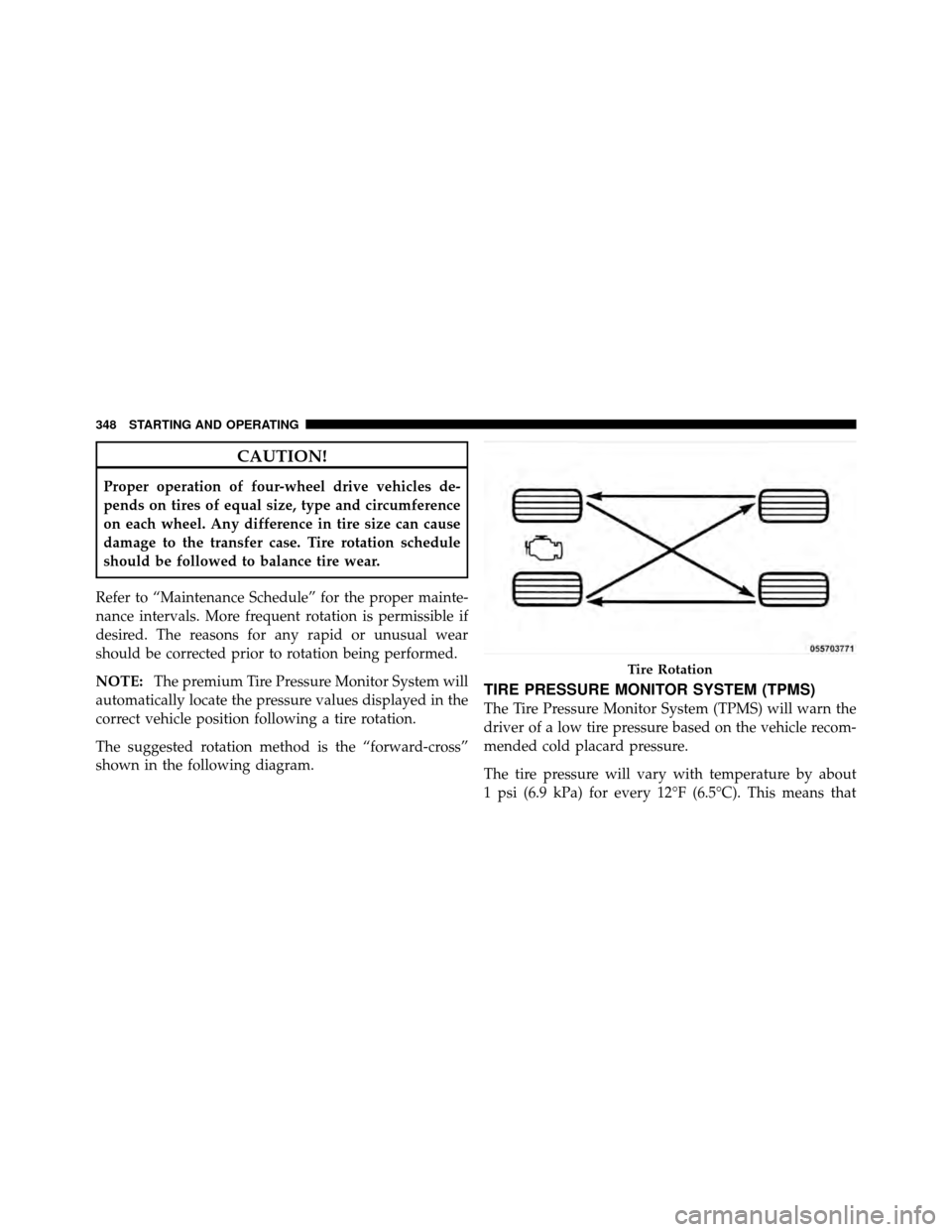
The suggested rotation method is the “forward-cross”
shown in the following diagram.
TIRE PRESSURE MONITOR SYSTEM (TPMS)
The Tire Pressure Monitor System (TPMS) will warn the
driver of a low tire pressure based on the vehicle recom-
mended cold placard pressure.
The tire pressure will vary with temperature by about
1 psi (6.9 kPa) for every 12°F (6.5°C). This means that
Tire Rotation
348 STARTING AND OPERATING
Page 352 of 498

NOTE:
•The TPMS is not intended to replace normal tire care
and maintenance, or to provide warning of a tire
failure or condition.
•The TPMS should not be used as a tire pressure gauge
while adjusting your tire pressure.
•Driving on a significantly under-inflated tire causes
the tire to overheat and can lead to tire failure.
Under-inflation also reduces fuel efficiency and tire
tread life, and may affect the vehicle’s handling and
stopping ability.
•The TPMS is not a substitute for proper tire mainte-
nance, and it is the driver ’s responsibility to maintain
correct tire pressure using an accurate tire pressure
gauge, even if under-inflation has not reached the
level to trigger illumination of the “Tire Pressure
Monitoring Telltale Light.”
•Seasonal temperature changes will affect tire pressure,
and the TPMS will monitor the actual tire pressure in
the tire.
Base System
The Tire Pressure Monitor System (TPMS) uses wireless
technology with wheel rim mounted electronic sensors to
monitor tire pressure levels. Sensors, mounted to each
wheel as part of the valve stem, transmit tire pressure
readings to the receiver module.
NOTE:It is particularly important for you to check the
tire pressure in all of the tires on your vehicle monthly
and to maintain the proper pressure.
The TPMS consists of the following components:
•Receiver Module
•Four Tire Pressure Monitoring Sensors
•Tire Pressure Monitoring Telltale Light
5
STARTING AND OPERATING 351