Page 110 of 484
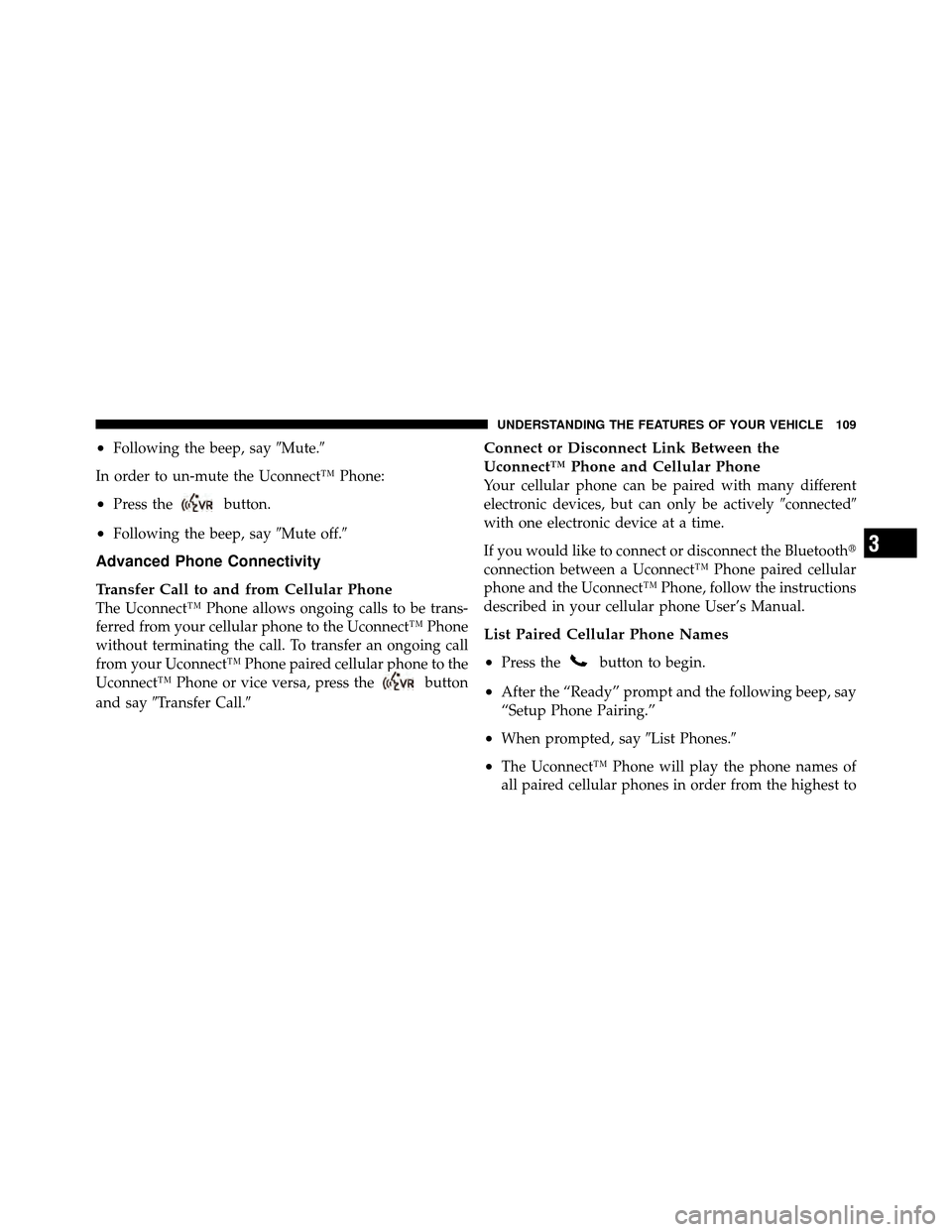
•Following the beep, say�Mute.�
In order to un-mute the Uconnect™ Phone:
•Press thebutton.
•Following the beep, say �Mute off.�
Advanced Phone Connectivity
Transfer Call to and from Cellular Phone
The Uconnect™ Phone allows ongoing calls to be trans-
ferred from your cellular phone to the Uconnect™ Phone
without terminating the call. To transfer an ongoing call
from your Uconnect™ Phone paired cellular phone to the
Uconnect™ Phone or vice versa, press the
button
and say �Transfer Call.�
Connect or Disconnect Link Between the
Uconnect™ Phone and Cellular Phone
Your cellular phone can be paired with many different
electronic devices, but can only be actively �connected�
with one electronic device at a time.
If you would like to connect or disconnect the Bluetooth�
connection between a Uconnect™ Phone paired cellular
phone and the Uconnect™ Phone, follow the instructions
described in your cellular phone User’s Manual.
List Paired Cellular Phone Names
•
Press thebutton to begin.
•After the “Ready” prompt and the following beep, say
“Setup Phone Pairing.”
•When prompted, say �List Phones.�
•The Uconnect™ Phone will play the phone names of
all paired cellular phones in order from the highest to
3
UNDERSTANDING THE FEATURES OF YOUR VEHICLE 109
Page 114 of 484
•In a convertible vehicle, system performance may be
compromised with the convertible top down.
Phone Far End Audio Performance
•
Audio quality is maximized under:
•low-to-medium blower setting,
•low-to-medium vehicle speed,
•low road noise,
•smooth road surface,
•fully closed windows,
•dry weather conditions, and
•operation from the driver’s seat.
•Performance, such as audio clarity, echo, and loudness
to a large degree rely on the phone and network, and
not the Uconnect™ Phone.
•Echo at the phone far end can sometimes be reduced
by lowering the in-vehicle audio volume.
•In a convertible vehicle, system performance may be
compromised with the convertible top down.
Bluetooth�Communication Link
Cellular phones have been found to lose connection to
the Uconnect™ Phone. When this happens, the connec-
tion can generally be reestablished by switching the
phone off/on. Your cellular phone is recommended to
remain in Bluetooth� ON mode.
Power-Up
After switching the ignition key from OFF to either the
ON or ACC position, or after a language change, you
must wait at least five seconds prior to using the system.
3
UNDERSTANDING THE FEATURES OF YOUR VEHICLE 113
Page 219 of 484
Push the rotary TUNE/SCROLL control knob again to
exit setting tone, balance, and fade.
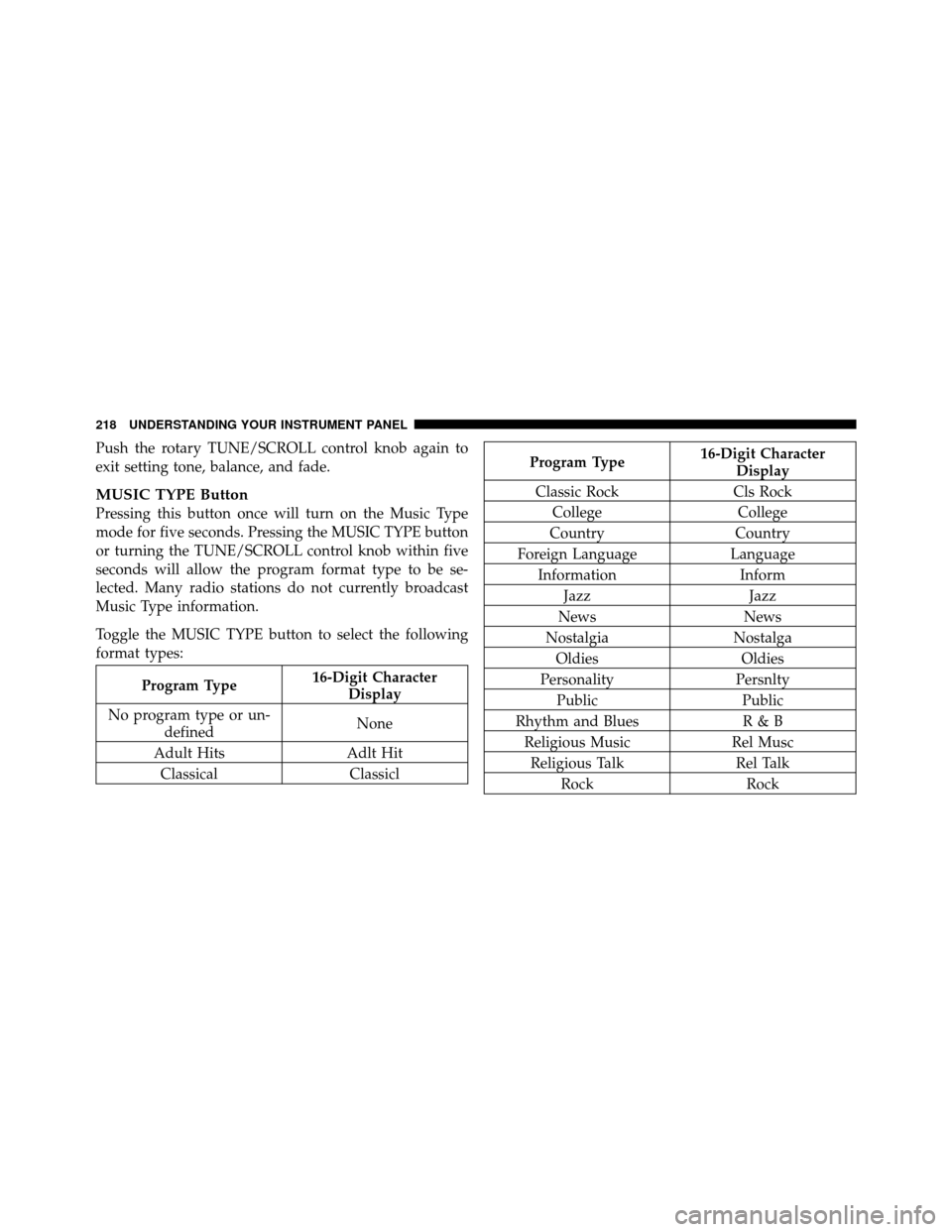
MUSIC TYPE Button
Pressing this button once will turn on the Music Type
mode for five seconds. Pressing the MUSIC TYPE button
or turning the TUNE/SCROLL control knob within five
seconds will allow the program format type to be se-
lected. Many radio stations do not currently broadcast
Music Type information.
Toggle the MUSIC TYPE button to select the following
format types:
Program Type16-Digit Character
Display
No program type or un- defined None
Adult Hits Adlt Hit
Classical Classicl
Program Type16-Digit Character
Display
Classic Rock Cls Rock
College College
Country Country
Foreign Language Language
Information Inform
Jazz Jazz
News News
Nostalgia Nostalga
Oldies Oldies
Personality Persnlty
Public Public
Rhythm and Blues R & B
Religious Music Rel Musc
Religious Talk Rel Talk
Rock Rock
218 UNDERSTANDING YOUR INSTRUMENT PANEL
Page 220 of 484
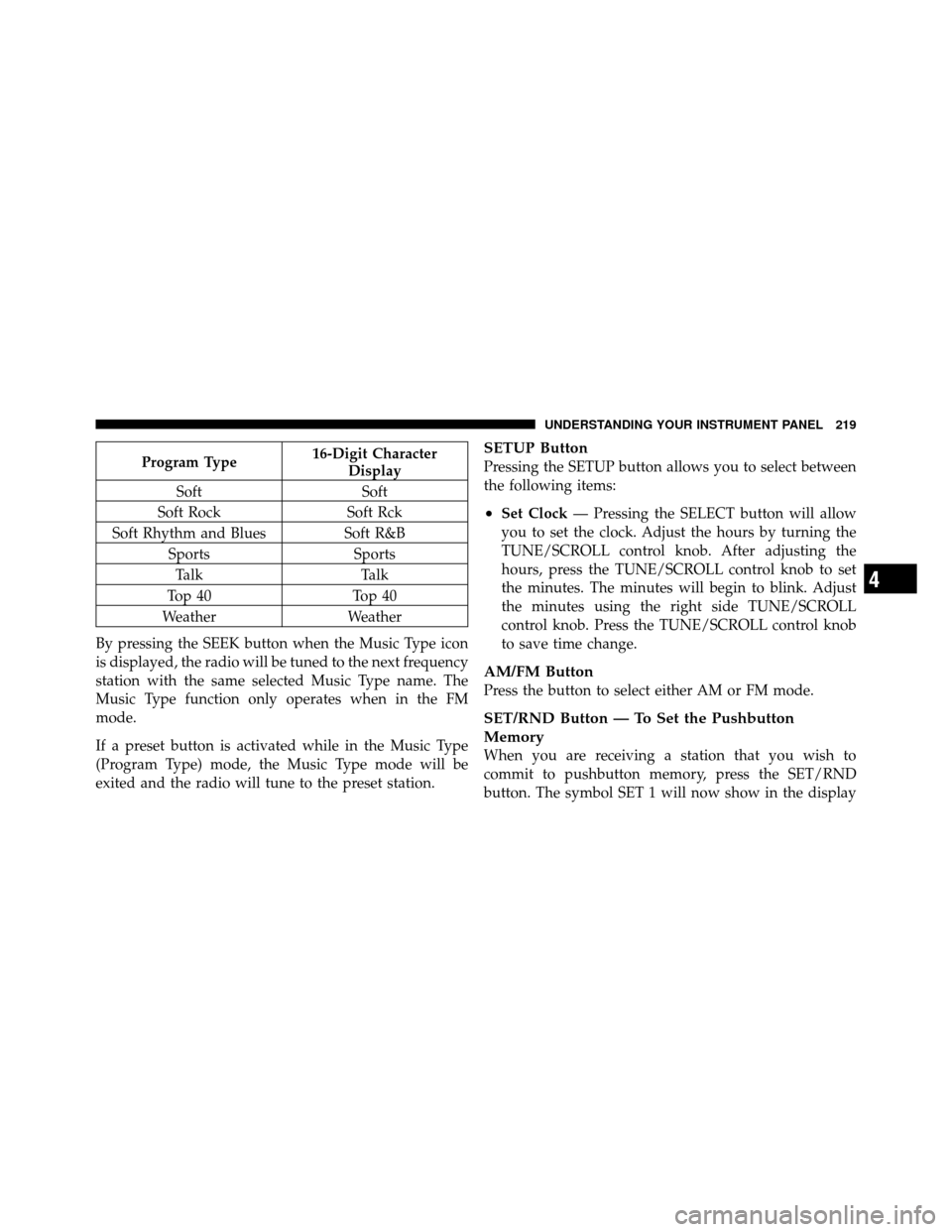
Program Type16-Digit Character
Display
Soft Soft
Soft Rock Soft Rck
Soft Rhythm and Blues Soft R&B
Sports Sports
Talk Talk
Top 40 Top 40
Weather Weather
By pressing the SEEK button when the Music Type icon
is displayed, the radio will be tuned to the next frequency
station with the same selected Music Type name. The
Music Type function only operates when in the FM
mode.
If a preset button is activated while in the Music Type
(Program Type) mode, the Music Type mode will be
exited and the radio will tune to the preset station.SETUP Button
Pressing the SETUP button allows you to select between
the following items:
•Set Clock — Pressing the SELECT button will allow
you to set the clock. Adjust the hours by turning the
TUNE/SCROLL control knob. After adjusting the
hours, press the TUNE/SCROLL control knob to set
the minutes. The minutes will begin to blink. Adjust
the minutes using the right side TUNE/SCROLL
control knob. Press the TUNE/SCROLL control knob
to save time change.
AM/FM Button
Press the button to select either AM or FM mode.
SET/RND Button — To Set the Pushbutton
Memory
When you are receiving a station that you wish to
commit to pushbutton memory, press the SET/RND
button. The symbol SET 1 will now show in the display
4
UNDERSTANDING YOUR INSTRUMENT PANEL 219
Page 411 of 484

CAUTION!
•When installing the integrated power module
cover, it is important to ensure the cover is prop-
erly positioned and fully latched. Failure to do so
may allow water to get into the integrated power
module and possibly result in an electrical system
failure.
•When replacing a blown fuse, it is important to
use only a fuse having the correct amperage rating.
The use of a fuse with a rating other than indicated
may result in a dangerous electrical system over-
load. If a properly rated fuse continues to blow, it
indicates a problem in the circuit that must be
corrected.
Cavity Car-tridge
FuseMini-
Fuse
Description
1 — 15 Amp BlueWasher Motor
2 — 25 Amp NaturalPowertrain Control
Module (PCM)
3 — 25 Amp NaturalIgnition Run/Start
4 — 25 Amp NaturalAlternator/EGR Sole-
noid
5 — 15 Amp BlueDiesel PCM – If
Equipped
6 — 25 Amp NaturalIgnition Coils/Injectors/
Short Runner Valve
7 — 25 Amp NaturalHeadlamp Washer Relay
– If Equipped
8 — 30 Amp GreenStarter
410 MAINTAINING YOUR VEHICLE
Page 415 of 484
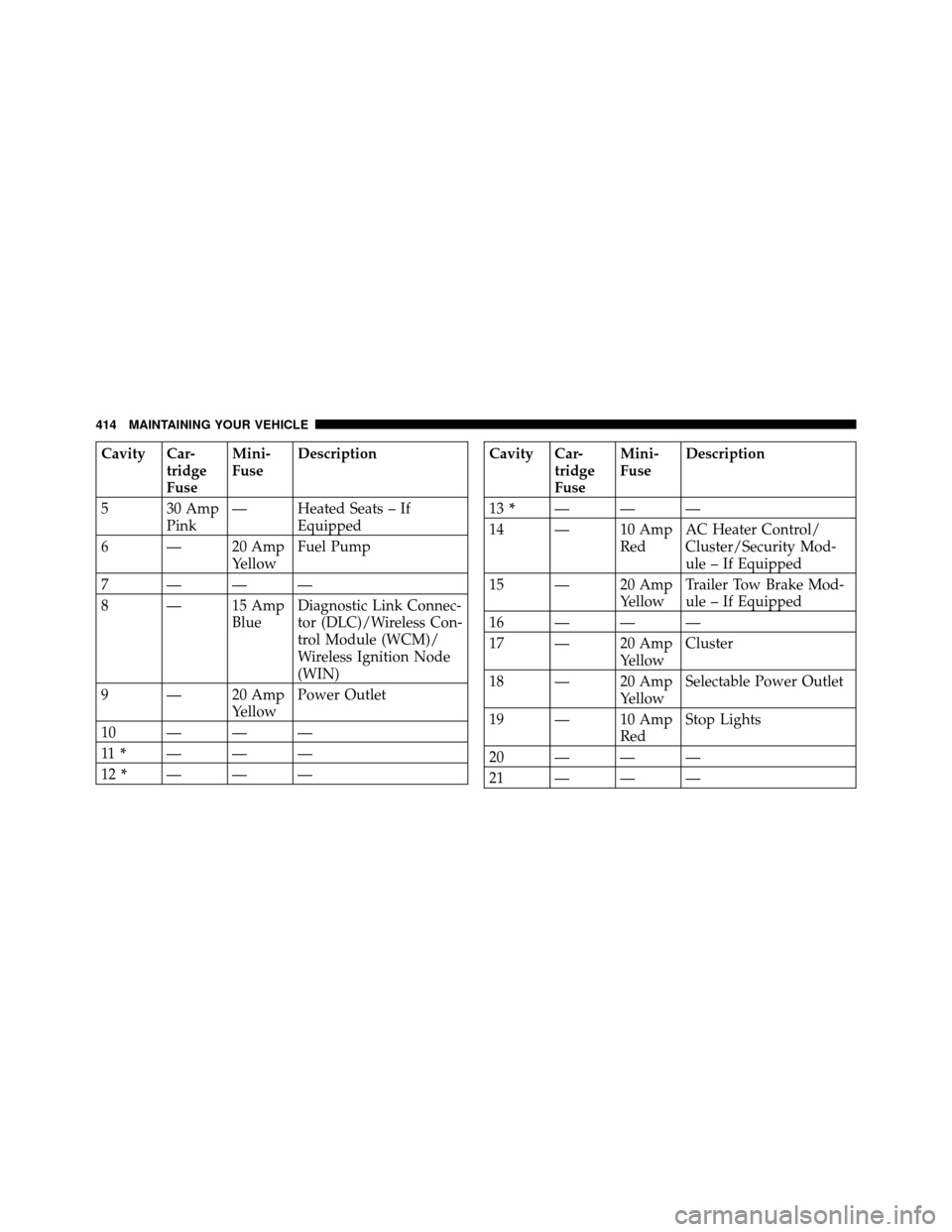
Cavity Car-tridge
FuseMini-
Fuse
Description
5 30 Amp Pink— Heated Seats – If
Equipped
6 — 20 Amp YellowFuel Pump
7 ———
8 — 15 Amp BlueDiagnostic Link Connec-
tor (DLC)/Wireless Con-
trol Module (WCM)/
Wireless Ignition Node
(WIN)
9 — 20 Amp YellowPower Outlet
10———
11 * ———
12 * ———Cavity Car-
tridge
FuseMini-
Fuse
Description
13 * ———
14 — 10 Amp RedAC Heater Control/
Cluster/Security Mod-
ule – If Equipped
15 — 20 Amp YellowTrailer Tow Brake Mod-
ule – If Equipped
16———
17 — 20 Amp YellowCluster
18 — 20 Amp YellowSelectable Power Outlet
19 — 10 Amp RedStop Lights
20———
21———
414 MAINTAINING YOUR VEHICLE
Page 416 of 484
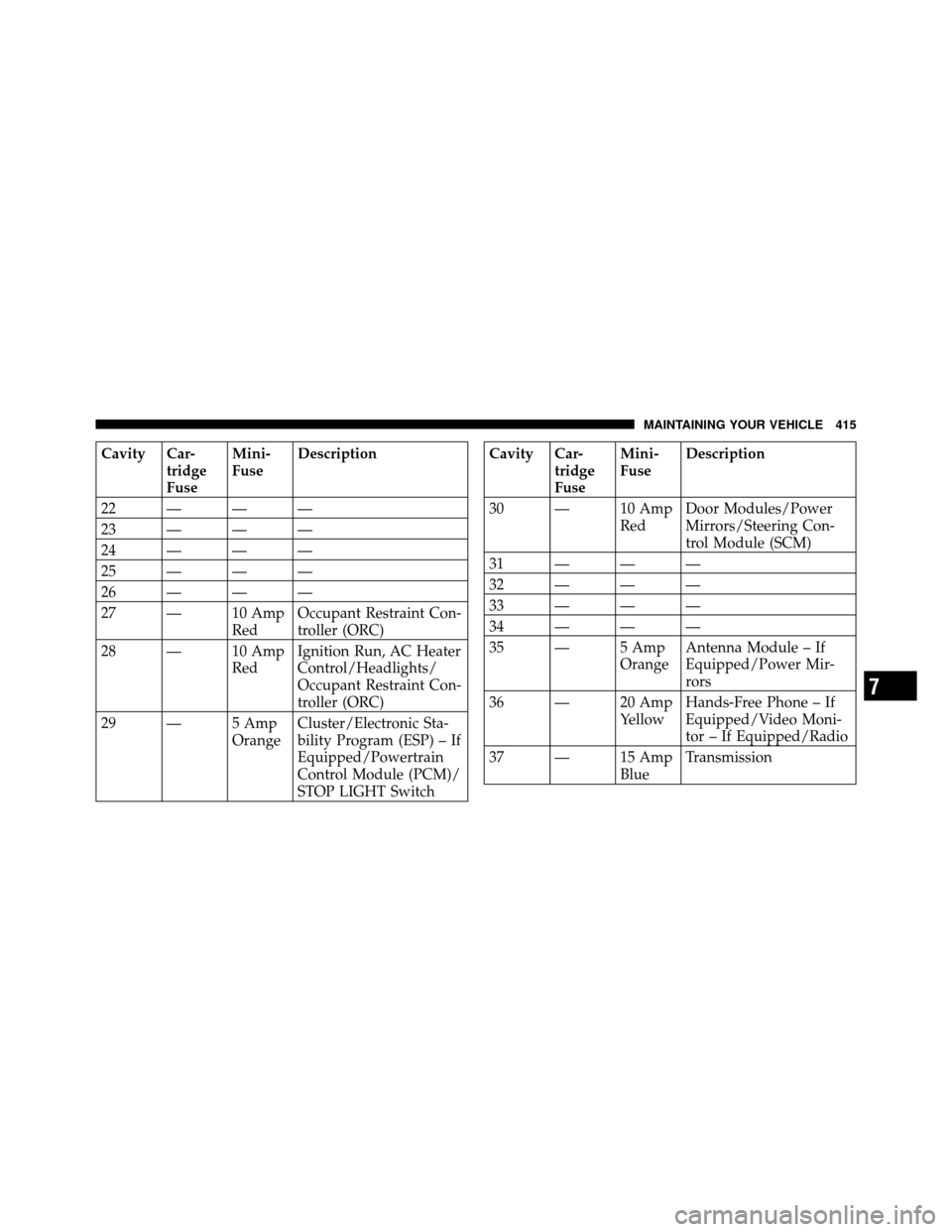
Cavity Car-tridge
FuseMini-
Fuse
Description
22———
23———
24———
25———
26———
27 — 10 Amp RedOccupant Restraint Con-
troller (ORC)
28 — 10 Amp RedIgnition Run, AC Heater
Control/Headlights/
Occupant Restraint Con-
troller (ORC)
29 — 5 Amp OrangeCluster/Electronic Sta-
bility Program (ESP) – If
Equipped/Powertrain
Control Module (PCM)/
STOP LIGHT SwitchCavity Car-
tridge
FuseMini-
Fuse
Description
30 — 10 Amp RedDoor Modules/Power
Mirrors/Steering Con-
trol Module (SCM)
31———
32———
33———
34———
35 — 5 Amp OrangeAntenna Module – If
Equipped/Power Mir-
rors
36 — 20 Amp YellowHands-Free Phone – If
Equipped/Video Moni-
tor – If Equipped/Radio
37 — 15 Amp BlueTransmission
7
MAINTAINING YOUR VEHICLE 415
Page 417 of 484

Cavity Car-tridge
FuseMini-
Fuse
Description
38 — 10 Amp RedCargo Light/Satellite
Receiver (SDARS) Video
– If Equipped/Vehicle
Information Module – If
Equipped
39 — 10 Amp RedHeated Mirrors – If
Equipped
40 — 5 Amp OrangeAuto Inside Rearview
Mirror – If Equipped/
Heated Seats – If
Equipped/Switch Bank
41———
42 30 Amp Pink— Front Blower Motor
43 30 Amp Pink— Rear Window DefrosterCavity Car-
tridge
FuseMini-
Fuse
Description
44 20 Amp Blue— Amplifier – If
Equipped/Sunroof – If
Equipped
* Cavities 11, 12, and 13 contain self-resetting fuses
(circuit breakers) that are only serviceable by an autho-
rized dealer. The cluster and the driver seat switch (if
equipped) are fused by the 25 Amp circuit breaker in
Cavity 11. The passenger seat switch (if equipped) is
fused by the 25 Amp circuit breaker in Cavity 12. The
door modules, the driver power window switch, and the
passenger power window switch are fused by the
25 Amp circuit breaker in Cavity 13. If you experience
temporary or permanent loss of these systems, see your
authorized dealer for service.
416 MAINTAINING YOUR VEHICLE