Page 163 of 484
6. Firmly press and release the LEARN or TRAINING
button. The name and color of the button may vary by
manufacturer.
NOTE:You have 30 seconds in which to initiate the next
step after the LEARN button has been pressed.
7. Return to the vehicle and press the programmed
HomeLink� button twice (holding the button for two
seconds each time). If the device is plugged in and
activates, programming is complete.
If the device does not activate, press the button a third
time (for two seconds) to complete the training.
If you have any problems, or require assistance, please
call toll-free 1–800–355–3515 or, on the Internet at
www.HomeLink.com for information or assistance.
To program the remaining two HomeLink� buttons,
repeat each step for each remaining button. DO NOT
erase the channels.Gate Operator/Canadian Programming
Canadian radio-frequency laws require transmitter sig-
nals to “time-out” (or quit) after several seconds of
transmission – which may not be long enough for
HomeLink� to pick up the signal during programming.
Similar to this Canadian law, some U.S. gate operators are
designed to “time-out” in the same manner.
It may be helpful to unplug the device during the cycling
process to prevent possible overheating of the garage
door or gate motor.
If you are having difficulties programming a garage door
opener or a gate operator, replace “Programming
HomeLink�” Step 3 with the following:
3.
Continue to press and hold the HomeLink� button,
while you press and release (“cycle”), your handheld
transmitter every two seconds until HomeLink �has suc-
cessfully accepted the frequency signal. The indicator light
will flash slowly and then rapidly when fully trained.
162 UNDERSTANDING THE FEATURES OF YOUR VEHICLE
Page 186 of 484
UNDERSTANDING YOUR INSTRUMENT PANEL
CONTENTS
�Instrument Panel Features ............... 189
� Instrument Cluster – Base ............... 190
� Instrument Cluster – Premium ............ 191
� Instrument Cluster Descriptions ........... 192
� Electronic Vehicle Information Center (EVIC) —
If Equipped .......................... 206
▫ Oil Change Required — If Equipped ...... 208
▫ EVIC Functions ..................... 209
▫ Compass/Temperature/Audio ........... 210▫
Average Fuel Economy ................ 210
▫ Distance To Empty (DTE) .............. 210
▫ Elapsed Time ....................... 211
▫ Tire Pressure Monitor (TPM) ............ 211
▫ Personal Settings (Customer-Programmable
Features) .......................... 211
� Media Center 230 (REQ) — AM/FM Stereo
Radio And 6–Disc CD/DVD Changer
(MP3/WMA AUX Jack) .................. 217
▫ Operating Instructions - Radio Mode ...... 217
4
Page 187 of 484

▫Operation Instructions - (Disc Mode For CD
And MP3/WMA Audio Play, DVD-Video) . . . 225
▫ Notes On Playing MP3/WMA Files ....... 227
▫ List Button (Disc Mode For
MP3/WMA Play) .................... 230
▫ Info Button (Disc Mode For MP3/WMA
Play) ............................. 230
� Media Center 730N/430 (RER/REN/RBZ) —
AM/FM Stereo Radio And CD/DVD/HDD/
NAV — If Equipped .................... 232
▫ Operating Instructions — Voice Command
System — If Equipped ................. 233
▫ Operating Instructions — Uconnect™ Phone
— If Equipped ...................... 233
▫ Clock Setting Procedure — RBZ Radio ..... 233▫
Clock Setting Procedure —
RER/REN Radio ..................... 235
� Media Center 130 (RES) — AM/FM Stereo
Radio With CD Player (MP3 AUX Jack) ....... 237
▫ Operating Instructions — Radio Mode ..... 237
▫ Operation Instructions — CD Mode For CD
And MP3 Audio Play ................. 240
▫ Notes On Playing MP3 Files ............ 242
▫ Operation Instructions - Auxiliary Mode .... 245
� Media Center 130 (RES/RSC) — AM/FM
Stereo Radio With CD Player (MP3 AUX Jack)
And Sirius Radio ...................... 246
▫ Operating Instructions — Radio Mode ..... 246
▫ Operation Instructions — CD Mode For CD
And MP3 Audio Play ................. 252
186 UNDERSTANDING YOUR INSTRUMENT PANEL
Page 188 of 484
▫Notes On Playing MP3 Files ............ 254
▫ List Button (CD Mode For MP3 Play) ...... 257
▫ Info Button (CD Mode For MP3 Play) ...... 257
▫ Uconnect™ Multimedia (Satellite Radio) — If
Equipped .......................... 258
� Universal Consumer Interface (UCI) 0.5 — If
Equipped ............................ 262
▫ Connecting The iPod� ................. 263
▫ Using This Feature ................... 264
▫ Controlling The iPod� Using
Radio Buttons ....................... 264
▫ Play Mode ......................... 264
▫ List Or Browse Mode ................. 266 �
Uconnect™ Multimedia (Satellite Radio) — If
Equipped (REN/REQ/RER/RES/REU/RBZ
Radios Only) ......................... 268
▫ System Activation .................... 268
▫ Electronic Serial Number/Sirius
Identification Number (ESN/SID) ......... 268
▫ Selecting Uconnect™ Multimedia (Satellite)
Mode ............................. 269
▫ Satellite Antenna ..................... 269
▫ Reception Quality .................... 269
▫ Operating Instructions — Uconnect™
Multimedia (Satellite) Mode ............. 270
▫ Operating Instructions — Uconnect™ Phone
(If Equipped) ....................... 272
4
UNDERSTANDING YOUR INSTRUMENT PANEL 187
Page 189 of 484
▫Operating Instructions — Video
Entertainment System (VES)™
(If Equipped) ....................... 273
� Remote Sound System Controls —
If Equipped .......................... 273
▫ Radio Operation ..................... 274
▫ CD Player ......................... 274
� CD/DVD Disc Maintenance .............. 274�
Radio Operation And Cellular Phones ....... 275
� Climate Controls ...................... 275
▫ Manual Heating And Air Conditioning ..... 276
▫ Automatic Temperature Control (ATC) —
If Equipped ........................ 280
▫ Operating Tips ...................... 285
188 UNDERSTANDING YOUR INSTRUMENT PANEL
Page 190 of 484
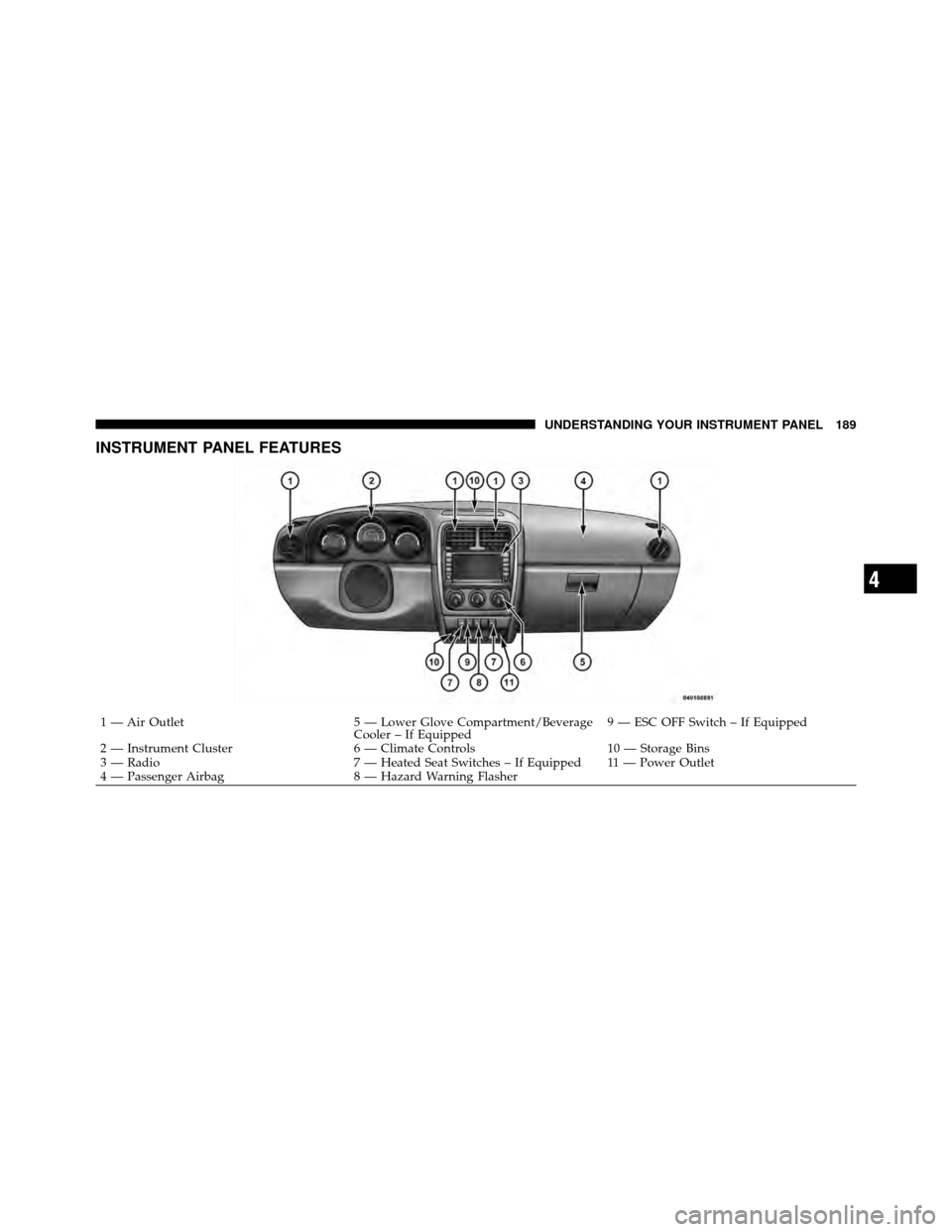
INSTRUMENT PANEL FEATURES
1 — Air Outlet5 — Lower Glove Compartment/Beverage
Cooler – If Equipped9 — ESC OFF Switch – If Equipped
2 — Instrument Cluster 6 — Climate Controls10 — Storage Bins
3 — Radio 7 — Heated Seat Switches – If Equipped 11 — Power Outlet
4 — Passenger Airbag 8 — Hazard Warning Flasher
4
UNDERSTANDING YOUR INSTRUMENT PANEL 189
Page 211 of 484

Compass/Temperature/Audio
Press and release the EVIC button to display one of eight
compass headings to indicate the direction the vehicle is
facing, the outside temperature, and the current radio
station.
For additional information regarding the compass, refer
to “Personal Settings (Customer-Programmable
Features)”.
Average Fuel Economy
Shows the average fuel economy since the last reset.
When the fuel economy is reset, the display will read
“RESET” or show dashes for two seconds. Then, the
history information will be erased, and the averaging will
continue from the last fuel reading before the reset.
Distance To Empty (DTE)
Shows the estimated distance that can be travelled with
the fuel remaining in the tank. This estimated distance is
determined by a weighted average of the instantaneous
and average fuel economy, according to the current fuel
tank level. This is not resettable.
NOTE:Significant changes in driving style or vehicle
loading will greatly affect the actual drivable distance of
the vehicle, regardless of the DTE displayed value.
When the DTE value is less than 30 miles (48 km)
estimated driving distance, the DTE display will change
to a text display of �LOW FUEL�. This display will
continue until the vehicle runs out of fuel. Adding a
significant amount of fuel to the vehicle will turn off the
�LOW FUEL� text and a new DTE value will be dis-
played, based on the current values in the DTE calcula-
tion and the current fuel tank level.
210 UNDERSTANDING YOUR INSTRUMENT PANEL
Page 214 of 484

when exiting the vehicle. Press and hold the EVIC button
when in this display until 0, 30, 60, or 90 appears to make
your selection.
Delay Power Off to Accessories Until Exit
When this feature is selected, the power window
switches, radio, Uconnect™ Phone, power sunroof, and
power outlets will remain active for up to 10 minutes
after the ignition switch has been turned off. Opening a
vehicle door will cancel this feature. Press and hold the
EVIC button when in this display until “OFF”, “45 sec.”,
“5 min.”, or “10 min.” appears to make your selection.
Turn Headlights on with Remote Key Unlock
When this feature is selected, the headlights will activate
and remain on for up to 90 seconds when the doors are
unlocked using the RKE transmitter. Press and hold the
EVIC button when in this display until “OFF”, “30 sec.”,
“60 sec.”, or “90 sec.” appears to make your selection.
Confirmation of Voice Commands — If Equipped
When ON is selected all voice commands from the
Uconnect™ system are confirmed. Press and hold the
EVIC button when in this display until “ON” or “OFF”
appears to make your selection.
Illuminated Approach
When this feature is selected the headlights will activate
and remain on for up to 90 seconds when the doors are
unlocked using the RKE transmitter. Press and hold the
EVIC button when in this display until “OFF”, “30 sec.”,
“60 sec.”, or “90 sec.” appears to make your selection.
Hill Start Assist (HSA) — If Equipped
When on is selected, the HSA system is active. Refer to
“Electronic Brake Control System” in “Starting And
Operating” for system function and operating informa-
tion. To make your selection, press and release the EVIC
button until “On” or “Off” appears.
4
UNDERSTANDING YOUR INSTRUMENT PANEL 213