Page 25 of 448
•For vehicles not equipped with the EVIC, perform the
following steps:
1. Press the LOCK button on a programmed RKE trans-
mitter for at least four seconds, but not longer than
10 seconds. Then, press the PANIC button while still
holding the LOCK button.
2. Release both buttons at the same time.
3. Test the feature while outside of the vehicle, by
pressing the LOCK button on the RKE transmitter with
the ignition in the LOCK position, and the key removed.
4. Repeat these steps if you want to return this feature to
its previous setting.
NOTE: Pressing the LOCK button on the RKE transmit-
ter while you are in the vehicle will activate the Vehicle
Security Alarm. Opening a door with the alarm activated
will cause the alarm to sound. Press the UNLOCK button
to deactivate the Vehicle Security Alarm.To Unlatch the Trunk
Press the TRUNK button on the RKE transmitter two
times to unlatch the trunk.
Remote Open Window Feature — If Equipped
The RKE remotely lowers both driver and passenger
front windows simultaneously. Lowering the front win-
dows using the RKE is a two step operation:
1. Press the RKE transmitter UNLOCK button once.
2. Press the UNLOCK button a second time and hold the
button until the windows lower completely or the win-
dows drop to the desired level, then release the button.
Using the Panic Alarm
To turn the Panic Alarm feature on or off, press and hold
the PANIC button on the RKE transmitter for at least one
second and release. When the Panic Alarm is on, the
24 THINGS TO KNOW BEFORE STARTING YOUR VEHICLE
Page 26 of 448
headlights and park lights will flash, the horn will pulse
on and off, and the Illuminated Entry system (if
equipped) will turn on.
The Panic Alarm will stay on for three minutes unless
you turn it off by pressing the PANIC button a second
time or if the vehicle speed is 5 mph (8 km/h) or greater.
NOTE:You may need to be close to the vehicle when
using the RKE transmitter to turn off the Panic Alarm due
to the Radio Frequency (RF) noises emitted by the
system.
Programming Additional Transmitters
Refer to Sentry Key� “Customer Key Programming.”
If you do not have a programmed RKE transmitter,
contact your authorized dealer for details.
Transmitter Battery Replacement
The recommended replacement battery is CR2032. NOTE:
Perchlorate Material — special handling may
apply. See www.dtsc.ca.gov/hazardouswaste/perchlorate.
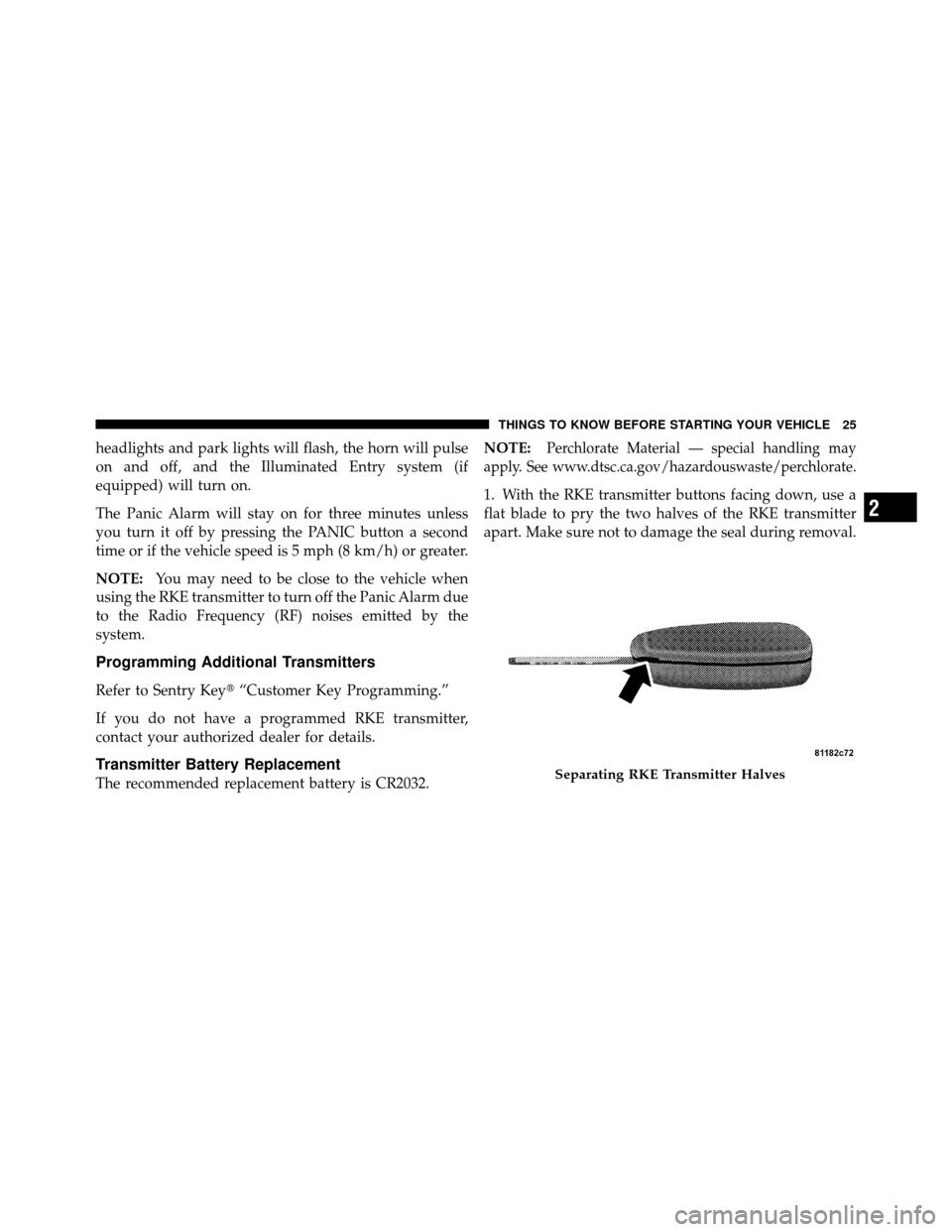
1. With the RKE transmitter buttons facing down, use a
flat blade to pry the two halves of the RKE transmitter
apart. Make sure not to damage the seal during removal.
Separating RKE Transmitter Halves
2
THINGS TO KNOW BEFORE STARTING YOUR VEHICLE 25
Page 29 of 448
NOTE:
•If an engine fault is present the vehicle will start and
then shut down 10 seconds later.
•For security, power window operation is disabled
when the vehicle is in the Remote Start mode.
•The engine can be started two consecutive times (two
15 minute cycles) with the RKE transmitter. However,
the ignition switch must be cycled to the ON position
before you can repeat the start sequence for a third
cycle.
To Exit Remote Start Mode Without Driving the
Vehicle
Press and release the REMOTE START button one time or
allow the engine to run for the entire 15 minute cycle.NOTE:
To avoid unintentional shut downs, the system
will disable the one-time press of the Remote Start button
for two seconds after receiving a valid remote start
request.
To Exit Remote Start Mode and Drive the Vehicle
Before the end of the 15 minute cycle, press and release
the UNLOCK button on the RKE transmitter to unlock
the doors and disarm the Vehicle Security Alarm (if
equipped). Then, within 15 minutes, insert the key into
the ignition switch and turn the switch to the ON
position.
NOTE: The ignition switch must be in the ON position
in order to drive the vehicle.
28 THINGS TO KNOW BEFORE STARTING YOUR VEHICLE
Page 57 of 448
WARNING! (Continued)
•Do not put anything on or around the airbag
covers or attempt to open them manually. You may
damage the airbags and you could be injured
because the airbags may no longer be functional.
The protective covers for the airbag cushions are
designed to open only when the airbags are inflat-
ing.
•Do not drill, cut or tamper with the knee bolster in
any way.
•Do not mount any accessories to the knee bolster
such as alarm lights, stereos, citizen band radios,
etc.
Supplemental Seat-Mounted Side Airbags (SAB) —
If Equipped
Supplemental Seat-Mounted Side Airbags provide en-
hanced protection to help protect an occupant during aside impact. The Supplemental Seat-Mounted Side Air-
bag is marked with an airbag label sewn into the out-
board side of the front seats.
Supplemental Seat-Mounted Side Airbag Label
56 THINGS TO KNOW BEFORE STARTING YOUR VEHICLE
Page 122 of 448
On steep hills, a greater speed loss or gain may occur so
it may be preferable to drive without Electronic Speed
Control.
WARNING!
Electronic Speed Control can be dangerous where the
system cannot maintain a constant speed. Your ve-
hicle could go too fast for the conditions, and you
could lose control. An accident could be the result.
Do not use Electronic Speed Control in heavy traffic
or on roads that are winding, icy, snow-covered or
slippery.
GARAGE DOOR OPENER — IF EQUIPPED
HomeLink�replaces up to three remote controls (hand-
held transmitters) that operate devices such as garage
door openers, motorized gates, lighting or home security
systems. The HomeLink� unit operates off your vehicle’s
battery. The HomeLink�
buttons that are located in the headliner
or sun visor designate the three different HomeLink�
channels.
NOTE: HomeLink� is disabled when the Vehicle Secu-
rity Alarm is active.HomeLink� Buttons
3
UNDERSTANDING THE FEATURES OF YOUR VEHICLE 121
Page 127 of 448
successfully accepted the frequency signal. The indica-
tor light will flash slowly and then rapidly when fully
trained.
If you unplugged the device for training, plug it back in
at this time.
Then proceed with Step 4 under “Programming
HomeLink�,” earlier in this section.
Security
It is advised to erase all channels before you sell or turn
in your vehicle.
To do this, press and hold the two outside buttons for
20 seconds until the red indicator flashes. Note that all
channels will be erased. Individual channels cannot be
erased.
The HomeLink�Universal Transceiver is disabled when
the Vehicle Security Alarm is active.
Troubleshooting Tips
If you are having trouble programming HomeLink �, here
are some of the most common solutions:
•Replace the battery in the original transmitter.
•Press the LEARN button on the Garage Door Opener
to complete the training for a Rolling Code.
•Did you unplug the device for training, and remember
to plug it back in?
If you have any problems, or require assistance, please
call toll-free 1–800–355–3515 or, on the Internet at
www.HomeLink.com for information or assistance.
General Information
This device complies with FCC rules Part 15 and Industry
Canada RSS-210. Operation is subject to the following
two conditions:
1. This device may not cause harmful interference.
126 UNDERSTANDING THE FEATURES OF YOUR VEHICLE
Page 159 of 448

If the light is flashing when the engine is running you
may experience power loss, an elevated/rough idle, and
increased brake pedal effort, and your vehicle may
require towing. Immediate service is required.
The light will come on when the ignition switch is first
turned on and remain on approximately 15 seconds as a
bulb check. This is normal. If the light does not come on
during starting, have the system checked by an autho-
rized dealer.
18. Position Light Indicator — If EquippedThis indicator will illuminate when the park
lights or headlights are turned on. 19. Electronic Stability Control (ESC) OFF Indicator
Light — If Equipped
This light indicates the Electronic Stability Con-
trol system (ESC) has been turned off by the
driver.
20. Turn Signal Indicators The arrows will flash in unison with the exterior
turn signal, when using the turn signal lever.
21. Vehicle Security Light — If Equipped This light will flash rapidly for approximately
16 seconds when the alarm system is arming.
The light will begin to flash slowly indicating
that the system is armed. The light will stop
flashing when the vehicle is disarmed.
158 UNDERSTANDING YOUR INSTRUMENT PANEL
Page 429 of 448
About Your Brakes....................... 259
ABS (Anti-Lock Brake System) .............. 262
Adding Engine Coolant (Antifreeze) .......... 368
Adding Fuel ........................... 309
Adding Washer Fluid ..................... 364
Additives, Fuel ......................... 303
Air Cleaner, Engine (Engine Air Cleaner Filter) . . . 358
Air Conditioner Maintenance ............... 360
Air Conditioning ........................ 225
Air Conditioning Controls ................. 225
Air Conditioning Filter .................236,361
Air Conditioning, Operating Tips ............ 237
Air Conditioning Refrigerant .............360,361
Air Conditioning System .............225,229,360
Air Pressure, Tires ....................... 283
Airbag .............................. 53,63
Airbag Deployment ....................... 64
Airbag Light ..................... 62,67,82,151
Airbag Maintenance ....................... 66 Airbag, Side
........................ 56,60,63
Airbag, Window (Side Curtain) ...........57,60,63
Alarm System (Security Alarm) ............17,158
Alterations/Modifications, Vehicle ............. 7
Antenna, Satellite Radio ................... 216
Antifreeze (Engine Coolant) ..............368,396
Disposal ............................ 370
Anti-Lock Brake System (ABS) .............. 262
Anti-Lock Warning Light .................. 262
Anti-Theft Security Alarm (Theft Alarm) ........ 17
Appearance Care ........................ 377
Ashtray ............................... 132
Auto Down Power Windows ................ 34
Auto Unlock, Doors ....................... 31
Auto Up Power Windows ................35,129
Automatic Dimming Mirror ................. 90
Automatic Door Locks ................... 30,31
Automatic Oil Change Indicator ........156,166,400
Automatic Temperature Control (ATC) ......... 229
428 INDEX