Page 215 of 448

begin playing the files contained in that folder (or the
next folder in sequence if the selection does not contain
playable files).
The folder list will time out after five seconds.
INFO Button (CD Mode for MP3 Play)
Pressing the INFO button repeatedly will scroll through
the following TAG information: Song Title, Artist, File
Name, and Folder Name (if available).
Press the INFO button once more to return to�elapsed
time� priority mode.
Press and hold the INFO button for three seconds or
more and the radio will display song titles for each file.
Press and hold the INFO button again for three seconds
to return to �elapsed time� display.
Operation Instructions - Auxiliary Mode
The auxiliary (AUX) jack is an audio input jack which
allows the user to plug in a portable device such as an
MP3 player or cassette player and utilize the vehicle’s
audio system to amplify the source and play through the
vehicle speakers.
Pressing the AUX button will change the mode to auxil-
iary device if the AUX jack is connected.
NOTE:The AUX device must be turned on and the
device’s volume set to the proper level. If the AUX audio
is not loud enough, turn the device’s volume up. If the
AUX audio sounds distorted, turn the device’s volume
down.
TIME Button (Auxiliary Mode)
Press this button to change the display to time of day. The
time of day will display for five seconds (when the
ignition is OFF).
214 UNDERSTANDING YOUR INSTRUMENT PANEL
Page 223 of 448
Audio/Video RCA Jacks (AUX Jacks)
on the rear of the center console enable
the monitor to display video directly
from a video camera, connect video
games for display on the screen, or
play music directly from an MP3
player.
1. Video in (yellow)
2. Left audio in (white)
3. Right audio in (red)
NOTE: Refer to the “Uconnect™ Multimedia” section of
Uconnect™ User Manual located on the DVD for further
details.
REMOTE SOUND SYSTEM CONTROLS —
IF EQUIPPED
The remote sound system controls are located on the rear
surface of the steering wheel. The left and right controls are rocker-type switches with a pushbutton in the center
of each switch. Reach behind the steering wheel to access
the switches.
Remote Sound System Controls
(Back View Of Steering Wheel)
222 UNDERSTANDING YOUR INSTRUMENT PANEL
Page 441 of 448
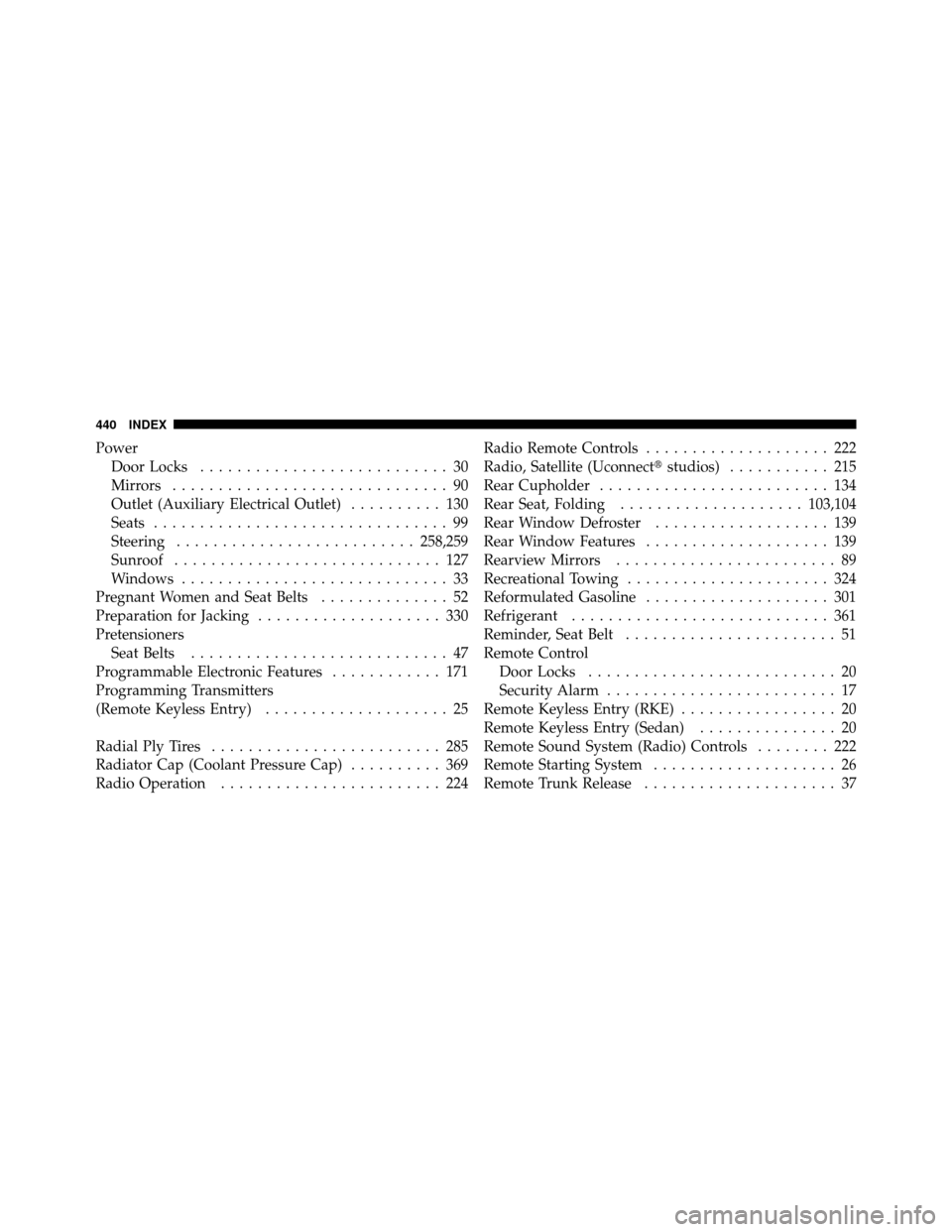
PowerDoor Locks ........................... 30
Mirrors .............................. 90
Outlet (Auxiliary Electrical Outlet) .......... 130
Seats ................................ 99
Steering .......................... 258,259
Sunroof ............................. 127
Windows ............................. 33
Pregnant Women and Seat Belts .............. 52
Preparation for Jacking .................... 330
Pretensioners Seat Belts ............................ 47
Programmable Electronic Features ............ 171
Programming Transmitters
(Remote Keyless Entry) .................... 25
Radial Ply Tires ......................... 285
Radiator Cap (Coolant Pressure Cap) .......... 369
Radio Operation ........................ 224 Radio Remote Controls
.................... 222
Radio, Satellite (Uconnect� studios)........... 215
Rear Cupholder ......................... 134
Rear Seat, Folding .................... 103,104
Rear Window Defroster ................... 139
Rear Window Features .................... 139
Rearview Mirrors ........................ 89
Recreational Towing ...................... 324
Reformulated Gasoline .................... 301
Refrigerant ............................ 361
Reminder, Seat Belt ....................... 51
Remote Control Door Locks ........................... 20
Security Alarm ......................... 17
Remote Keyless Entry (RKE) ................. 20
Remote Keyless Entry (Sedan) ............... 20
Remote Sound System (Radio) Controls ........ 222
Remote Starting System .................... 26
Remote Trunk Release ..................... 37
440 INDEX
