Page 155 of 436

the conventional brake system will continue to operate
normally provided that the BRAKE warning light is not
on.
If the ABS light is on, the brake system should be serviced
as soon as possible to restore the benefit of Anti-Lock
Brakes.
The ABS warning light should be checked frequently to
assure that it is operating properly. Turn the ignition key
to the on position, but do not start the vehicle. The light
should come on. If the light does not come on, have the
system inspected by an authorized dealer.
24. Electronic Stability Control (ESC) Malfunction
Indicator Light — If EquippedThe “ESC Indicator Light” in the instrument
cluster will come on when the ignition switch
is turned to the ON position. It should go out
with the engine running. If the “ESC Indicator
Light” comes on continuously with the engine running, a malfunction has been detected in the ESC system. If this
light remains on after several ignition cycles, and the
vehicle has been driven several miles (kilometers) at
speeds greater than 30 mph (48 km/h), see your autho-
rized dealer as soon as possible to have the problem
diagnosed and corrected.
NOTE:
•The “ESC Indicator Light” come on momentarily each
time the ignition switch is turned ON.
•Each time the ignition is turned ON, the ESC system
will be ON even if it was turned off previously.
•The ESC system will make buzzing or clicking sounds
when it is active. This is normal; the sounds will stop
when ESC becomes inactive following the maneuver
that caused the ESC activation.
4
UNDERSTANDING YOUR INSTRUMENT PANEL 155
Page 161 of 436
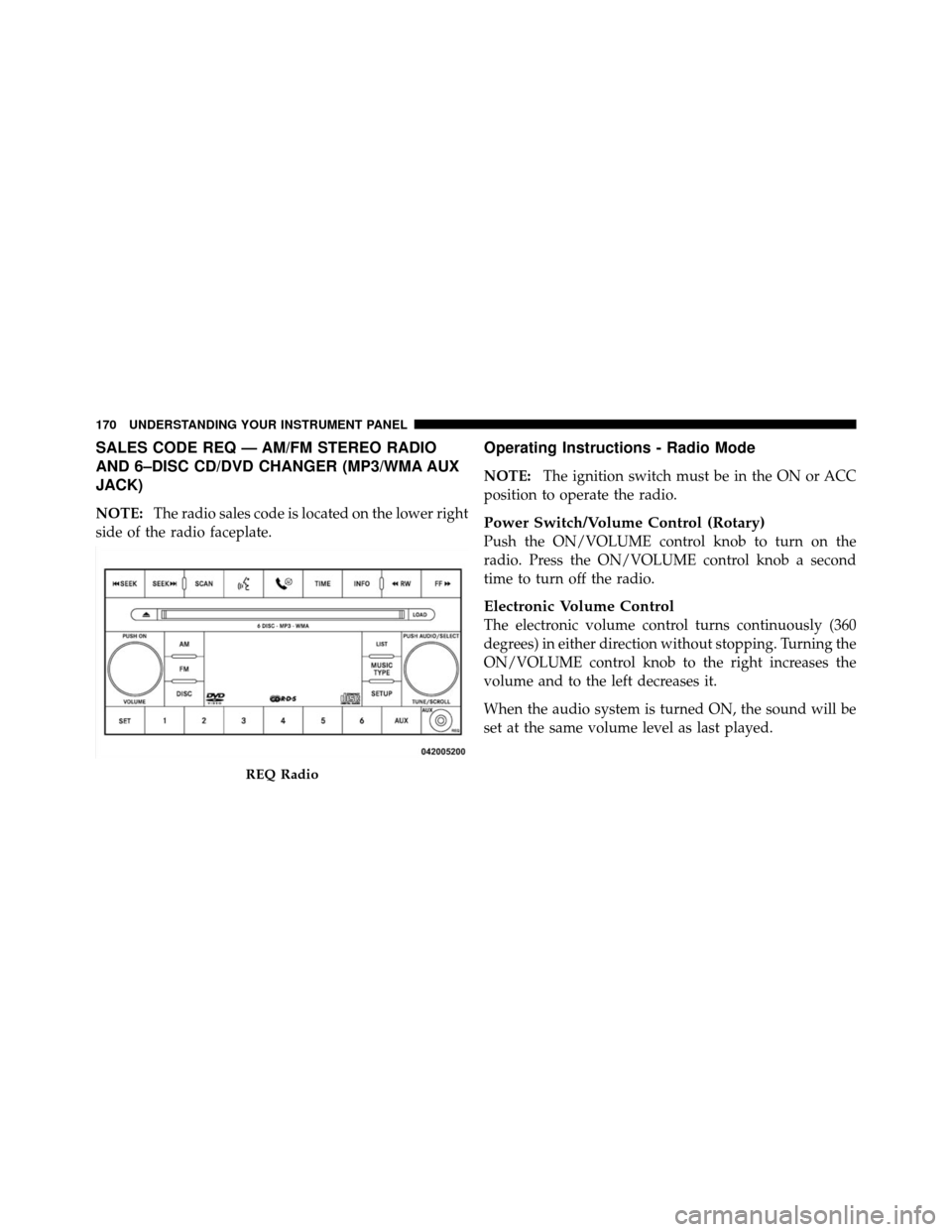
Press and release the RESET button to accept a
selection. The RESET button also resets various
Trip Functions.
Electronic Vehicle Information Center (EVIC)
Displays
When the appropriate conditions exist, the EVIC displays
the following messages.
•Turn Signal On (with a continuous warning chime
after one mile traveled)
•Left Front Turn Signal Light Out (with a single chime)
•Left Rear Turn Signal Light Out (with a single chime)
•Right Front Turn Signal Light Out (with a single
chime)
•Right Rear Turn Signal Light Out (with a single chime)
•RKE (Remote Keyless Entry) Battery Low (with a
single chime)
•Personal Settings Not Available – Vehicle Not In PARK
•Personal Settings Not Available – Vehicle in Motion
•Door(s) Ajar (with a single chime if vehicle is in
motion)
•Trunk Ajar (with a single chime)
•Headlights On
•Key In Ignition
•Oil Change Required (with a single chime)
•ECO (Fuel Saver Indicator) — If Equipped
RESETButton
4
UNDERSTANDING YOUR INSTRUMENT PANEL 161
Page 162 of 436

Oil Change Required
Your vehicle is equipped with an engine oil change
indicator system. The Oil Change Required message will
flash in the EVIC display for approximately five seconds
after a single chime has sounded to indicate the next
scheduled oil change interval. The engine oil change
indicator system is duty cycle based, which means the
engine oil change interval may fluctuate dependent upon
your personal driving style.
Unless reset, this message will continue to display each
time you turn the ignition switch to the ON/RUN
position. To turn off the message temporarily, press and
release the MENU button. To reset the oil change indica-
tor system (after performing the scheduled maintenance)
perform the following procedure:
1. Turn the ignition switch to the ON position (Do not
start the engine).2. Fully depress the accelerator pedal slowly three times
within 10 seconds.
3. Turn the ignition switch to the LOCK position.
NOTE:
If the indicator message illuminates when you
start the vehicle, the oil change indicator system did not
reset. If necessary repeat this procedure.
Trip Functions
Press and release the MENU button until one of the
following Trip Functions displays in the EVIC:
•ECO (Fuel Saver Indicator) — If Equipped
•Average Fuel Economy
•Distance To Empty
•Elapsed Time
•Display Units of Measure in
162 UNDERSTANDING YOUR INSTRUMENT PANEL
Page 164 of 436
•Elapsed Time
Shows the total elapsed time of travel since the last reset.
Elapsed time will increment when the ignition switch is
in the ON or START position.
•Display Units In:
To make your selection, press and release the RESET
button until ENGLISH or METRIC appears.
To Reset The Display
Reset will only occur if a resettable function is currently
displayed. Press and hold the RESET button once to clear
the function currently displayed.
To reset all resettable functions, press and release the
RESET button a second time within three seconds of
resetting the currently displayed function (Reset ALL will
display during this three-second window).
Compass Display
The compass heading indicates the direction
the vehicle is facing. Press and release the
compass button to display one of eight com-
pass heading and the outside temperature.
Automatic Compass Calibration
This compass is self-calibrating, which eliminates the
need to calibrate the compass manually. When the ve-
hicle is new, the compass may appear erratic and the
EVIC will flash the “CAL” indicator until the compass is
calibrated. You may calibrate the compass by completing
one or more 360–degree turns (in an area free from large
metal or metallic objects) until the CAL indicator in the
EVIC turns off. The compass will now function normally.
COM-
PASS
Button
164 UNDERSTANDING YOUR INSTRUMENT PANEL
Page 166 of 436
NOTE:Magnetic and battery powered devices, (such as
cell phones, iPod’s, radar detectors, PDA’s and laptops)
should be kept away from the top of the instrument
panel. This is where the compass module is located and
such devices may interfere and cause false compass
readings. 1. Turn the ignition switch to the ON position. Leave the
shift lever in PARK.
2. Press and release the MENU button until “Personal
Settings” displays in the EVIC.
3. Press and release the STEP button until “Compass
Variance” and the current Variance Value displays in the
EVIC.
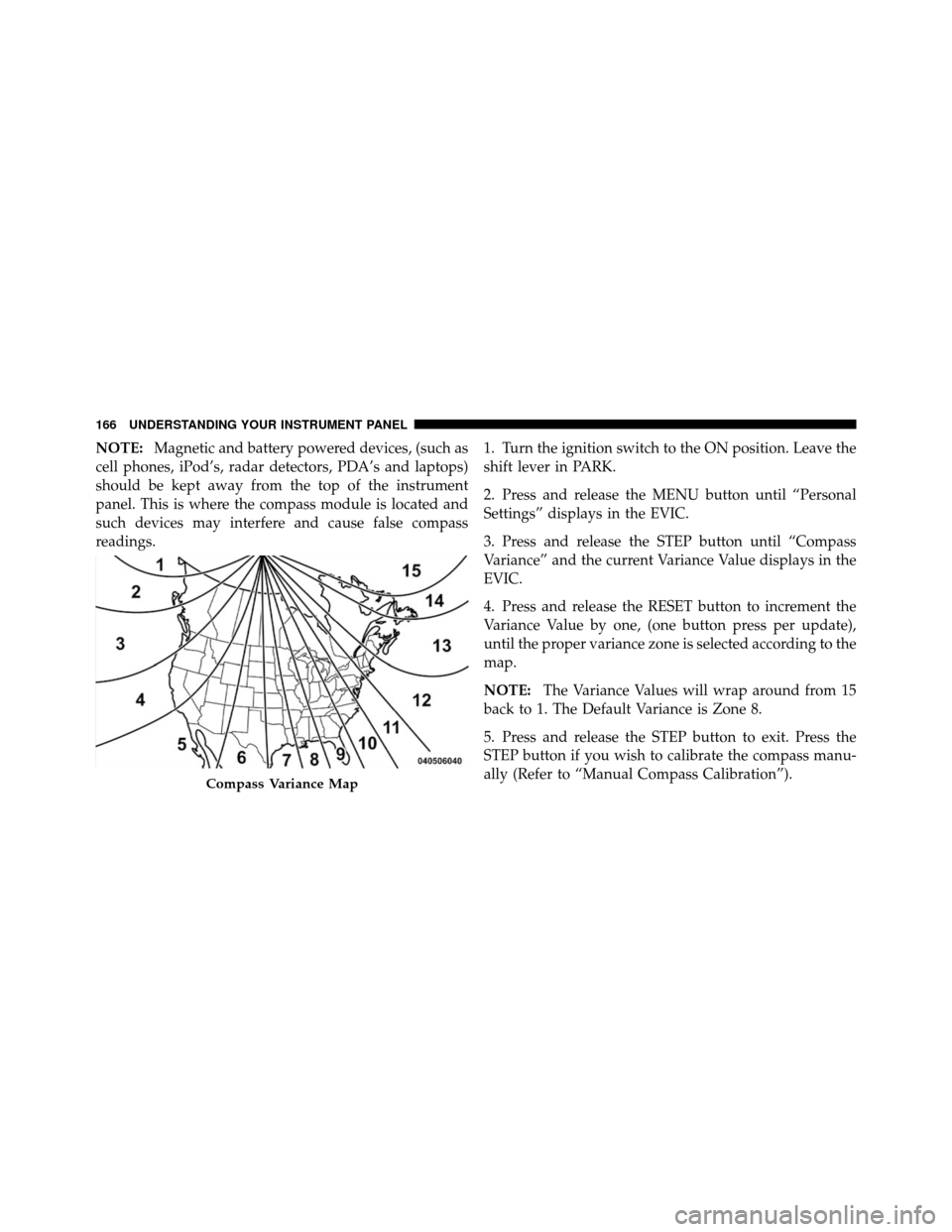
4. Press and release the RESET button to increment the
Variance Value by one, (one button press per update),
until the proper variance zone is selected according to the
map.
NOTE:
The Variance Values will wrap around from 15
back to 1. The Default Variance is Zone 8.
5. Press and release the STEP button to exit. Press the
STEP button if you wish to calibrate the compass manu-
ally (Refer to “Manual Compass Calibration”).
Compass Variance Map
166 UNDERSTANDING YOUR INSTRUMENT PANEL
Page 169 of 436

power outlets will remain active for up to 10 minutes
after the ignition switch is turned to the LOCK position.
Opening a vehicle door will cancel this feature. To make
your selection, press and hold the RESET button until
Off, 45 sec., 5 min., or 10 min. appears.
Illumination Approach
When this feature is selected, the headlights will activate
and remain on for up to 90 seconds when the doors are
unlocked with the RKE transmitter. To make your selec-
tion, press and hold the RESET button until OFF, 30, 60,
or 90 seconds appears.
Display ECO — If Equipped
The “ECO” message is located in the EVIC, this message
can be turned on or off. To make your selection, press and
release the FUNCTION SELECT button until “ON” or
“OFF” appears.
Display Units in English or Metric
The EVIC and odometer can be changed between English
and Metric units of measure. To make your selection,
press and release the RESET button until ENGLISH or
METRIC appears.
SETTING THE ANALOG CLOCK
To set the analog clock, lo-
cated at the top center of the
instrument panel, press and
hold the button in until the
setting is correct. The clock
will adjust slowly at first and
then quicker the longer the
button is held.4
UNDERSTANDING YOUR INSTRUMENT PANEL 169
Page 170 of 436
SALES CODE REQ — AM/FM STEREO RADIO
AND 6–DISC CD/DVD CHANGER (MP3/WMA AUX
JACK)
NOTE:The radio sales code is located on the lower right
side of the radio faceplate.
Operating Instructions - Radio Mode
NOTE: The ignition switch must be in the ON or ACC
position to operate the radio.
Power Switch/Volume Control (Rotary)
Push the ON/VOLUME control knob to turn on the
radio. Press the ON/VOLUME control knob a second
time to turn off the radio.
Electronic Volume Control
The electronic volume control turns continuously (360
degrees) in either direction without stopping. Turning the
ON/VOLUME control knob to the right increases the
volume and to the left decreases it.
When the audio system is turned ON, the sound will be
set at the same volume level as last played.
REQ Radio
170 UNDERSTANDING YOUR INSTRUMENT PANEL
Page 179 of 436
CAUTION!
The radio may shut down during extremely hot
conditions. When this occurs, the radio will indicate
“Disc Hot” and shut off until a safe temperature is
reached. This shutdown is necessary to protect the
optics of the DVD player and other radio internal
components.
NOTE: The ignition switch must be in the ON or ACC
position to operate the radio.
LOAD Button — Loading Compact Disc(s)
Press the LOAD button and the pushbutton with the
corresponding number (1-6) where the CD is being
loaded. The radio will display PLEASE WAIT and
prompt when to INSERT DISC. After the radio displays
�INSERT DISC,� insert the CD into the player. Radio display will show
�LOADING DISC�when the disc
is loading and “READING DISC” when the radio is
reading the disc.
CAUTION!
This CD player will accept 4–3/4 in (12 cm) discs only.
The use of other sized discs may damage the CD
player mechanism.
Eject Button — Ejecting Compact Disc(s)
Press the EJECT button and the pushbutton
with the corresponding number (1-6) where the
CD was loaded and the disc will unload and
move to the entrance for easy removal. Radio
display will show �EJECTING DISC�when the disc is
being ejected and prompt the user to remove the disc.
Press and hold the EJECT button for five seconds and all
CDs will be ejected from the radio.
4
UNDERSTANDING YOUR INSTRUMENT PANEL 179