Page 125 of 457

Headlights And Parking Lights
Turn the end of the multifunction lever to the first detent
for parking light operation. Turn the end of the lever to
the second detent for headlight operation.
Lights-On Reminder
If the headlights or parking lights are on after the ignition
is turned to the LOCK position, a chime will sound to
alert the driver when the driver’s door is opened.
Automatic Headlights — If Equipped
This system automatically turns the headlights on or off
according to ambient light levels. To turn the system on,
turn the end of the multifunction lever to the AUTO
position. When the system is on, the Headlight Time
Delay feature is also on. This means the headlights will
stay on for up to 90 seconds after you turn the ignition
switch to the LOCK position. To turn the Automatic
System off, turn the end of the multifunction lever out of
the AUTO position.
NOTE:The engine must be running before the head-
lights will turn on in the Automatic mode.
Headlight Switch
124 UNDERSTANDING THE FEATURES OF YOUR VEHICLE
Page 126 of 457

Headlights with Wipers (Available with Automatic
Headlights Only)
When this feature is active, the headlights will turn on
approximately 10 seconds after the wipers are turned on
if the multifunction lever is placed in the AUTO position.
In addition, the headlights will turn off when the wipers
are turned off if they were turned on by this feature.
The Headlights with Wipers feature can be turned on or
off through the Electronic Vehicle Information Center
(EVIC) — if equipped. Refer to “Electronic Vehicle Infor-
mation Center (EVIC)/Customer-Programmable Fea-
tures” in “Understanding Your Instrument Panel” for
further information.
Headlight Time Delay — If Equipped
This feature is particularly useful when exiting your
vehicle in an unlit area. It provides the safety of headlight
illumination for about 90 seconds after turning the igni-
tion switch to the LOCK position.To activate the delay, turn the ignition switch to the
LOCK position while the headlights are still on. Then,
turn off the headlights within 45 seconds. The delay
interval begins when you turn off the headlights. Only
the headlights will illuminate during this time.
If you turn the headlights, parking lights, or ignition
switch ON again, the system will cancel the delay.
If you turn the headlights off before the ignition, they will
turn off in the normal manner.
The Headlight delay time is programmable on vehicles
equipped with the Electronic Vehicle Information Center
(EVIC). Refer to “Electronic Vehicle Information Center
(EVIC)/Customer-Programmable Features” in “Under-
standing Your Instrument Panel” for further information.
3
UNDERSTANDING THE FEATURES OF YOUR VEHICLE 125
Page 128 of 457
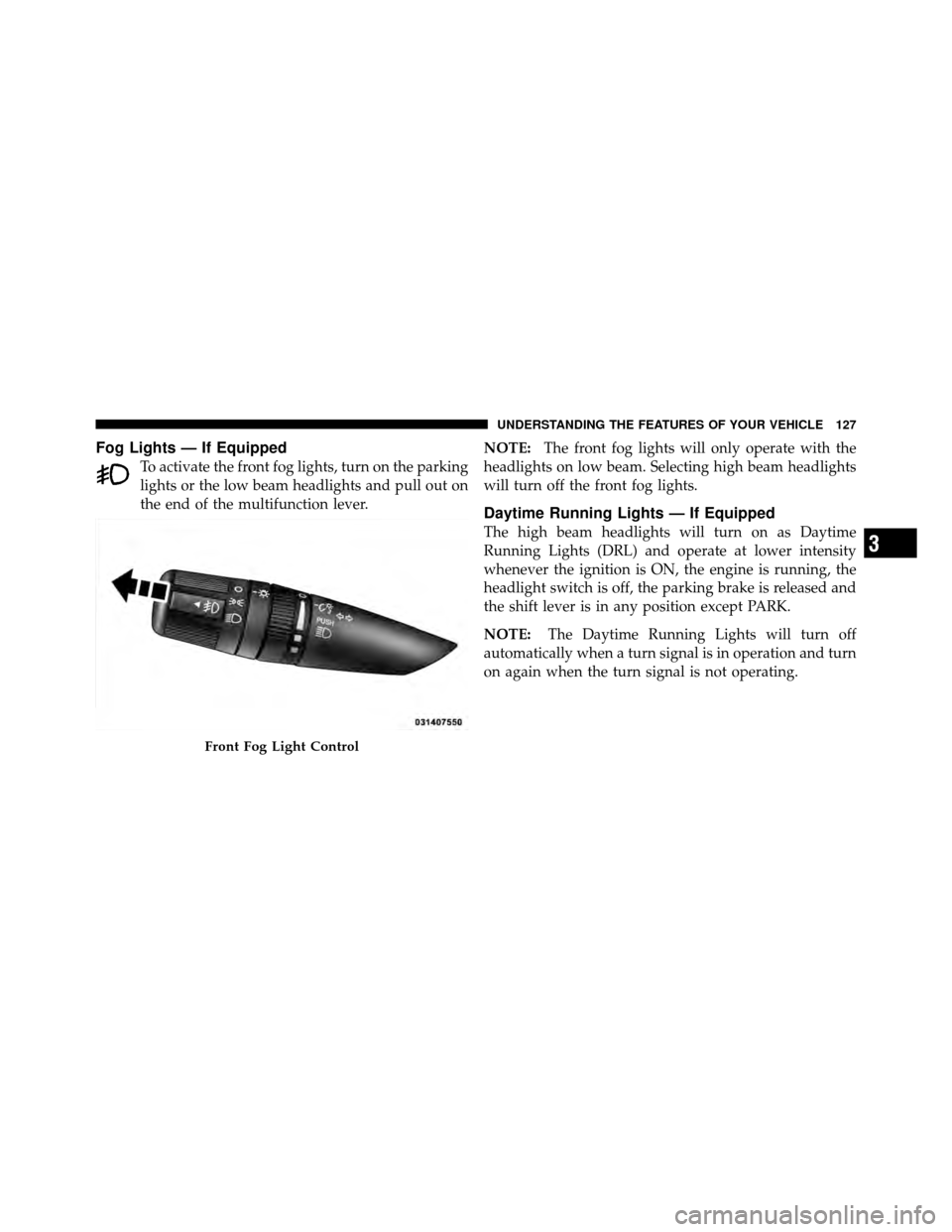
Fog Lights — If Equipped
To activate the front fog lights, turn on the parking
lights or the low beam headlights and pull out on
the end of the multifunction lever.NOTE:
The front fog lights will only operate with the
headlights on low beam. Selecting high beam headlights
will turn off the front fog lights.
Daytime Running Lights — If Equipped
The high beam headlights will turn on as Daytime
Running Lights (DRL) and operate at lower intensity
whenever the ignition is ON, the engine is running, the
headlight switch is off, the parking brake is released and
the shift lever is in any position except PARK.
NOTE: The Daytime Running Lights will turn off
automatically when a turn signal is in operation and turn
on again when the turn signal is not operating.
Front Fog Light Control
3
UNDERSTANDING THE FEATURES OF YOUR VEHICLE 127
Page 130 of 457
Interior Lights
Two courtesy/reading lights are located in the bottom of
the rearview mirror. You can turn these lights on and off
from the switches in the mirror or from the dimmer
control in the multifunction lever. These lights are also
controlled automatically by the Illuminated Entry System.
A courtesy light is also found in the rear of the center
console. You can turn this light on and off from the
dimmer control in the multifunction lever. This light is
also controlled automatically by the Illuminated Entry
System.
Battery Saver Feature
To protect the battery, the interior lights will turn off
automatically 10 minutes after the ignition switch is
moved to the LOCK position. This will occur if the
interior lights were switched on manually or are on
because a door is open.
Courtesy/Reading Light Switches
3
UNDERSTANDING THE FEATURES OF YOUR VEHICLE 129
Page 131 of 457
WINDSHIELD WIPERS AND WASHERS
The windshield wiper/washer control lever is
located on the right side of the steering column.
Rotate the end of the lever to the LO position for
low-speed wiper operation, or to the HI position for
high-speed wiper operation. NOTE:
The wipers will automatically return to the
“Park” position if you turn the ignition switch OFF while
they are operating. The wipers will resume operation
when you turn the ignition switch to the ON position
again.
Windshield Wiper/Washer Lever
Changing Wiper Speeds
130 UNDERSTANDING THE FEATURES OF YOUR VEHICLE
Page 136 of 457

ELECTRONIC SPEED CONTROL
When engaged, the Electronic Speed Control takes over
the accelerator operation at speeds greater than 25 mph
(40 km/h).
The Electronic Speed Control lever is located on the right
side of the steering wheel.NOTE:
In order to ensure proper operation, the Elec-
tronic Speed Control System has been designed to shut
down if multiple Speed Control functions are operated at
the same time. If this occurs, the Electronic Speed Control
System can be reactivated by pushing the Electronic
Speed Control ON/OFF button and resetting the desired
vehicle set speed.
To Activate
Push and release the ON/OFF button located on the end
of the Electronic Speed Control lever. The CRUISE indi-
cator in the instrument cluster will illuminate. To turn the
system off, push and release the ON/OFF button a
second time. The CRUISE indicator will turn off. Be sure
to turn the system off when not in use.
NOTE: The Electronic Speed Control system will auto-
matically turn off when the ignition is turned OFF.
Electronic Speed Control Lever
3
UNDERSTANDING THE FEATURES OF YOUR VEHICLE 135
Page 137 of 457

WARNING!
Leaving the Electronic Speed Control on when not in
use is dangerous. You could accidentally set the
system or cause it to go faster than you want. You
could lose control and have an accident. Always
leave the system off when you are not using it.
To Set a Desired Speed
Turn the Electronic Speed Control ON. When the vehicle
reaches the speed desired, press down on the lever and
release SET DECEL. Release the accelerator and the
vehicle will operate at the selected speed.
NOTE:
•The vehicle must be traveling at least 25 mph
(40 km/h) for the Electronic Speed Control to set.
•The vehicle should be traveling at a steady speed and
on level ground before pressing the lever SET DECEL.
To Deactivate
A soft tap on the brake pedal, or pulling the Electronic
Speed Control lever toward you (CANCEL), or normal
brake pressure while slowing the vehicle will deactivate
the Electronic Speed Control without erasing the set
speed from memory. Pressing the ON/OFF button or
turning off the ignition erases the set speed from
memory.
To Resume Speed
If you deactivated the Electronic Speed Control without
erasing the set speed from memory and your vehicle
speed is above 20 mph (32 km/h) you can resume the
previous set speed. To do so, push the lever up and
release RESUME ACCEL, and then remove your foot
from the accelerator pedal.
To Vary the Speed Setting
When the Electronic Speed Control is set, you can in-
crease speed by pushing up and holding the RESUME
136 UNDERSTANDING THE FEATURES OF YOUR VEHICLE
Page 140 of 457

WARNING!
•Your motorized door or gate will open and close
while you are training the universal transceiver.
Do not train the transceiver if people, pets or other
objects are in the path of the door or gate. Only use
this transceiver with a garage door opener that has
a “stop and reverse” feature as required by Federal
safety standards. This includes most garage door
opener models manufactured after 1982. Do not
use a garage door opener without these safety
features. Call toll-free 1–800–355–3515 or, on the
Internet at www.HomeLink.com for safety infor-
mation or assistance.
•Vehicle exhaust contains carbon monoxide, a dan-
gerous gas. Do not run your vehicle in the garage
while training the transceiver. Exhaust gas can
cause serious injury or death.
Programming HomeLink�
Before You Begin
If you have not trained any of the HomeLink�buttons,
erase all channels before you begin training.
To do this, press and hold the two outside buttons for up
to 20 seconds until the red indicator flashes.
It is recommended that a new battery be placed in the
handheld transmitter of the device that is being copied to
HomeLink� for more efficient training and accurate
transmission of the radio-frequency signal.
Your vehicle should be parked outside of the garage
when programming.
Begin Programming
1. Turn the ignition switch to the ON/RUN position.
2. Hold the battery side of the handheld transmitter
away from the HomeLink� button you wish to program.
3
UNDERSTANDING THE FEATURES OF YOUR VEHICLE 139