Page 85 of 538

WARNING! (Continued)
•Always make sure that objects cannot fall into the
driver foot well while the vehicle is moving.
Objects can become trapped under the brake pedal
and accelerator pedal causing a loss of vehicle
control.
•If required, mounting posts must be properly
installed, if not equipped from the factory.
Failure to properly follow floor mat installation or
mounting can cause interference with the brake
pedal and accelerator pedal operation causing loss
of control of the vehicle.
Periodic Safety Checks You Should Make Outside
the Vehicle
Tires
Examine tires for excessive tread wear and uneven wear
patterns. Check for stones, nails, glass, or other objectslodged in the tread. Inspect the tread and sidewall for
cuts and cracks. Check the wheel nuts for tightness.
Check the tires (including spare) for proper pressure.
Lights
Have someone observe the operation of exterior lights
while you work the controls. Check turn signal and high
beam indicator lights on the instrument panel.
Door Latches
Check for positive closing, latching, and locking.
Fluid Leaks
Check area under vehicle after overnight parking for fuel,
engine coolant, oil, or other fluid leaks. Also, if gasoline
fumes are detected or if fuel, power steering fluid, or
brake fluid leaks are suspected, the cause should be
located and corrected immediately.
84 THINGS TO KNOW BEFORE STARTING YOUR VEHICLE
Page 219 of 538

Rear Wheel Drive (RWD) / All Wheel Drive (AWD)
Displays (Base Cluster)
On vehicles equipped with a Base Instrument Cluster, the
odometer will display “2drivE” when the vehicle is in
Rear Wheel Drive (RWD), and “4drivE” when All Wheel
Drive (AWD) is activated.
If the odometer displays the “tCASE” warning message
after engine start up, or during driving, the AWD system
is not functioning properly and service is required.
NOTE:Vehicles equipped with Electronic Vehicle Infor-
mation Center (EVIC) will display “ALL WHEEL
DRIVE” and “REAR WHEEL DRIVE” when the appro-
priate condition exists. The EVIC will display “SERVICE
AWD SYSTEM” if the system is not functioning properly
and service is required. Refer to “Electronic Vehicle
Information Center (EVIC)” for further information. gASCAP
If the vehicle diagnostic system determines that the fuel
filler cap is loose, improperly installed, or damaged, a
“gASCAP” message will display in the odometer display
area. Tighten the fuel filler cap properly and press the
TRIP ODOMETER button to turn off the message. If the
problem continues, the message will appear the next time
the vehicle is started.
A loose, improperly installed, or damaged fuel filler cap
may also turn on the Malfunction Indicator Light (MIL).
Lo tirE
When the appropriate tire pressure is low, the odometer
display will toggle between Lo and tirE for three cycles.
noFUSE
If the vehicle diagnostic system determines that the
Ignition Off Draw (IOD) fuse is improperly installed, or
218 UNDERSTANDING YOUR INSTRUMENT PANEL
Page 227 of 538

turn off. If the light remains lit with the engine running,
your vehicle will usually be drivable. However, see an
authorized dealer for service as soon as possible.
If the light is flashing when the engine is running,
immediate service is required. In this case, you may
experience reduced performance, an elevated/rough idle
or engine stall, and your vehicle may require towing.
Also, have the system checked by an authorized dealer if
the light does not come on during starting.
22. Tire Pressure Monitoring Telltale LightEach tire, including the spare (if provided),
should be checked monthly when cold and
inflated to the inflation pressure recommended
by the vehicle manufacturer on the vehicle
placard or tire inflation pressure label. (If your vehicle
has tires of a different size than the size indicated on the vehicle placard or tire inflation pressure label, you should
determine the proper tire inflation pressure for those
tires.)
As an added safety feature, your vehicle has been
equipped with a Tire Pressure Monitoring System
(TPMS) that illuminates a low tire pressure telltale when
one or more of your tires is significantly under-inflated.
Accordingly, when the low tire pressure telltale illumi-
nates, you should stop and check your tires as soon as
possible, and inflate them to the proper pressure. Driving
on a significantly under-inflated tire causes the tire to
overheat and can lead to tire failure. Under-inflation also
reduces fuel efficiency and tire tread life, and may affect
the vehicle’s handling and stopping ability.
Please note that the TPMS is not a substitute for proper
tire maintenance, and it is the driver ’s responsibility to
226 UNDERSTANDING YOUR INSTRUMENT PANEL
Page 228 of 538

maintain correct tire pressure, even if under-inflation has
not reached the level to trigger illumination of the TPMS
low tire pressure telltale.
Your vehicle has also been equipped with a TPMS
malfunction indicator to indicate when the system is not
operating properly. The TPMS malfunction indicator is
combined with the low tire pressure telltale. When the
system detects a malfunction, the telltale will flash for
approximately one minute and then remain continuously
illuminated. This sequence will continue upon subse-
quent vehicle start-ups as long as the malfunction exists.
When the malfunction indicator is illuminated, the sys-
tem may not be able to detect or signal low tire pressure
as intended. TPMS malfunctions may occur for a variety
of reasons, including the installation of replacement or
alternate tires or wheels on the vehicle that prevent the
TPMS from functioning properly. Always check the
TPMS malfunction telltale after replacing one or moretires or wheels on your vehicle to ensure that the replace-
ment or alternate tires and wheels allow the TPMS to
continue to function properly.
CAUTION!
The TPMS has been optimized for the original
equipment tires and wheels. TPMS pressures and
warning have been established for the tire size
equipped on your vehicle. Undesirable system opera-
tion or sensor damage may result when using re-
placement equipment that is not of the same size,
type, and/or style. Aftermarket wheels can cause
sensor damage. Do not use aftermarket tire sealants
or balance beads if your vehicle is equipped with a
TPMS, as damage to the sensors may result.
4
UNDERSTANDING YOUR INSTRUMENT PANEL 227
Page 231 of 538
ELECTRONIC VEHICLE INFORMATION CENTER
(EVIC) — IF EQUIPPED
The Electronic Vehicle Information Center (EVIC) fea-
tures a driver-interactive display that is located in the
instrument cluster.This system conveniently allows the driver to select a
variety of useful information by pressing the switches
mounted on the steering wheel. The EVIC consists of the
following:
•System status
•Vehicle information warning message displays
•Tire Pressure Monitor System (if equipped)
•Personal Settings (Customer-Programmable Features)
•Compass display
•Outside temperature display
•Trip computer functions
•Uconnect™ Phone displays (if equipped)
•Navigation system screens (if equipped)
•Audio mode display
Electronic Vehicle Information Center (EVIC)
230 UNDERSTANDING YOUR INSTRUMENT PANEL
Page 236 of 538

•Channel # Trained
•Clearing Channels
•Channels Cleared
•Did Not Train
•Left Front Low Pressure (with a single chime). Refer to
information on “Tire Pressure” and “Tire Pressure
Monitor” under “Starting And Operating.”
•Left Rear Low Pressure (with a single chime). Refer to
information on “Tire Pressure” and “Tire Pressure
Monitor” under “Starting And Operating.”
•Right Front Low Pressure (with a single chime). Refer
to information on “Tire Pressure” and “Tire Pressure
Monitor” under “Starting And Operating.”
•Right Rear Low Pressure (with a single chime). Refer
to information on “Tire Pressure” and “Tire Pressure
Monitor” under “Starting And Operating.”
•Check TPM System (with a single chime). Refer to
information on “Tire Pressure Monitor” under “Start-
ing And Operating.”
•Check Gascap (refer to “Adding Fuel” in “Starting
And Operating”)
•Service Park Assist System (with a single chime)
•Turn To Run (refer to “Remote Starting System” in
“Things To Know Before Starting Your Vehicle”)
•Key Fob Battery Low
•Service Keyless System
•Wrong Key
•Push Button or Insert Key/Turn To Run (refer to
“Remote Starting System” in “Things To Know Before
Starting Your Vehicle”)
•Oil Change Required (with a single chime)
4
UNDERSTANDING YOUR INSTRUMENT PANEL 235
Page 308 of 538
�Tire Safety Information ................. 345
▫ Tire Markings ....................... 345
▫ Tire Identification Number (TIN) ......... 349
▫ Tire Terminology And Definitions ......... 350
▫ Tire Loading And Tire Pressure .......... 351
� Tires — General Information ............. 355
▫ Tire Pressure ....................... 355
▫ Tire Inflation Pressures ................ 356
▫ Tire Pressures For High Speed Operation . . . 358
▫ Radial Ply Tires ..................... 358
▫ Compact Spare Tire – If Equipped ........ 358
▫ Limited-Use Spare – If Equipped ......... 359
▫ Tire Spinning ....................... 360 ▫
Tread Wear Indicators ................. 360
▫ Life Of Tire ........................ 361
▫ Replacement Tires .................... 362
� Self-Sealing Tires — If Equipped ........... 363
� Snow Tires .......................... 363
� Tire Rotation Recommendations ........... 364
� Tire Pressure Monitor System (TPMS) ....... 365
▫ Base System ........................ 367
▫ Premium System – If Equipped .......... 370
▫ General Information .................. 374
� Fuel Requirements ..................... 374
▫ 2.7L Engine ........................ 374
▫ 3.5L And 5.7L Engine ................. 374
5
STARTING AND OPERATING 307
Page 346 of 538
NOTE:
•The “ESP/TCS Indicator Light” and the “ESP/BAS
Malfunction Indicator Light” will turn on momen-
tarily each time the ignition switch is turned to the ON
position.
•Each time the ignition switch is turned to the ON
position, the ESP system will be on even if it was
turned off previously.
•The ESP control system will make buzzing or clicking
sounds when it is active. This is NORMAL; the sounds
will stop when ESP becomes inactive following the
maneuver that caused the ESP activation.
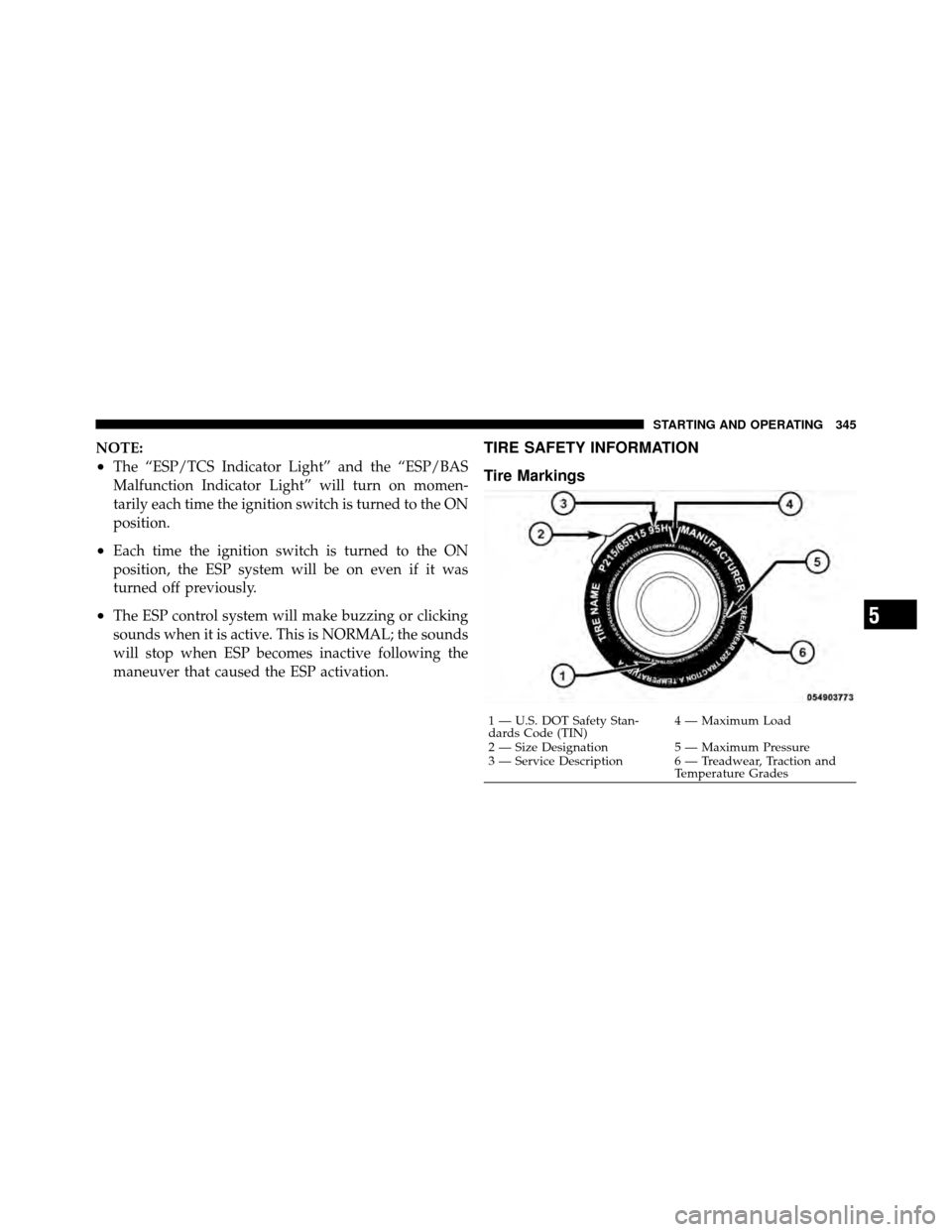
TIRE SAFETY INFORMATION
Tire Markings
1 — U.S. DOT Safety Stan-
dards Code (TIN)4 — Maximum Load
2 — Size Designation 5 — Maximum Pressure
3 — Service Description 6 — Treadwear, Traction and Temperature Grades
5
STARTING AND OPERATING 345