Page 187 of 538

ParkSense�System Usage Precautions
NOTE:
•Ensure that the rear bumper is free of snow, ice, mud,
dirt and debris to keep the ParkSense� Rear Park
Assist system operating properly.
•Jackhammers, large trucks, and other vibrations could
affect the performance of the ParkSense� Rear Park
Assist system.
•When you turn ParkSense� off, the instrument cluster
will display “PARK ASSIST DISABLED.” Further-
more, once you turn ParkSense� off, it remains off
until you turn it on again, even if you cycle the ignition
key.
•When you move the shift lever to the REVERSE
position and ParkSense� is turned off, the instrument
cluster will display “PARK ASSIST DISABLED” mes-
sage for as long as the vehicle is in REVERSE.
•ParkSense�, when on, will MUTE the radio when it is
sounding a tone.
•If a ParkSense� system malfunction occurs, a single
chime will sound once per ignition cycle. In addition,
the Electronic Vehicle Information Center (EVIC) will
display “SERVICE PARK ASSIST SYSTEM” and the
LED in the ParkSense� switch will illuminate. If this
occurs after making sure the rear fascia/bumper is
clean and clear of snow, ice, mud, dirt, or other
obstruction, see your authorized dealer for service.
•Clean the ParkSense� sensors regularly, taking care
not to scratch or damage them. The sensors must not
be covered with ice, snow, slush, mud, dirt, or debris.
Failure to do so can result in ParkSense� not working
properly. The ParkSense� system might not detect an
obstacle behind the fascia/bumper, or it could provide
a false indication that an obstacle is behind the fascia/
bumper.
186 UNDERSTANDING THE FEATURES OF YOUR VEHICLE
Page 188 of 538
•Objects must not be within 12 in (30 cm) from the rear
fascia/bumper while driving the vehicle. Failure to do
so can result in the system misinterpreting a close
object as a sensor problem, causing the “SERVICE
PARK ASSIST SYSTEM” message to be displayed in
the instrument cluster.
CAUTION!
•The ParkSense�Rear Park Assist system is only a
parking aid and it is unable to recognize every
obstacle, including small obstacles. Parking curbs
might be temporarily detected or not detected at
all. Obstacles located above or below the sensors
will not be detected when they are in close prox-
imity.
(Continued)
CAUTION! (Continued)
•The vehicle must be driven slowly when using the
ParkSense�Rear Park Assist system to be able to
stop in time when the obstacle is detected. It is
recommended that the driver looks over his/her
shoulder when using ParkSense�.
3
UNDERSTANDING THE FEATURES OF YOUR VEHICLE 187
Page 210 of 538
UNDERSTANDING YOUR INSTRUMENT PANEL
CONTENTS
�Instrument Panel Features ............... 213
� Instrument Cluster — Base ............... 214
� Instrument Cluster — Premium ........... 215
� Instrument Cluster Descriptions ........... 216
� Electronic Vehicle Information Center (EVIC)
— If Equipped ........................ 230
▫ Electronic Vehicle Information Center (EVIC)
Displays ........................... 232
▫ Oil Change Required .................. 236
▫ Trip Functions ...................... 236 ▫
Keyless Go Display — If Equipped ........ 240
▫ Automatic All Wheel Drive (AWD) Displays
— If Equipped ...................... 241
▫ Driver-Selectable Surround Sound (DSS)
– If Equipped ....................... 242
▫ Compass Display .................... 242
▫ Navigation — If Equipped .............. 244
▫ Personal Settings (Customer-Programmable
Features) .......................... 245
� Setting The Analog Clock ................ 251
4
Page 214 of 538
INSTRUMENT PANEL FEATURES
1 — Air Outlet7 — Radio13 — Ignition Switch
2 — Instrument Cluster 8 — Climate Control14 — Hood Release
3 — Hazard Switch 9 — Heated Seat Switch*15 — Trunk Release Button
4 — Analog Clock 10 — Power Outlet16 — Headlight Switch
5 — Electronic Stability Program Off But-
ton* / Traction Control System Off Button* 11 — Ash Tray*
* If Equipped
6 — Glove Compartment 12 — Storage Compartment*
4
UNDERSTANDING YOUR INSTRUMENT PANEL 213
Page 215 of 538
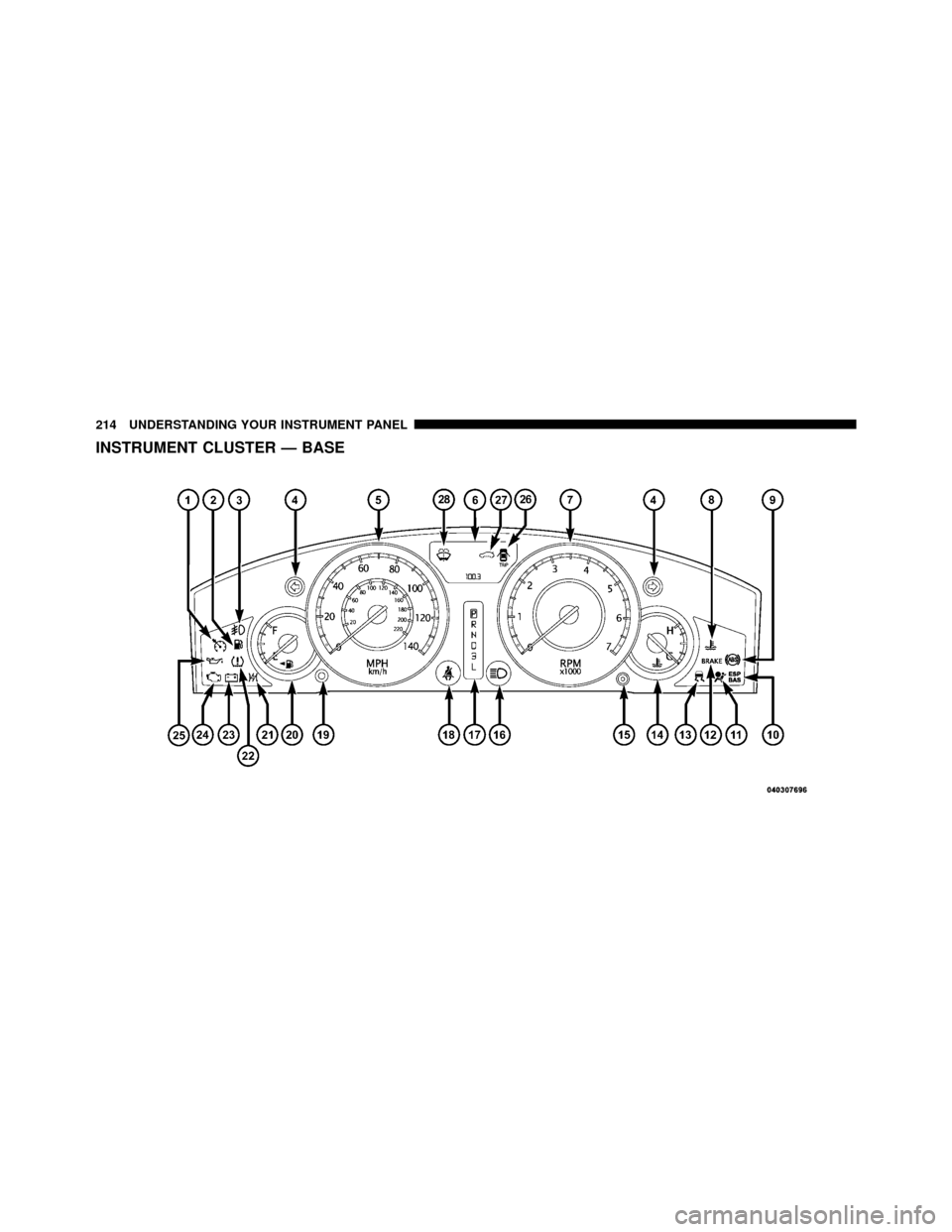
INSTRUMENT CLUSTER — BASE
214 UNDERSTANDING YOUR INSTRUMENT PANEL
Page 216 of 538
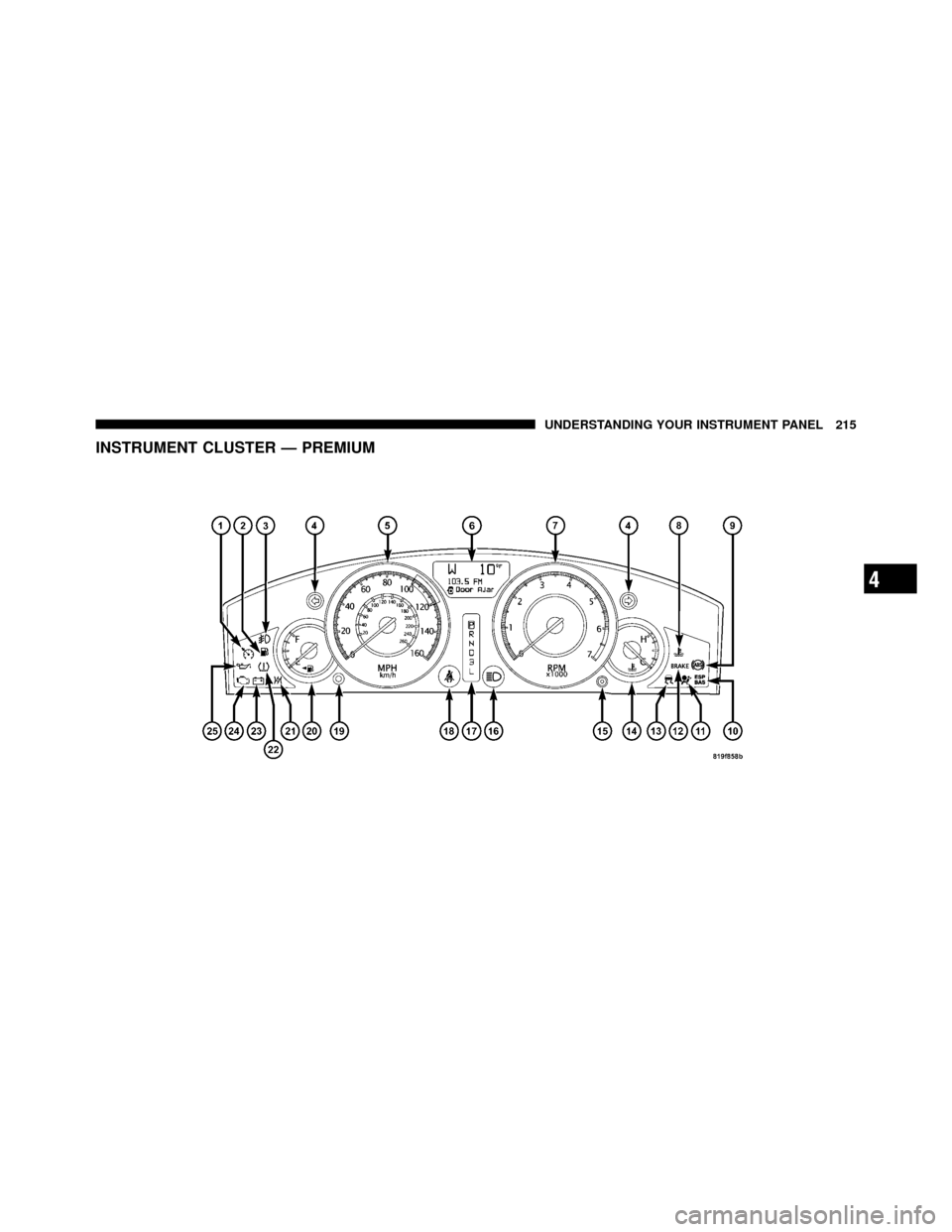
INSTRUMENT CLUSTER — PREMIUM
4
UNDERSTANDING YOUR INSTRUMENT PANEL 215
Page 217 of 538

INSTRUMENT CLUSTER DESCRIPTIONS
1. Electronic Speed Control / Adaptive Cruise Control
(ACC) Indicator Light — If EquippedThis light will turn on when the electronic
speed control or Adaptive Cruise Control
(ACC) is ON.
2. Low Fuel Indicator Light This light will turn on and a single chime will
sound when the fuel level drops to 1/8 tank.
3. Front Fog Light Indicator — If Equipped This indicator will illuminate when the front fog
lights are on.
4. Turn Signal Indicators The arrow will flash with the exterior turn signal
when the turn signal lever is operated. NOTE:•A continuous chime will sound if the vehicle is driven
more than 1 mile (1.6 km) with either turn signal on.
•Check for an inoperative outside light bulb if either
indicator flashes at a rapid rate.
5. Speedometer
Indicates vehicle speed.
6. Odometer / Trip Odometer / Electronic Vehicle
Information Center (EVIC) Display Area — If Equipped
The odometer shows the total distance the vehicle has
been driven. The trip odometer shows individual trip
mileage. Refer to “Trip Odometer Button” for additional
information.
216 UNDERSTANDING YOUR INSTRUMENT PANEL
Page 219 of 538

Rear Wheel Drive (RWD) / All Wheel Drive (AWD)
Displays (Base Cluster)
On vehicles equipped with a Base Instrument Cluster, the
odometer will display “2drivE” when the vehicle is in
Rear Wheel Drive (RWD), and “4drivE” when All Wheel
Drive (AWD) is activated.
If the odometer displays the “tCASE” warning message
after engine start up, or during driving, the AWD system
is not functioning properly and service is required.
NOTE:Vehicles equipped with Electronic Vehicle Infor-
mation Center (EVIC) will display “ALL WHEEL
DRIVE” and “REAR WHEEL DRIVE” when the appro-
priate condition exists. The EVIC will display “SERVICE
AWD SYSTEM” if the system is not functioning properly
and service is required. Refer to “Electronic Vehicle
Information Center (EVIC)” for further information. gASCAP
If the vehicle diagnostic system determines that the fuel
filler cap is loose, improperly installed, or damaged, a
“gASCAP” message will display in the odometer display
area. Tighten the fuel filler cap properly and press the
TRIP ODOMETER button to turn off the message. If the
problem continues, the message will appear the next time
the vehicle is started.
A loose, improperly installed, or damaged fuel filler cap
may also turn on the Malfunction Indicator Light (MIL).
Lo tirE
When the appropriate tire pressure is low, the odometer
display will toggle between Lo and tirE for three cycles.
noFUSE
If the vehicle diagnostic system determines that the
Ignition Off Draw (IOD) fuse is improperly installed, or
218 UNDERSTANDING YOUR INSTRUMENT PANEL