Page 136 of 538
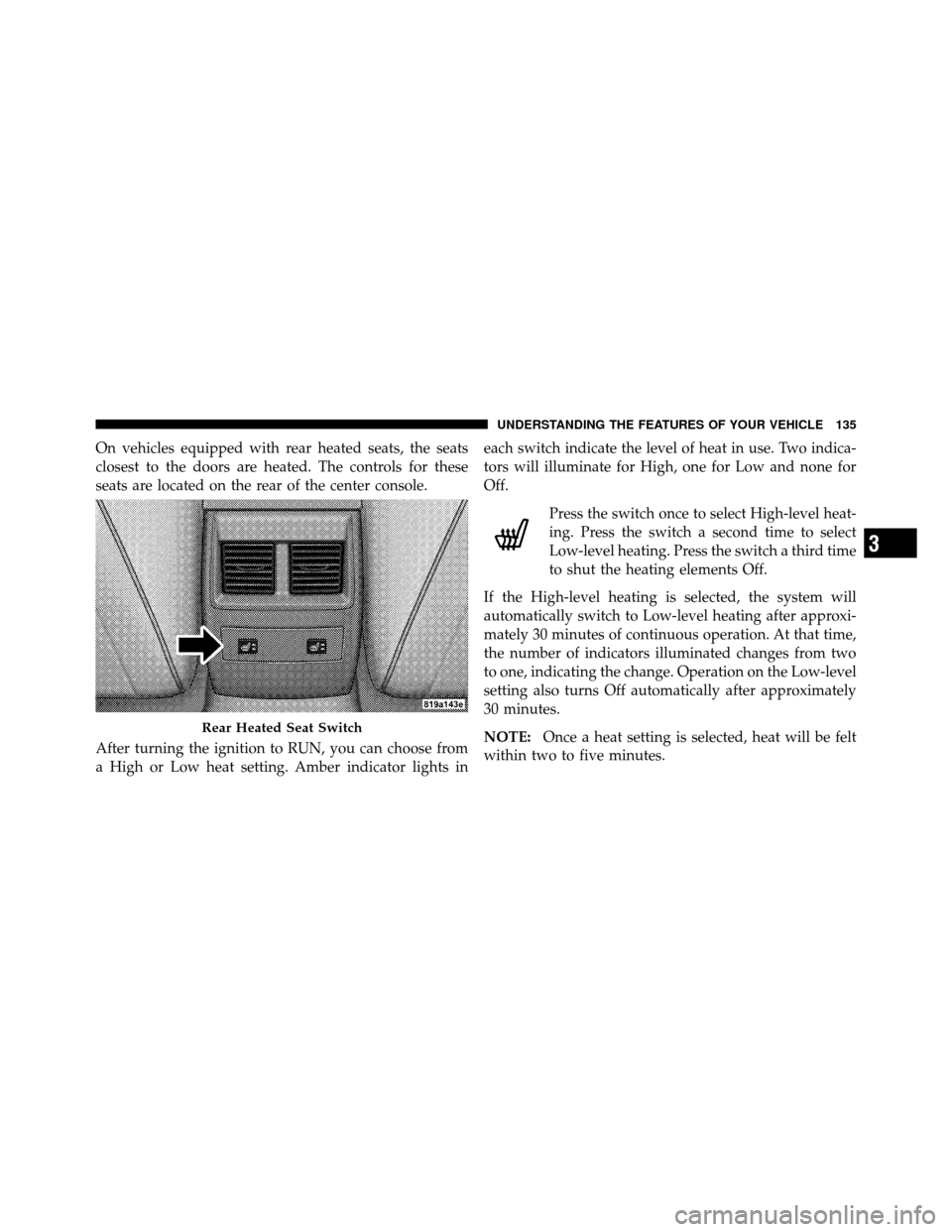
On vehicles equipped with rear heated seats, the seats
closest to the doors are heated. The controls for these
seats are located on the rear of the center console.
After turning the ignition to RUN, you can choose from
a High or Low heat setting. Amber indicator lights ineach switch indicate the level of heat in use. Two indica-
tors will illuminate for High, one for Low and none for
Off.
Press the switch once to select High-level heat-
ing. Press the switch a second time to select
Low-level heating. Press the switch a third time
to shut the heating elements Off.
If the High-level heating is selected, the system will
automatically switch to Low-level heating after approxi-
mately 30 minutes of continuous operation. At that time,
the number of indicators illuminated changes from two
to one, indicating the change. Operation on the Low-level
setting also turns Off automatically after approximately
30 minutes.
NOTE: Once a heat setting is selected, heat will be felt
within two to five minutes.
Rear Heated Seat Switch
3
UNDERSTANDING THE FEATURES OF YOUR VEHICLE 135
Page 149 of 538
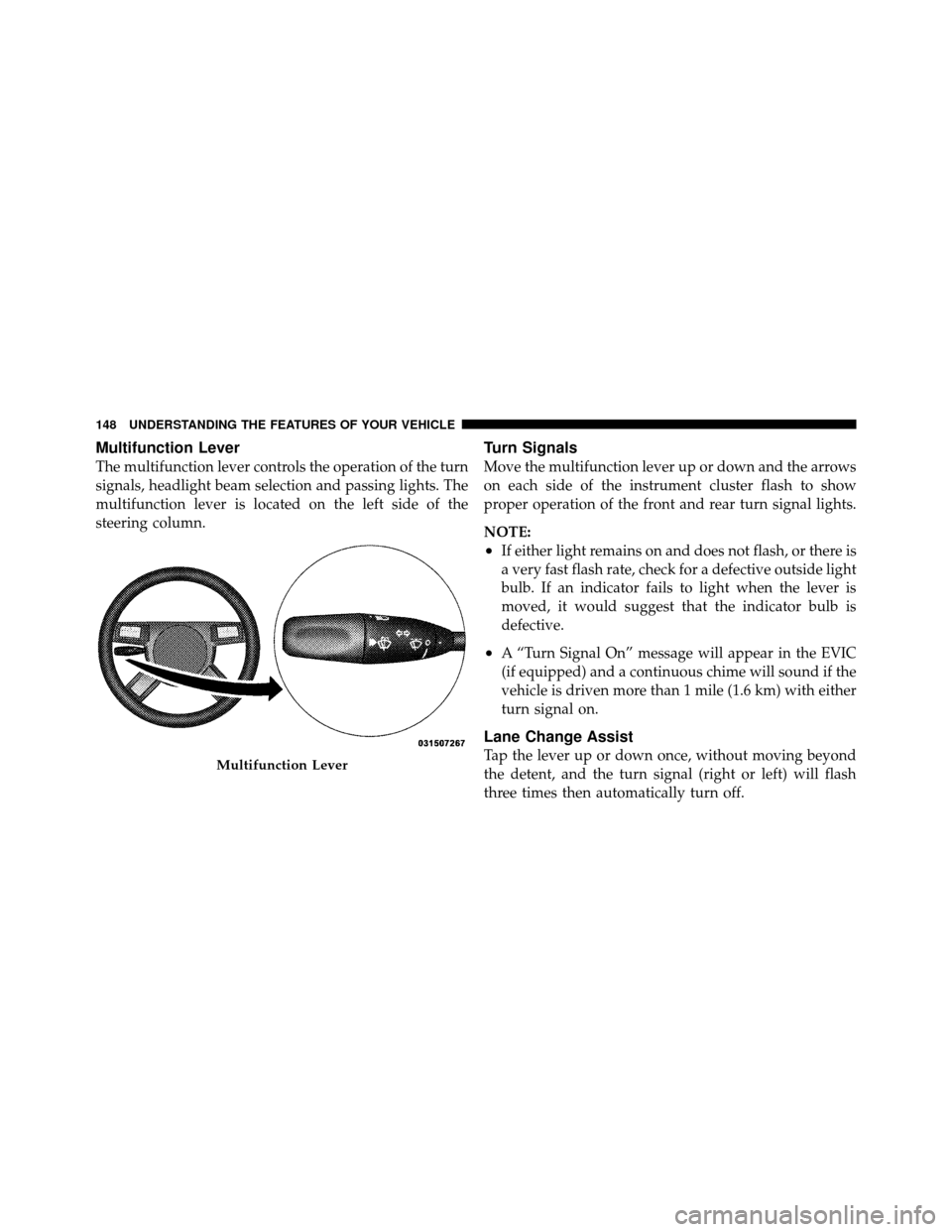
Multifunction Lever
The multifunction lever controls the operation of the turn
signals, headlight beam selection and passing lights. The
multifunction lever is located on the left side of the
steering column.
Turn Signals
Move the multifunction lever up or down and the arrows
on each side of the instrument cluster flash to show
proper operation of the front and rear turn signal lights.
NOTE:
•If either light remains on and does not flash, or there is
a very fast flash rate, check for a defective outside light
bulb. If an indicator fails to light when the lever is
moved, it would suggest that the indicator bulb is
defective.
•A “Turn Signal On” message will appear in the EVIC
(if equipped) and a continuous chime will sound if the
vehicle is driven more than 1 mile (1.6 km) with either
turn signal on.
Lane Change Assist
Tap the lever up or down once, without moving beyond
the detent, and the turn signal (right or left) will flash
three times then automatically turn off.Multifunction Lever
148 UNDERSTANDING THE FEATURES OF YOUR VEHICLE
Page 162 of 538
To decrease speed while Electronic Speed Control is set,
push down and hold the lever in SET DECEL. If the lever
is continually held in the SET DECEL position, the set
speed will continue to until the lever is released. Release
the lever when the desired speed is reached, and a new
set speed will be established.
Tapping the Electronic Speed Control lever to SET DE-
CEL once will result in a 1 mph (1.6 km/h) speed
decrease. Each time the lever is tapped, speed decreases.
To Accelerate For Passing
Press the accelerator as you would normally. When the
pedal is released, the vehicle will return to the set speed.
Using Electronic Speed Control on Hills
NOTE:The Electronic Speed Control system maintains
speed up and down hills. A slight speed change on
moderate hills is normal. The automatic transmission will downshift while climb-
ing uphill or descending downhill. This downshift is
necessary to maintain vehicle set speed.
On steep hills, a greater speed loss or gain may occur, so
it may be preferable to drive without Electronic Speed
Control.
WARNING!
Electronic Speed Control can be dangerous where the
system cannot maintain a constant speed. Your ve-
hicle could go too fast for the conditions and you
could lose control. An accident could be the result.
Do not use Electronic Speed Control in heavy traffic
or on roads that are winding, icy, snow-covered or
slippery.
3
UNDERSTANDING THE FEATURES OF YOUR VEHICLE 161
Page 171 of 538

Setting the Following Distance in ACC
The specified following distance for ACC can be set by
varying the distance setting between long, medium, and
short. Using this distance setting and the vehicle speed,
ACC calculates and sets the distance to the vehicle ahead.
This distance setting displays in the EVIC.To change the distance setting, push the lever away from
you (DISTANCE) and release. Each time this is done, the
distance setting adjusts between long, medium, and
short.
If there is no vehicle ahead, the vehicle will maintain the
set speed. If a slower moving vehicle is detected in the
same lane, the EVIC displays the “Sensed Vehicle Indi-
cator” icon, and the system adjusts vehicle speed auto-
matically to maintain the distance setting, regardless of
the set speed.
The vehicle will then maintain the set distance until:
•The vehicle ahead accelerates to a speed above the set
speed.
•The vehicle ahead moves out of your lane or view of
the sensor.
1 — Sensor Bars. Default Distance Setting is Three Bars = Long.
170 UNDERSTANDING THE FEATURES OF YOUR VEHICLE
Page 195 of 538
Gate Operator/Canadian Programming
Canadian radio-frequency laws require transmitter sig-
nals to “time-out” (or quit) after several seconds of
transmission – which may not be long enough for
HomeLink�to pick up the signal during programming.
Similar to this Canadian law, some U.S. gate operators are
designed to “time-out” in the same manner.
It may be helpful to unplug the device during the cycling
process to prevent possible overheating of the garage
door or gate motor.
If you are having difficulties programming a garage door
opener or a gate operator, replace “Programming
HomeLink” Step 3 with the following:
3. Continue to press and hold the HomeLink� button,
while you press and release (“cycle”), your handheld
transmitter every two seconds until HomeLink� hassuccessfully accepted the frequency signal. The EVIC
display will change from “CHANNEL # TRAINING” to
“CHANNEL # TRAINED.”
If you unplugged the device for training, plug it back in
at this time.
Then proceed with Step 4 under “Programming
HomeLink�” earlier in this section.
Using HomeLink�
To operate, press and release the programmed
HomeLink�
button. Activation will now occur for the
trained device (i.e., garage door opener, gate operator,
security system, entry door lock, home/office lighting,
etc.,). The handheld transmitter of the device may also be
used at any time.
194 UNDERSTANDING THE FEATURES OF YOUR VEHICLE
Page 220 of 538

damaged, a “noFUSE” message will display in the odom-
eter display area. For further information on fuses and
fuse locations refer to “Fuses” in “Maintaining Your
Vehicle”.
CHAngE OIL
Your vehicle is equipped with an engine oil change
indicator system. The “CHAngE OIL” message will flash
in the instrument cluster odometer for approximately
12 seconds after a single chime has sounded to indicate
the next scheduled oil change interval. The engine oil
change indicator system is duty cycle based, which
means the engine oil change interval may fluctuate
dependent upon your personal driving style.
Unless reset, this message will continue to display each
time you place the ignition switch in the RUN position.
To turn off the message temporarily, press and release the
TRIP ODOMETER button on the instrument cluster. Toreset the oil change indicator system (after performing
the scheduled maintenance) perform the following pro-
cedure:
1. Place the ignition switch in the RUN position. (Do
not start the engine).
2. Fully depress the accelerator pedal slowly three
times within 10 seconds.
3. Place the ignition switch in the OFF position.
NOTE: If the indicator message illuminates when you
start the vehicle, the oil change indicator system did not
reset. If necessary, repeat this procedure.
On vehicles equipped with a Premium Instrument Clus-
ter, this display shows the Electronic Vehicle Information
Center (EVIC) messages when the appropriate conditions
exist.
4
UNDERSTANDING YOUR INSTRUMENT PANEL 219
Page 237 of 538
Oil Change Required
Your vehicle is equipped with an engine oil change
indicator system. The “Oil Change Required” message
will flash in the EVIC display for approximately 10 sec-
onds after a single chime has sounded to indicate the next
scheduled oil change interval. The engine oil change
indicator system is duty cycle based, which means the
engine oil change interval may fluctuate dependent upon
your personal driving style.
Unless reset, this message will continue to display each
time you turn the ignition switch to the RUN position. To
turn off the message temporarily, press and release the
MENU button. To reset the oil change indicator system
(after performing the scheduled maintenance) perform
the following procedure:
1. Place the ignition switch in the RUN position (Do not
start the engine).2. Fully depress the accelerator pedal slowly three times
within 10 seconds.
3. Place the ignition in the OFF position.
NOTE:
If the indicator message illuminates when you
start the vehicle, the oil change indicator system did not
reset. If necessary, repeat this procedure.
Trip Functions
Press and release the MENU button until one of the
following Trip Functions displays in the EVIC:
•Average Fuel Economy / Fuel Saver Mode
•Distance To Empty
•Trip A
•Trip B
•Elapsed Time
236 UNDERSTANDING YOUR INSTRUMENT PANEL
Page 250 of 538
position when the transmission is shifted out of RE-
VERSE. To make your selection, press and release the
FUNCTION SELECT button until “ON” or “OFF”
appears.
“Turn Headlights On with Remote Key Unlock”
When this feature is selected, the headlights will activate
and remain on for up to 90 seconds when the doors are
unlocked with the RKE transmitter. To make your selec-
tion, press and release the FUNCTION SELECT button
until “OFF,” “30 sec.,” “60 sec.,” or “90 sec.” appears.
“Delay Power Off to Accessories Until Exit”
When this feature is selected, the power WINDOW
switches, radio, hands-free system (if equipped), DVD
video system (if equipped), power sunroof (if equipped),
and power outlets will remain active for up to 60 minutes
after the ignition switch is placed in the OFF position.
Opening a vehicle door will cancel this feature. To makeyour selection, press and release the FUNCTION SE-
LECT button until “Off,” “45 sec.,” “5 min.,” “10 min.,”
“30 min.,” or “60 min.” appears.
“AWD System Displays”
When in this display you may select “ON” or “OFF”.
When ON is selected, the EVIC displays the current
mode of the transfer-case. A five second display appears
any time the transfer-case changes from All Wheel Drive
(AWD) to Rear Wheel Drive (RWD) or from RWD to
AWD. The EVIC also displays the current mode of the
transfer-case when you shift into drive or reverse. To
make your selection, press and release the FUNCTION
SELECT button until “ON” or “OFF” appears.
4
UNDERSTANDING YOUR INSTRUMENT PANEL 249