2010 CHEVROLET IMPALA airbag off
[x] Cancel search: airbag offPage 103 of 432

Adding Equipment to Your
Airbag-Equipped VehicleQ:
Is there anything I might add to or change
about the vehicle that could keep the airbags
from working properly?
A:
Yes. If you add things that change the vehicle’s
frame, bumper system, height, front end or side
sheet metal, they may keep the airbag system from
working properly. Changing or moving any parts
of the front seats, safety belts, the airbag sensing
and diagnostic module, steering wheel, instrument
panel, roof-rail airbag modules, ceiling headliner
or pillar garnish trim, front sensors, side impact
sensors, or airbag wiring can affect the operation of
the airbag system.
In addition, the vehicle has a passenger sensing
system for the right front passenger position, which
includes sensors that are part of the passenger’s
seat. The passenger sensing system may not
operate properly if the original seat trim is replaced
with non-GM covers, upholstery or trim, or with
GM covers, upholstery or trim designed for a
different vehicle. Any object, such as an aftermarket
seat heater or a comfort enhancing pad or device,
installed under or on top of the seat fabric,could also interfere with the operation of the
passenger sensing system. This could either
prevent proper deployment of the passenger
airbag(s) or prevent the passenger sensing system
from properly turning off the passenger airbag(s).
SeePassenger Sensing System on page 2-66.
If you have any questions, call Customer
Assistance. The phone numbers and addresses
for Customer Assistance are in Step Two of
the Customer Satisfaction Procedure in this manual.
SeeCustomer Satisfaction Procedure on page 8-2.
Q:
Because I have a disability, I have to get
my vehicle modified. How can I find out whether
this will affect my airbag system?
A:
If you have questions, call Customer Assistance.
The phone numbers and addresses for Customer
Assistance are in Step Two of the Customer
Satisfaction Procedure in this manual. See
Customer Satisfaction Procedure on page 8-2.
In addition, your dealer/retailer and the service manual
have information about the location of the airbag
sensors, sensing and diagnostic module and airbag
wiring.
2-73
Page 174 of 432

Passenger Safety Belt Reminder LightSeveral seconds after the engine is started, a chime
sounds for several seconds to remind the front
passenger to buckle their safety belt. This only occurs
if the passenger airbag is enabled. SeePassenger
Sensing System on page 2-66for more information.
The passenger safety belt light, located on the instrument
panel, comes on and stays on for several seconds and
then flashes for several more.
This chime and light are
repeated if the passenger
remains unbuckled and
the vehicle is in motion.
If the passenger safety belt is buckled, neither the
chime nor the light comes on.
The front passenger safety belt warning light and chime
may turn on if an object is put on the seat such as a
briefcase, handbag, grocery bag, laptop or other
electronic device. To turn off the warning light and or
chime, remove the object from the seat or buckle the
safety belt.
Airbag Readiness LightThe system checks the airbag’s electrical system for
possible malfunctions. If the light stays on it indicates
there is an electrical problem. The system check includes
the airbag sensor, the pretensioners, the airbag modules,
the wiring and the crash sensing and diagnostic module.
For more information on the airbag system, seeAirbag
System on page 2-56.
The airbag readiness light
flashes for a few seconds
when the engine is started.
If the light does not come
on then, have it fixed
immediately.
4-24
Page 175 of 432
{
WARNING:
If the airbag readiness light stays on after the
vehicle is started or comes on while driving, it
means the airbag system might not be working
properly. The airbags in the vehicle might not
inflate in a crash, or they could even inflate
without a crash. To help avoid injury, have the
vehicle serviced right away.
If there is a problem with the airbag system, an airbag
Driver Information Center (DIC) message can also come
on. SeeDIC Warnings and Messages on page 4-44
for more information.
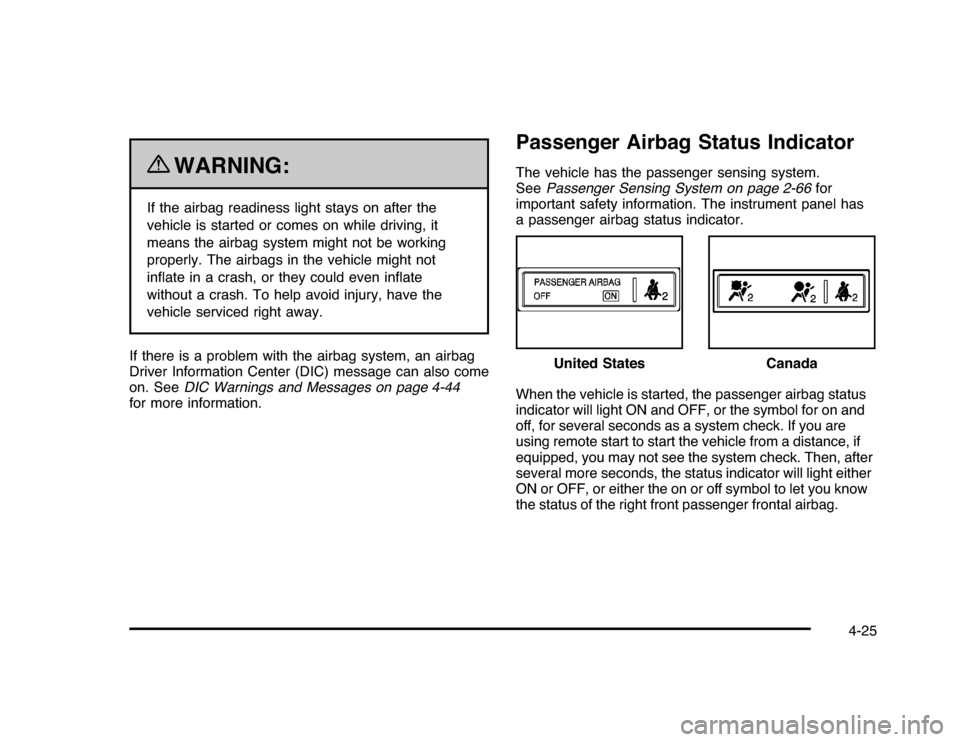
Passenger Airbag Status IndicatorThe vehicle has the passenger sensing system.
SeePassenger Sensing System on page 2-66for
important safety information. The instrument panel has
a passenger airbag status indicator.
When the vehicle is started, the passenger airbag status
indicator will light ON and OFF, or the symbol for on and
off, for several seconds as a system check. If you are
using remote start to start the vehicle from a distance, if
equipped, you may not see the system check. Then, after
several more seconds, the status indicator will light either
ON or OFF, or either the on or off symbol to let you know
the status of the right front passenger frontal airbag.United States
Canada
4-25
Page 176 of 432
If the word ON or the on symbol is lit on the passenger
airbag status indicator, it means that the right front
passenger frontal airbag is enabled (may inflate).
If the word OFF or the off symbol is lit on the airbag
status indicator, it means that the passenger sensing
system has turned off the right front passenger
frontal airbag.
If, after several seconds, both status indicator lights
remain on, or if there are no lights at all, there may be
a problem with the lights or the passenger sensing
system. See your dealer/retailer for service.
{
WARNING:
If the airbag readiness light ever comes on and
stays on, it means that something may be wrong
with the airbag system. To help avoid injury to
yourself or others, have the vehicle serviced right
away. SeeAirbag Readiness Light on page 4-24
for more information, including important safety
information.
Charging System Light
This light comes on briefly
when the ignition key is
turned to START, but
the engine is not running,
as a check to show it
is working.
If it does not, have the vehicle serviced by your
dealer/retailer.
The light should go out once the engine starts. If it stays
on, or comes on while driving, there could be a problem
with the charging system. A charging system message
in the Driver Information Center (DIC) can also appear.
SeeDIC Warnings and Messages on page 4-44for more
information. This light could indicate that there are
problems with a generator drive belt, or that there is an
electrical problem. Have it checked right away. If the
vehicle must be driven a short distance with the light
on, turn off accessories, such as the radio and air
conditioner.
4-26
Page 197 of 432
REMOTE KEY LEARNING ACTIVEThis message displays while you are matching a
Remote Keyless Entry (RKE) transmitter to your vehicle.
See “Matching Transmitter(s) to Your Vehicle” under
Remote Keyless Entry (RKE) System Operation
on page 3-4andDIC Operation and Displays on
page 4-37for more information.REPLACE BATTERY IN REMOTE KEYThis message displays when the battery in the Remote
Keyless Entry (RKE) transmitter needs to be replaced.
To replace the battery, see “Battery Replacement” under
Remote Keyless Entry (RKE) System Operation on
page 3-4.RIGHT REAR DOOR OPENThis message displays when the passenger side rear
door is not closed properly. Make sure that the door
is closed completely.SERVICE A/C (Air Conditioning)
SYSTEMThis message displays when the electronic sensors that
control the air conditioning and heating systems are
no longer working. Have the climate control system
serviced by your dealer/retailer if you notice a drop
in heating and air conditioning efficiency.
SERVICE AIR BAGThis message displays when there is a problem with
the airbag system. Have your vehicle serviced by your
dealer/retailer immediately. SeeAirbag Readiness
Light on page 4-24for more information.SERVICE BATTERY CHARGING
SYSTEMThis message displays when there is a problem with the
generator and battery charging systems. Driving with this
problem could drain the battery. Turn off all unnecessary
accessories. Stop and turn off the vehicle as soon as it is
safe to do so. Have the electrical system checked by your
dealer/retailer immediately.SERVICE BRAKE SYSTEMThis message displays when service is required on the
brake system. Have the brake system serviced by
your dealer/retailer as soon as possible. The brake
system warning light also appears on the instrument
panel cluster when this message appears on the DIC.
SeeBrake System Warning Light on page 4-27.
4-47
Page 274 of 432

California Proposition 65 WarningMost motor vehicles, including this one, contain and/or
emit chemicals known to the State of California to
cause cancer and birth defects or other reproductive
harm. Engine exhaust, many parts and systems,
many fluids, and some component wear by-products
contain and/or emit these chemicals.California Perchlorate Materials
RequirementsCertain types of automotive applications, such as
airbag initiators, seat belt pretensioners, and lithium
batteries contained in remote keyless transmitters,
may contain perchlorate materials. Special handling
may be necessary. For additional information, see
www.dtsc.ca.gov/hazardouswaste/perchlorate.
Doing Your Own Service Work
{
WARNING:
You can be injured and the vehicle could be
damaged if you try to do service work on a vehicle
without knowing enough about it.
•
Be sure you have sufficient knowledge,
experience, the proper replacement parts,
and tools before attempting any vehicle
maintenance task.
•
Be sure to use the proper nuts, bolts, and
other fasteners. English and metric fasteners
can be easily confused. If the wrong fasteners
are used, parts can later break or fall off.
You could be hurt.
If doing some of your own service work, use the proper
service manual. It tells you much more about how to
service the vehicle than this manual can. To order
the proper service manual, seeService Publications
Ordering Information on page 8-17.
6-4
Page 407 of 432

Event Data RecordersThis vehicle has an Event Data Recorder (EDR). The
main purpose of an EDR is to record, in certain crash or
near crash-like situations, such as an airbag deployment
or hitting a road obstacle, data that will assist in
understanding how a vehicle’s systems performed.
The EDR is designed to record data related to vehicle
dynamics and safety systems for a short period of time,
typically 30 seconds or less. The EDR in this vehicle
is designed to record such data as:•
How various systems in your vehicle were operating
•
Whether or not the driver and passenger safety
belts were buckled/fastened
•
How far, if at all, the driver was pressing the
accelerator and/or brake pedal
•
How fast the vehicle was traveling
This data can help provide a better understanding of the
circumstances in which crashes and injuries occur.Important:EDR data is recorded by your vehicle only
if a non-trivial crash situation occurs; no data is
recorded by the EDR under normal driving conditions
and no personal data (e.g., name, gender, age,
and crash location) is recorded. However, other parties,
such as law enforcement, could combine the EDR
data with the type of personally identifying data routinely
acquired during a crash investigation.
To read data recorded by an EDR, special equipment is
required, and access to the vehicle or the EDR is
needed. In addition to the vehicle manufacturer, other
parties, such as law enforcement, that have the special
equipment, can read the information if they have
access to the vehicle or the EDR.
GM will not access this data or share it with others
except: with the consent of the vehicle owner or, if the
vehicle is leased, with the consent of the lessee; in
response to an official request of police or similar
government office; as part of GM’s defense of litigation
through the discovery process; or, as required by
law. Data that GM collects or receives may also be used
for GM research needs or may be made available to
others for research purposes, where a need is shown
and the data is not tied to a specific vehicle or
vehicle owner.
8-19