2010 CHEVROLET CAMARO light
[x] Cancel search: lightPage 83 of 378

Black plate (1,1)Chevrolet Camaro Owner Manual - 2010
Instruments and Controls 4-1
Instruments and
Controls
Instrument Panel Overview
Instrument Panel Overview . . . . 4-4
Controls
Steering Wheel Adjustment . . . 4-6
Steering Wheel Controls . . . . . . 4-6
Horn . . . . . . . . . . . . . . . . . . . . . . . . . . 4-7
Windshield Wiper/Washer . . . . . 4-7
Compass . . . . . . . . . . . . . . . . . . . . . 4-8
Clock . . . . . . . . . . . . . . . . . . . . . . . . . 4-8
Power Outlets . . . . . . . . . . . . . . . . . 4-9
Warning Lights, Gauges, and
Indicators
Warning Lights, Gauges, andIndicators . . . . . . . . . . . . . . . . . . 4-10
Instrument Cluster . . . . . . . . . . . 4-11
Speedometer . . . . . . . . . . . . . . . . 4-12
Odometer . . . . . . . . . . . . . . . . . . . . 4-12
Trip Odometer . . . . . . . . . . . . . . . 4-12
Tachometer . . . . . . . . . . . . . . . . . . 4-12
Fuel Gauge . . . . . . . . . . . . . . . . . . 4-12
Engine Oil Pressure Gauge . . . . . . . . . . . . . . . . . . . . . . 4-13 Engine Oil Temperature
Gauge . . . . . . . . . . . . . . . . . . . . . . 4-14
Engine Coolant Temperature Gauge . . . . . . . . . . . . . . . . . . . . . . 4-15
Transmission Temperature
Gauge . . . . . . . . . . . . . . . . . . . . . . 4-16
Voltmeter Gauge . . . . . . . . . . . . . 4-17
Safety Belt Reminders . . . . . . . 4-17
Airbag Readiness Light . . . . . . 4-18
Passenger Airbag Status Indicator . . . . . . . . . . . . . . . . . . . . 4-19
Charging System Light . . . . . . 4-20
Malfunction Indicator Lamp . . . . . . . . . . . . . 4-20
Brake System Warning Light . . . . . . . . . . . . . . . . . . . . . . . 4-23
Antilock Brake System (ABS) Warning Light . . . . . . . . . . . . . . 4-24
Traction Off Light . . . . . . . . . . . . 4-24
Traction Control System (TCS)/StabiliTrak®Light . . . . 4-25
Traction Control System (TCS) OFF/StabiliTrak
®OFF
Light . . . . . . . . . . . . . . . . . . . . . . . 4-25
Tire Pressure Light . . . . . . . . . . 4-26
Engine Oil Pressure Light . . . . 4-26
Immobilizer Light . . . . . . . . . . . . 4-27 Fog Lamp Light . . . . . . . . . . . . . . 4-27
Taillamp Indicator Light . . . . . . 4-27
Cruise Control Light . . . . . . . . . 4-27
Information Displays
Driver Information
Center (DIC) . . . . . . . . . . . . . . . 4-28
Vehicle Messages
Vehicle Messages . . . . . . . . . . . 4-31
Battery Voltage and ChargingMessages . . . . . . . . . . . . . . . . . . 4-31
Brake System Messages . . . . 4-32
Compass Messages . . . . . . . . . 4-32
Cruise Control Messages . . . . 4-32
Door Ajar Messages . . . . . . . . . 4-32
Engine Cooling System Messages . . . . . . . . . . . . . . . . . . 4-33
Engine Oil Messages . . . . . . . . 4-33
Engine Power Messages . . . . 4-34
Fuel System Messages . . . . . . 4-34
Key and Lock Messages . . . . . 4-34
Lamp Messages . . . . . . . . . . . . . 4-34
Object Detection System Messages . . . . . . . . . . . . . . . . . . 4-35
Ride Control System Messages . . . . . . . . . . . . . . . . . . 4-35
Airbag System Messages . . . . 4-36
Safety Belt Messages . . . . . . . 4-36
Page 91 of 378

Black plate (9,1)Chevrolet Camaro Owner Manual - 2010
Instruments and Controls 4-9
Setting the Time and Date
1. Press the CONFIG button.
2. Select Time and Date Settings.
3. Select Set Time or Set Date.
4. Turn the MENU/SELECT knob toadjust the highlighted value.
5. Press the MENU/SELECT knob to select the next value.
6. To save the time or date and return to the Time and Date
Settings menu, press the
0BACK button at any time or
press MENU/SELECT knob after
adjusting the minutes or year.
Setting the 12/24 Hour Format
1. Press the CONFIG button.
2. Select Time and Date Settings.
3. Highlight 12/24 Hour Format.
4. Press the MENU/SELECT knob to select the 12 hour or 24 hour
display format.
Setting the Month & Day
Format
1. Press the CONFIG button.
2. Select Time and Date Settings.
3. Highlight Month & Day Format.
4. Press the MENU/SELECT knobto select MM/DD (month/day) or
DD/MM (day/month).
Setting the Auto Time Adjust
1. Press the CONFIG button.
2. Select Time and Date Settings.
3. Highlight Auto Time Adjust.
4. Press the MENU/SELECT knobto turn Auto Time Adjust on
or off.
Power Outlets
The vehicle has two accessory
power outlets; one is located below
the climate control system and the
other is inside the center storage
console.
The accessory power outlets do not
work when the key is removed from
the ignition and the driver door is
opened, this helps to preserve the
battery life of the vehicle.
Certain power accessory plugs may
not be compatible to the accessory
power outlet and could result in
blown vehicle or adapter fuses.
If you experience a problem,
see your dealer for additional
information on the accessory
power plugs.
Page 92 of 378

Black plate (10,1)Chevrolet Camaro Owner Manual - 2010
4-10 Instruments and Controls
Notice:Adding any electrical
equipment to the vehicle can
damage it or keep other
components from working as
they should. The repairs would
not be covered by the vehicle
warranty. Each outlet is rated
to a maximum output of 120W.
Usage of equipment exceeding
an amperage rating of 20A may
require fuse replacement. Check
with your dealer before adding
electrical equipment.
When adding electrical equipment,
be sure to follow the proper
installation instructions included
with the equipment.
Notice: Improper use of the
power outlet can cause damage
not covered by the vehicle
warranty. Do not hang any type
of accessory or accessory
bracket from the plug because
the power outlets are designed
for accessory power plugs only.Warning Lights,
Gauges, and
Indicators
Warning lights and gauges can
signal that something is wrong
before it becomes serious enough
to cause an expensive repair or
replacement. Paying attention to the
warning lights and gauges could
prevent injury.
Warning lights come on when there
could be a problem with a vehicle
function. Some warning lights come
on briefly when the engine is started
to indicate they are working. Gauges can indicate when there
could be a problem with a vehicle
function. Often gauges and warning
lights work together to indicate a
problem with the vehicle.
When one of the warning lights
comes on and stays on while
driving, or when one of the gauges
shows there may be a problem,
check the section that explains what
to do. Follow this manual's advice.
Waiting to do repairs can be costly
and even dangerous.
Page 99 of 378
Black plate (17,1)Chevrolet Camaro Owner Manual - 2010
Instruments and Controls 4-17
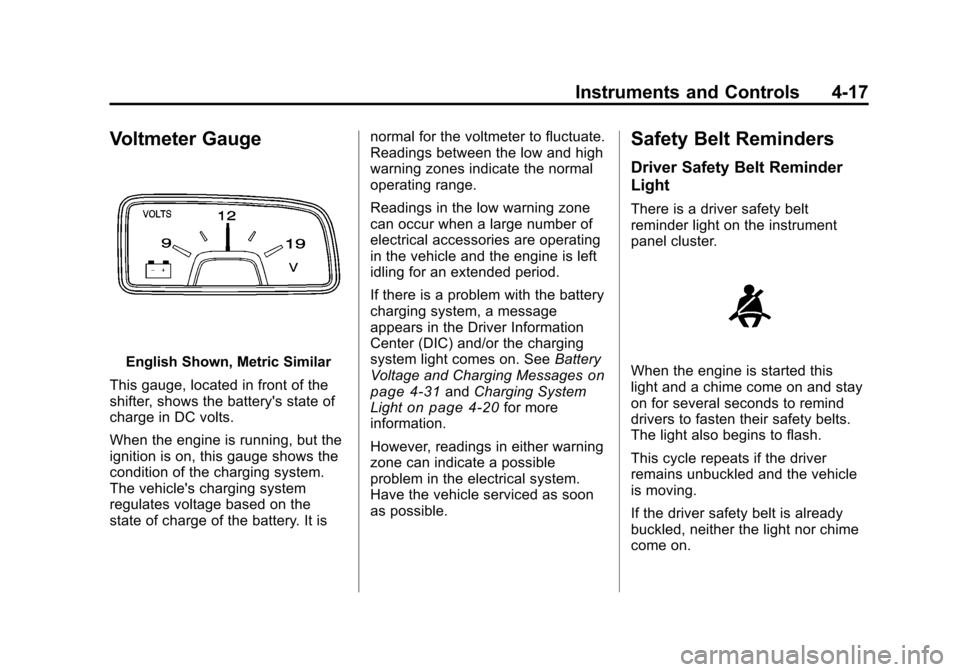
Voltmeter Gauge
English Shown, Metric Similar
This gauge, located in front of the
shifter, shows the battery's state of
charge in DC volts.
When the engine is running, but the
ignition is on, this gauge shows the
condition of the charging system.
The vehicle's charging system
regulates voltage based on the
state of charge of the battery. It is normal for the voltmeter to fluctuate.
Readings between the low and high
warning zones indicate the normal
operating range.
Readings in the low warning zone
can occur when a large number of
electrical accessories are operating
in the vehicle and the engine is left
idling for an extended period.
If there is a problem with the battery
charging system, a message
appears in the Driver Information
Center (DIC) and/or the charging
system light comes on. See
Battery
Voltage and Charging Messageson
page 4‑31and Charging System
Lighton page 4‑20for more
information.
However, readings in either warning
zone can indicate a possible
problem in the electrical system.
Have the vehicle serviced as soon
as possible.
Safety Belt Reminders
Driver Safety Belt Reminder
Light
There is a driver safety belt
reminder light on the instrument
panel cluster.
When the engine is started this
light and a chime come on and stay
on for several seconds to remind
drivers to fasten their safety belts.
The light also begins to flash.
This cycle repeats if the driver
remains unbuckled and the vehicle
is moving.
If the driver safety belt is already
buckled, neither the light nor chime
come on.
Page 100 of 378

Black plate (18,1)Chevrolet Camaro Owner Manual - 2010
4-18 Instruments and Controls
Passenger Safety Belt
Reminder Light
The passenger safety belt reminder
light is located on the overhead
console.
When the engine is started, this light
and the chime come on and stay on
for several seconds to remind the
passenger to fasten their safety belt.
The light also begins to flash.
This cycle repeats if the passenger
remains unbuckled and the vehicle
is moving.
If the passenger safety belt is
buckled, neither the chime nor the
light comes on.The front passenger safety belt
warning light and chime may turn on
if an object is put on the seat such
as a briefcase, handbag, grocery
bag, laptop or other electronic
device. To turn off the warning light
and or chime, remove the object
from the seat or buckle the
safety beltAirbag Readiness Light
This light shows if there is an
electrical problem. The system
check includes the airbag sensor,
the pretensioners, the airbag
modules, the wiring, and the crash
sensing and diagnostic module.
For more information on the airbag
system, see
Airbag System
on
page 2‑22.
The airbag readiness light comes on
and stays on for several seconds
when the vehicle is started.
Then the light turns off.
{WARNING
If the airbag readiness light stays
on after the vehicle is started or
comes on while driving, it means
the airbag system might not be
working properly. The airbags in
the vehicle might not inflate in a
crash, or they could even inflate
without a crash. To help avoid
injury, have the vehicle serviced
right away.
Page 101 of 378

Black plate (19,1)Chevrolet Camaro Owner Manual - 2010
Instruments and Controls 4-19
Passenger Airbag Status
Indicator
The vehicle has a passenger
sensing system. SeePassenger
Sensing System
on page 2‑29for important safety information.
The overhead console has a
passenger airbag status indicator.
United States
Canada and Mexico When the vehicle is started, the
passenger airbag status indicator
will light ON and OFF, or the symbol
for on and off, for several seconds
as a system check. If you are using
remote start to start your vehicle
from a distance, if equipped, you
may not see the system check.
Then, after several seconds, the
status indicator will light either ON
or OFF, or either the on or off
symbol to let you know the status
of the right front passenger frontal
airbag.
If the word ON or the on symbol is
lit on the passenger airbag status
indicator, it means that the right
front passenger frontal airbag is
enabled (may inflate).
If the word OFF or the off symbol
is lit on the passenger airbag
status indicator, it means that the
passenger sensing system has
turned off the right front passenger
frontal airbag. If, after several seconds, both
status indicator lights remain on,
or if there are no lights at all, there
may be a problem with the lights
or the passenger sensing system.
See your dealer for service.
{WARNING
If the airbag readiness light ever
comes on and stays on, it means
that something may be wrong
with the airbag system. To help
avoid injury to yourself or others,
have the vehicle serviced right
away. See
Airbag Readiness
Light
on page 4‑18for more
information, including important
safety information.
Page 102 of 378

Black plate (20,1)Chevrolet Camaro Owner Manual - 2010
4-20 Instruments and Controls
Charging System Light
The charging system light comes on
briefly when the ignition is turned on
but the engine is not running, as a
check to show the light is working.
It should go out when the engine is
started.
If the light stays on, or comes on
while driving, there may be a
problem with the electrical charging
system. Have it checked by your
dealer. Driving while this light is on
could drain the battery.When this light comes on, the Driver
Information Center (DIC) also
displays a message.
See
Battery Voltage and Charging
Messages on page 4‑31.
If a short distance must be driven
with the light on, be sure to turn off
all accessories, such as the radio
and air conditioner.
Malfunction
Indicator Lamp
Check Engine Light
A computer system called OBD II
(On-Board Diagnostics-Second
Generation) monitors operation of
the fuel, ignition, and emission
control systems. It ensures that
emissions are at acceptable levels
for the life of the vehicle, helping to
produce a cleaner environment.
This light comes on when the
ignition is on, but the engine is not
running, as a check to show it is
working. If it does not, have the
vehicle serviced by your dealer.
If the check engine light comes on
and stays on, while the engine is
running, this indicates that there is
an OBD II problem and service is
required.
Malfunctions often are indicated by
the system before any problem is
apparent. Being aware of the light
can prevent more serious damage
to the vehicle. This system assists
the service technician in correctly
diagnosing any malfunction.
Page 103 of 378

Black plate (21,1)Chevrolet Camaro Owner Manual - 2010
Instruments and Controls 4-21
Notice:If the vehicle is
continually driven with this light
on, after a while, the emission
controls might not work as well,
the vehicle's fuel economy might
not be as good, and the engine
might not run as smoothly. This
could lead to costly repairs that
might not be covered by the
vehicle warranty.
Notice: Modifications made
to the engine, transmission,
exhaust, intake, or fuel system
of the vehicle or the replacement
of the original tires with other
than those of the same Tire
Performance Criteria (TPC) can
affect the vehicle's emission
controls and can cause this light
to come on. Modifications to
these systems could lead to
costly repairs not covered by
the vehicle warranty. This could
also result in a failure to
pass a required Emission
Inspection/Maintenance test.
See Accessories and
Modifications on page 9‑4. This light comes on during a
malfunction in one of two ways:
Light Flashing:
A misfire condition
has been detected. A misfire
increases vehicle emissions and
could damage the emission control
system on the vehicle. Diagnosis
and service might be required.
The following can prevent more
serious damage to the vehicle:
.Reduce vehicle speed.
.Avoid hard accelerations.
.Avoid steep uphill grades.
If the light continues to flash, when
it is safe to do so, stop the vehicle.
Find a safe place to park the
vehicle. Turn the engine off, wait at
least 10 seconds, and restart the
engine. If the light is still flashing,
follow the previous steps and see
your dealer for service as soon as
possible. Light On Steady:
An emission
control system malfunction has
been detected on the vehicle.
Diagnosis and service might be
required.
An emission system malfunction
might be corrected by:
.Make sure the fuel cap is fully
installed. See Filling the Tankon
page 8‑46. The diagnostic
system can determine if the
fuel cap has been left off or
improperly installed. A loose or
missing fuel cap allows fuel to
evaporate into the atmosphere.
A few driving trips with the cap
properly installed should turn the
light off.
.If the vehicle has been driven
through a deep puddle of water,
the vehicle's electrical system
might be wet. The condition
is usually corrected when the
electrical system dries out.
A few driving trips should turn
the light off.