2010 CHEVROLET CAMARO remote start
[x] Cancel search: remote startPage 101 of 378

Black plate (19,1)Chevrolet Camaro Owner Manual - 2010
Instruments and Controls 4-19
Passenger Airbag Status
Indicator
The vehicle has a passenger
sensing system. SeePassenger
Sensing System
on page 2‑29for important safety information.
The overhead console has a
passenger airbag status indicator.
United States
Canada and Mexico When the vehicle is started, the
passenger airbag status indicator
will light ON and OFF, or the symbol
for on and off, for several seconds
as a system check. If you are using
remote start to start your vehicle
from a distance, if equipped, you
may not see the system check.
Then, after several seconds, the
status indicator will light either ON
or OFF, or either the on or off
symbol to let you know the status
of the right front passenger frontal
airbag.
If the word ON or the on symbol is
lit on the passenger airbag status
indicator, it means that the right
front passenger frontal airbag is
enabled (may inflate).
If the word OFF or the off symbol
is lit on the passenger airbag
status indicator, it means that the
passenger sensing system has
turned off the right front passenger
frontal airbag. If, after several seconds, both
status indicator lights remain on,
or if there are no lights at all, there
may be a problem with the lights
or the passenger sensing system.
See your dealer for service.
{WARNING
If the airbag readiness light ever
comes on and stays on, it means
that something may be wrong
with the airbag system. To help
avoid injury to yourself or others,
have the vehicle serviced right
away. See
Airbag Readiness
Light
on page 4‑18for more
information, including important
safety information.
Page 120 of 378

Black plate (38,1)Chevrolet Camaro Owner Manual - 2010
4-38 Instruments and Controls
Window Messages
Open, Then Close Driver
Window
This message is displayed when the
window needs to be reprogrammed.
If the vehicle's battery has been
recharged or disconnected, you
will need to reprogram each front
window for the express up feature
to work. SeePower Windows
on
page 1‑14for more information.
Open, Then Close Passenger
Window
This message is displayed when the
window needs to be reprogrammed.
If the vehicle's battery has been
recharged or disconnected, you
will need to reprogram each front
window for the express up feature
to work. See Power Windows
on
page 1‑14for more information.
Vehicle
Personalization
The audio system controls are
used to access the personalization
menus for customizing vehicle
features.
CONFIG (Configuration): Press
to access the Configuration
Settings Menu.
MENU / SELECT Knob: Press
the center of this knob to enter
the menus and select menu items.
Turn the knob to scroll through the
menus.
0BACK: Press to exit or move
backwards in a menu.
Entering the Personalization
Menus
1. Press the CONFIG button to access the Configuration
Settings menu.
2. Turn the MENU / SELECT knob to highlight Vehicle Settings. 3. Press the center of the
MENU / SELECT knob to select
the Vehicle Settings menu.
The following list of menu items will
be available:
.Climate and Air Quality
.Comfort and Convenience
.Collision/Detection Systems
.Language
.Lighting
.Power Door Locks
.Remote Lock/Unlock/Start
.Return to Factory Settings
Turn the MENU / SELECT knob to
highlight the menu. Press the knob
to select it. Each of the menus is
detailed in the following information.
Page 121 of 378

Black plate (39,1)Chevrolet Camaro Owner Manual - 2010
Instruments and Controls 4-39
Climate and Air Quality
Select the Climate and Air Quality
menu and the following will be
displayed:
.Remote Start Heated Seats
Remote Start Heated Seats
When on, this feature will turn the
heated seats on when using remote
start.
Press the MENU / SELECT knob
when Remote Start Heated Seats is
highlighted. Turn the knob to select
On or Off. Press the knob to confirm
and go back to the last menu.
Comfort and Convenience
Select the Comfort and
Convenience menu and the
following will be displayed:
.Chime Volume
.Personalization by Driver Chime Volume
This allows the selection of the
chime volume level.
Press the MENU / SELECT knob
when Chime Volume is highlighted.
Turn the knob to select Normal or
High. Press the knob to confirm and
go back to the last menu.
Personalization by Driver
This allows the selection of if the
personalization settings are specific
to each driver or the same no matter
which key was used to enter and
start the vehicle.
Press the MENU / SELECT knob
when Personalization by Driver is
highlighted. Turn the knob to select
On or Off. Press the knob to confirm
and go back to the last menu.
Collision/Detection Systems
Select the Collision/Detection
Systems menu and the following will
be displayed:
.Park AssistPark Assist
This allows the Ultrasonic Parking
Assist feature to be turned on or off.
Press the MENU / SELECT knob
when Park Assist is highlighted.
Turn the knob to select On or Off.
Press the knob to confirm and go
back to the last menu.
Language
Select the Language menu and the
following will be displayed:
.English
.French
.Spanish
Turn the MENU / SELECT knob to
select the language. Press the knob
to confirm and go back to the
last menu.
Lighting
Select the Lighting menu and the
following will be displayed:
.Exit Lighting
.Vehicle Locator Lights
Page 123 of 378

Black plate (41,1)Chevrolet Camaro Owner Manual - 2010
Instruments and Controls 4-41
Remote Lock/Unlock/Start
Select Remote Lock/Unlock/Start
and the following will be displayed:
.Unlock Feedback (Lights)
.Locking Feedback
.Door Unlock Options
.Remote Vehicle Start
Unlock Feedback (Lights)
When on, the exterior lamps will
flash when unlocking the vehicle
with the RKE transmitter.
Press the MENU / SELECT knob
when Unlock Feedback (Lights) is
highlighted. Turn the knob to select
Flash Lights or Off. Press the knob
to confirm and go back to the
last menu. Locking Feedback
This allows selection of what type of
feedback is given when unlocking
the vehicle with the RKE transmitter.
Press the MENU / SELECT
knob when Locking Feedback is
highlighted. Turn the knob to select
Lights and Horn, Lights Only, Horn
Only, or Off. Press the knob to
confirm and go back to the
last menu.
Door Unlock Options
This allows selection of which doors
will unlock when pressing the unlock
button on the RKE transmitter.
Press the MENU / SELECT knob
when Door Unlock Options is
highlighted. Turn the knob to select
All Doors or Driver Door Only. Press
the knob to confirm and go back to
the last menu.Remote Vehicle Start
This allows the Remote Vehicle
Start to be turned on or off, if the
vehicle has this feature.
Press the MENU / SELECT knob
when Remote Vehicle Start is
highlighted. Turn the knob to select
On or Off. Press the knob to confirm
and go back to the last menu.
Return to Factory Settings
Select Return to Factory
Settings to return all of the vehicle
personalization to the default
settings. Turn the knob to select Yes
or No. Press the knob to confirm
and go back to the last menu.
Page 127 of 378
Black plate (45,1)Chevrolet Camaro Owner Manual - 2010
Instruments and Controls 4-45
Keep the original hand-held
transmitter for use in other vehicles
as well as for future Universal Home
Remote programming. It is also
recommended that upon the sale
of the vehicle, the programmed
Universal Home Remote buttons
should be erased for security
purposes. See“Erasing Universal
Home Remote Buttons” later in this
section.
When programming a garage door,
park outside of the garage. Park
directly in line with and facing the
garage door opener motor-head
or gate motor-head. Be sure that
people and objects are clear of the
garage door or gate that is being
programmed.
It is recommended that a new
battery be installed in your
hand-held transmitter for quicker
and more accurate transmission
of the radio-frequency signal.Programming the Universal
Home Remote System
For questions or help programming
the Universal Home Remote
System, call 1‐800‐355‐3515
or go to www.homelink.com.
Programming a garage door opener
involves time-sensitive actions, so
read the entire procedure before
starting. Otherwise, the device will
time out and the procedure will have
to be repeated.
To program up to three devices:
1. Hold the end of your hand-held transmitter about 3 to 8 cm
(1 to 3 inches) away from the
Universal Home Remote buttons
while keeping the indicator
light in view. The hand-held
transmitter was supplied by
the manufacturer of your
garage door opener receiver
(motor-head unit). 2. At the same time, press and
hold both the hand-held
transmitter button and one
of the three Universal Home
Remote buttons to be used to
operate the garage door. Do not
release the Universal Home
Remote button or the hand-held
transmitter button until the
indicator light changes from a
slow to a rapidly flashing light.
You now may release both
buttons.
Some entry gates and garage
door openers may require
substitution of Step 2 with the
procedure noted in “Gate
Operator and Canadian
Programming” later in this
section.
Page 128 of 378
Black plate (46,1)Chevrolet Camaro Owner Manual - 2010
4-46 Instruments and Controls
3. Press and hold for five secondsthe newly-trained Universal
Home Remote button (selected
button from Step 2) while
observing the indicator light
and garage door activation.
.If the indicator light stays on
continuously or the garage
door starts to move when
the Universal Home
Remote button is pressed
and released, then the
programming is complete.
There is no need to
continue programming
Steps 4 through 6.
.If the Universal Home
Remote indicator light
blinks rapidly for
two seconds, then turns
to a constant light and the
garage door does not
move, continue with the
programming Steps 4
through 6. It may be helpful to have
another person to assist
with the remaining Steps 4
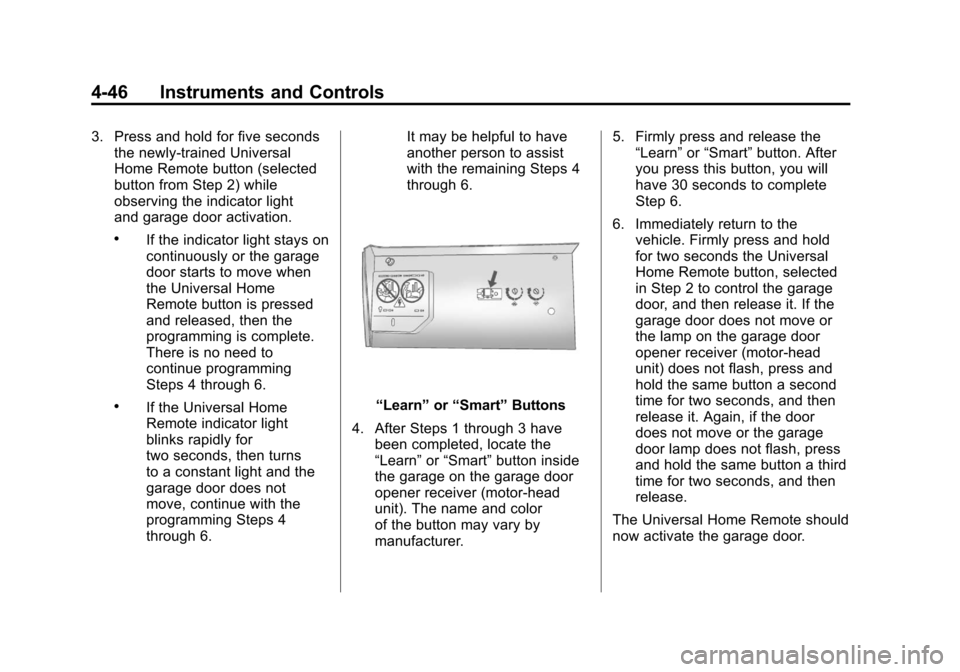
through 6.“Learn”
or“Smart” Buttons
4. After Steps 1 through 3 have been completed, locate the
“Learn” or“Smart” button inside
the garage on the garage door
opener receiver (motor-head
unit). The name and color
of the button may vary by
manufacturer. 5. Firmly press and release the
“Learn” or“Smart” button. After
you press this button, you will
have 30 seconds to complete
Step 6.
6. Immediately return to the vehicle. Firmly press and hold
for two seconds the Universal
Home Remote button, selected
in Step 2 to control the garage
door, and then release it. If the
garage door does not move or
the lamp on the garage door
opener receiver (motor-head
unit) does not flash, press and
hold the same button a second
time for two seconds, and then
release it. Again, if the door
does not move or the garage
door lamp does not flash, press
and hold the same button a third
time for two seconds, and then
release.
The Universal Home Remote should
now activate the garage door.
Page 321 of 378
Black plate (89,1)Chevrolet Camaro Owner Manual - 2010
Vehicle Care 9-89
9. Start the engine in the vehiclewith the good battery and run
the engine at idle speed for at
least four minutes.
10. Try to start the vehicle that had the dead battery. If it will not
start after a few tries, it
probably needs service.
Notice: If the jumper cables are
connected or removed in the
wrong order, electrical shorting
may occur and damage the
vehicle. The repairs would not be
covered by the vehicle warranty.
Always connect and remove the
jumper cables in the correct
order, making sure that the
cables do not touch each other
or other metal.
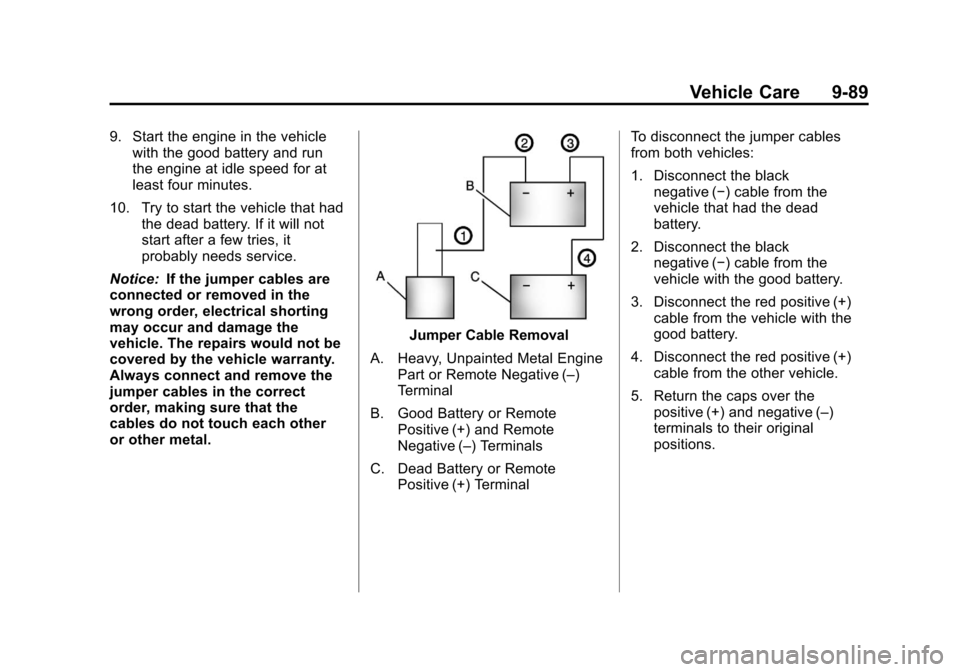
Jumper Cable Removal
A. Heavy, Unpainted Metal Engine Part or Remote Negative (–)
Terminal
B. Good Battery or Remote Positive (+) and Remote
Negative (–) Terminals
C. Dead Battery or Remote Positive (+) Terminal To disconnect the jumper cables
from both vehicles:
1. Disconnect the black
negative (−) cable from the
vehicle that had the dead
battery.
2. Disconnect the black negative (−) cable from the
vehicle with the good battery.
3. Disconnect the red positive (+) cable from the vehicle with the
good battery.
4. Disconnect the red positive (+) cable from the other vehicle.
5. Return the caps over the positive (+) and negative (–)
terminals to their original
positions.
Page 355 of 378
Black plate (7,1)Chevrolet Camaro Owner Manual - 2010
Customer Information 12-7
Chevrolet and General Motors of
Canada Limited reserve the right to
limit services or payment to an
owner or driver if they decide the
claims are made too often, or the
same type of claim is made many
times.
Services Provided
.Emergency Fuel Delivery:
Delivery of enough fuel for the
vehicle to get to the nearest
service station.
.Lock‐Out Service:Service to
unlock the vehicle if you are
locked out. A remote unlock
may be available if you have
OnStar
®. For security reasons,
the driver must present
identification before this
service is given.
.Emergency Tow From a Public
Road or Highway: Tow to the
nearest Chevrolet dealer for
warranty service, or if the vehicle
was in a crash and cannot be driven. Assistance is also given
when the vehicle is stuck in the
sand, mud, or snow.
.Flat Tire Change:
Service to
change a flat tire with the spare
tire. The spare tire, if equipped,
must be in good condition and
properly inflated. It is the owner's
responsibility for the repair or
replacement of the tire if it is not
covered by the warranty.
.Battery Jump Start: Service to
jump start a dead battery.
Services Not Included in
Roadside Assistance
.Impound towing caused by
violation of any laws.
.Legal fines.
.Mounting, dismounting,
or changing of snow tires,
chains, or other traction devices.
.Towing or services for vehicles
driven on a non-public road or
highway.
Services Specific to Canadian
Purchased Vehicles
.Fuel Delivery: Reimbursement
is approximately $5 Canadian.
Diesel fuel delivery may be
restricted. Propane and other
fuels are not provided through
this service.
.Lock-Out Service: Vehicle
registration is required.
.Trip Routing Service: Detailed
maps of North America are
provided when requested either
with the most direct route or the
most scenic route. There is a
limit of six requests per year.
Additional travel information is
also available. Allow three
weeks for delivery.