2010 CHEVROLET CAMARO audio
[x] Cancel search: audioPage 140 of 378
Black plate (2,1)Chevrolet Camaro Owner Manual - 2010
6-2 Infotainment System
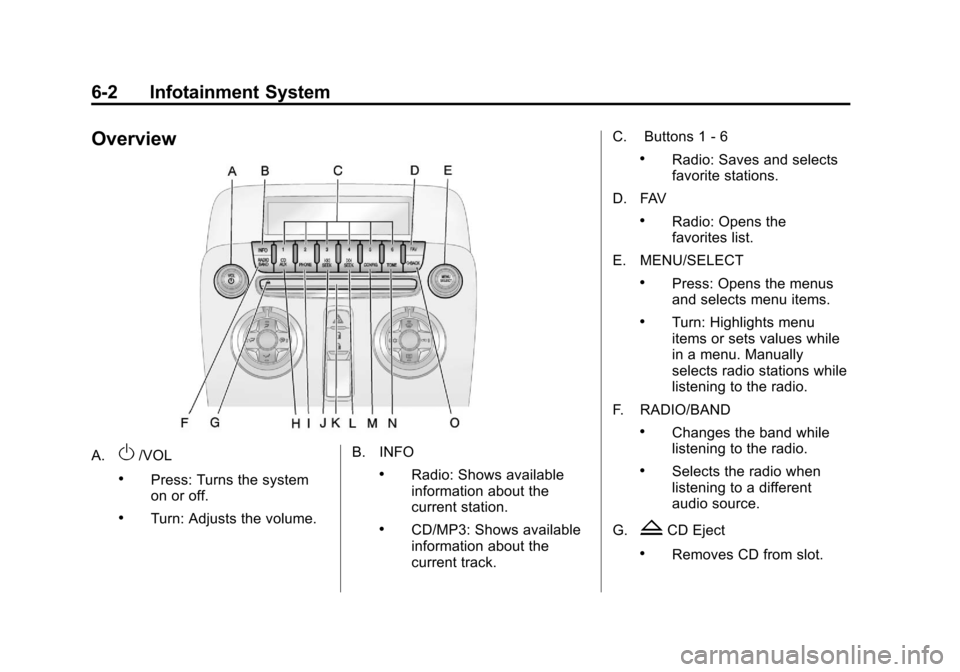
Overview
A.O/VOL
.Press: Turns the system
on or off.
.Turn: Adjusts the volume.B. INFO
.Radio: Shows available
information about the
current station.
.CD/MP3: Shows available
information about the
current track.C. Buttons 1
‐6
.Radio: Saves and selects
favorite stations.
D. FAV
.Radio: Opens the
favorites list.
E. MENU/SELECT
.Press: Opens the menus
and selects menu items.
.Turn: Highlights menu
items or sets values while
in a menu. Manually
selects radio stations while
listening to the radio.
F. RADIO/BAND
.Changes the band while
listening to the radio.
.Selects the radio when
listening to a different
audio source.
G.
ZCD Eject
.Removes CD from slot.
Page 141 of 378
Black plate (3,1)Chevrolet Camaro Owner Manual - 2010
Infotainment System 6-3
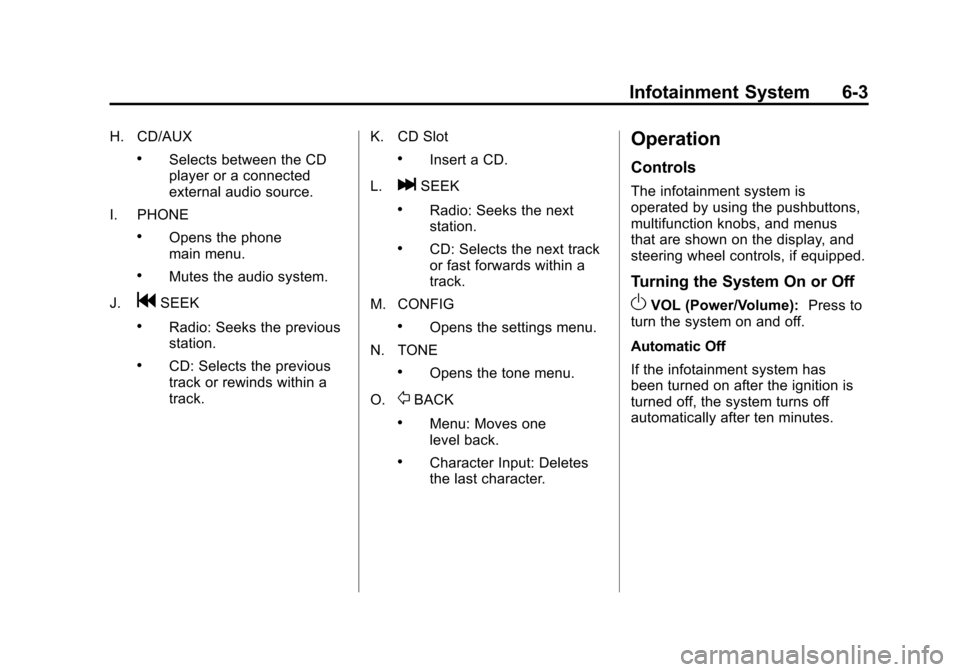
H. CD/AUX
.Selects between the CD
player or a connected
external audio source.
I. PHONE
.Opens the phone
main menu.
.Mutes the audio system.
J.
gSEEK
.Radio: Seeks the previous
station.
.CD: Selects the previous
track or rewinds within a
track. K. CD Slot
.Insert a CD.
L.
lSEEK
.Radio: Seeks the next
station.
.CD: Selects the next track
or fast forwards within a
track.
M. CONFIG
.Opens the settings menu.
N. TONE
.Opens the tone menu.
O.
0BACK
.Menu: Moves one
level back.
.Character Input: Deletes
the last character.
Operation
Controls
The infotainment system is
operated by using the pushbuttons,
multifunction knobs, and menus
that are shown on the display, and
steering wheel controls, if equipped.
Turning the System On or Off
OVOL (Power/Volume): Press to
turn the system on and off.
Automatic Off
If the infotainment system has
been turned on after the ignition is
turned off, the system turns off
automatically after ten minutes.
Page 143 of 378
Black plate (5,1)Chevrolet Camaro Owner Manual - 2010
Infotainment System 6-5
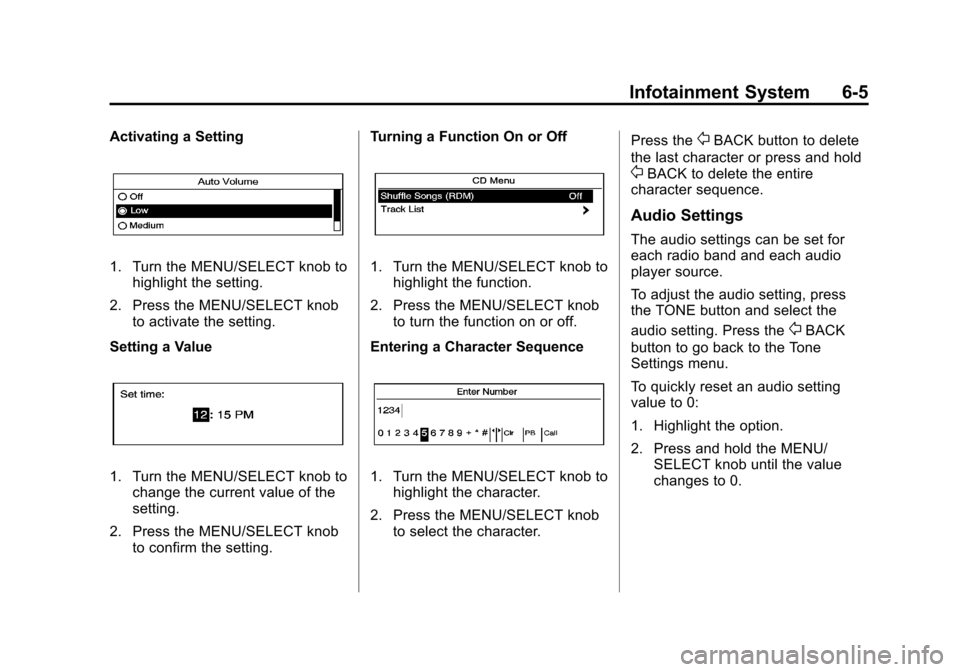
Activating a Setting
1. Turn the MENU/SELECT knob tohighlight the setting.
2. Press the MENU/SELECT knob to activate the setting.
Setting a Value
1. Turn the MENU/SELECT knob to change the current value of the
setting.
2. Press the MENU/SELECT knob to confirm the setting. Turning a Function On or Off
1. Turn the MENU/SELECT knob to
highlight the function.
2. Press the MENU/SELECT knob to turn the function on or off.
Entering a Character Sequence
1. Turn the MENU/SELECT knob to highlight the character.
2. Press the MENU/SELECT knob to select the character. Press the
0BACK button to delete
the last character or press and hold
0BACK to delete the entire
character sequence.
Audio Settings
The audio settings can be set for
each radio band and each audio
player source.
To adjust the audio setting, press
the TONE button and select the
audio setting. Press the
0BACK
button to go back to the Tone
Settings menu.
To quickly reset an audio setting
value to 0:
1. Highlight the option.
2. Press and hold the MENU/ SELECT knob until the value
changes to 0.
Page 149 of 378
Black plate (11,1)Chevrolet Camaro Owner Manual - 2010
Infotainment System 6-11
To select an XM station using the
MENU/SELECT knob:
1. Turn the MENU/SELECT knob tohighlight an XM station.
2. Press the MENU/SELECT knob to select the station, or leave the
station highlighted.
To select a station using the menu:
1. Press the MENU/SELECT knob.
2. Select XM Stations List.
3. Select the station.
Selecting a Station by Category
1. Press the MENU/SELECT knob.
2. Select XM Category List. A list of all programing types available
displays.
3. Select the programing type.
4. Select the station.Storing and Retrieving
Favorites
Stations from all bands can be
stored in any order in the favorite
pages.
Up to six stations can be stored in
each favorite page and the number
of available favorite pages can
be set.
Storing a Station as a Favorite
To store the station to a position
in the list, press and hold the
corresponding 1‐6 button until
the station can be heard again.
Retrieving stations
Press the FAV button to open a
favorite page or to switch to another
favorite page. Briefly press one of
the 1‐6 buttons to retrieve the
station.
XM Messages
XL (Explicit Language
Channels): These channels, or any
others, can be blocked by request,
by calling 1-800-852-XMXM (9696).
XM Updating: The encryption code
is being updated, no action is
required.
Loading XM: The audio system is
acquiring and processing audio and
text data, no action is needed.
Channel Off Air: This channel is
not currently in service.
Channel Unauth: This channel is
blocked or cannot be received with
the XM Subscription package.
Channel Unavail: This previously
assigned channel is no longer
assigned.
No Artist Info: No artist
information is available.
No Title Info: No song title
information is available.
Page 152 of 378
Black plate (14,1)Chevrolet Camaro Owner Manual - 2010
6-14 Infotainment System
Audio Players
CD Player
The CD player can play audio CDs
and MP3 CDs.
The CD player will not play 8 cm
(3 inches) CDs.
Care of CDs
Sound quality can be reduced due
to disc quality, recording method,
quality of the music recorded, and
how the disc has been handled.
Handle discs carefully and store
them in their original cases or other
protective cases away from direct
sunlight and dust. If the bottom
surface of a disc is damaged, the
disc may not play properly or at all.
Do not touch the bottom surface of
a disc while handling it; this could
damage the surface. Pick up discs
by grasping the outer edges or the
edge of the hole and the outer edge.
If the bottom surface of a disc is
dirty, take a soft lint free cloth,
or dampen a clean soft cloth in amild neutral detergent solution
mixed with water, and clean it. Wipe
the disc from the center to the
outer edge.
Care of the CD Player
Do not add a label to a disc, as it
could get caught in the CD player.
If a label is needed, label the top
of the recorded disc with a
marking pen.
Do not use disc lens cleaners
because they could contaminate the
lens of the disc optics and damage
the CD player.
Notice:
If a label is added to a
CD, or more than one CD is
inserted into the slot at a time,
or an attempt is made to play
scratched or damaged CDs, the
CD player could be damaged.
While using the CD player, use
only CDs in good condition
without any label, load one CD at
a time, and keep the CD player
and the loading slot free of
foreign materials, liquids, and
debris.
Control Buttons
The buttons used to control the CD
player are:
CD/AUX: Press to choose between
the CD and AUX player.
gSEEK /lSEEK: Press to
select tracks or to fast forward or
rewind within a track.
MENU/SELECT: Turn to select
tracks.
INFO: Press to display additional
information about the CD that may
be available.
Z(Eject): Press to remove
the CD.
Inserting a CD
With the printed side facing up,
insert a disc into the CD slot until it
is drawn in.
Page 154 of 378

Black plate (16,1)Chevrolet Camaro Owner Manual - 2010
6-16 Infotainment System
To search for tracks:
1. Press the MENU/SELECT knob.
2. Select Search.
3. Select: Playlists, Artists, Albums,Song Titles, Genres,
or Folder View.
4. Select the track.
Auxiliary Devices
The AUX Input allows portable
devices to connect to the vehicle
using the 3.5mm (1/8 in) input
jack, the USB port, if equipped,
or Bluetooth
®wireless technology,
if equipped.
Portable devices are controlled by
using the menu system described in
Operation on page 6‑3.
The AUX input is located in the
center console.
3.5mm Jack
Connect a 3.5 mm (1/8 in) cable to
the auxiliary input jack to use a
portable audio player.
Playback of an audio device that is
connected to the 3.5mm jack can
only be controlled using the controls
on the device. Adjusting the Volume
Turn the VOL
Oknob to adjust the
volume of the Infotainment system
after the volume level has been set
on the portable audio device.
USB Port
For vehicles with a USB port, the
following devices may be connected
and controlled by the infotainment
system.
.iPod's
.PlaysForSure Devices (PFD)
.USB Drives
.Zune's
Connecting and Controlling
an iPod™
Not all iPod's can be controlled by
the Infotainment System.
Connecting an iPod
Connect the iPod to the USB port
using the cable that came with the
device.
Page 155 of 378
Black plate (17,1)Chevrolet Camaro Owner Manual - 2010
Infotainment System 6-17
Searching For a Track
Tracks can be searched for by:
.Playlists
.Artists
.Albums
.Song Titles
.Podcasts
.Genres
.Audiobooks
.Composers
To search for tracks:
1. Press the MENU/SELECT knob.
2. Select Search.
3. Select: Playlists, Artists, Albums, Song Titles, Podcasts, Genres,
Audiobooks, or Composers.
4. Select the track. Shuffle
Press the MENU/SELECT knob and
set Shuffle Songs (Random) to On
or Off, then press the
0BACK
button to return the main screen.
On: Plays tracks in the current
folder in random order.
Off: Plays tracks in the current
folder in sequential order.
Repeat
Press the MENU/SELECT knob and
set Repeat to On or Off, then press
the
0BACK button to return the
main screen.
On: Repeats the current track.
Off: Playback starts from the
beginning of the current track after
the last track finishes.
Connecting and Controlling a
PlaysForSure Device (PFD)
or Zune™
Connecting a PFD or Zune
Connect the PFD or Zune to the
USB port using the cable that came
with the device.
Searching For a Track
Tracks can be searched for by:
.Playlists
.Artists
.Albums
.Song Titles
.Podcasts
.Genres
To search for tracks:
1. Press the MENU/SELECT knob.
2. Select Search.
3. Select: Playlists, Artists, Albums, Song Titles, Podcasts,
or Genres
4. Select the track.
Page 157 of 378

Black plate (19,1)Chevrolet Camaro Owner Manual - 2010
Infotainment System 6-19
Shuffle Functionality
Press the MENU/SELECT knob and
set Shuffle Songs (Random) to On
or Off.
On:Plays current tracks in random
order.
Off: Plays current tracks in
sequential order.
Repeat Functionality
Press the MENU/SELECT knob and
set Repeat to On or Off.
Repeat On: Repeats the current
track.
Repeat Off: Playback starts from
the beginning of the current track
after the last track finishes.
Connecting a Bluetooth®
Device
Before a Bluetooth device can be
connected to the infotainment
system, it must first be paired to the
system. Not all Bluetooth devices
can be paired to the infotainment system. Before pairing the Bluetooth
device, become familiar with its
user guide for Bluetooth functions.
The system only connects to
Bluetooth devices that support
A2DP (Advanced Audio Distribution
Profile) version 1.2.
Pairing Information:
.Up to five devices can be paired
to the system.
.The pairing process is disabled
when the vehicle is moving.
.The infotainment system
automatically links with the first
available paired device in the
order the device was paired.
.Only one paired device can be
connected to the infotainment
system at a time.
.Pairing should only need to be
completed once, unless changes
to the pairing information have
been made or the device is
deleted.
Bluetooth Setup Menu
The Bluetooth Setup menu can be
accessed with or without a device
attached to the USB port.
To select the Bluetooth Setup menu
when a device is attached to the
USB port and active:
1. Press the MENU/SELECT knob
while in the iPod, Zune, PFD,
or USB device main menu.
2. Select Bluetooth Music Setup.
To select the Bluetooth Music Setup
menu when a device is not attached
to the USB port, or when a device is
attached to the USB port but not
active:
1. Press the CD/AUX button until AUX is the active source.
2. Press the MENU/SELECT knob.
3. Select Bluetooth Music Setup.