2010 BUICK LUCERNE ECU
[x] Cancel search: ECUPage 162 of 474

Section 4 Instrument Panel
Traction Control System (TCS) WarningLight . . . . . . . . . . . . . . . . . . . . . . . . . . . . . . . . . . . . . . . . . 4-38
StabiliTrak
®Indicator Light . . . . . . . . . . . . . . . . . . . . . 4-39
Lane Departure Warning (LDW) Light . . . . . . . . . . 4-39
Engine Coolant Temperature Warning Light . . . . 4-40
Engine Coolant Temperature Gauge . . . . . . . . . . . 4-40
Tire Pressure Light . . . . . . . . . . . . . . . . . . . . . . . . . . . . 4-41
Malfunction Indicator Lamp . . . . . . . . . . . . . . . . . . . . 4-41
Oil Pressure Light . . . . . . . . . . . . . . . . . . . . . . . . . . . . . 4-44
Security Light . . . . . . . . . . . . . . . . . . . . . . . . . . . . . . . . . . 4-45
Fog Lamp Light . . . . . . . . . . . . . . . . . . . . . . . . . . . . . . . . 4-45
Cruise Control Light . . . . . . . . . . . . . . . . . . . . . . . . . . . 4-45
Highbeam On Light . . . . . . . . . . . . . . . . . . . . . . . . . . . . 4-45
Fuel Gauge . . . . . . . . . . . . . . . . . . . . . . . . . . . . . . . . . . . . 4-46 Driver Information Center (DIC)
. . . . . . . . . . . . . . . . . .4-47
DIC Operation and Displays . . . . . . . . . . . . . . . . . . . 4-47
DIC Compass . . . . . . . . . . . . . . . . . . . . . . . . . . . . . . . . . . 4-53
DIC Warnings and Messages . . . . . . . . . . . . . . . . . . 4-55
DIC Vehicle Customization . . . . . . . . . . . . . . . . . . . . 4-65
Audio System(s) . . . . . . . . . . . . . . . . . . . . . . . . . . . . . . . . . . 4-74
Setting the Clock . . . . . . . . . . . . . . . . . . . . . . . . . . . . . . 4-75
Radio(s) . . . . . . . . . . . . . . . . . . . . . . . . . . . . . . . . . . . . . . . 4-77
Using an MP3 . . . . . . . . . . . . . . . . . . . . . . . . . . . . . . . . . 4-87
XM Radio Messages . . . . . . . . . . . . . . . . . . . . . . . . . . . 4-92
Navigation/Radio System . . . . . . . . . . . . . . . . . . . . . . 4-93
Bluetooth
®. . . . . . . . . . . . . . . . . . . . . . . . . . . . . . . . . . . . . 4-93
Theft-Deterrent Feature . . . . . . . . . . . . . . . . . . . . . . 4-104
Audio Steering Wheel Controls . . . . . . . . . . . . . . . 4-105
Radio Reception . . . . . . . . . . . . . . . . . . . . . . . . . . . . . . 4-106
Backglass Antenna . . . . . . . . . . . . . . . . . . . . . . . . . . . 4-107
XM™ Satellite Radio Antenna System . . . . . . . . 4-107
4-2
Page 205 of 474
If the light comes on and stays on, it means that oil is
not flowing through the engine properly. The vehicle
could be low on oil and it might have some other
system problem.
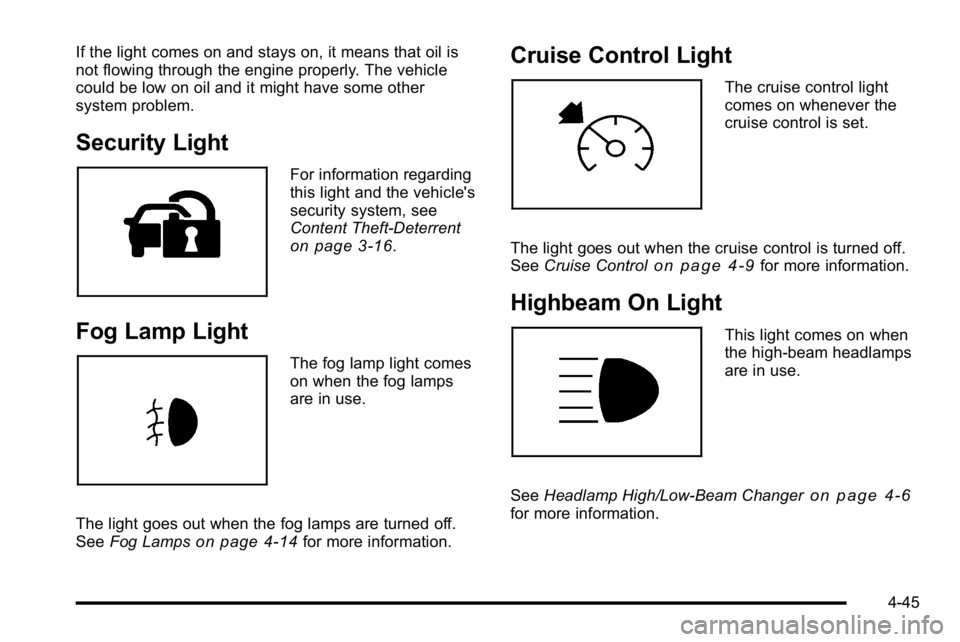
Security Light
For information regarding
this light and the vehicle's
security system, see
Content Theft-Deterrent
on page 3‑16.
Fog Lamp Light
The fog lamp light comes
on when the fog lamps
are in use.
The light goes out when the fog lamps are turned off.
See Fog Lamps
on page 4‑14for more information.
Cruise Control Light
The cruise control light
comes on whenever the
cruise control is set.
The light goes out when the cruise control is turned off.
See Cruise Control
on page 4‑9for more information.
Highbeam On Light
This light comes on when
the high-beam headlamps
are in use.
See Headlamp High/Low-Beam Changer
on page 4‑6for more information.
4-45
Page 253 of 474

XM Theftlocked:The XM receiver in the vehicle could
have previously been in another vehicle. For security
purposes, XM receivers cannot be swapped between
vehicles. If this message is received after having the
vehicle serviced, check with your dealer.
XM Radio ID: If tuned to channel 0, this message
alternates with the XM™ Radio 8 digit radio ID label.
This label is needed to activate the service.
Unknown: If this message is received when tuned to
channel 0, there could be a receiver fault. Consult with
your dealer.
Check Antenna: If this message does not clear within
a short period of time, the receiver or antenna could
have a fault. Consult with your dealer.
Check XM Receivr: If this message does not clear
within a short period of time, the receiver could have a
fault. Consult with your dealer.
XM Not Available: If this message does not clear
within a short period of time, the receiver could have a
fault. Consult with your dealer.Navigation/Radio System
For vehicles with a navigation radio system, see the
separate Navigation System manual.
Bluetooth®
Vehicles with a Bluetooth system can use a Bluetooth
capable cell phone with a Hands Free Profile to make
and receive phone calls. The system can be used while
the key is in ON/RUN or ACC/ACCESSORY position.
The range of the Bluetooth system can be up to 9.1 m
(30 ft). Not all phones support all functions, and not all
phones are guaranteed to work with the in-vehicle
Bluetooth system. See www.gm.com/bluetooth for more
information on compatible phones.
Voice Recognition
The Bluetooth system uses voice recognition to
interpret voice commands to dial phone numbers
and name tags.
Noise: Keep interior noise levels to a minimum. The
system may not recognize voice commands if there is
too much background noise.
When to Speak: A short tone sounds after the system
responds indicating when it is waiting for a voice
command. Wait until the tone and then speak.
How to Speak: Speak clearly in a calm and natural
voice.
4-93
Page 292 of 474

If things like suitcases, tools, packages,
or anything else are put inside the vehicle, they
will go as fast as the vehicle goes. If you have to
stop or turn quickly, or if there is a crash, they will
keep going.
{WARNING:
Things you put inside the vehicle can strike
and injure people in a sudden stop or turn,
or in a crash.
.Put things in the cargo area of the
vehicle. In the cargo area, put them as
far forward as you can. Try to spread the
weight evenly.
.Never stack heavier things, like
suitcases, inside the vehicle so that
some of them are above the tops of the
seats.
(Continued)
WARNING: (Continued)
.Do not leave an unsecured child restraint
in the vehicle.
.When you carry something inside the
vehicle, secure it whenever you can.
.Do not leave a seat folded down unless
you need to.
Towing
Towing Your Vehicle
To avoid damage, the disabled vehicle should be towed
with all four wheels off the ground. Consult your dealer
or a professional towing service if the disabled vehicle
must be towed. SeeRoadside Assistance Program
on
page 8‑8.
To tow the vehicle behind another vehicle for
recreational purposes, such as behind a motorhome,
see “Recreational Vehicle Towing” following.
5-24
Page 294 of 474

Dolly Towing
The vehicle can be towed using a dolly. To tow the
vehicle using a dolly, follow these steps:1. Put the front wheels on a dolly.
2. Put the gear shift lever in P (Park). 3. Set the parking brake.
4. Clamp the steering wheel in a straight-ahead
position with a clamping device designed for
towing.
5. Remove the key from the ignition.
6. Secure the vehicle to the dolly.
7. Release the parking brake.
5-26
Page 299 of 474

Driving with a Trailer
Towing a trailer requires a certain amount of
experience. Get to know the rig before setting out for
the open road. Get acquainted with the feel of handling
and braking with the added weight of the trailer. And
always keep in mind that the vehicle you are driving is
now longer and not as responsive as the vehicle is by
itself.
Before starting, check all trailer hitch parts and
attachments, safety chains, electrical connectors,
lamps, tires and mirror adjustments. If the trailer has
electric brakes, start the vehicle and trailer moving and
then apply the trailer brake controller by hand to be sure
the brakes are working. This checks the electrical
connection at the same time.
During the trip, check occasionally to be sure that the
load is secure, and that the lamps and any trailer
brakes are still working.
Following Distance
Stay at least twice as far behind the vehicle ahead as
you would when driving the vehicle without a trailer.
This can help to avoid situations that require heavy
braking and sudden turns.
Passing
More passing distance is needed when towing a trailer.
Because the rig is longer, it is necessary to go much
farther beyond the passed vehicle before returning to
the lane.
Backing Up
Hold the bottom of the steering wheel with one hand.
Then, to move the trailer to the left, move that hand to
the left. To move the trailer to the right, move your hand
to the right. Always back up slowly and, if possible,
have someone guide you.
Making Turns
Notice:Making very sharp turns while trailering
could cause the trailer to come in contact with the
vehicle. The vehicle could be damaged. Avoid
making very sharp turns while trailering.
When turning with a trailer, make wider turns than
normal. Do this so the trailer will not strike soft
shoulders, curbs, road signs, trees or other objects.
Avoid jerky or sudden maneuvers. Signal well in
advance.
5-31
Page 301 of 474

If parking the rig on a hill:1. Press the brake pedal, but do not shift into P (Park) yet. Turn the wheels into the curb if facing downhill
or into traffic if facing uphill.
2. Have someone place chocks under the trailer wheels.
3. When the wheel chocks are in place, release the brake pedal until the chocks absorb the load.
4. Reapply the brake pedal. Then apply the parking brake and shift the transmission into P (Park).
5. Release the brake pedal.
Leaving After Parking on a Hill
1. Apply and hold the brake pedal while you:
.start the engine,
.shift into a gear, and
.release the parking brake.
2. Let up on the brake pedal.
3. Drive slowly until the trailer is clear of the chocks.
4. Stop and have someone pick up and store the chocks.
Maintenance When Trailer Towing
The vehicle needs service more often when pulling a
trailer. See Scheduled Maintenanceon page 7‑3for
more information. Things that are especially important
in trailer operation are automatic transmission fluid,
engine oil, belts, cooling system and brake system. It is
a good idea to inspect these before and during the trip.
Check periodically to see that all hitch nuts and bolts
are tight.
Engine Cooling When Trailer Towing
The cooling system may temporarily overheat during
severe operating conditions. See Engine Overheating
on page 6‑35.
Changing a Tire When Trailer Towing
If the vehicle gets a flat tire while towing a trailer, be
sure to secure the trailer and disconnect it from the
vehicle before changing the tire.
5-33
Page 333 of 474

3. Fill the coolant surgetank with the proper
mixture to the FULL
COLD mark on the
side of the coolant
surge tank.
4. With the coolant surge tank cap off, start the engine and let it run until you can feel the upper
radiator hose getting hot. Watch out for the engine
cooling fans.
By this time, the coolant level inside the coolant
surge tank may be lower. If the level is lower, add
more of the proper mixture to the coolant surge
tank until the level reaches the FULL COLD mark
on the side of the coolant surge tank.
5. Then replace the cap. Be sure the cap is hand‐tight and fully seated. If coolant is needed, add the proper DEX-COOL®
coolant mixture at the coolant recovery tank.
Notice:
If the pressure cap is not tightly installed,
coolant loss and possible engine damage may
occur. Be sure the cap is properly and tightly
secured.
Engine Coolant (3.9L Engine)
The cooling system in the vehicle is filled with
DEX-COOL®engine coolant. This coolant is designed
to remain in the vehicle for five years or 150,000 miles
(240 000 km), whichever occurs first.
The following explains the cooling system and how to
check and add coolant when it is low. If there is a
problem with engine overheating, see Engine
Overheating on page 6‑35.
6-31