2010 BUICK LUCERNE instrument cluster
[x] Cancel search: instrument clusterPage 151 of 474

How the System Works
LDW uses a camera located between the inside
rearview mirror and the windshield to detect the lane
markings.
@(Lane Departure Warning):To turn LDW on and
off, press the LDW control, located by the exterior
headlamp control. An indicator on the control will light
to indicate that LDW is on.
When the vehicle is started, the LDW symbol, located
in the instrument panel cluster, will briefly come on to
indicate that the light is operational. LDW only operates at speeds of 35 mph (56 km) or
greater. If LDW is turned on when traveling at these
speeds, the LDW symbol will appear green if the
system detects a left or right lane marking. This symbol
will change to amber and flash and three beeps will
sound if you cross a detected lane marking without
using the turn signal.
If the LDW symbol does not appear, LDW is not
currently operating and will not warn you.
To change the volume of the warning chime, see Chime
Volume under
DIC Vehicle Customization
on page 4‑65for more information.
When the System Does Not Seem To Work
Properly
The LDW symbol will not appear when the system is
having difficulty seeing the lines on the road or if the
view of the camera on the windshield is blocked with
mud, dirt, snow, ice, or slush, if the windshield is
damaged, or when weather limits visibility, such as
while driving in fog, rain, or snow conditions. This is
normal operation, the vehicle does not need service.
For cleaning instructions, see Washing Your Vehicle
on
page 6‑104.
3-43
Page 161 of 474

Section 4 Instrument Panel
Instrument Panel Overview. . . . . . . . . . . . . . . . . . . . . . . .4-3
Hazard Warning Flashers . . . . . . . . . . . . . . . . . . . . . . . 4-3
Horn . . . . . . . . . . . . . . . . . . . . . . . . . . . . . . . . . . . . . . . . . . . . 4-3
Tilt Wheel . . . . . . . . . . . . . . . . . . . . . . . . . . . . . . . . . . . . . . . 4-3
Power Tilt Wheel and Telescopic Steering Column . . . . . . . . . . . . . . . . . . . . . . . . . . . . . . . . . . . . . . . 4-4
Heated Steering Wheel . . . . . . . . . . . . . . . . . . . . . . . . . 4-4
Turn Signal/Multifunction Lever . . . . . . . . . . . . . . . . . . 4-5
Turn and Lane-Change Signals . . . . . . . . . . . . . . . . . 4-5
Headlamp High/Low-Beam Changer . . . . . . . . . . . . 4-6
Flash-to-Pass . . . . . . . . . . . . . . . . . . . . . . . . . . . . . . . . . . . 4-6
Windshield Wipers . . . . . . . . . . . . . . . . . . . . . . . . . . . . . . 4-6
Rainsense™ II Wipers . . . . . . . . . . . . . . . . . . . . . . . . . . 4-7
Windshield Washer . . . . . . . . . . . . . . . . . . . . . . . . . . . . . 4-8
Cruise Control . . . . . . . . . . . . . . . . . . . . . . . . . . . . . . . . . . 4-9
Exterior Lamps . . . . . . . . . . . . . . . . . . . . . . . . . . . . . . . . 4-12
Wiper Activated Headlamps . . . . . . . . . . . . . . . . . . . 4-13
Headlamps on Reminder . . . . . . . . . . . . . . . . . . . . . . 4-13
Daytime Running Lamps (DRL) . . . . . . . . . . . . . . . . 4-13
Fog Lamps . . . . . . . . . . . . . . . . . . . . . . . . . . . . . . . . . . . . 4-14
Cornering Lamps . . . . . . . . . . . . . . . . . . . . . . . . . . . . . . 4-14
Exterior Lighting Battery Saver . . . . . . . . . . . . . . . . . 4-14
Instrument Panel Brightness . . . . . . . . . . . . . . . . . . . 4-14
Courtesy Lamps . . . . . . . . . . . . . . . . . . . . . . . . . . . . . . . 4-15
Entry Lighting . . . . . . . . . . . . . . . . . . . . . . . . . . . . . . . . . . 4-15
Delayed Entry Lighting . . . . . . . . . . . . . . . . . . . . . . . . . 4-15 Theater Dimming . . . . . . . . . . . . . . . . . . . . . . . . . . . . . . 4-15
Delayed Exit Lighting . . . . . . . . . . . . . . . . . . . . . . . . . . 4-15
Perimeter Lighting . . . . . . . . . . . . . . . . . . . . . . . . . . . . . 4-15
Front Reading Lamps . . . . . . . . . . . . . . . . . . . . . . . . . . 4-15
Electric Power Management . . . . . . . . . . . . . . . . . . . 4-16
Inadvertent Power Battery Saver . . . . . . . . . . . . . . . 4-16
Battery Run-Down Protection . . . . . . . . . . . . . . . . . . 4-17
Accessory Power Outlet(s) . . . . . . . . . . . . . . . . . . . . . 4-17
Ashtray(s) . . . . . . . . . . . . . . . . . . . . . . . . . . . . . . . . . . . . . 4-18
Climate Controls . . . . . . . . . . . . . . . . . . . . . . . . . . . . . . . . . . 4-18
Climate Control System . . . . . . . . . . . . . . . . . . . . . . . . 4-18
Dual Automatic Climate Control System . . . . . . . 4-22
Outlet Adjustment . . . . . . . . . . . . . . . . . . . . . . . . . . . . . . 4-27
Passenger Compartment Air Filter . . . . . . . . . . . . . 4-28
Warning Lights, Gauges, and Indicators . . . . . . . .4-30
Instrument Panel Cluster . . . . . . . . . . . . . . . . . . . . . . . 4-30
Speedometer and Odometer . . . . . . . . . . . . . . . . . . . 4-32
Trip Odometer . . . . . . . . . . . . . . . . . . . . . . . . . . . . . . . . . 4-32
Tachometer . . . . . . . . . . . . . . . . . . . . . . . . . . . . . . . . . . . . 4-32
Safety Belt Reminders . . . . . . . . . . . . . . . . . . . . . . . . . 4-32
Airbag Readiness Light . . . . . . . . . . . . . . . . . . . . . . . . 4-33
Passenger Airbag Status Indicator . . . . . . . . . . . . . 4-34
Charging System Light . . . . . . . . . . . . . . . . . . . . . . . . 4-35
Brake System Warning Light . . . . . . . . . . . . . . . . . . . 4-36
Antilock Brake System (ABS) Warning Light . . . 4-37
4-1
Page 165 of 474
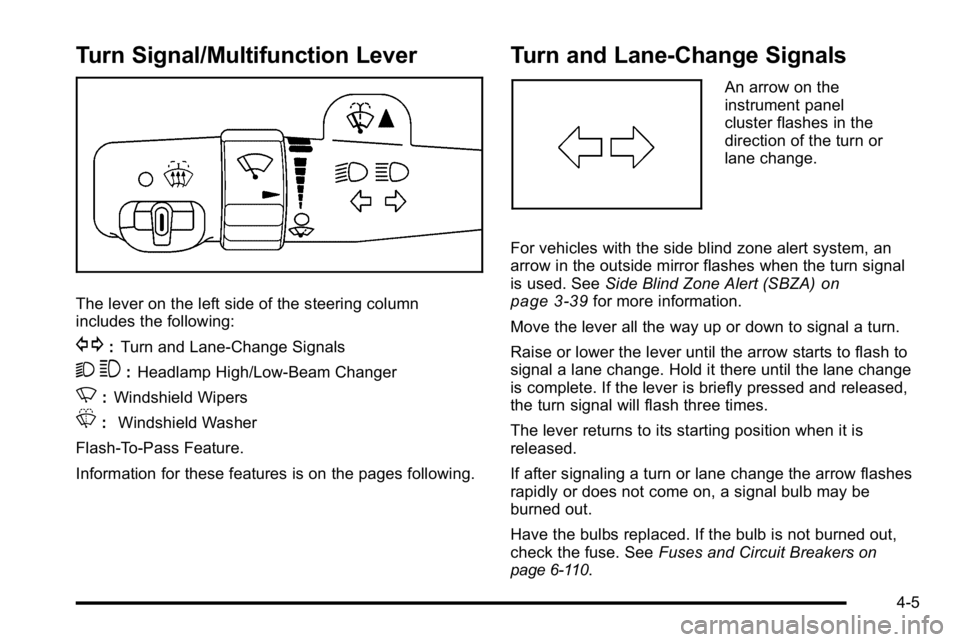
Turn Signal/Multifunction Lever
The lever on the left side of the steering column
includes the following:
G:Turn and Lane-Change Signals
2 3:Headlamp High/Low-Beam Changer
N: Windshield Wipers
L: Windshield Washer
Flash-To-Pass Feature.
Information for these features is on the pages following.
Turn and Lane-Change Signals
An arrow on the
instrument panel
cluster flashes in the
direction of the turn or
lane change.
For vehicles with the side blind zone alert system, an
arrow in the outside mirror flashes when the turn signal
is used. See Side Blind Zone Alert (SBZA)
on
page 3‑39for more information.
Move the lever all the way up or down to signal a turn.
Raise or lower the lever until the arrow starts to flash to
signal a lane change. Hold it there until the lane change
is complete. If the lever is briefly pressed and released,
the turn signal will flash three times.
The lever returns to its starting position when it is
released.
If after signaling a turn or lane change the arrow flashes
rapidly or does not come on, a signal bulb may be
burned out.
Have the bulbs replaced. If the bulb is not burned out,
check the fuse. See Fuses and Circuit Breakers
on
page 6‑110.
4-5
Page 166 of 474

Turn Signal On Chime
If the turn signal is left on, a warning chime sounds and
the Driver Information Center (DIC) will display TURN
SIGNAL ON after driving about a mile as a reminder to
turn it off. SeeDIC Warnings and Messages
on
page 4‑55.
Headlamp High/Low-Beam Changer
To change the headlamps from low beam to high beam,
push the turn signal lever away from you. To change
from high beam to low beam, pull the turn signal lever
toward you.
While the high beams are
on, this light located on
the instrument panel
cluster will also be on.
Flash-to-Pass
This feature lets you use the high-beam headlamps to
signal the driver in front of you that you want to pass.
It works even if your headlamps are off.
Pull the turn signal lever toward you briefly to
flash-to-pass.
If the headlamps are off or on low beam, the high-beam
headlamps will turn on. They will stay on as long as you
hold the lever toward you and the high-beam indicator
on the instrument panel cluster will come on.
Windshield Wipers
The windshield wiper lever is located on the left side of
the steering column.
Turn the band with the wiper symbol on it to control the
windshield wipers.
8 (Mist): For a single wiping cycle, hold it on mist until
the wipers start, then release. The wipers stop after one
wipe. Several wipes, hold the band longer.
6(Delay): Use to set the delay time between wipe
cycles. The wiper speed can be set for a long or short
delay between wipes. The closer the band is set to the
top of the lever, the shorter the delay.
4-6
Page 170 of 474

Setting Cruise Control
The cruise control light on the instrument panel cluster
comes on after the cruise control has been set to the
desired speed. SeeInstrument Panel Cluster
on
page 4‑30.
{WARNING:
If you leave your cruise control on when you are
not using cruise, you might hit a button and go
into cruise when you do not want to. You could be
startled and even lose control. Keep the cruise
control switch off until you want to use cruise
control.
1. Press the
Tbutton to turn the cruise system on.
2. Get up to the desired speed.
3. Press and release the SET– button located on the
steering wheel.
4. Take your foot off the accelerator.
Resuming a Set Speed
If cruise control is set at a desired speed and then the
brakes are applied, the cruise control is disengaged
without erasing the set speed from memory.
Once the vehicle speed is 40 km/h (25 mph) or greater,
press the +RES button on the steering wheel. The
vehicle returns to the previously selected speed and
stays there.
Increasing Speed While Using Cruise
Control
If the cruise control system is already activated,
.Press and hold the +RES button on the steering
wheel until the desired speed is reached, then
release it.
.To increase vehicle speed in small increments,
press the +RES button. Each time this is done, the
vehicle goes about 1.6 km/h (1 mph) faster.
4-10
Page 174 of 474
Fog Lamps
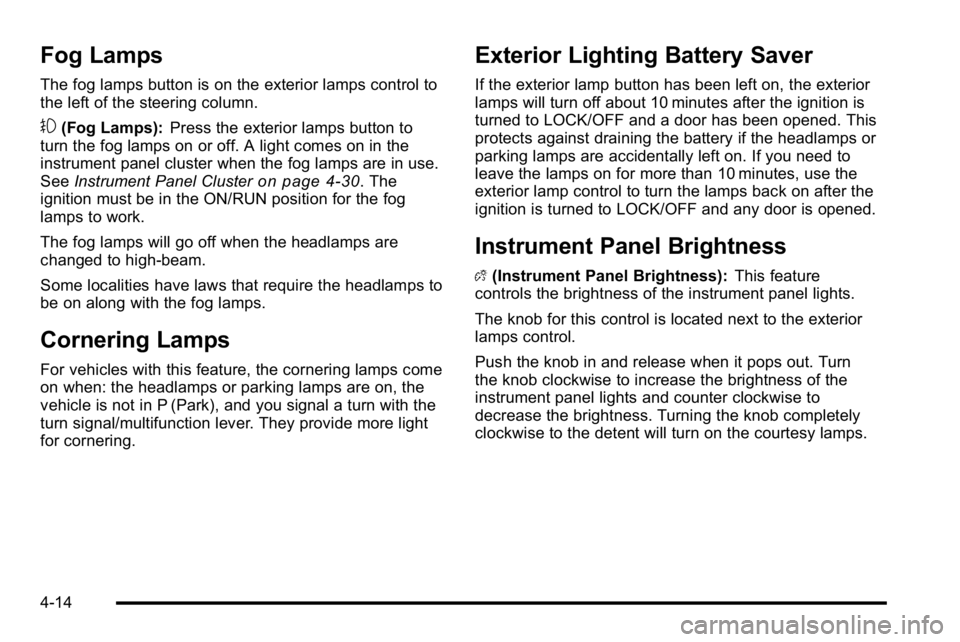
The fog lamps button is on the exterior lamps control to
the left of the steering column.
#(Fog Lamps):Press the exterior lamps button to
turn the fog lamps on or off. A light comes on in the
instrument panel cluster when the fog lamps are in use.
See Instrument Panel Cluster
on page 4‑30. The
ignition must be in the ON/RUN position for the fog
lamps to work.
The fog lamps will go off when the headlamps are
changed to high-beam.
Some localities have laws that require the headlamps to
be on along with the fog lamps.
Cornering Lamps
For vehicles with this feature, the cornering lamps come
on when: the headlamps or parking lamps are on, the
vehicle is not in P (Park), and you signal a turn with the
turn signal/multifunction lever. They provide more light
for cornering.
Exterior Lighting Battery Saver
If the exterior lamp button has been left on, the exterior
lamps will turn off about 10 minutes after the ignition is
turned to LOCK/OFF and a door has been opened. This
protects against draining the battery if the headlamps or
parking lamps are accidentally left on. If you need to
leave the lamps on for more than 10 minutes, use the
exterior lamp control to turn the lamps back on after the
ignition is turned to LOCK/OFF and any door is opened.
Instrument Panel Brightness
D (Instrument Panel Brightness): This feature
controls the brightness of the instrument panel lights.
The knob for this control is located next to the exterior
lamps control.
Push the knob in and release when it pops out. Turn
the knob clockwise to increase the brightness of the
instrument panel lights and counter clockwise to
decrease the brightness. Turning the knob completely
clockwise to the detent will turn on the courtesy lamps.
4-14
Page 190 of 474

Warning Lights, Gauges, and
Indicators
Warning lights and gauges can signal that something is
wrong before it becomes serious enough to cause an
expensive repair or replacement. Paying attention to the
warning lights and gauges could prevent injury.
Warning lights come on when there might be or there is
a problem with one of the vehicle's functions. Some
warning lights come on briefly when the engine is
started to indicate they are working.
Gauges can indicate when there might be or there is a
problem with one of the vehicle's functions. Often
gauges and warning lights work together to indicate a
problem with the vehicle.When one of the warning lights comes on and stays on
while driving, or when one of the gauges shows there
could be a problem, check the section that explains
what to do. Follow this manual's advice. Waiting to do
repairs can be costly and even dangerous.
Instrument Panel Cluster
The instrument panel cluster is designed to show how
the vehicle is running. It shows how fast the vehicle is
going, how much fuel has been used, and many other
things needed to drive safely and economically.
The vehicle has this cluster or one very similar to it.
It includes indicator warning lights and gauges that are
explained on the following pages. Be sure to read
about them.
4-30
Page 207 of 474

Driver Information Center (DIC)
Your vehicle has a Driver Information Center (DIC).
All messages will appear in the DIC display located
below the speedometer in the instrument panel cluster.
The DIC buttons are located on the instrument panel, to
the left of the instrument panel cluster.
The DIC comes on when the ignition is on. After a short
delay, the DIC will display the information that was last
displayed before the engine was turned off.
The DIC displays trip, fuel, and vehicle system
information, and warning messages if a system problem
is detected. The bottom line of the DIC shows the shift
lever position indicator. SeeAutomatic Transmission
Operation
on page 3‑24for more information.
If your vehicle's DIC has these features, the compass
direction and the outside air temperature may also
display on the DIC when viewing the trip and fuel
information. The compass direction appears on the
top right corner of the DIC display. The outside air
temperature automatically appears in the bottom right
corner of the DIC display. If there is a problem with the
system that controls the temperature display, the
numbers will be replaced with dashes. If this occurs,
have the vehicle serviced by your dealer.
The DIC also allows some features to be customized.
See DIC Vehicle Customization
on page 4‑65for more
information.
DIC Operation and Displays
The DIC has different displays which can be accessed
by pressing the DIC buttons located on the instrument
panel, to the left of the instrument panel cluster.
DIC Buttons
The buttons are the trip/fuel, vehicle information,
customization, and set/reset buttons. The button
functions are detailed in the following pages.
3(Trip/Fuel): Press this button to display the
odometer, trip odometers, fuel range, average economy,
instantaneous economy, and average speed.
T(Vehicle Information): Press this button to display
the oil life, units, park assist on vehicles with this
feature, side blind zone alert on vehicles with this
feature, tire pressure readings on vehicles with this
feature, compass zone and compass calibration on
vehicles with this feature, and Remote Keyless Entry
(RKE) transmitter programming.
4-47