Page 146 of 414
Page 150 of 414
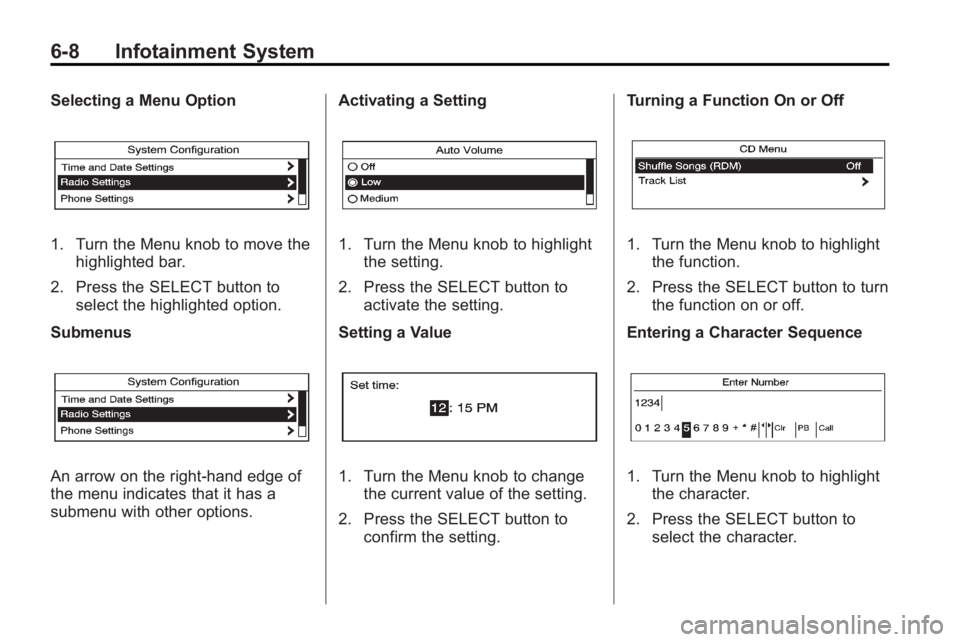
6-4 Infotainment System
E. TUNE
.Radio: Manually selects
radio stations.
.CD: Selects tracks.
F. CD/AUX
.Selects the CD player or an
external audio source.
G.
g
.Radio: Seeks the previous
station.
.CD: Select the previous
track or rewinds within a
track.
H.
ZCD Eject
.Removes a disc from the
CD slot. I.
l
.Radio: Seeks the next
station.
.CD: Select the next track or
fast forwards within a track.
J. RADIO/BAND
.Changes the band while
listening to the radio.
.Selects the radio when
listening to a different audio
source.
K. Menu Knob
.Opens menus, highlights
menu items, or sets
numeric values while in
a menu.
L. SELECT
.Selects menu items. M. CONFIG
.Opens the settings menu.
N.
0BACK
.Menu: Moves one
level back.
.Character Input: Deletes
the last character.
O.
H
.Opens the clock menu.
P. TONE
.Opens the tone menu.
Q.
5
.Opens the phone
main menu.
.Mutes the audio system.
Page 152 of 414

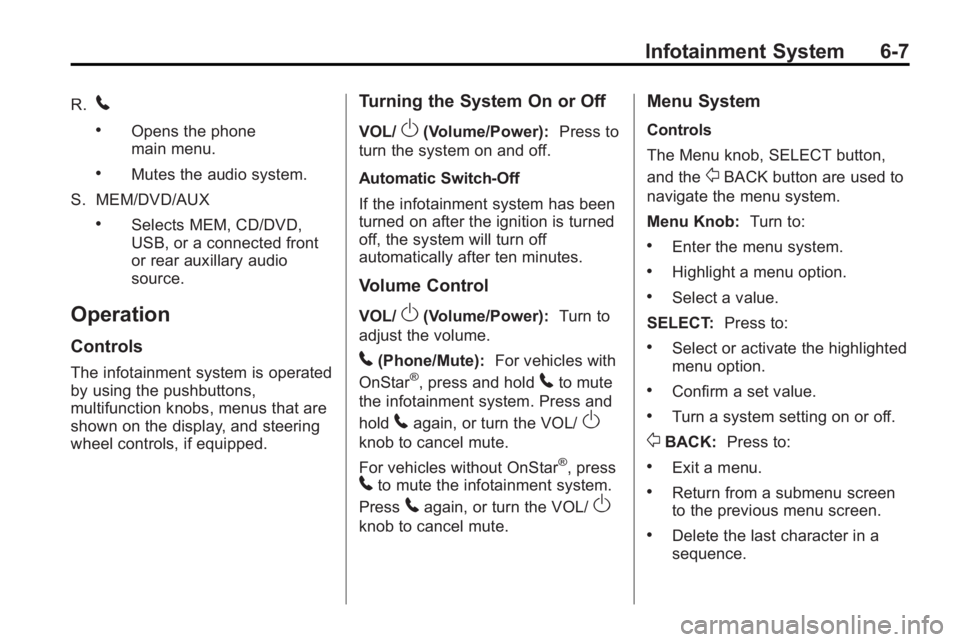
6-6 Infotainment System
E. TUNE/k
.Manually selects radio
stations and pauses time
shifted content.
.CD/DVD: Select tracks,
pauses playback, and stops
playback.
.MEM: Select tracks and
pauses playback.
F. RADIO/BAND
.Changes the band while
listening to the radio.
.Selects the radio when
listening to a different audio
source.
G.
g
.Radio: Seeks the previous
station.
.CD: Selects the previous
track or rewinds within
a track.
.MEM: Selects the previous
track or rewinds within
a track. H.
ZCD Eject
.Removes a disc from the
CD slot.
I. REC
O
.AUX: Records content from
audio CDs, MP3/WMA
CDs, and USB mass
storage devices..
J. DEL
.MEM: Deletes the current
track from MEM.
K.
l
.Radio: Seeks the next
station.
.CD: Selects the next track
or fast forwards within a
track.
.MEM: Selects the next
track or fast forwards within
a track. L. SELECT
.Selects menu items.
M. Menu Knob
.Opens menus, highlights
menu items, or sets
numeric values while in
a menu.
N.
0BACK
.Menu: Moves one
level back.
.Character Input: Deletes
the last character.
O. TONE
.Opens the tone menu.
P.
H
.Opens the clock menu.
Q. CONFIG
.Opens the settings menu.
Page 153 of 414
Infotainment System 6-7
R.5
.Opens the phone
main menu.
.Mutes the audio system.
S. MEM/DVD/AUX
.Selects MEM, CD/DVD,
USB, or a connected front
or rear auxillary audio
source.
Operation
Controls
The infotainment system is operated
by using the pushbuttons,
multifunction knobs, menus that are
shown on the display, and steering
wheel controls, if equipped.
Turning the System On or Off
VOL/O(Volume/Power): Press to
turn the system on and off.
Automatic Switch-Off
If the infotainment system has been
turned on after the ignition is turned
off, the system will turn off
automatically after ten minutes.
Volume Control
VOL/O(Volume/Power): Turn to
adjust the volume.
5(Phone/Mute): For vehicles with
OnStar®, press and hold5to mute
the infotainment system. Press and
hold
5again, or turn the VOL/O
knob to cancel mute.
For vehicles without OnStar
®, press5to mute the infotainment system.
Press
5again, or turn the VOL/O
knob to cancel mute.
Menu System
Controls
The Menu knob, SELECT button,
and the
0BACK button are used to
navigate the menu system.
Menu Knob: Turn to:
.Enter the menu system.
.Highlight a menu option.
.Select a value.
SELECT: Press to:
.Select or activate the highlighted
menu option.
.Confirm a set value.
.Turn a system setting on or off.
0BACK:Press to:
.Exit a menu.
.Return from a submenu screen
to the previous menu screen.
.Delete the last character in a
sequence.
Page 154 of 414
6-8 Infotainment System
Selecting a Menu Option
1. Turn the Menu knob to move thehighlighted bar.
2. Press the SELECT button to select the highlighted option.
Submenus
An arrow on the right-hand edge of
the menu indicates that it has a
submenu with other options. Activating a Setting
1. Turn the Menu knob to highlight
the setting.
2. Press the SELECT button to activate the setting.
Setting a Value
1. Turn the Menu knob to change the current value of the setting.
2. Press the SELECT button to confirm the setting. Turning a Function On or Off
1. Turn the Menu knob to highlight
the function.
2. Press the SELECT button to turn the function on or off.
Entering a Character Sequence
1. Turn the Menu knob to highlight the character.
2. Press the SELECT button to select the character.
Page 161 of 414
Infotainment System 6-15
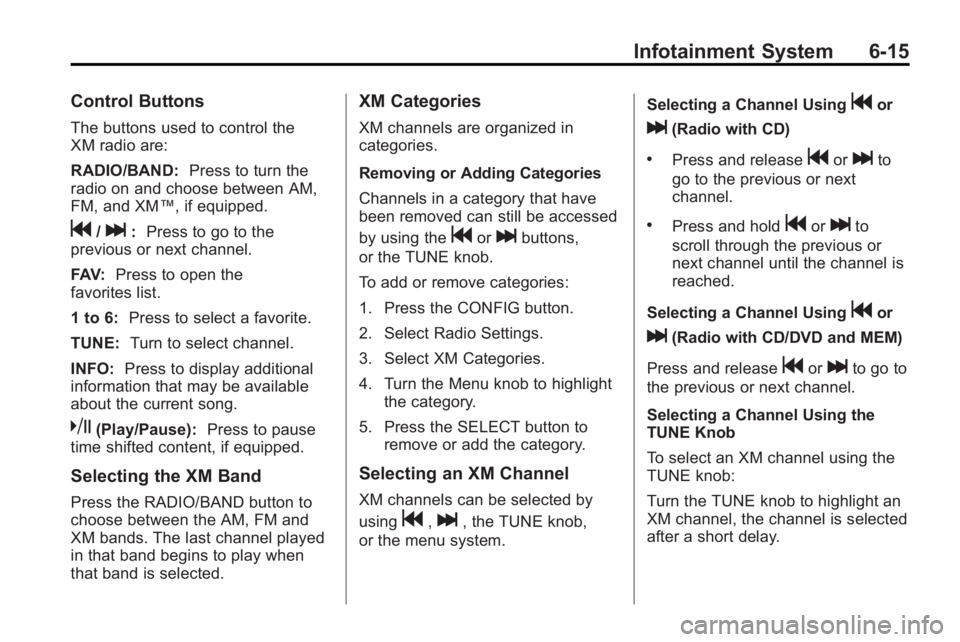
Control Buttons
The buttons used to control the
XM radio are:
RADIO/BAND:Press to turn the
radio on and choose between AM,
FM, and XM™, if equipped.
g/l: Press to go to the
previous or next channel.
FAV: Press to open the
favorites list.
1 to 6: Press to select a favorite.
TUNE: Turn to select channel.
INFO: Press to display additional
information that may be available
about the current song.
k(Play/Pause): Press to pause
time shifted content, if equipped.
Selecting the XM Band
Press the RADIO/BAND button to
choose between the AM, FM and
XM bands. The last channel played
in that band begins to play when
that band is selected.
XM Categories
XM channels are organized in
categories.
Removing or Adding Categories
Channels in a category that have
been removed can still be accessed
by using the
gorlbuttons,
or the TUNE knob.
To add or remove categories:
1. Press the CONFIG button.
2. Select Radio Settings.
3. Select XM Categories.
4. Turn the Menu knob to highlight the category.
5. Press the SELECT button to remove or add the category.
Selecting an XM Channel
XM channels can be selected by
using
g,l, the TUNE knob,
or the menu system. Selecting a Channel Using
gor
l(Radio with CD)
.Press and releasegorlto
go to the previous or next
channel.
.Press and holdgorlto
scroll through the previous or
next channel until the channel is
reached.
Selecting a Channel Using
gor
l(Radio with CD/DVD and MEM)
Press and release
gorlto go to
the previous or next channel.
Selecting a Channel Using the
TUNE Knob
To select an XM channel using the
TUNE knob:
Turn the TUNE knob to highlight an
XM channel, the channel is selected
after a short delay.
Page 166 of 414

6-20 Infotainment System
Audio Players
CD Player
The CD player can play audio CDs
and MP3 CDs.
The CD player will not play
8 cm (3 in.) CDs.
Care of CDs
Sound quality can be reduced due
to disc quality, recording method,
quality of the music recorded, and
how the disc has been handled.
Handle discs carefully and store
them in their original cases or other
protective cases away from direct
sunlight and dust. If the bottom
surface of a disc is damaged, the
disc may not play properly or at all.
Do not touch the bottom surface of
a disc while handling it; this could
damage the surface. Pick up discs
by grasping the outer edges or the
edge of the hole and the outer edge.
If the bottom surface of a disc is
dirty, take a soft lint free cloth,
or dampen a clean soft cloth in amild neutral detergent solution
mixed with water, and clean it. Wipe
the disc from the center to the
outer edge.
Care of the CD Player
Do not add a label to a disc, as it
could get caught in the CD player.
If a label is needed, label the top of
the recorded disc with a
marking pen.
Do not use disc lens cleaners
because they could contaminate the
lens of the disc optics and damage
the CD player.
Notice:
If a label is added to a
CD, or more than one CD is
inserted into the slot at a time,
or an attempt is made to play
scratched or damaged CDs, the
CD player could be damaged.
While using the CD player, use
only CDs in good condition
without any label, load one CD at
a time, and keep the CD player
and the loading slot free of
foreign materials, liquids, and
debris.
Control Buttons
The buttons used to control the
CD player are:
CD / AUX: Press to use the
CD player.
l/g: Press to select tracks or
to fast forward or rewind within a
track.
INFO: Press to display additional
information about the current track
that may be available.
TUNE: Turn to select tracks.
Menu Knob: Turn to enter
the menu.
SELECT: Press to select an item.
Z(Eject):Press to eject the disc.
Inserting a CD
With the printed side facing up,
insert a disc into the CD slot until it
is drawn in.
Page 168 of 414

6-22 Infotainment System
CD/DVD Player
The CD/DVD player can play CDs,
DVD-As, MP3/WMA CDs, MP3/
WMA DVDs, and DVD-Vs.
The CD/DVD player will not play
8 cm (3 in.) discs.
Care of CDs and DVDs
Sound quality can be reduced due
to disc quality, recording method,
quality of the music recorded, and
how the disc has been handled.
Handle discs carefully and store
them in their original cases or other
protective cases away from direct
sunlight and dust. If the bottom
surface of a disc is damaged, the
disc may not play properly or at all.
Do not touch the bottom surface of
a disc while handling it; this could
damage the surface. Pick up discs
by grasping the outer edges or the
edge of the hole and the outer edge.
If the bottom surface of a disc is
dirty, take a soft lint free cloth,
or dampen a clean soft cloth in a
mild neutral detergent solutionmixed with water, and clean it. Wipe
the disc from the center to the
outer edge.
Care of the CD/DVD Player
Do not add a label to a disc, as it
could get caught in the CD/DVD
player. If a label is needed, label the
top of the recorded disc with a
marking pen.
Do not use disc lens cleaners
because they could contaminate the
lens of the disc optics and damage
the CD/DVD player.
Notice:
If a label is added to a
CD, or more than one CD is
inserted into the slot at a time,
or an attempt is made to play
scratched or damaged CDs, the
CD player could be damaged.
While using the CD player, use
only CDs in good condition
without any label, load one CD at
a time, and keep the CD player
and the loading slot free of
foreign materials, liquids, and
debris.
Control Buttons
The buttons used to control the
CD/DVD player are:
MEM/DVD/AUX: Press to choose
between the MEM, CD/DVD,
and AUX.
l/g: Press to select tracks or
to fast forward or rewind within
a track.
INFO: Press to display additional
information about the disc that may
be available.
TUNE: Turn to select tracks.
Menu Knob: Turn to enter
the menu.
SELECT: Press to select an item.
Z(Eject):Press to eject the disc.
k:Press to pause a CD, DVD-A,
or DVD-V, press again to resume
playback. Press and hold to stop a
DVD-V disc.