2010 BUICK LACROSSE tow
[x] Cancel search: towPage 249 of 414
Driving and Operating 8-27
{WARNING
It can be dangerous to get out of
the vehicle if the automatic
transmission shift lever is not fully
in P (Park) with the parking brake
firmly set. The vehicle can roll. Do
not leave the vehicle when the
engine is running unless you
have to. If you have left the
engine running, the vehicle can
move suddenly. You or others
could be injured. To be sure the
vehicle will not move, even when
you are on fairly level ground,
always set the parking brake and
move the shift lever to P (Park).
Follow the proper steps to be sure
the vehicle will not move. See
Shifting Into Park on page 8‑23.
If parking on a hill and pulling a
trailer, see Driving Characteristics
and Towing Tips on page 8‑54.
Automatic
Transmission
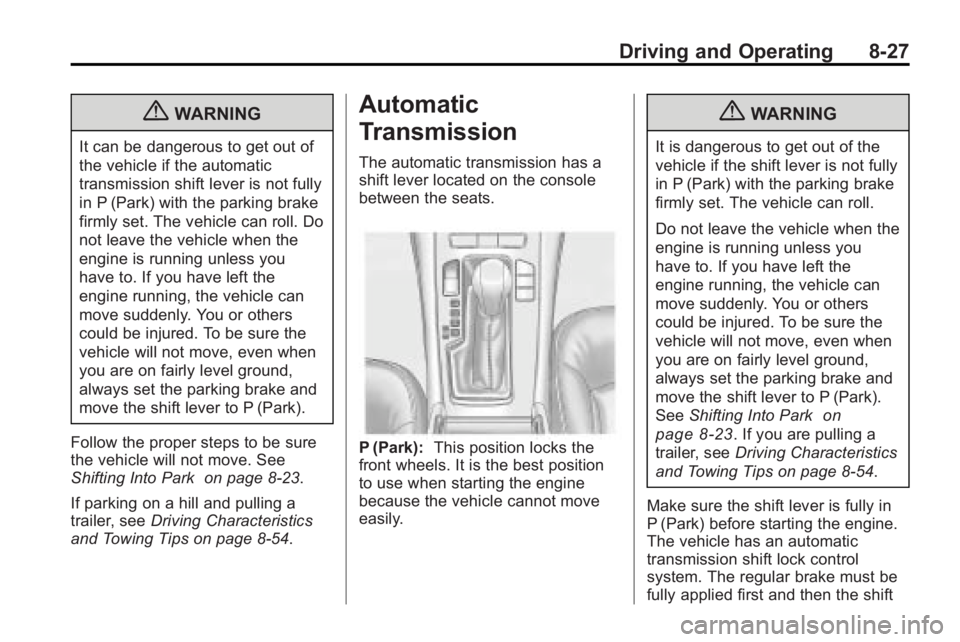
The automatic transmission has a
shift lever located on the console
between the seats.
P (Park): This position locks the
front wheels. It is the best position
to use when starting the engine
because the vehicle cannot move
easily.
{WARNING
It is dangerous to get out of the
vehicle if the shift lever is not fully
in P (Park) with the parking brake
firmly set. The vehicle can roll.
Do not leave the vehicle when the
engine is running unless you
have to. If you have left the
engine running, the vehicle can
move suddenly. You or others
could be injured. To be sure the
vehicle will not move, even when
you are on fairly level ground,
always set the parking brake and
move the shift lever to P (Park).
See Shifting Into Park
on
page 8‑23
. If you are pulling a
trailer, see Driving Characteristics
and Towing Tips on page 8‑54.
Make sure the shift lever is fully in
P (Park) before starting the engine.
The vehicle has an automatic
transmission shift lock control
system. The regular brake must be
fully applied first and then the shift
Page 250 of 414
8-28 Driving and Operating
lever button pressed before shifting
from P (Park) when the ignition key
is in ON/RUN. If you cannot shift out
of P (Park), ease pressure on the
shift lever, then push the shift lever
all the way into P (Park) as you
maintain brake application. Then
press the shift lever button and
move the shift lever into another
gear. SeeShifting Out of Park
on
page 8‑25.
R (Reverse): Use this gear to
back up.
Notice: Shifting to R (Reverse)
while the vehicle is moving
forward could damage the
transmission. The repairs would
not be covered by the vehicle
warranty. Shift to R (Reverse) only
after the vehicle is stopped.
To rock the vehicle back and forth to
get out of snow, ice or sand without
damaging the transmission, see If
the Vehicle is Stuck on page 8‑11.
N (Neutral): In this position, the
engine does not connect with the
wheels. To restart the engine when the vehicle is already moving, use
N (Neutral) only. Also, use
N (Neutral) when the vehicle is
being towed.
{WARNING
Shifting into a drive gear while the
engine is running at high speed is
dangerous. Unless your foot is
firmly on the brake pedal, the
vehicle could move very rapidly.
You could lose control and hit
people or objects. Do not shift
into a drive gear while the engine
is running at high speed.
Notice: Shifting out of P (Park) or
N (Neutral) with the engine
running at high speed may
damage the transmission. The
repairs would not be covered by
the vehicle warranty. Be sure the
engine is not running at high
speed when shifting the vehicle. D (Drive):
This position is for
normal driving. It provides the best
fuel economy. If more power is
needed for passing, and the
vehicle is:
.Going less than 35 mph
(56 km/h), push the accelerator
pedal about halfway down.
.Going about 35 mph (56 km/h) or
more, push the accelerator all
the way down.
Notice: If the vehicle seems to
accelerate slowly or not shift
gears when you go faster, and
you continue to drive the vehicle
that way, you could damage the
transmission. Have the vehicle
serviced right away. You can
drive in L (Low) when you are
driving less than 56 km/h (35 mph)
and D (Drive) for higher speeds
until then.
Page 255 of 414
Driving and Operating 8-33
If the park brake status light flashes
continuously, the EPB is only
partially applied or released,
or there is a problem with the EPB.
The DIC message SERVICE PARK
BRAKE will be displayed. If this light
flashes continuously, release the
EPB, and attempt to apply it again.
If this light continues to flash, do not
drive the vehicle. See your dealer/
retailer.
If the park brake warning light is on,
the EPB has detected an error in
another system and is operating
with reduced functionality. To apply
the EPB when this light is on, lift up
on the EPB switch and hold it in the
up position. Full application of the
parking brake by the EPB system
may take a longer period of time
than normal when this light is on.
Continue to hold the switch until the
park brake status light remains on.
If the park brake warning light is on,
see your dealer/retailer.
If the EPB fails to apply, the rear
wheels should be blocked to
prevent vehicle movement.EPB Release
To release the EPB, place the
ignition in the ON/RUN position,
apply and hold the brake pedal, and
push down momentarily on the EPB
switch. If you attempt to release the
EPB without the brake pedal
applied, a chime will sound, and the
DIC message PRESS BRAKE
PEDAL TO RELEASE PARK
BRAKE will be displayed. The EPB
is released when the park brake
status light is off.
If the park brake warning light is on,
the EPB has detected an error in
another system and is operating
with reduced functionality. To
release the EPB when this light is
on, push down on the EPB switch
and hold it in the down position.
EPB release may take a longer
period of time than normal when this
light is on. Continue to hold the
switch until the park brake status
light is off. If the light is on, see your
dealer/retailer.Notice:
Driving with the parking
brake on can overheat the brake
system and cause premature
wear or damage to brake system
parts. Make sure that the parking
brake is fully released and the
brake warning light is off before
driving.
Automatic EPB Release
The EPB will automatically release if
the vehicle is running, placed into
gear and an attempt is made to
drive away. Avoid rapid acceleration
when the EPB is applied, to
preserve park brake lining life.
For maximum EPB force when
towing a trailer or parking on a hill,
pull the EPB switch twice. If you are
towing a trailer and parking on a hill,
see Driving Characteristics and
Towing Tips
on page 8‑54for more
information.
Page 261 of 414
Driving and Operating 8-39
3. Move the thumbwheel downtoward SET/− and release it.
The desired set speed briefly
appears in the instrument panel
cluster.
4. Take your foot off the accelerator pedal.
When the brakes are applied, the
cruise control shuts off.
Resuming a Set Speed
If the cruise control is set at a
desired speed and then the brakes
are applied, the cruise control is
disengaged. To return to the
previously set speed, move the
thumbwheel up toward RES/+
briefly when the vehicle has
reached a speed of about 40 km/h
(25 mph) or more.
This accelerates the vehicle to the
previously selected speed. Increasing Speed While Using
Cruise Control
There are two ways to go to a
higher speed.
.Disengage the cruise control,
but do not turn it off.
.If the cruise control system is
already engaged, move the
thumbwheel up toward RES/+
and hold it until the vehicle
accelerates to the desired
speed, and then release it. To
increase the speed in small
amounts, move the thumbwheel
up toward RES/+ briefly and
then release it. Each time this is
done, the vehicle goes about
1.6 km/h (1 mph) faster.
Reducing Speed While Using
Cruise Control
If the cruise control system is
already engaged,
.Move the thumbwheel toward
SET/−
and hold until the desired
lower speed is reached, then
release it.
.To slow down in very small
amounts, move the thumbwheel
toward SET/− briefly. Each time
this is done, the vehicle goes
about 1.6 km/h (1 mph) slower.
Passing Another Vehicle While
Using Cruise Control
Use the accelerator pedal to
increase the vehicle's speed. When
you take your foot off the pedal, the
vehicle will slow down to the
previously set cruise control speed.
Page 265 of 414

Driving and Operating 8-43
.A tow bar is attached to the
vehicle.
.The vehicle's bumper is
damaged. Take the vehicle to
your dealer/retailer to repair the
system.
.Other conditions may affect
system performance, such as
vibrations from a jackhammer or
the compression of air brakes on
a very large truck.
If the system is still disabled, after
driving forward at least 25 km/h
(15 mph), take the vehicle to your
dealer/retailer.
Side Blind Zone
Alert (SBZA)
The vehicle may have a Side Blind
Zone Alert (SBZA) system. Read
this entire section before using the
system.
{WARNING
SBZA is only a lane changing aid
and does not replace driver
vision. SBZA does not detect:
.Vehicles outside the side
blind zones which may be
rapidly approaching.
.Pedestrians, bicyclists,
or animals. (Continued)
WARNING (Continued)
Failure to use proper care when
changing lanes may result in
damage to the vehicle, injury,
or death. Always check the
outside and rearview mirrors,
glance over your shoulder, and
use the turn signal before
changing lanes.
When the system detects a vehicle
in the side blind zone, amber SBZA
displays will light up in the side
mirrors. This indicates that it may be
unsafe to change lanes. Before
making a lane change, always
check the SBZA display, check the
outside and rearview mirrors, look
over your shoulder for vehicles and
hazards, and use the turn signal.
Page 266 of 414

8-44 Driving and Operating
SBZA Detection Zones
The SBZA sensor covers a zone
of approximately one lane over
from both sides of the vehicle,
3.5 m (11 ft.). This zone starts at
each side mirror and goes back
approximately 5.0 m (16 ft.). The
height of the zone is approximately
between 0.5 m (1.5 ft.) and
2.0 m (6 ft.) off the ground.
The SBZA detection zones do not
change if the vehicle is towing a
trailer. So be extra careful when
changing lanes while towing a
trailer.How the System Works
Left Side Mirror
DisplayRight Side Mirror Display
When the vehicle is started, both
outside mirror displays will briefly
come on to indicate that the system
is operating. While driving forward,
the left or right side mirror SBZA
display will light up if a vehicle is
detected in that blind zone. If you
activate a turn signal and a vehicle
has been detected on the same
side, the SBZA display will flash to
give you extra warning not to
change lanes. SBZA displays do not come on
while the vehicle is approaching or
passing other vehicles. At speeds
greater than 32 km/h (20 mph),
SBZA displays may come on when
a vehicle you have passed remains
in or drops back into the
detection zone.
SBZA can be disabled through
Vehicle Personalization. See
Vehicle Personalization
on
page 4‑38for more information.
If the SBZA is disabled by the
driver, the SBZA mirror displays will
not light up during normal driving.
Page 276 of 414

8-54 Driving and Operating
Towing
General Towing
Information
Only use towing equipment that has
been designed for the vehicle.
Contact your dealer/retailer or
towing retailer for assistance with
preparing the vehicle for towing a
trailer.
See the following trailer towing
information in this section:
.For information on driving while
towing a trailer, see Driving
Characteristics and Towing Tips.
.For maximum vehicle and trailer
weights, see Trailer Towing.
.For information on equipment to
tow a trailer, see Towing
Equipment.
For information on towing a disabled
vehicle, see Towing the Vehicle
on
page 9‑79. For information on
towing the vehicle behind another vehicle
—such as a motorhome,
see Recreational Vehicle Towing
on
page 9‑79.
Driving Characteristics
and Towing Tips
{WARNING
The driver can lose control when
pulling a trailer if the correct
equipment is not used or the
vehicle is not driven properly. For
example, if the trailer is too
heavy, the brakes may not work
well —or even at all. The driver
and passengers could be
seriously injured. The vehicle may
also be damaged; the resulting
repairs would not be covered by
the vehicle warranty. Pull a trailer
only if all the steps in this section
have been followed. Ask your
dealer/retailer for advice and
information about towing a trailer
with the vehicle. The vehicle can tow a trailer when
equipped with the proper trailer
towing equipment. For trailering
capacity, see
Trailer Towing (2.4L
L4 Engine)
on page 8‑58or Trailer
Towing (3.0L and 3.6L V6 Engines)
on page 8‑58. Trailering changes
handling, acceleration, braking,
durability and fuel economy. With
the added weight, the engine,
transmission, wheel assemblies and
tires are forced to work harder and
under greater loads. The trailer also
adds wind resistance, increasing the
pulling requirements. For safe
trailering, correctly use the proper
trailering equipment.
The following information has
important trailering tips and rules for
your safety and that of your
passengers. Read this section
carefully before pulling a trailer.
Page 277 of 414
Driving and Operating 8-55
Pulling A Trailer
Here are some important points:
.There are many laws, including
speed limit restrictions that apply
to trailering. Check for legal
requirements with state or
provincial police.
.Do not tow a trailer at all during
the first 1 600 km (1,000 miles)
the new vehicle is driven. The
engine, axle or other parts could
be damaged.
.During the first 800 km
(500 miles) that a trailer is
towed, do not drive over 80 km/h
(50 mph) and do not make starts
at full throttle. This reduces wear
on the vehicle.
.The vehicle can tow in D (Drive).
Use a lower gear if the
transmission shifts too often.
.Do not use the Fuel Saver Mode
when towing.
.Obey speed limit restrictions. Do
not drive faster than the
maximum posted speed for
trailers, or no more than 90 km/h
(55 mph), to reduce wear on the
vehicle.
Driving with a Trailer
Towing a trailer requires experience.
Get familiar with handling and
braking with the added trailer
weight. The vehicle is now longer
and not as responsive as the
vehicle is by itself.
Check all trailer hitch parts and
attachments, safety chains,
electrical connectors, lamps, tires
and mirror adjustments. If the trailer
has electric brakes, start the vehicle
and trailer moving and then apply
the trailer brake controller by hand
to be sure the brakes are working.
During the trip, check regularly to be
sure that the load is secure, and the
lamps and trailer brakes are working
properly.
Towing with a Stability Control
System
When towing, the sound of the
stability control system might be
heard. The system is reacting to the
vehicle movement caused by the
trailer, which mainly occurs during
cornering. This is normal when
towing heavier trailers.
Following Distance
Stay at least twice as far behind the
vehicle ahead as you would when
driving the vehicle without a trailer.
This can help to avoid situations
that require heavy braking and
sudden turns.
Passing
More passing distance is needed
when towing a trailer. Because the
rig is longer, it is necessary to go
farther beyond the passed vehicle
before returning to the lane.