2010 BMW X5 3.0Si Tool
[x] Cancel search: ToolPage 252 of 300

Replacing components
250
Replacing components
Onboard toolkit
The onboard toolkit is located in the cargo bay
under the floor panel.
Replacing wiper blades
Front
1.Fold down the wiper arm.
2.Swing the wiper blade upward.
3.Remove the wiper blade toward the wind-
shield, refer to arrow.
BMW X5: rear
1.Lift off the wiper arm completely and pull off
the wiper blade, refer to arrow.
2.Mount the new wiper blade and press on
until it is heard to engage.
Lamps and bulbs
Lamps and bulbs make an essential contribu-
tion to vehicle safety. You must be duly diligent
in replacing them. BMW recommends having
your BMW Sports Activity Vehicle Center per-
form any work that you do not feel competent to
perform yourself or that is not described here.
Never touch the glass of new bulbs with
your bare fingers, as even minute
amounts of contamination will burn into the
bulb's surface and reduce its service life. Use a
clean cloth, napkin, etc., or hold the bulb by its
metal socket.<
A replacement bulb set is available from your
BMW Sports Activity Vehicle Center.
Only replace bulbs when cool, as other-
wise you may be burned.<
Whenever you perform any work on the
electrical system, turn off the systems/
consumers involved to prevent short circuits
from occurring. To avoid possible injury or
equipment damage when replacing bulbs,
observe any instructions provided by the bulb
manufacturer.<
ba8_e70ag.book Seite 250 Freitag, 5. Juni 2009 11:42 11
Page 258 of 300

Replacing components
256 3.Apply gentle pressure to the bulb while
turning it to the left for removal and replace-
ment.
4.Insert the bulb socket in the liftgate and
engage it.
5.Replace the cover.
License plate lamp
5-Watt bulb, C5W
1.Slide the lamp to the right with a screw-
driver, refer to arrow1.
2.Remove the lamp, arrow2.
3.Replace the bulb.
4.Reinstall the lamp.
Center brake lamp
This lamp uses LED technology for operation.
In case of a defect, please go to a BMW Sports
Activity Vehicle Center or a workshop that
works according to BMW repair procedures
with correspondingly trained personnel.
Changing wheels
Your BMW is equipped with run-flat tires as
standard. As a result, it is not necessary to
change the wheel immediately in the case of air
loss in the event of a breakdown.
To continue driving with a damaged tire:
>With Flat Tire Monitor, refer to Indication of
a flat tire page93
>With Tire Pressure Monitor, refer to Mes-
sage with low tire inflation pressure page95
You will recognize run-flat tires by a circular
symbol containing the letters RSC on the side
of the tire, refer to Run-flat tires, page237.
When mounting new tires, or changing from
s u m m e r t o w i n t e r t i r e s o r v i c e v e r s a , u s e r u n - f l a t
tires for your own safety. No spare tire is avail-
able in case of a flat tire. Your BMW Sports
Activity Vehicle Center will be happy to advise
you. Also refer to New wheels and tires,
page237.
BMW X6: do not rotate the front wheels to
the rear or vice versa, as otherwise the
handling characteristics will be negatively
affected.<
Suitable tools for changing tires are avail-
able as accessories at your BMW Sports
Activity Vehicle Center.<
Jacking points for vehicle jack
The jacking points for the vehicle jack are
located in the positions shown.
Compact wheel*
Safety precautions in the event of a flat
tire or wheel change: park the vehicle as
far as possible from passing traffic and on solid
ba8_e70ag.book Seite 256 Freitag, 5. Juni 2009 11:42 11
Page 259 of 300
Mobility
257Reference
At a glance
Controls
Driving tips
Communications
Navigation
Entertainment
ground. Switch on the hazard warning flashers.
Set the parking brake and engage transmission
position P.
Have all vehicle occupants get out of the vehicle
and ensure that they remain outside the imme-
diate area in a safe place, such as behind a
guardrail.
If a warning triangle
* or portable hazard warning
lamp
* is required, set it up on the roadside at an
appropriate distance from the rear of the vehi-
cle. Comply with all safety guidelines and regu-
lations.
Change the wheel only on a level, firm surface
which is not slippery. The vehicle or the jack
could slip to the side if you attempt to raise the
vehicle on a soft or slippery surface such as
snow, ice, tiles, etc.
Position the jack on a firm support surface.
Do not use a wooden block or similar object as a
support base for the jack, as this would prevent
it from extending to its full support height and
reduce its load-carrying capacity.
To avoid serious or fatal injury: never lie under
the vehicle, and never start the engine while it is
supported by the jack.<
What you will need
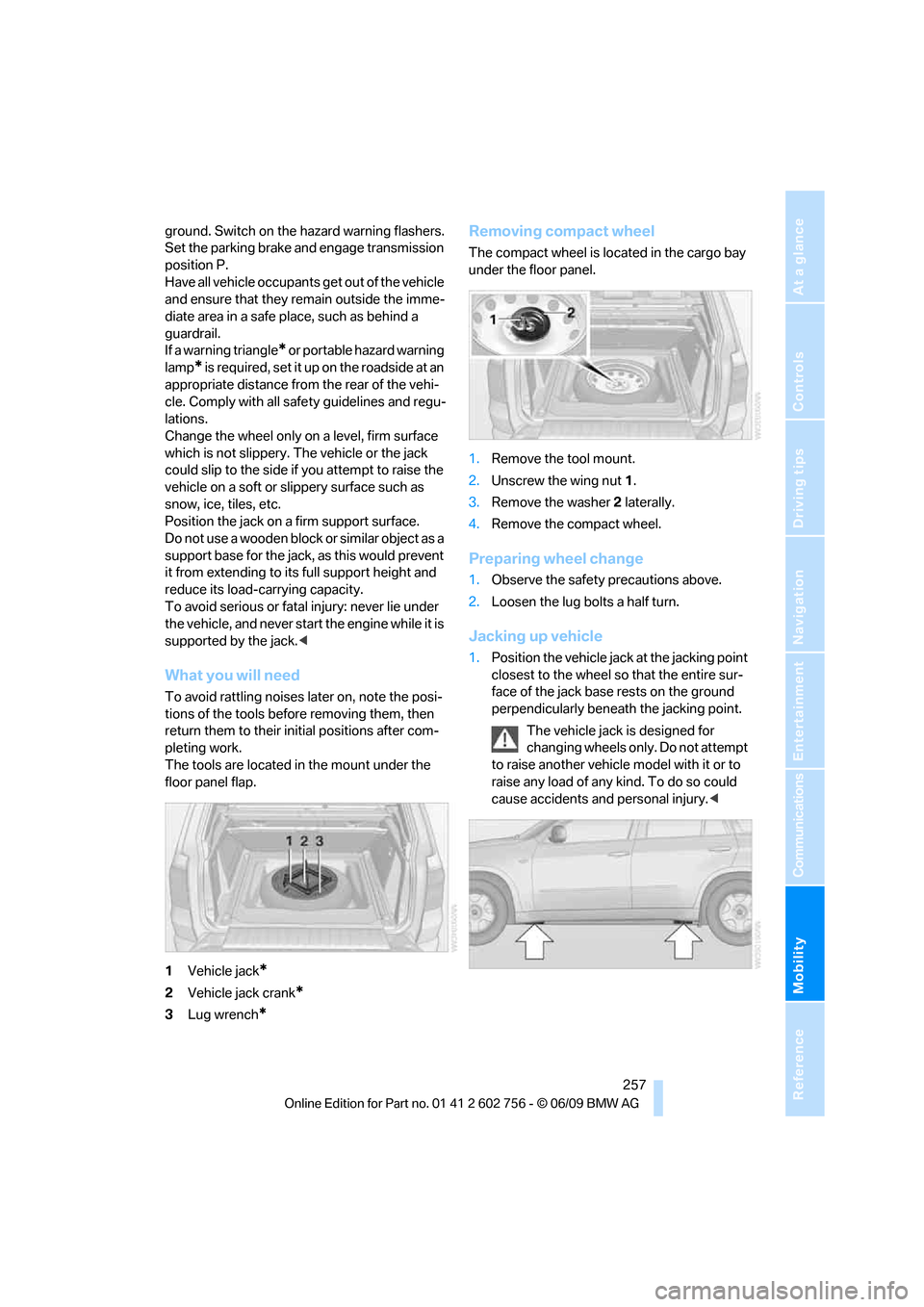
To avoid rattling noises later on, note the posi-
tions of the tools before removing them, then
return them to their initial positions after com-
pleting work.
The tools are located in the mount under the
floor panel flap.
1Vehicle jack
*
2Vehicle jack crank*
3Lug wrench*
Removing compact wheel
The compact wheel is located in the cargo bay
under the floor panel.
1.Remove the tool mount.
2.Unscrew the wing nut 1.
3.Remove the washer 2 laterally.
4.Remove the compact wheel.
Preparing wheel change
1.Observe the safety precautions above.
2.Loosen the lug bolts a half turn.
Jacking up vehicle
1.Position the vehicle jack at the jacking point
closest to the wheel so that the entire sur-
face of the jack base rests on the ground
perpendicularly beneath the jacking point.
The vehicle jack is designed for
changing wheels only. Do not attempt
to raise another vehicle model with it or to
raise any load of any kind. To do so could
cause accidents and personal injury.<
ba8_e70ag.book Seite 257 Freitag, 5. Juni 2009 11:42 11
Page 265 of 300

Mobility
263Reference
At a glance
Controls
Driving tips
Communications
Navigation
Entertainment
Your BMW has a special nut as body ground
or negative pole.
5.Attach the second end of the cable to the
negative terminal of the battery or to the
engine or body ground of the vehicle to be
started.
Starting engine
1.Start the engine on the assisting vehicle
and allow it to run at idle for several minutes
at slightly increased speed.
2.Start the engine on the other vehicle in the
usual way.
If the first starting attempt is not successful,
wait a few minutes before another attempt
in order to allow the discharged battery to
recharge.
3.Let the engines run for a few minutes.
4.Disconnect the jumper cables by reversing
the connection sequence.
Check the battery and recharge if necessary.
Never use spray fluids to start the
engine.<
Tow-starting and towing
Observe applicable laws and regulations
for tow-starting and towing.<
Do not transport any passengers other
than the driver in a vehicle that is being
towed.<
Using a tow fitting
The screw-on tow-fitting must always be car-
ried in the vehicle. It can be screwed in at the
front or rear of the BMW.It is located in the toolkit under the floor panel
flap in the cargo bay, refer to page250.
Use only the tow fitting provided with the
vehicle and screw it all the way in. Use the
tow fitting for towing only on roads. Avoid lateral
loading of the tow fitting, e.g. do not lift the vehi-
cle by the tow fitting. Otherwise damage to the
tow fitting and the vehicle can occur.<
Access to screw thread
Cover panel on left and right side of bumper:
press on the arrow symbol on the cover panel.
Front
Rear
Being towed
Make sure that the ignition is switched on,
refer to page59, otherwise the low
beams, tail lamps, turn signals and windshield
wipers would not be available. When the engine
is stopped, there is no power assist. This then
requires increased effort for braking and steer-
ing. Active steering is deactivated and larger
steering wheel movements are required.<
Switch on the hazard warning flashers depend-
ing on the local regulations. If the electrical sys-
ba8_e70ag.book Seite 263 Freitag, 5. Juni 2009 11:42 11
Page 290 of 300

Everything from A to Z
288 Music player
– connecting, refer to USB-
audio interface183
Music player, connecting
– refer to AUX-IN
connection183
Music search179
My Info208
N
Navigation data140
Navigation destination
– entering manually141
– home address144
Navigation instructions, refer
to Switching voice
instructions on/off152
Navigation system140
– address book143
– bypassing a route
section151
– continuing destination
guidance150
– destination entry141
– entering a destination by
voice147
– entering a destination
manually141
– questions about system157
– route list151
– selecting destination via
map146
– selecting route criteria150
– special destinations144
– starting destination
guidance150
– terminating destination
guidance150
– trip planner148
– voice instructions152
– volume adjustment152
Neck support, refer to Head
restraints46
New remote control26
New wheels and tires237
North-facing map152Nozzles, refer to Windshield
washer nozzles68
Nylon rope, refer to Tow-
starting and towing263
O
OBD socket245
Octane ratings, refer to Fuel
specifications225
Odometer71
Oil
– additives, refer to Approved
engine oils243
– approved engine oils243
– consumption, refer to
Checking engine oil
level241
– level241
– refilling, refer to Adding
engine oil242
Oil change interval, refer to
Service requirements74
Onboard computer, refer to
iDrive16
Onboard toolkit250
Opening and closing
– comfort access35
– from inside30
– panorama glass sunroof39
– using remote control27
– using the door lock29
Opening liftgate33
Operation on poor roads135
Options, selecting for
navigation150
Orientation menu, refer to
Main menu17
Output, refer to Engine
data268
Outside air, refer to AUC
Automatic recirculated-air
control110
Outside temperature
display71
– changing unit of measure80
Outside temperature
warning71
Overview, radio control160
P
Panic mode28
Panorama glass sunroof38
– moving manually40
– power failure40
– raising, opening, closing39
Park Distance Control PDC82
Parked-car ventilation114
– preselecting activation
times114
– switching on and off
directly114
Parking, vehicle60
Parking aid
– refer to PDC Park Distance
Control82
– refer to Rear view camera86
Parking assistance
– refer to PDC Park Distance
Control82
– refer to Top View84
Parking brake61
– Automatic Hold61
– indicator lamp13
– releasing manually61
– releasing manually in case of
an electrical malfunction63
– setting manually61
Parking lamps102
Parking with Automatic
Hold62
Particulate filter, refer to
Diesel particulate filter131
Parts and accessories5
Passenger-side exterior
mirror, tilting down53
Pathway lighting103
Paying attention to speed238
PDC Park Distance Control82
Personal Profile26
Phone book205
Phone numbers, dialing206
Pinch protection system
– glass sunroof, electric41
– panorama glass sunroof39
– power windows38
Plasters, refer to First-aid
kit262
ba8_e70ag.book Seite 288 Freitag, 5. Juni 2009 11:42 11
Page 294 of 300

Everything from A to Z
292 Switching on
– audio160
– CD changer160
– CD player160
– radio160
Swiveling headlamps, refer to
Adaptive Head Light103
Symbols4
– indicator/warning lamps13
– status information19
– traffic information with
navigation system153
T
Tachometer72
Tailgate33
Tail lamps251,254
– replacing bulbs251,254
Tank contents, refer to
Capacities272
Target cursor for
navigation146
Technical alterations, refer to
For your own safety5
Technical data268
Telephone202
– refer to separate operating
instructions
Teleservice Diagnosis217
Teleservice Help217
TeleServices, activating218
Temperature
– adjusting with automatic
climate control109,113
– changing units of
measure80
– refer to Coolant
temperature72
Temperature display
– outside temperature71
– setting units80
– temperature warning71
Temperature warning71
Tempomat, refer to Cruise
control69
The individual vehicle5
Third brake lamp, refer to
Center brake lamp253,2563rd row seats49
Tightening torque of the lug
bolts, refer to After
mounting258
Tilt alarm sensor, switching
off35
Tilting down passenger-side
exterior mirror53
Timer, refer to Preselecting
activation times114
Tire inflation pressure
monitoring, refer to Flat Tire
Monitor92
Tire inflation pressures229
– checking229
Tire Pressure Monitor
TPM94
Tire Quality Grading235
Tires
– age235
– air loss93,95
– breaking-in130
– changing237
– condition236
– damage236
– flat tire, refer to Changing
wheels256
– inflation pressure229
– inflation pressure
monitoring, refer to FTM
Flat Tire Monitor92
– new wheels and tires237
– pressure loss93,95
– pressure monitoring, refer to
TPM Tire Pressure
Monitor94
– replacing256
– retreaded tires237
– run-flat tires237
– size235
– tread236
– wear indicators236
– wheel/tire combination237
– winter tires238
TMC station, refer to Traffic
information153
Tone
– control160
– middle setting162Tone on locking/unlocking28
Tools, refer to Onboard
toolkit250
Top 50 of music
collection180
Top View84
Torque
– engine268
– lug bolts, refer to After
mounting258
Tow fitting263
Towing263
Town/city, for navigation141
Tow-starting263,264
TPM Tire Pressure
Monitor94
– resetting system94
– system limits94
– warning lamp95
Track, selecting on CD172
TRACTION, refer to DTC89
Traction-assist feature, refer
to DSC Dynamic Stability
Control88
Traction control, refer to
DSC Dynamic Stability
Control88
Traffic bulletins
– categories155
– filtering155
Traffic bulletins for
navigation
153
– in map display155
Traffic congestion
– displaying traffic
information153
– refer to Route, bypassing
sections151
Traffic information for
navigation during
destination guidance155
Transmission
– automatic transmission with
Steptronic64
– manually releasing
transmission lock on
automatic transmission with
Steptronic66
ba8_e70ag.book Seite 292 Freitag, 5. Juni 2009 11:42 11
Page 296 of 300

Everything from A to Z
294 Windshield
– cleaning, refer to Washer/
wiper system67
– defrosting, refer to
Defrosting windows109
– displays, refer to Head-Up
Display100
Windshield washer system
– refer to Washer/wiper
system67
– windshield washer
nozzles68
Windshield wipers, refer to
Washer/wiper system67
– replacing wiper blades250
Winter diesel225
Winter tires238
– storage238
Word matching principle for
navigation149
Working in the engine
compartment239
Wrenches/screwdrivers, refer
to Onboard toolkit250
X
xDrive90
Xenon lamps251,253
– bulb changing251,253
ba8_e70ag.book Seite 294 Freitag, 5. Juni 2009 11:42 11