USB-audio interface/mobile phone audio interface
172 1.Press the button.
This opens the start menu.
2.Move the controller backwards to call up
"Entertainment".
3.Change to upper field if necessary. Turn the
controller until "AUX" is selected and press
the controller.
4.Select "USB" or the name of the audio
device and press the controller.
5.The playback starts with the first track.
About programmable memory buttons
You can store the "USB" function on the pro-
grammable memory keys to start audio play-
back, refer to page22.
Selecting a track
You can call up the tracks via the playback lists
and information. With USB devices you can also
call up the tracks via the file directory.1.Make your selection, e.g. "Playlists" or "Art-
ists", and press the controller.
2.Select the track and press the controller.
Displaying information on track
You can display any information stored on the
current track, e.g. the name of the artist.
1.Press the controller during playback.
2.Select "Details" and press the controller.
The information for the current track are dis-
played.
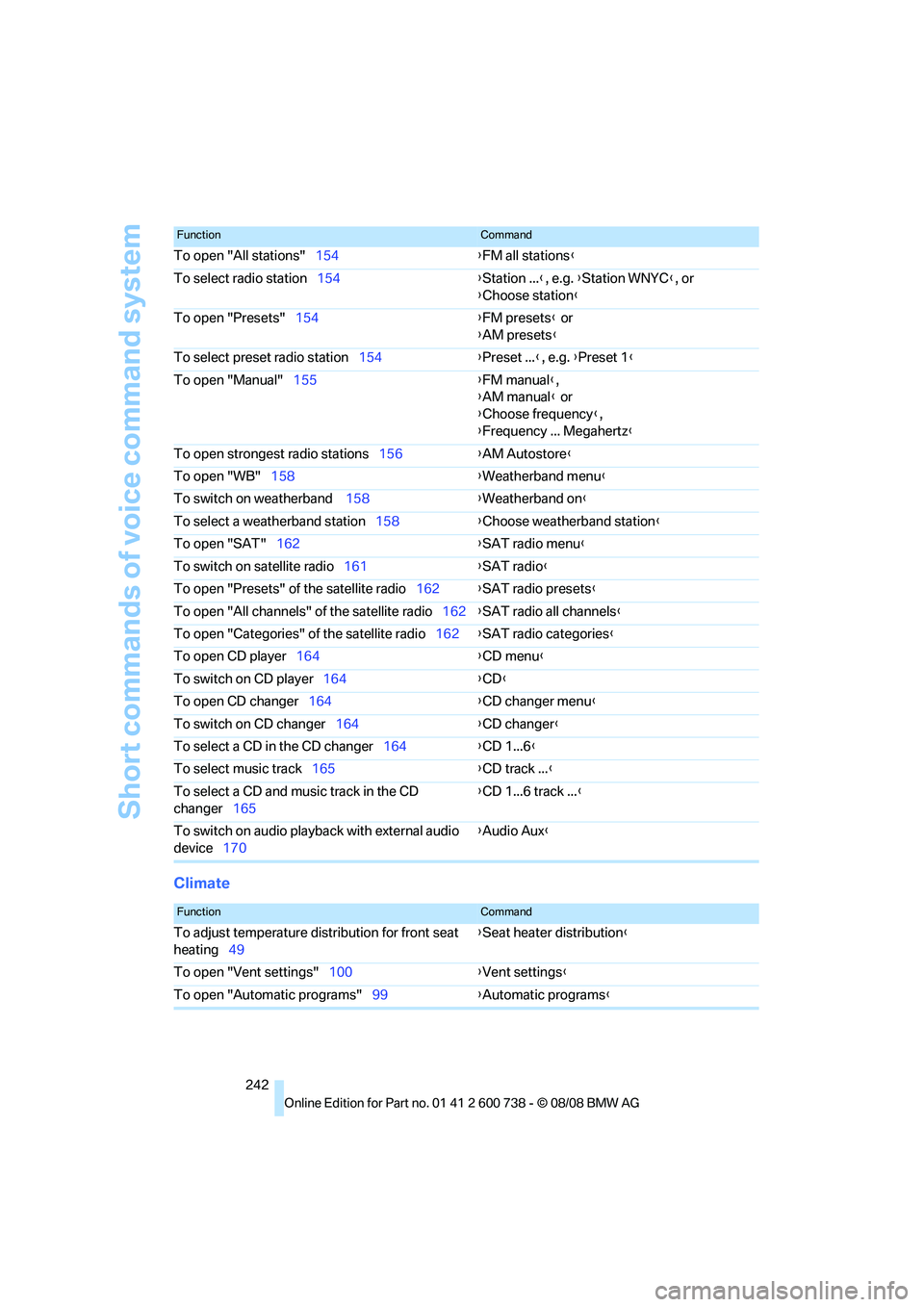
Short commands of voice command system
242
Climate
To open "All stations"154{FM all stations}
To select radio station154{Station ...}, e.g. {Station WNYC}, or
{Choose station}
To open "Presets"154{FM presets} or
{AM presets}
To select preset radio station154{Preset ...}, e.g. {Preset 1}
To open "Manual"155{FM manual},
{AM manual} or
{Choose frequency},
{Frequency ... Megahertz}
To open strongest radio stations156{AM Autostore}
To open "WB"158{Weatherband menu}
To switch on weatherband 158{Weatherband on}
To select a weatherband station158{Choose weatherband station}
To open "SAT"162{SAT radio menu}
To switch on satellite radio161{SAT radio}
To open "Presets" of the satellite radio162{SAT radio presets}
To open "All channels" of the satellite radio162{SAT radio all channels}
To open "Categories" of the satellite radio162{SAT radio categories}
To open CD player164{
CD menu}
To switch on CD player164{CD}
To open CD changer164{CD changer menu}
To switch on CD changer164{CD changer}
To select a CD in the CD changer164{CD 1...6}
To select music track165{CD track ...}
To select a CD and music track in the CD
changer165{CD 1...6 track ...}
To switch on audio playback with external audio
device170{Audio Aux}
FunctionCommand
FunctionCommand
To adjust temperature distribution for front seat
heating49{Seat heater distribution}
To open "Vent settings"100{Vent settings}
To open "Automatic programs"99{Automatic programs}
Reference 245
At a glance
Controls
Driving tips
Communications
Navigation
Entertainment
Mobility
Assistance window21
"Assist. window off"22
AUC Automatic recirculated-
air control101
"Audio"151,153,158
Audio150
– controls150
– switching on/off150
– tone control151
– volume151
Audio device, external108
Automatic
– air distribution99
– air volume99
– headlamp control93
– service notification193
– steering wheel
adjustment45
– storing stations156
Automatic car washes118
Automatic climate control98
– automatic air distribution99
– parked car ventilation102
– switching on and off102
– ventilation in rear102
Automatic closing of doors,
refer to Automatic soft
closing35
Automatic curb monitor50
Automatic lighting
– refer to Automatic headlamp
control93
– refer to Daytime running
lamps94
– refer to Interior lamps97
– refer to Pathway lighting94
– refer to Welcome lamps93
Automatic lights
– refer to High-beam
assistant95
Automatic low beams, refer to
High-beam assistant95
"Automatic programs"99
Automatic soft closing35
Automatic station search155
"Automatic ventilation"103
AUTO program for automatic
climate control99
"Auto Request"193"Autostore" on the
radio154,156
"AUX"150,170,172
AUX-IN connection
170
"AUX IN" in audio mode170
Average fuel consumption69
– setting units77
Average speed, refer to
Computer68
"Avoid ferries" in
navigation137
"Avoid highways" in
navigation137
Avoiding freeways for
navigation136
Avoiding unintentional
alarms37
"Avoid tollroads" in
navigation137
Axle loads, refer to
Weights239
"A - Z"184
B
"Backrest"53
Backrest contour, refer to
Lumbar support44
Backrests, refer to Seats43
Backrest width44
Back seats, refer to Rear seats
Backup lamps, replacing
bulbs224
"Balance", tone control152
Band-aids, refer to First-aid
kit232
Bass, refer to Tone
control151
"Bass", tone control151
Battery, refer to Vehicle
battery230
– jump starting232
Battery replacement
– remote control for comfort
access39
BC button, refer to
Computer68
Being towed233
Belts, refer to Safety belts47Beverage holder, refer to Cup
holders109
Blind, refer to Sun blinds106
Blower, refer to Air
volume100
"Bluetooth"177
BMW
– Car Shampoo220
"BMW Assist"192,193
BMW Assist191
– activating197
– BMW TeleServices193
– concierge service194
– contacting BMW Customer
Relations194
– displaying vehicle data198
– offered services191
– roadside assistance192
– updating196
BMW Assist My Info195
"BMW Contact"186
"BMW Contact
Numbers"186
BMW homepage4
BMW maintenance
system216
"BMW Service settings"196
BMW TeleServices193
BMW TeleServices services
– displaying194
– updating194
BMW website4
Bottle holder, refer to Cup
holders109
Bracket for telephone or
mobile phone
– refer to Snap-in adapter189
Brake assistant80
Brake force display88
Brake lamps
– replacing bulbs224
– two-stage88
Brake rotors
– breaking-in116
– refer to Braking safely117