2010 BMW 650I COUPE rear view mirror
[x] Cancel search: rear view mirrorPage 102 of 252

Lamps
100
High beams/
roadside parking lamps
1High beams
2Headlamp flasher
3Roadside parking lamps
Roadside parking lamps, left or right*
You also enjoy the option of lighting up just one
side of your vehicle when parking.
Switching on
After parking the vehicle, press the lever up or
down beyond the resistance point, arrow 3.
The roadside parking lamps drain the bat-
tery. Do not leave them switched on for
long periods of time, otherwise it may no longer
be possible to start the engine.<
Switching off
Briefly press the lever in the opposite direction
up to the resistance point, arrow3.
High-beam Assistant*
The concept
This system automatically switches the high
beams on and off. A sensor on the front side of
the inside rearview mirror controls the process.
The assistant makes sure that the high beams
are switched on whenever traffic conditions
permit. This relieves you of the burden of con-
stantly switching back and forth and simulta-
neously provides you with the best possible vis-
ibility. Naturally, you can intervene at any time to
switch the high beams on and off as usual.
Activating system
1.Turn the light switch to position3, refer to
page98.
2.With the low beams switched on, briefly
press the turn signal lever in the high-beam
direction.
The indicator lamp in the instrument
cluster lights up when the High-beam
Assistant is activated. The system
automatically switches between high beams
and low beams, reacting to oncoming traffic,
vehicles ahead of you, and sufficiently lit areas,
e.g. in built-up zones.
Manually switching between high
beams and low beams
If you wish or the situation requires, you can
intervene at any time.
>If the High-beam Assistant has switched on
the high beams, but you wish to use the low
beams, just switch on the low beams with
the turn signal lever. This deactivates the
High-beam Assistant.
In order to reactivate the system, briefly
press the turn signal lever in the high-beam
direction.
>If the High-beam Assistant has switched on
the low beams, but you wish to use the high
beams, simply switch on the high beams as
usual. This deactivates the system and it is
up to you to switch back to low beams.
In order to reactivate the system, briefly
press the turn signal lever in the high-beam
direction.
>When the low beams are on, use the head-
lamp flasher as usual.
Page 103 of 252

Controls
101Reference
At a glance
Driving tips
Communications
Navigation
Entertainment
Mobility
System limits
The High-beam Assistant is designed to
maximize the amount of time that high
beams can be safely used and to quickly switch
back to low beams when traffic approaches.
The system cannot completely replace driver
intervention when unusual conditions are
encountered. For this reason, switch to low
beams when circumstances so dictate. Failure
to do so can pose a safety risk.<
Below are a few examples of situations in which
the system may not react or may only function
to a limited degree, requiring personal interven-
tion:
>in extremely unfavorable weather condi-
tions such as fog or heavy precipitation
>in sensing road users with poor inherent
illumination such as pedestrians, cyclists,
equestrians, horse-drawn vehicles, railroad
or shipping traffic close to the road, and at
deer crossings
>in tight curves, on steep crests or dips, with
cross-traffic, or with partially hidden
oncoming traffic on divided highways
>in poorly illuminated areas and in the pres-
ence of highly reflective signs
>in the low speed range
>when the windshield is fogged up, dirty or
covered with stickers, decals etc. in the area
of the inside rearview mirror
>when the sensor is dirty. Clean the sensor
on the front side of the inside rearview mir-
ror with a cloth slightly moistened with glass
cleaner
Moreover, no system can operate without limi-
tations. High-beam Assistant operation is sub-
ject to conditions that may reduce the system's
ability to recognize the difference between
actual vehicle head lamps or tail lamps and, for
example, highly reflective signs, markers, and
streetlights. To be on the safe side, the system
may periodically interpret these situations as
conditions that require low beams. Below are
some of the situations in which premature
switching to low beams can occur:>approaching large and/or highly reflective
signs
>approaching certain lights, such as drive-
way lighting and porch lights
>approaching certain traffic signals
>approaching large reflective markers
In these situations, the system may interpret
the above conditions as a vehicle ahead requir-
ing a switch to low beams. When the conditions
return to normal, the system will reactivate the
high beams.
The High-beam Assistant cannot replace the
driver's responsibility for complying with state
laws on high-beam switching or for adapting to
visibility and traffic conditions.
Switching off via iDrive
iDrive, for operating principle refer to page16.
1."Settings"
2."Lighting"
3."High beam assistant"
High beam assistant is activated and is
stored for the remote control currently in use.
Page 104 of 252
Lamps
102
Fog lamps
First switch on the parking lamps or the low
beams. The green indicator lamp in the instru-
ment cluster lights up whenever the fog lamps
are on.
The fog lamps are switched off whenever the
high beams are switched on.
If the automatic headlamp control is acti-
vated, the low beams will come on when
you switch on the fog lamps.<
Instrument lighting
You can control the lighting intensity by using
the thumbwheel.
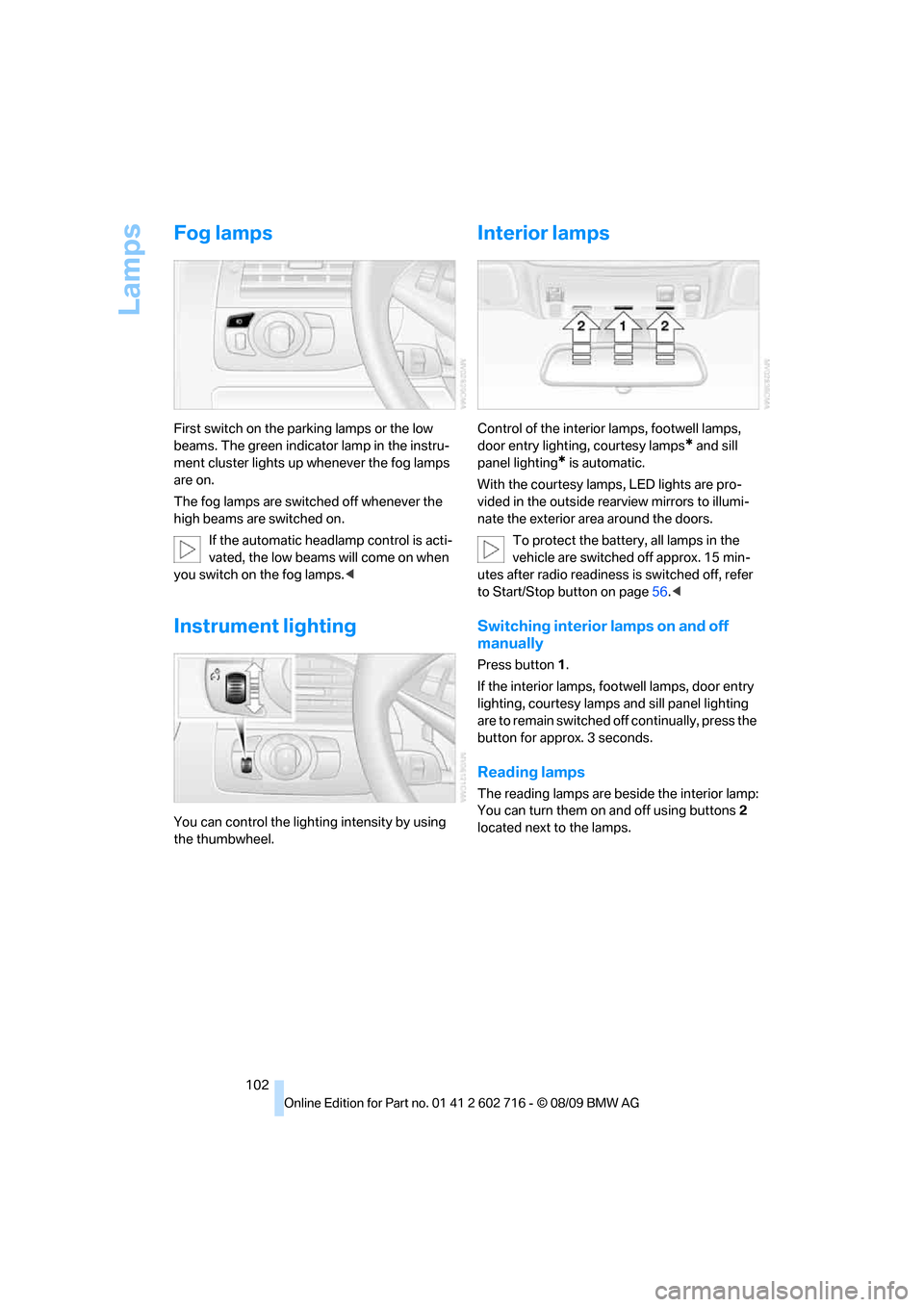
Interior lamps
Control of the interior lamps, footwell lamps,
door entry lighting, courtesy lamps
* and sill
panel lighting
* is automatic.
With the courtesy lamps,
LED lights are pro-
vided in the outside rearview mirrors to illumi-
nate the exterior area around the doors.
To protect the battery, all lamps in the
vehicle are switched off approx. 15 min-
utes after radio readiness is switched off, refer
to Start/Stop button on page56.<
Switching interior lamps on and off
manually
Press button 1.
If the interior lamps, footwell lamps, door entry
lighting, courtesy lamps and sill panel lighting
are to remain switched off continually, press the
button for approx. 3 seconds.
Reading lamps
The reading lamps are beside the interior lamp:
You can turn them on and off using buttons2
located next to the lamps.
Page 210 of 252

Care
208
Care
Car-care products
Regular cleaning and care make a significant
contribution to retaining your BMW's value.
For the cleaning and care of your vehicle, BMW
recommends using only products that BMW
has approved for this purpose.
Your BMW center will be glad to advise you
about products and services for the cleaning
and care of your BMW.
Original BMW Care Products are materi-
als tested, laboratory tested, and tested in
actual use. They offer optimum care and pro-
tection for your vehicle.<
Do not use cleaners that contain alcohol
or solvents; they can damage your vehi-
cle.<
Cleaning agents can contain substances
that are dangerous or pose health risks.
You should therefore heed the warnings and
hazard indications on the packaging. Open the
doors or windows on your vehicle whenever
cleaning the interior. Make sure there is suffi-
cient ventilation in enclosed spaces. Use only
products that are formulated for vehicle clean-
ing.<
Exterior care
Washing your vehicle
In the winter months, it is especially
important to ensure that the vehicle is
washed on a regular basis. Otherwise, signifi-
cant soiling and road salt can cause damage to
the vehicle.<
After washing the vehicle, apply the
brakes briefly to dry them. Failure to do so
may lead to a reduction in braking efficiency and
also to corrosion of the brake rotors.<
Car washes
Give preference to cloth car washes.Do not use high-pressure car washes
because they can cause drops of water to
penetrate in the vicinity of the windshield.<
Before driving into the car wash, make sure that
it is suitable for your BMW. Pay attention to the
following points:
>Dimensions of your vehicle, refer to
page225.
>If necessary, fold in the outside rearview
mirrors, refer to page51.
>Maximum permissible tire width.
>The convertible top must not be treated
with wax. Make sure that a program without
wax or a special convertible program is
available.
Avoid car washes with guide rail heights
over 4 in/10 cm; otherwise, there is a dan-
ger of damaging chassis parts.<
Preparations for driving into the car wash:
>Deactivate rain sensor to prevent unwanted
wiper activation.
>Remove additional add-on parts, e.g. spoil-
ers or phone antennas, if they could be
damaged.
Automatic transmission
Before driving into the car wash, make sure the
vehicle is able to roll by making sure to:
1.Insert the remote control into the ignition
lock, even with Comfort Access.
2.Shift into transmission position N.
3.Release the parking brake.
4.Switch off the engine.
5.Leave the remote control in the ignition lock
so that the vehicle can roll.
Steam jets/high-pressure washers
When using steam jets or high-pressure
washers, ensure that you maintain suffi-
cient clearance to the vehicle and do not exceed
a temperature of 140 °F/606.
Page 243 of 252

Reference 241
At a glance
Controls
Driving tips
Communications
Navigation
Entertainment
Mobility
Indicator/warning lamps
– ABS Antilock Brake
System84
– active steering89
– airbags92
– brake system84
– DSC13,84
– DTC13,84
– Flat Tire Monitor86
– fog lamps13,102
– parking brake13,58
– safety belt warning50
– TPM Tire Pressure
Monitor88
Indicator and warning lamps
– overview13
Inflation pressure, refer to Tire
inflation pressure196
Inflation pressure monitoring,
refer to Flat Tire Monitor85
Inflation pressure monitoring,
refer to Tire Pressure
Monitor87
Initializing
– Flat Tire Monitor86
– radio, refer to Storing
stations150
– refer to Power failure214
– refer to Setting time and
date77
– seat, mirror and steering
wheel memory47
Instructions for navigation
system, refer to Voice
instructions137
Instrument cluster12
Instrument illumination, refer
to Instrument lighting102
Instrument lighting102
Instrument panel, refer to
Cockpit10
Instrument panel, refer to
Instrument cluster12
Integrated key26
Integrated universal remote
control109
Interactive map132Interior lamps102
– switching on with remote
control28
Interior motion sensor33
– switching off34
Interior rearview mirror,
automatic dimming
feature52
Intermittent mode of the
wipers62
Intersection, entering for
navigation128
iPod, connecting, refer to
AUX-IN port166
iPod, connecting, refer to USB
audio interface166
J
Jacking points214
Joystick, refer to iDrive16
Jumpering, refer to Jump
starting217
Jump starting217
K
Keyless-Go, refer to Comfort
Access34
Keyless opening and closing,
refer to Comfort Access34
Key Memory, refer to Personal
Profile26
Keys26
– key-related settings, refer to
Personal Profile26
– spare key26
Kickdown, Sport automatic
transmission59
Knee airbags90
Knock control195
L
Lamps
– refer to High-beam
Assistant100
– refer to Parking lamps/low
beams98Lamps and bulbs212
Lane demarcation lines, refer
to Lane Departure
Warning96
Lane Departure Warning96
Lashing eyes, refer to
Securing cargo122
Last destinations130
LATCH child restraint fixing
system54
Leather care210
LEDs light-emitting
diodes212
Length, refer to
Dimensions225
License plate lamp, replacing
bulbs214
Light Control, refer to
Adaptive Light Control99
Light-emitting diodes
LEDs212
Lighter113
Lighting
– instruments102
– lamps and bulbs212
– of the vehicle, refer to
Lamps98
Light switch98
Loading
– securing cargo122
– stowing cargo121
– vehicle120
Loading, refer to Cargo
loading120
Load securing equipment,
refer to Securing cargo122
Lock buttons in the doors,
refer to Locking30
Locking28
– confirmation signals29
– from inside30
– from outside28
– without key, refer to Comfort
Access34
– without key, refer to Comfort
access34
Page 246 of 252

Everything from A to Z
244 Protective function, refer to
Pinch protection system
– glass sunroof38
– windows37
R
Radio
– controls146
– HD Radio150
– satellite radio152
– selecting waveband149
– storing stations150
– switching on/off146
– tone control146
– volume146
– weatherband, refer to
Weather news flashes151
Radio key, refer to Keys/
remote control26
Radio position, refer to Radio
readiness56
Radio readiness56
– switched off57
– switched on56
– with Comfort Access35
Rain sensor, windshield wiper
system62
Random sequence
– external devices168
– music collection164
Reading lamps102
Rear lamps, refer to Tail
lamps213
Rearview mirrors, refer to
Mirrors51
Rear window
– heating105
– opening and closing37
Reception
– quality150
– radio stations150
Recirculated-air mode, refer
to AUC Automatic
recirculated-air control105
Recirculation of air, refer to
AUC Automatic
recirculated-air control105Reclining seat, refer to
Seats45
Reflectors, refer to Tail
lamps213
Refueling194
Releasing
– hood202
Releasing the locks, refer to
Unlocking34
Remaining distance, refer to
Cruising range73
Remaining distance to
destination, refer to
Computer74
Remote control26
– Comfort Access34
– garage door opener109
– luggage compartment lid28
– malfunction29,35
– replacing battery35
Removing condensation on
the windows105
Replacement fuses215
Replacement of tires
– refer to Changing
wheels214
Replacement remote control,
refer to New remote
controls26
Replacing bulbs, refer to
Lamps and bulbs212
Replacing wheels/tires, refer
to New wheels and tires200
Reporting safety defects7
Required fuel195
Reserve
– warning, refer to Fuel
gauge73
Reset, refer to Resetting tone
settings148
Residual heat106
Restraint systems
– for children53
– refer to Safety belts50
Retreaded tires200
Reverse
– CD changer156
– CD player156Reverse gear
– manual transmission58
– Sport automatic
transmission59
Road map138
Roadside
Assistance187,217
Roadside parking lamps100
– replacing bulbs, refer to
Parking lamps213
Rollover protection system on
Convertible92
– lowering92
Rope, refer to Tow-starting
and towing218
Rotary/pushbutton, refer to
iDrive16
Route136,137
– bypassing sections137
– changing136,137
– changing criteria136
– displaying map view138
– displaying streets or towns/
cities137
– selecting136
Route information, refer to
Destination guidance with
voice instructions137
Route map, refer to Displaying
map view138
Route selection136
RSC Runflat System
Component, refer to Run-
flat tires200
Run-flat System Component
RSC, refer to Run-flat
tires200
Run-flat tires200
– continuing driving with a
damaged tire86,88
– flat tire86,88
– Flat Tire Monitor85
– tire inflation pressure196
– Tire Pressure Monitor87
– tire replacement200,201
– winter tires201