2010 BMW 650I COUPE high beam
[x] Cancel search: high beamPage 102 of 252

Lamps
100
High beams/
roadside parking lamps
1High beams
2Headlamp flasher
3Roadside parking lamps
Roadside parking lamps, left or right*
You also enjoy the option of lighting up just one
side of your vehicle when parking.
Switching on
After parking the vehicle, press the lever up or
down beyond the resistance point, arrow 3.
The roadside parking lamps drain the bat-
tery. Do not leave them switched on for
long periods of time, otherwise it may no longer
be possible to start the engine.<
Switching off
Briefly press the lever in the opposite direction
up to the resistance point, arrow3.
High-beam Assistant*
The concept
This system automatically switches the high
beams on and off. A sensor on the front side of
the inside rearview mirror controls the process.
The assistant makes sure that the high beams
are switched on whenever traffic conditions
permit. This relieves you of the burden of con-
stantly switching back and forth and simulta-
neously provides you with the best possible vis-
ibility. Naturally, you can intervene at any time to
switch the high beams on and off as usual.
Activating system
1.Turn the light switch to position3, refer to
page98.
2.With the low beams switched on, briefly
press the turn signal lever in the high-beam
direction.
The indicator lamp in the instrument
cluster lights up when the High-beam
Assistant is activated. The system
automatically switches between high beams
and low beams, reacting to oncoming traffic,
vehicles ahead of you, and sufficiently lit areas,
e.g. in built-up zones.
Manually switching between high
beams and low beams
If you wish or the situation requires, you can
intervene at any time.
>If the High-beam Assistant has switched on
the high beams, but you wish to use the low
beams, just switch on the low beams with
the turn signal lever. This deactivates the
High-beam Assistant.
In order to reactivate the system, briefly
press the turn signal lever in the high-beam
direction.
>If the High-beam Assistant has switched on
the low beams, but you wish to use the high
beams, simply switch on the high beams as
usual. This deactivates the system and it is
up to you to switch back to low beams.
In order to reactivate the system, briefly
press the turn signal lever in the high-beam
direction.
>When the low beams are on, use the head-
lamp flasher as usual.
Page 103 of 252

Controls
101Reference
At a glance
Driving tips
Communications
Navigation
Entertainment
Mobility
System limits
The High-beam Assistant is designed to
maximize the amount of time that high
beams can be safely used and to quickly switch
back to low beams when traffic approaches.
The system cannot completely replace driver
intervention when unusual conditions are
encountered. For this reason, switch to low
beams when circumstances so dictate. Failure
to do so can pose a safety risk.<
Below are a few examples of situations in which
the system may not react or may only function
to a limited degree, requiring personal interven-
tion:
>in extremely unfavorable weather condi-
tions such as fog or heavy precipitation
>in sensing road users with poor inherent
illumination such as pedestrians, cyclists,
equestrians, horse-drawn vehicles, railroad
or shipping traffic close to the road, and at
deer crossings
>in tight curves, on steep crests or dips, with
cross-traffic, or with partially hidden
oncoming traffic on divided highways
>in poorly illuminated areas and in the pres-
ence of highly reflective signs
>in the low speed range
>when the windshield is fogged up, dirty or
covered with stickers, decals etc. in the area
of the inside rearview mirror
>when the sensor is dirty. Clean the sensor
on the front side of the inside rearview mir-
ror with a cloth slightly moistened with glass
cleaner
Moreover, no system can operate without limi-
tations. High-beam Assistant operation is sub-
ject to conditions that may reduce the system's
ability to recognize the difference between
actual vehicle head lamps or tail lamps and, for
example, highly reflective signs, markers, and
streetlights. To be on the safe side, the system
may periodically interpret these situations as
conditions that require low beams. Below are
some of the situations in which premature
switching to low beams can occur:>approaching large and/or highly reflective
signs
>approaching certain lights, such as drive-
way lighting and porch lights
>approaching certain traffic signals
>approaching large reflective markers
In these situations, the system may interpret
the above conditions as a vehicle ahead requir-
ing a switch to low beams. When the conditions
return to normal, the system will reactivate the
high beams.
The High-beam Assistant cannot replace the
driver's responsibility for complying with state
laws on high-beam switching or for adapting to
visibility and traffic conditions.
Switching off via iDrive
iDrive, for operating principle refer to page16.
1."Settings"
2."Lighting"
3."High beam assistant"
High beam assistant is activated and is
stored for the remote control currently in use.
Page 104 of 252
Lamps
102
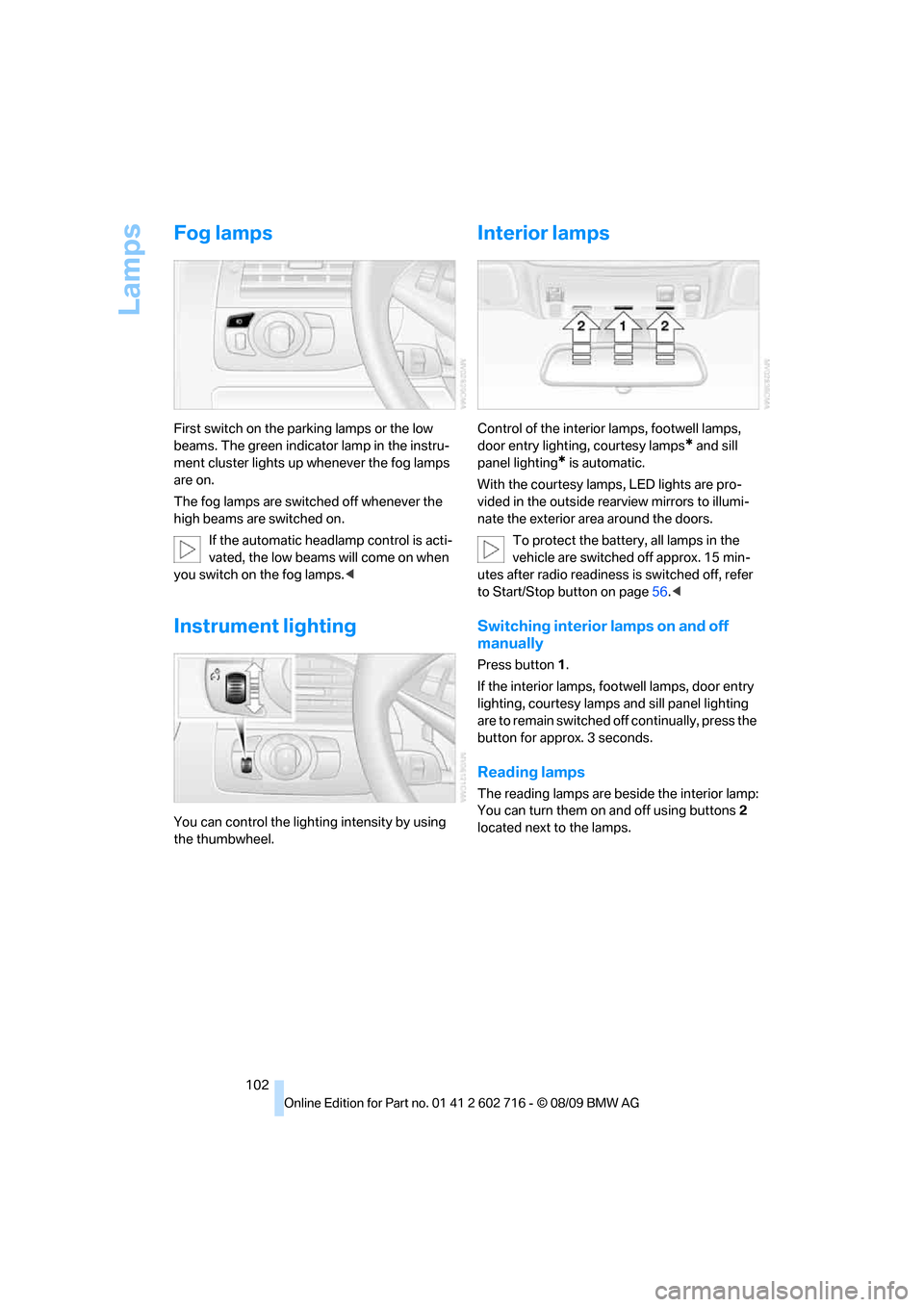
Fog lamps
First switch on the parking lamps or the low
beams. The green indicator lamp in the instru-
ment cluster lights up whenever the fog lamps
are on.
The fog lamps are switched off whenever the
high beams are switched on.
If the automatic headlamp control is acti-
vated, the low beams will come on when
you switch on the fog lamps.<
Instrument lighting
You can control the lighting intensity by using
the thumbwheel.
Interior lamps
Control of the interior lamps, footwell lamps,
door entry lighting, courtesy lamps
* and sill
panel lighting
* is automatic.
With the courtesy lamps,
LED lights are pro-
vided in the outside rearview mirrors to illumi-
nate the exterior area around the doors.
To protect the battery, all lamps in the
vehicle are switched off approx. 15 min-
utes after radio readiness is switched off, refer
to Start/Stop button on page56.<
Switching interior lamps on and off
manually
Press button 1.
If the interior lamps, footwell lamps, door entry
lighting, courtesy lamps and sill panel lighting
are to remain switched off continually, press the
button for approx. 3 seconds.
Reading lamps
The reading lamps are beside the interior lamp:
You can turn them on and off using buttons2
located next to the lamps.
Page 213 of 252

Mobility
211Reference
At a glance
Controls
Driving tips
Communications
Navigation
Entertainment
matte components with water and, if necessary,
a solvent-free plastic cleaner.
Fine wooden components
Use a damp cloth to clean fine wooden trim
panels and components. Follow up by drying
with a soft cloth.
Safety belts
Dirty belt straps impede the reeling action and
thus have a negative impact on safety.
Chemical cleaning
Do not clean chemically, as this may
destroy the webbing.<
Inside sensors
Clean inside sensors such as those of the High-
beam Assistant using a lint-free cloth moist-
ened with glass cleaner.
Displays
Clean displays like the radio or the Control Dis-
play using a display-cleaning cloth or a soft,
nonabrasive lint-free cloth.
Avoid using excessive pressure when
cleaning displays; otherwise, you could
damage them.<
Never use chemical-based cleansers or
household scouring products. Keep all
liquids away from the equipment. Otherwise
corrosion or damage to surfaces or electrical
components can occur.<
CD/DVD drives
Do not use cleaning CDs; they can dam-
age parts of the player.<
Storing your vehicle
When storing your vehicle for longer than three
months, please seek the advice of your BMW
center or a workshop that works in accordance
with BMW guidelines.
Page 237 of 252

Reference 235
At a glance
Controls
Driving tips
Communications
Navigation
Entertainment
Mobility
Automatic climate control103
– automatic air
distribution104
– convertible program104
– parked car ventilation/
heating107
– switching on and off106
Automatic closing of doors,
refer to Automatic soft
closing31
Automatic curb monitor51
Automatic lighting
– refer to Automatic headlamp
control98
– refer to Daytime running
lamps99
– refer to Interior lamps102
– refer to Pathway lighting99
– refer to Welcome lamps98
Automatic lights
– refer to High-beam
Assistant100
Automatic Service
Request190
Automatic soft closing31
AUTO program for automatic
climate control104
AUX-IN connection111
AUX-IN port166
Available services190
Average fuel consumption73
– setting units74
Average speed73
Avoiding highways for
navigation136
Avoiding unintentional
alarms34
Axle loads, refer to
Weights227
B
Backrest contour, refer to
Lumbar support46
Backrests, refer to Seats45
Backup lamps, replacing
bulbs, refer to Tail
lamps213Band-aids, refer to First aid
kit217
Bass, refer to Tone
control146
Battery
– jump starting217
– refer to Vehicle battery214
Battery replacement, remote
control for Comfort
Access36
BC button, refer to
Computer73
Being towed219
Belts, refer to Safety belts50
Beverage holder, refer to
Cupholders112
Blower, refer to Air
volume105
Bluetooth, activating/
deactivating174
BMW
– Car Shampoo211
BMW Assist,
activating188,190
BMW Assist186
BMW homepage4
BMW maintenance
system206
BMW Night Vision94
– activating95
– cleaning camera96
– cleaning camera, refer to
Wiper system62
– deactivating96
– making settings96
BMW Search188
BMW website4
Bottle holder, refer to
Cupholders112
Bracket for telephone or
mobile phone
– refer to Snap-in adapter182
Brake assistant83
– adaptive83
Brake force display90
Brake lamps
– replacing bulbs, refer to Tail
lamps213
– two-stage90Brake rotors
– breaking-in118
– refer to Braking safely120
Brakes
– ABS Antilock Brake
System83
– brake force display90
– breaking-in
118
– CBC Cornering Brake
Control83
– electronic brake-force
distribution83
– parking brake58
– refer to Braking safely120
Brake system118
– brake pads118
– brake rotors120
– breaking-in118
– warning lamp13,84
Braking safely120
Breakdown services, refer to
Roadside Assistance217
Breaking-in brake pads118
Breaking-in the clutch118
Breaking-in the differential,
refer to Engine and
differential118
Break-in period118
Brightness of Control
Display81
Button for starting engine,
refer to Start/Stop button56
Buttons on steering wheel11
C
California Proposition 65
Warning6
Call
– accepting175
– ending176
– rejecting176
Calling, refer to Phone
numbers, dialing176
Can holder, refer to
Cupholders112
Capacities227
Car battery, refer to Vehicle
battery214
Page 242 of 252
Everything from A to Z
240 Gasoline
– refer to Average fuel
consumption73
– refer to Fuel
specifications195
– refer to Required fuel195
Gasoline display, refer to Fuel
gauge73
Gas station
recommendations137
Gearshift lever
– manual transmission58
General driving
notes118,119
Glass sunroof, electric with
raise function38
– convenient opening and
closing30
– convenient opening and
closing with Comfort
Access35
– moving manually39
– remote control28
Glove compartment110
GPS navigation, refer to
Navigation system126
Grills, refer to Ventilation106
Gross vehicle weight, refer to
Weights227
H
Handbrake
– indicator lamp13,58
Handbrake, refer to Parking
brake58
Hands-free system, refer to
Microphone14
Hand washing209
Hazard warning flashers15
HD Radio150
Head airbags90
Headlamp
– cleaning tank, refer to
Capacities227
Headlamp control,
automatic98
Headlamp flasher61Headlamps
– cleaning, refer to Wiper
system62
– filler neck for washer
fluid203
– replacing bulbs212
Head restraints
– active front head
restraints48
– front48
– sitting safely45
Head-up Display93
Heated
– mirrors51
– rear window105
– seats50
– steering wheel52
Heating104
– exterior mirrors51
– interior103
– rear window105
– residual heat106
– seats50
– steering wheel52
Heating with engine switched
off, refer to Residual
heat106
Heavy cargo, refer to Securing
cargo122
Height, refer to
Dimensions225
Height adjustment
– seats46
– steering wheel52
High-beam Assistant100
High beams100
– headlamp flasher100
– indicator lamp13
High-pressure cleaning
jets208,209
High water, refer to Driving
through water120
Highway, refer to Route
criteria
136
Hills120
Holder for cups112
Homepage of BMW4
Hood202
Horn10Hotel function30
– unlocking manually31
Hot exhaust system119
Hydraulic brake assistant,
refer to Brake assistant83
Hydroplaning119
I
IBOC, refer to HD Radio150
Ice, refer to Outside
temperature warning72
Identification mark
– recommended tire
brands201
– run-flat tires200
– tire coding198
iDrive16
– changing date and time77
– changing language80
– changing settings80
– changing units of measure
and display type74
– controller16
– controls16
– operating principle17
– setting brightness81
– start menu17
– status information19
Ignition56
– switched off57
– switched on56
Ignition key, refer to Keys/
remote control26
Ignition key position 1, refer to
Radio readiness56
Ignition key position 2, refer to
Ignition on56
Ignition lock56
– starting engine with Comfort
Access35
Impressum2
Imprint2
Page 243 of 252

Reference 241
At a glance
Controls
Driving tips
Communications
Navigation
Entertainment
Mobility
Indicator/warning lamps
– ABS Antilock Brake
System84
– active steering89
– airbags92
– brake system84
– DSC13,84
– DTC13,84
– Flat Tire Monitor86
– fog lamps13,102
– parking brake13,58
– safety belt warning50
– TPM Tire Pressure
Monitor88
Indicator and warning lamps
– overview13
Inflation pressure, refer to Tire
inflation pressure196
Inflation pressure monitoring,
refer to Flat Tire Monitor85
Inflation pressure monitoring,
refer to Tire Pressure
Monitor87
Initializing
– Flat Tire Monitor86
– radio, refer to Storing
stations150
– refer to Power failure214
– refer to Setting time and
date77
– seat, mirror and steering
wheel memory47
Instructions for navigation
system, refer to Voice
instructions137
Instrument cluster12
Instrument illumination, refer
to Instrument lighting102
Instrument lighting102
Instrument panel, refer to
Cockpit10
Instrument panel, refer to
Instrument cluster12
Integrated key26
Integrated universal remote
control109
Interactive map132Interior lamps102
– switching on with remote
control28
Interior motion sensor33
– switching off34
Interior rearview mirror,
automatic dimming
feature52
Intermittent mode of the
wipers62
Intersection, entering for
navigation128
iPod, connecting, refer to
AUX-IN port166
iPod, connecting, refer to USB
audio interface166
J
Jacking points214
Joystick, refer to iDrive16
Jumpering, refer to Jump
starting217
Jump starting217
K
Keyless-Go, refer to Comfort
Access34
Keyless opening and closing,
refer to Comfort Access34
Key Memory, refer to Personal
Profile26
Keys26
– key-related settings, refer to
Personal Profile26
– spare key26
Kickdown, Sport automatic
transmission59
Knee airbags90
Knock control195
L
Lamps
– refer to High-beam
Assistant100
– refer to Parking lamps/low
beams98Lamps and bulbs212
Lane demarcation lines, refer
to Lane Departure
Warning96
Lane Departure Warning96
Lashing eyes, refer to
Securing cargo122
Last destinations130
LATCH child restraint fixing
system54
Leather care210
LEDs light-emitting
diodes212
Length, refer to
Dimensions225
License plate lamp, replacing
bulbs214
Light Control, refer to
Adaptive Light Control99
Light-emitting diodes
LEDs212
Lighter113
Lighting
– instruments102
– lamps and bulbs212
– of the vehicle, refer to
Lamps98
Light switch98
Loading
– securing cargo122
– stowing cargo121
– vehicle120
Loading, refer to Cargo
loading120
Load securing equipment,
refer to Securing cargo122
Lock buttons in the doors,
refer to Locking30
Locking28
– confirmation signals29
– from inside30
– from outside28
– without key, refer to Comfort
Access34
– without key, refer to Comfort
access34
Page 248 of 252

Everything from A to Z
246 Sport automatic
transmission58
– Dynamic Driving Control60
– kickdown59
– releasing transmission
lock60
– towing219,220
– with Comfort Access35
Sport program in the Sport
automatic transmission59
Stability control, refer to
Driving stability control
systems83
Start/Stop button56
– starting the engine57
– switching off the engine57
Starting, refer to Starting
engine57
Starting assistance, refer to
Jump starting217
Starting difficulties, refer to
Jump starting217
Starting off on slopes, refer to
Drive-off assistant85
Start menu17
Station, refer to Radio149
Station, selecting
– radio149
Stationary ventilation
– preselecting activation
times107
Status information on Control
Display19
Status of this Owner's Manual
at time of printing5
Steam cleaners208,209
Steering wheel
– adjustment52
– automatic adjustment, refer
to Easy entry/exit52
– automatic adjustment, refer
to Steering wheel
memory47
– buttons on steering
wheel11
– heating52
– lock, refer to Ignition lock56
– memory47Steering with variable ratio,
refer to Active steering89
Steptronic, refer to Sport
automatic transmission58
Storage compartments112
Stored trip, calling up135
Storing211
Storing a destination in the
address book129
Storing music161
Storing sitting position, refer
to Seat, mirror and steering
wheel memory
47
Storing tires201
Storing your vehicle211
Street, entering for
navigation128
Summer tires, refer to Wheels
and tires196
Surround147
SVCD156
SW, waveband149
Switches, refer to Cockpit10
Switching automatically
between high beams and
low beams, refer to High-
beam Assistant100
Switching automatically
between high beams and
low beams, refer to High-
beam assistant100
Switching off
– engine57
Switching on
– audio146
– CD changer146
– CD player146
– radio146
Swiveling headlamps, refer to
Adaptive Light Control99
Symbols4
– indicator/warning lamps13
T
Tachometer72
Tail lamps213
– replacing bulbs213Tank capacity
– also refer to Capacities227
– fuel tank capacity194
Target cursor for
navigation132
Technical alterations, refer to
For your own safety5
Technical data224
– capacities227
– dimensions225
Telephone172
– installation location, refer to
Center armrest111
– refer to separate operating
instructions
– voice commands179
TeleService186
TeleService Diagnosis188
TeleService Help188
Temperature
– adjusting in upper body
region106
– adjusting with automatic
climate control104
– changing unit of measure74
– refer to Coolant
temperature72
Temperature display
– outside temperature72
– outside temperature
warning72
– setting the units74
Temperature gauge
– engine oil73
Tempomat, refer to Cruise
control63
The individual vehicle5
Tilt alarm sensor33
– switching off34
Tilting down passenger-side
exterior mirror51
Timer, refer to Preselecting
activation times107
Tire inflation pressure196
Tire pressure
– loss86,87
Tire Pressure Monitor
TPM87
Tire Quality Grading198