2010 BMW 5 SERIES manual radio set
[x] Cancel search: manual radio setPage 156 of 271
On/off and tone
154
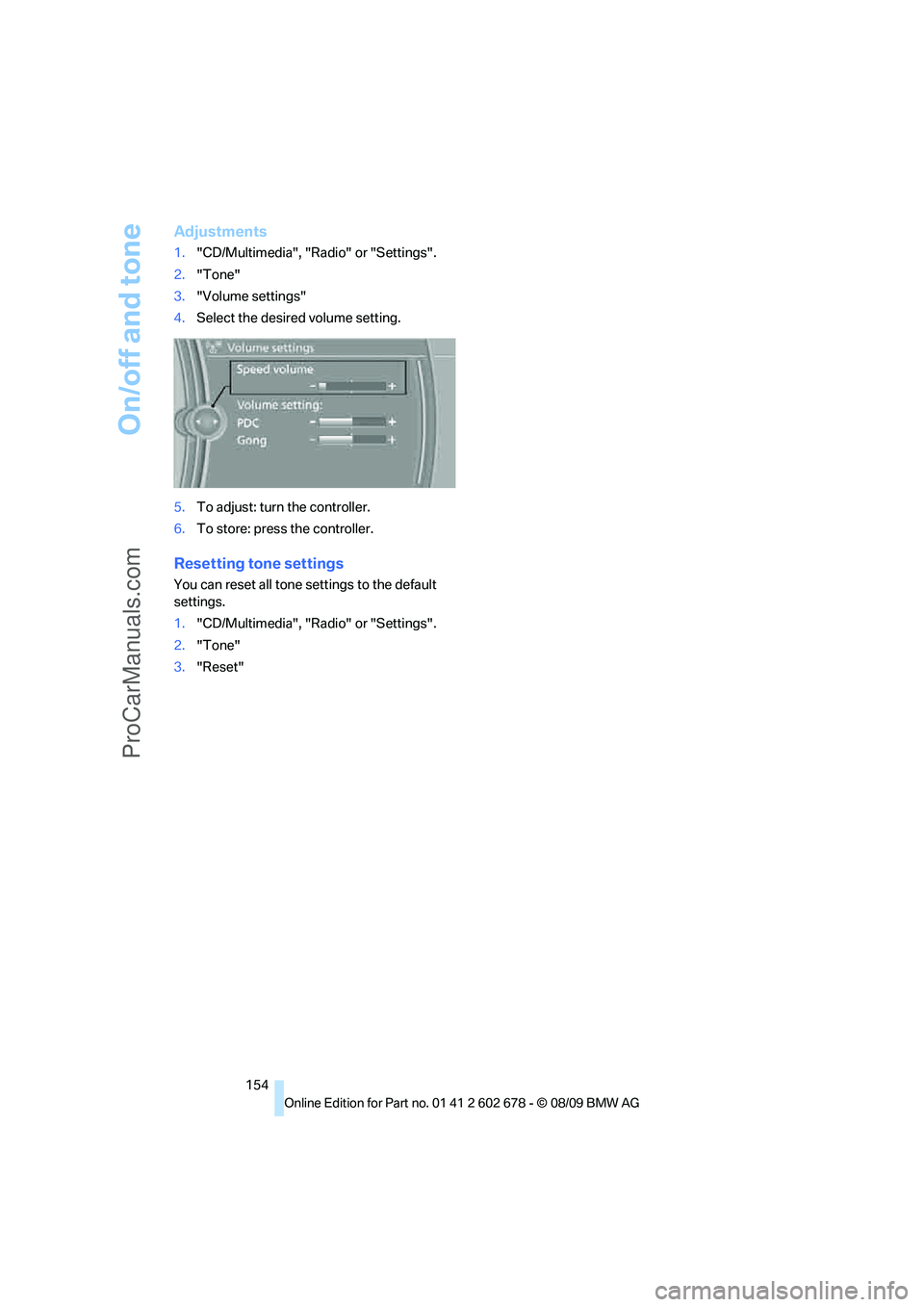
Adjustments
1."CD/Multimedia", "Radio" or "Settings".
2."Tone"
3."Volume settings"
4.Select the desired volume setting.
5.To adjust: turn the controller.
6.To store: press the controller.
Resetting tone settings
You can reset all tone settings to the default
settings.
1."CD/Multimedia", "Radio" or "Settings".
2."Tone"
3."Reset"
ProCarManuals.com
Page 158 of 271

Radio
156
Storing stations
Via iDrive
1."Radio"
2."FM" or "AM"
3.Select the desired station.
4.Press the controller for an extended period.
5.Select the desired memory location.
The stations are stored for the remote control
currently in use.
About programmable memory buttons
You can also store a station on the programma-
ble memory buttons, refer to page20.
1.Select a station.
2. ... Press the desired button
for a longer period.
Radio Data System RDS*
In the FM waveband, additional information is
transmitted via RDS. If the reception conditions
are good, the station names are shown on the
Control Display. If the reception is weak or dis-
rupted, it can take some time before the station
names are displayed.
Switching RDS on/off
1."Radio"
2."FM"
3.Open "Options".4."RDS"
The setting is stored for the remote control cur-
rently in use.
HD Radio*
Many stations broadcast both analog and digi-
tal signals. If a digital radio network is available,
these stations can be received digitally and thus
with better sound quality.
License conditions
HD Radio™ technology manufactured under
license from iBiquity Digital Corp. U.S. and For-
eign Patents. HD Radio™ and the HD and HD
Radio logos are proprietary trademarks of iBiq-
uity Digital Corp.
Activating/deactivating digital radio
reception
1."Radio"
2."FM" or "AM"
3.Open "Options".
4."HD Radio"
The setting is stored for the remote control cur-
rently in use.
This symbol is displayed when a station is
being received digitally.
In areas in which the station is not continuously
received in digital mode, the playback switches
between analog and digital reception. Due to
time delayed broadcasting, there may be repe-
titions or interruptions. In this case, switch off
digital radio reception.
ProCarManuals.com
Page 159 of 271

Navigation
Entertainment
Driving tips
157Reference
At a glance
Controls
Communications
Mobility
Displaying additional information
Some stations broadcast additional information
on the current track, such as the name of the
artist.
1.Select the desired station.
2.Open "Options".
3."Station info"
Selecting a substation
1.Select the desired station.
2.Press the controller.
3.Select the substation.
Presets
It is possible to store up to 40 stations.
Calling up a station
1."Radio"
2."Presets"
3.Select the desired station.
Storing a station
The station currently selected is stored.
1."Radio"
2."Presets"
3."Store station"
4.Select the desired memory location.
The list of stored stations is stored for the
remote control currently in use.
The stations can also be stored on the pro-
grammable memory buttons, refer to page20.
Deleting a station
1."Radio"
2."Presets"
3.Select the desired station.
4.Open "Options".
5."Delete entry"
Weather Band*
Weather Radio is a service of the National Oce-
anic and Atmospheric Administration (NOAA)
of the US Department of Trade. Weather news
flashes are repeated every 4 to 6 minutes and
are routinely updated at intervals of 1 to
3 hours, and more often when necessary. Most
stations operate 24 hours a day. In case of a
storm, the National Weather Service interrupts
the routine weather news and transmits special
warning messages instead. If you have a ques-
tion about NOAA Weather Radio, please con-
tact the nearest office of the National Weather
Service. Details are also provided on the Inter-
net at www.nws.noaa.gov.
Calling up weather news flashes
To operate via the iDrive:
1.Switch on the radio.
2."Weather band"
3.Select the desired channel.
The station for weather news flashes may be
unavailable in some regions.
ProCarManuals.com
Page 183 of 271

181
Entertainment
Reference
At a glance
Controls
Driving tips Communications
Navigation
Mobility
To temporarily deactivate the Bluetooth link
between the vehicle and your mobile phone:
1."Telephone"
2.Open "Options".
3."Bluetooth"
Adjusting volume
Turn the knob during a call to select the desired
volume.
This volume for the hands-free system is main-
tained, even if the other audio sources are set to
minimum volume.
The setting is stored for the remote control cur-
rently in use.
Operation via iDrive
You can operate the following functions via
iDrive:
>Accepting/refusing a call
>Dialing phone numbers
>Dialing phone numbers from the phone
book
>Selecting stored phone numbers, e.g., from
the list of received calls
>Ending a callWhen the ignition is switched off or in radio
readiness, e.g., after taking the remote control
out of the ignition switch, you can continue an
ongoing call via the hands-free system for sev-
eral minutes.
Speech quality
If the person you are talking to cannot under-
stand you well, this may be due to excessively
loud background noises. The full preparation
package mobile phone can compensate for
these noises to a certain extent. To optimize
voice quality during a call, we recommend that
you:
>Reduce background noises, e.g., by closing
the windows, reducing the air volume of the
automatic climate control or pointing the
opened front vent outlets downward
>Reduce the volume of the hands-free sys-
tem.
Requirements
>The logon data of the mobile phone are
stored in the vehicle and the mobile phone
is ready to operate.
>The engine is running or the ignition is
switched on.
>The mobile phone is detected by the vehi-
cle.
Receiving calls
If you have the phone number of the caller
stored in the phone book and the phone num-
ber has been transmitted, the name of the entry
is displayed.
Accepting a call
Press the button on the steering wheel
ProCarManuals.com
Page 231 of 271
Mobility
229Reference
At a glance
Controls
Driving tips
Communications
Navigation
Entertainment
3.Check and correct the tire inflation pressure
at the earliest opportunity.
Protect valve stems with valve stem
seal caps against dirt and contamina-
tion. Dirt in valve stems is a frequent source
of gradual air loss.<
4.Initialize the Flat Tire Monitor, refer to
page89, or reset the Tire Pressure Monitor,
refer to page90.
5.Replace the damaged tire as soon as possi-
ble and have the new wheel/tire balanced.
Driving with compact wheel
Drive reservedly and do not exceed a speed of
50 mph/80 km/h.
The driving characteristics change, for example
reduced track stability on braking, extended
braking distance, and altered self-steering
characteristics in the limit range. In conjunction
with winter tires, these characteristics are more
pronounced.
Only one compact wheel may be
mounted. Restore the wheels and tires to
their original size as quickly as possible. Failure
to do so is a safety risk.<
Vehicle battery
Battery care
The battery is 100 % maintenance-free, i.e., the
electrolyte will last for the life of the battery
when the vehicle is operated in a temperate cli-
mate. Your BMW center will be glad to advise in
all matters concerning the battery.
Charging battery
Only charge the battery in the vehicle via the
terminals in the engine compartment with the
engine switched off. Connections, refer to
Jump starting on page232.
Disposal
Have old batteries disposed of by your
BMW center or bring them to a recycling
center. Maintain the battery in an upright posi-tion for transport and storage. Always restrain
the battery to prevent it from tipping over during
transport.<
Power failure
Following a temporary power failure, e.g., due to
a discharged battery, the use of some equip-
ment will be restricted, requiring its reinitializa-
tion. In the same way, individual settings are lost
and must be updated again:
>Seat, mirror and steering wheel memory
The positions must be stored again, refer to
page46.
>Time and date
Must be updated again, refer to page78.
>Radio
In some cases, radio stations may have to
be stored again, refer to page156.
>Navigation system
You must wait until the system becomes
functional again, refer to page132.
>Glass roof, electric
It may only be possible to raise the glass
roof. The system must be initialized, refer to
page40.
>Panorama glass roof
It may only be possible to raise the glass
roof. The system must be reinitialized, refer
to page41.
>Active steering
The system automatically initializes itself
briefly during a trip. The system is deacti-
vated during this time, refer to page92.
>xDrive
The system automatically initializes itself
during a trip. Indicator lamps light up during
this time. If the lamps do not disappear dur-
ing the current trip, have the system
checked.
>Power windows
The pinch prevention system for the power
windows must be reinitialized, refer to
page38.
Talk to your BMW center before placing
the stored vehicle back in service.<
ProCarManuals.com
Page 247 of 271

Reference 245
At a glance
Controls
Driving tips
Communications
Navigation
Entertainment
Mobility
Satellite radio
Presets
Telephone
Navigation
General information
FunctionCommand
Calling up the satellite radio{Satellite radio}
Switching on the satellite radio{Satellite radio on}
Selecting a satellite radio channel{Satellite radio channel} e.g., channel 2
FunctionCommand
Calling up the stored stations{Presets}
Choosing a stored station{Select preset}
Selecting a stored station{Preset …} e.g., stored station 2
FunctionCommand
Opening the Telephone menu{Telephone}
Displaying the phone book{Phonebook}
Redialing{Redial}
Displaying accepted calls{Received calls}
Dialing a phone number{Dial number}
Displaying the list of messages{Messages}
Displaying Bluetooth{Bluetooth}
FunctionCommand
Navigation menu{Navigation}
Opening destination entry{Enter address}
Opening destination guidance{Guidance}
Starting destination guidance{Start guidance}
Ending destination guidance{Stop guidance}
Opening the home address{Home address}
Opening the route criteria{Route preference}
Opening the route{Route information}
Switching on the voice instructions{Switch on voice instructions}
Repeating a voice instruction{Repeat voice instructions}
ProCarManuals.com
Page 256 of 271

Everything from A to Z
254 Cooling function, automatic
climate control107
Cooling system, refer to
Coolant214
Copyright2
Cornering Brake Control
CBC85
Country codes DVD162
Country of destination for
navigation133
Courtesy lamps104
Cradle for telephone or mobile
phone112
Cruise control65
– active cruise control66
Cruising range75
Cupholders114
Curb weight, refer to
Weights241
Current consumption, refer to
Energy Control75
Current playback
– external devices174
– of music collection169
Customer Relations195
Cylinders, refer to Engine
data238
D
Dashboard, refer to
Cockpit10
Dashboard lighting, refer to
Instrument lighting104
Data, technical238
– dimensions239
– engine238
– weights241
Data transfer196
Date74
– date format79
– retrieval74
– setting79
Daytime running lamps101Defect
– door lock30
– fuel filler flap200
– glass sunroof40
– luggage compartment lid32
– panorama glass sunroof41
– tailgate33
Defrosting windows106
Defrosting windows and
removing condensation106
Defrosting windshield, refer to
Defrosting windows106
Defrost position, refer to
Defrosting windows106
Deleting a trip141
Destination address
– entering133,139
Destination entry via BMW
Assist137
Destination for navigation
– entering via map138
– entering via voice139
– entry133
Destination guidance142
– bypassing route
sections143
– changing specified
route142
– continuing142
– starting142
– voice instructions143
– volume of voice
instructions144
Digital clock74
Digital radio, refer to HD
Radio156
Dimensions239
Directional indicators, refer to
Turn signals63
Direction announcements,
refer to Voice
instructions143
Direction instructions, refer to
Voice instructions143
Directory for navigation, refer
to Address book
135
Displacement, refer to Engine
data238Display, refer to iDrive
controls16
Display elements, refer to
Instrument cluster12
Display lighting, refer to
Instrument lighting104
Displays
– on Control Display, refer to
iDrive16
– refer to Instrument
cluster12
Displays on the windshield,
refer to Head-up Display95
Disposal
– battery of remote control
with Comfort Access38
– coolant214
– vehicle battery229
Distance, refer to
Computer76
Distance control, refer to
Active cruise control66
Distance to destination, refer
to Computer76
Distance warning, refer to
PDC Park Distance
Control84
Divided rear backrest, refer to
Through-loading
system116
Do201
Door entry lighting104
Door key, refer to Keys/
remote control26
Door lock30
Door locking, confirmation
signals29
Doors
– manual operation30
– remote control28
DOT Quality Grades207
Draft-free ventilation108
Drinks holder, refer to
Cupholders114
Drive-off assistant87
Driving lamps, refer to Parking
lamps/low beams100
Driving stability control
systems85
ProCarManuals.com
Page 259 of 271

Reference 257
At a glance
Controls
Driving tips
Communications
Navigation
Entertainment
Mobility
Glove compartment112
– lighting112
GPS navigation, refer to
Navigation system132
Grills, refer to Ventilation108
Gross vehicle weight, refer to
Weights241
H
Halogen lamps222
Hands-free system, refer to
Microphone14
Hand washing218
Hazard warning flashers15
HDC Hill Descent Control86
HD Radio156
Head airbags93
Headlamp
– cleaning tank, refer to
Capacities242
Headlamp control,
automatic100
Headlamp flasher63
Headlamps100
– cleaning, refer to Wiper
system63
– filler neck for washer
fluid212
– replacing bulbs222
Head Light, refer to Adaptive
Light Control101
Head restraints46
– active front head
restraints47
– removing47
– sitting safely43
Head-up Display95
Heated
– mirrors51
– rear window106
– seats49
– steering wheel52Heating105
– exterior mirrors51
– interior105
– rear window106
– residual heat107
– seats49
– steering wheel52
Heating with engine switched
off, refer to Residual
heat107
Heavy cargo, refer to Securing
cargo128
Height, refer to
Dimensions239
Height adjustment
– seats44
– steering wheel52
High-beam Assistant102
High beams102
– headlamp flasher102
– indicator lamp13
– replacing bulbs223
High-pressure cleaning
jets217,218
High water, refer to Driving
through water126
Hill Descent Control HDC86
Hills126
Holder for cups114
Homepage of BMW4
Hood211
Hooks for shopping bags,
Sports Wagon119
Horn10
Hotel function, refer to
Locking separately31
Hot exhaust system125
Hydraulic brake assistant,
refer to Brake assistant85
Hydroplaning125
I
IBOC, refer to HD Radio156
Ice, refer to Outside
temperature warning74Identification mark
– recommended tire
brands209
– tire coding206
iDrive16
– automatic climate
control108
– automatic climate control
with expanded scope106
– changing language82
– changing settings82
– changing units of measure
and display type76
– controller16
– controls16
– menu guidance17
– setting brightness83
– setting the date and time79
– start menu17
– status information19
Ignition57
– switched off58
– switched on57
Ignition key, refer to Keys/
remote control26
Ignition key position 1, refer to
Radio readiness57
Ignition key position 2, refer to
Ignition on57
Ignition lock57
– starting engine with Comfort
Access37
Impressum2
Imprint2
Indicator/warning lamps
– ABS Antilock Brake
System87
– active steering93
– airbags95
– brake system87
– DSC13,86
– DTC13,86
– Flat Tire Monitor89
– safety belt warning48
– TPM Tire Pressure
Monitor91
Indicator and warning
lamps13
ProCarManuals.com