Page 233 of 274
Mobility
231Reference
At a glance
Controls
Driving tips
Communications
Navigation
Entertainment
Replacing the corner-illuminating
lamp*
H3 bulb, 55 watts
1.Switch off the lamps and take the remote
control out of the ignition lock.
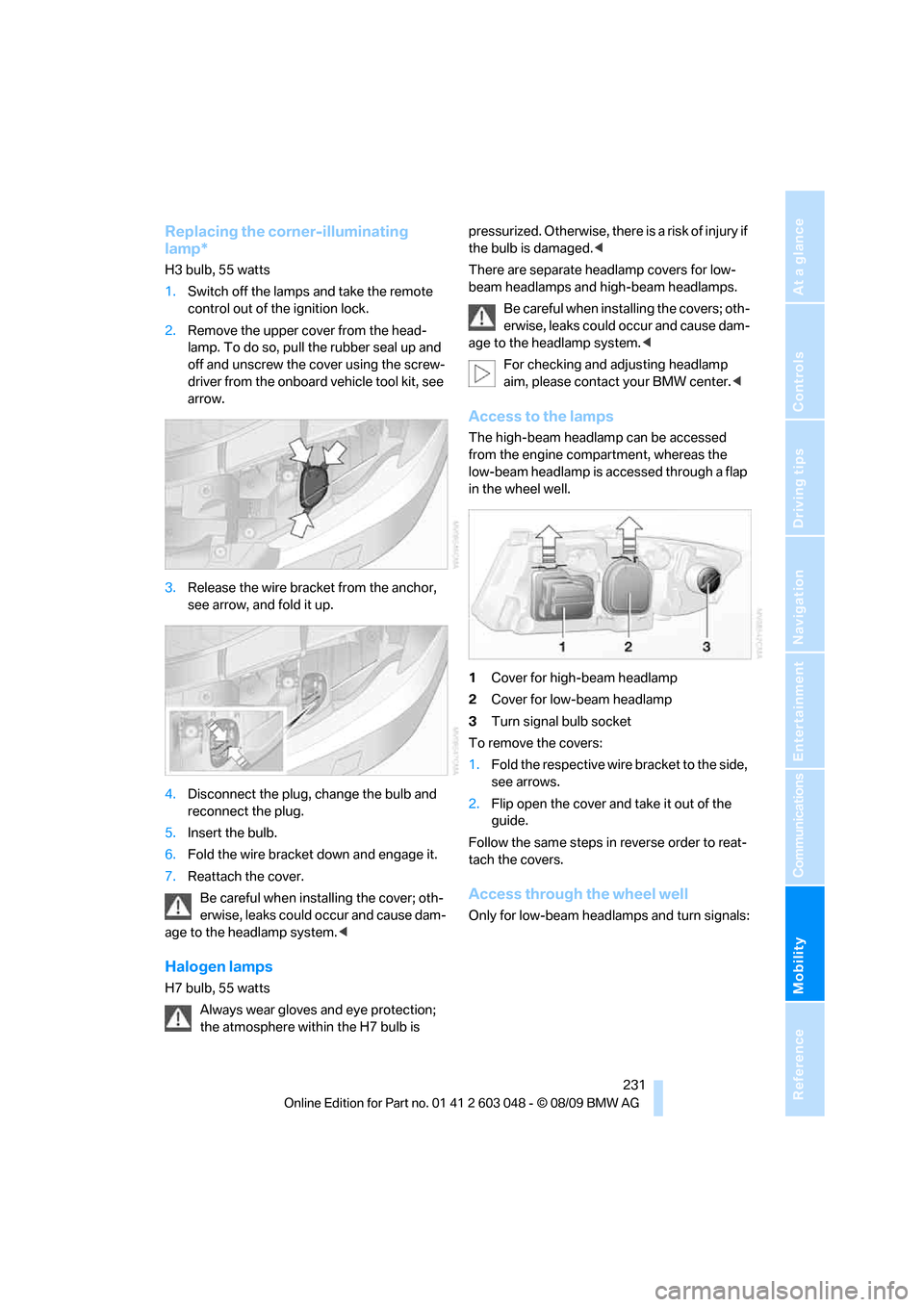
2.Remove the upper cover from the head-
lamp. To do so, pull the rubber seal up and
off and unscrew the cover using the screw-
driver from the onboard vehicle tool kit, see
arrow.
3.Release the wire bracket from the anchor,
see arrow, and fold it up.
4.Disconnect the plug, change the bulb and
reconnect the plug.
5.Insert the bulb.
6.Fold the wire bracket down and engage it.
7.Reattach the cover.
Be careful when installing the cover; oth-
erwise, leaks could occur and cause dam-
age to the headlamp system.<
Halogen lamps
H7 bulb, 55 watts
Always wear gloves and eye protection;
the atmosphere within the H7 bulb is pressurized. Otherwise, there is a risk of injury if
the bulb is damaged.<
There are separate headlamp covers for low-
beam headlamps and high-beam headlamps.
Be careful when installing the covers; oth-
erwise, leaks could occur and cause dam-
age to the headlamp system.<
For checking and adjusting headlamp
aim, please contact your BMW center.<
Access to the lamps
The high-beam headlamp can be accessed
from the engine compartment, whereas the
low-beam headlamp is accessed through a flap
in the wheel well.
1Cover for high-beam headlamp
2Cover for low-beam headlamp
3Turn signal bulb socket
To remove the covers:
1.Fold the respective wire bracket to the side,
see arrows.
2.Flip open the cover and take it out of the
guide.
Follow the same steps in reverse order to reat-
tach the covers.
Access through the wheel well
Only for low-beam headlamps and turn signals:
Page 234 of 274
Replacing components
232 1.Turn the wheel inwards.
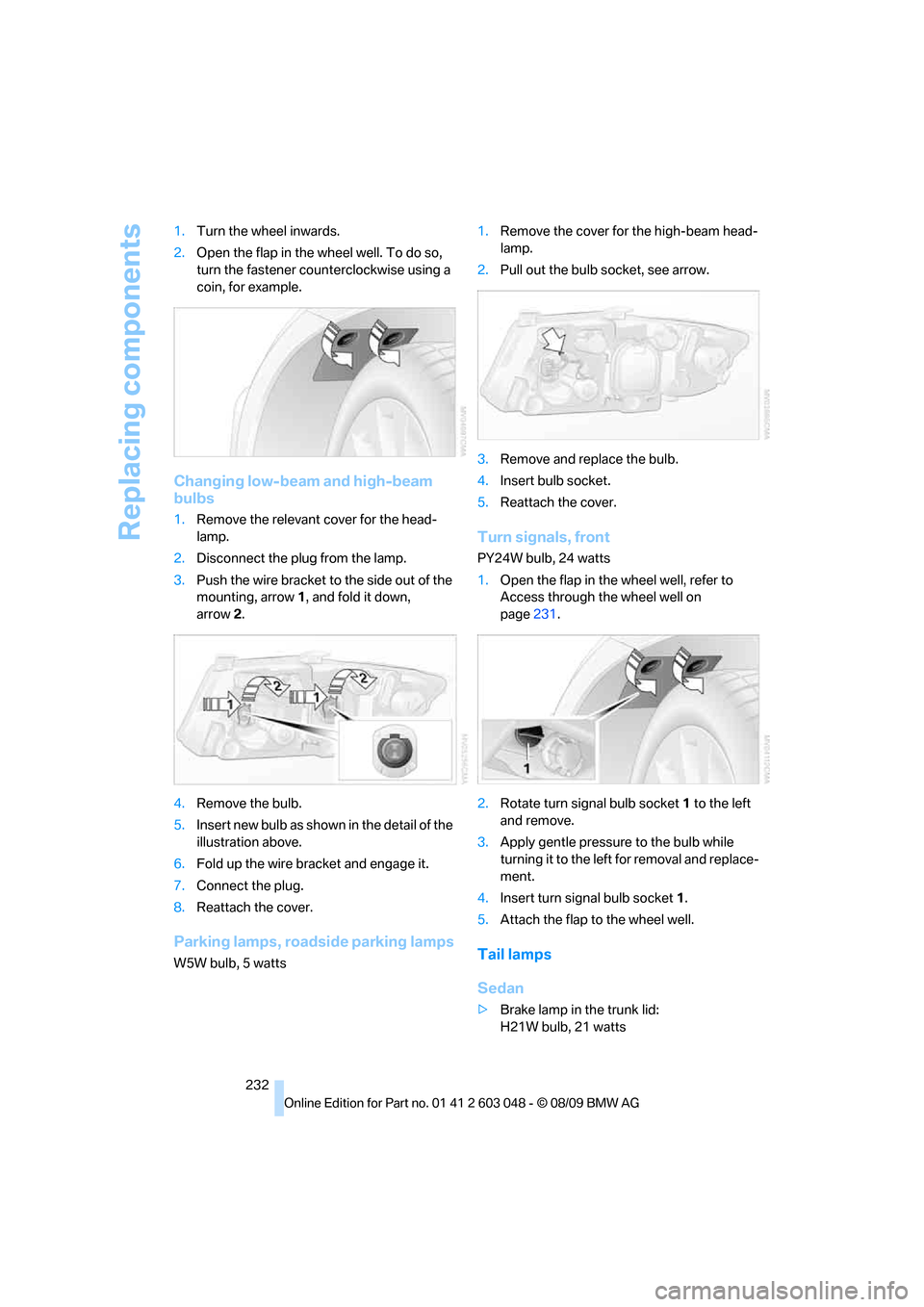
2.Open the flap in the wheel well. To do so,
turn the fastener counterclockwise using a
coin, for example.
Changing low-beam and high-beam
bulbs
1.Remove the relevant cover for the head-
lamp.
2.Disconnect the plug from the lamp.
3.Push the wire bracket to the side out of the
mounting, arrow1, and fold it down,
arrow2.
4.Remove the bulb.
5.Insert new bulb as shown in the detail of the
illustration above.
6.Fold up the wire bracket and engage it.
7.Connect the plug.
8.Reattach the cover.
Parking lamps, roadside parking lamps
W5W bulb, 5 watts1.Remove the cover for the high-beam head-
lamp.
2.Pull out the bulb socket, see arrow.
3.Remove and replace the bulb.
4.Insert bulb socket.
5.Reattach the cover.
Turn signals, front
PY24W bulb, 24 watts
1.Open the flap in the wheel well, refer to
Access through the wheel well on
page231.
2.Rotate turn signal bulb socket 1 to the left
and remove.
3.Apply gentle pressure to the bulb while
turning it to the left for removal and replace-
ment.
4.Insert turn signal bulb socket 1.
5.Attach the flap to the wheel well.
Tail lamps
Sedan
>Brake lamp in the trunk lid:
H21W bulb, 21 watts
Page 261 of 274

Reference 259
At a glance
Controls
Driving tips
Communications
Navigation
Entertainment
Mobility
Entry lamps, refer to Interior
lamps96
Entry map for destination130
Environmentally friendly
driving, refer to Energy
Control70
Equalizer, tone setting145
Error messages, refer to
Check Control77
ESP Electronic Stability
Program, refer to Dynamic
Stability Control DSC82
Event data recorders224
Exhaust system, refer to Hot
exhaust system117
Expanding the cargo area110
Extended connectivity of the
music player in the mobile
phone167
Exterior mirrors47
– adjusting47
– automatic dimming
feature48
– automatic heating47
– folding in and out47
External audio device106
External devices
– random sequence169
Eyes
– for tow-starting and towing
away239
– for tying down loads120
F
Failure messages, refer to
Check Control77
Failure of an electrical
consumer236
False alarm
– avoiding unintentional
alarm34
– switching off an alarm33
Fastening safety belts, refer to
Safety belts46
Fastest route for
navigation134Fast forward
– CD changer157
– CD player157
Filter
– refer to Microfilter/activated-
charcoal filter for automatic
climate control100
First aid pouch237
Fixture for remote control,
refer to Ignition lock54
Flash when locking/
unlocking28
Flat tire
– run-flat tires216
– Tire Pressure Monitor
TPM86
Flat Tire Monitor FTM84
– indicating a flat tire85
– indicator/warning lamp85
– initializing the system85
– snow chains84,217
– system limits84
Flat tires, refer to Tire
condition215
Fluid reservoir, refer to
Washer fluid reservoir60
FM, waveband147
Fog lamps95
– indicator lamp13,95
Folding rear seat backrest110
Folding up the floor panel112
Footbrake, refer to Braking
safely118
Footwell lamps, refer to
Interior lamps96
For your own safety5
Four-wheel drive, refer to
xDrive83
Free memory capacity, music
collection165
Front airbags90
FTM, refer to Flat Tire
Monitor84Fuel197
– additives198
– average consumption71
– gauge70
– high-quality brands197
– quality197
– specifications197
– tank contents, refer to
Capacities248
Fuel clock, refer to Fuel
gauge70
Fuel display, refer to Fuel
gauge70
Fuel-efficient driving, refer to
Energy Control70
Fuel filler flap196
– releasing in the event of
electrical malfunction196
Fuses236
G
Garage door opener, refer to
Integrated universal remote
control102
Gasoline
– refer to Average
consumption71
Gasoline, refer to Required
fuel197
Gasoline display, refer to Fuel
gauge70
Gas station
recommendations135
Gear indicator, automatic
transmission with
Steptronic57
Gearshift lever
– automatic transmission with
Steptronic57
– manual transmission56
Gearshifts
– automatic transmission with
Steptronic57
– manual transmission56
General driving notes117