2010 BMW 328I SEDAN onboard
[x] Cancel search: onboardPage 39 of 274

Controls
37Reference
At a glance
Driving tips
Communications
Navigation
Entertainment
Mobility
Sedan: glass roof*, electric
To prevent injuries, watch the glass roof
while closing it.
Take the remote control with you when you
leave the car; otherwise, children could operate
the roof and possibly injure themselves.<
Raising
Press the switch.
>The closed glass roof is raised and the slid-
ing visor opens slightly.
>The open glass roof automatically travels
into the raised position. The sliding visor
remains completely open.
Opening, closing
>Press the switch backwards to the resis-
tance point.
The glass roof and the sliding visor open
together as long as you hold the switch in
this position.
>Press the switch backwards past the resis-
tance point.
The glass roof and the sliding visor open
automatically. Briefly press the switch again
to stop the opening movement.
You can close the glass roof in a similar manner
by pressing the switch forwards. The sliding
visor remains open and can be closed by hand.
For information on Convenient operation via the
remote control or door lock, refer to page27
or29.
After switching off the ignition
When the remote control is removed or the igni-
tion is switched off, you can still operate the roof for approx. 1 minute as long as no door has
been opened.
Pinch protection system
If the glass roof encounters an obstruction dur-
ing closing from approximately the middle of
the opening in the roof, or during closing from
the raised position, the closing movement is
interrupted and the glass roof is opened again
slightly.
Despite the pinch protection system
check and clear the roof's travel path prior
to closing it; otherwise, the safety system might
fail to detect certain kinds of obstructions, such
as very thin objects, and the roof would con-
tinue closing.<
Closing without pinch protection
If there is an external danger, press the switch
forward past the resistance point. The roof
closes without pinch protection.
Following interruptions in electrical
power supply
After a power failure, there is a possibility that
the glass roof can only be raised. The system
must be initialized. BMW recommends having
this work done by your BMW center.
Closing manually*
In the event of an electrical malfunction, you can
move the glass roof manually:
1.Unclip the front of the cover of the interior
lamps using the screwdriver from the
onboard vehicle tool kit, refer to page229.
Page 40 of 274

Opening and closing
38 2.Insert the screwdriver into the openings on
each side to press the clips.
3.Remove the control unit.
4.Unplug the motor. Considerably less effort
will be required for manual operation.
5.Insert the Allen wrench
* supplied with the
onboard vehicle tool kit, refer to page229,
into the opening provided. Move the glass
roof in the desired direction.
6.Reinstall the control unit and reattach the
lamp cover.
Sports Wagon:
Panorama glass roof*
To prevent injuries, exercise care when
closing the panorama glass roof and keep it in your field of vision until it is shut.
Take the remote control with you when you
leave the car; otherwise, children could operate
the roof and possibly injure themselves.<
Raising
Press the switch.
The closed roof is raised and the sliding visor
opens slightly.
Do not close the sliding visor forcibly with
the roof in the raised position, as this
would damage the mechanism.<
Opening, closing
Sliding visor
The sliding visor can be opened or closed sep-
arately when the roof is in the closed or raised
position.
>Press the switch backwards to the resis-
tance point.
The sliding visor opens as long as you keep
the switch in this position.
>Tap the switch backwards past the resis-
tance point.
The sliding visor opens automatically. Tap-
ping the switch again stops the operation.
You can close the sliding visor in a similar man-
ner by pressing the switch forwards.
Panorama glass roof
When the sliding visor is open, proceed as
described under Sliding visor.
For information on Convenient operation via the
remote control or door lock, refer to page28
or29.
Page 41 of 274

Controls
39Reference
At a glance
Driving tips
Communications
Navigation
Entertainment
Mobility
Opening and closing the roof and
sliding visor at the same time
Tap the switch twice in quick succession
beyond the resistance point.
Tapping the switch again stops the operation.
Convenience functions
>With the roof open, press the switch twice:
The roof is raised.
>With the roof open, tap the switch twice in
the direction for opening:
The roof is opened fully.
Comfort position
In the comfort position, the roof is not com-
pletely open, thus reducing wind noise in the
passenger compartment.
Each time the panorama glass roof is opened or
closed completely, it stops in the comfort posi-
tion. If desired, continue the movement by
pressing the switch.
After switching off the ignition
When the remote control is removed or the igni-
tion is switched off, you can still operate the roof
for approx. 1 minute as long as no door has
been opened.
Pinch protection system
If the panorama glass roof or the sliding visor
encounters an obstruction while closing from a
position about two-thirds closed, or during
closing from the raised position, the closing
movement is interrupted and the panorama
glass roof and the sliding visor are opened again
slightly.
Despite the pinch protection system
check and clear the roof's travel path prior
to closing it; otherwise, the safety system might
fail to detect certain kinds of obstructions, such
as very thin objects, and the roof would con-
tinue closing.<
Closing without pinch protection
If there is an external danger, press the switch
forward past the resistance point and hold it
there. The roof closes without pinch protection.
Following interruptions in electrical
power supply
After a power failure, there is a possibility that
the panorama glass roof can only be raised. The
system must be initialized. BMW recommends
having this work done by your BMW center.
Closing manually*
In the event of an electrical malfunction, you can
move the panorama glass roof manually:
1.Unclip the front of the cover of the interior
lamps using the screwdriver from the
onboard vehicle tool kit, refer to page229.
2.Insert the screwdriver into the openings on
each side to press the clips.
3.Remove the control unit.
Page 42 of 274

Opening and closing
40 4.Unplug the motor. Considerably less effort
will be required for manual operation.
5.Insert the Allen wrench
* supplied with the
onboard vehicle tool kit, refer to page229,
into the opening provided. Move the pan-
orama glass roof in the desired direction.
6.Reinstall the control unit and reattach the
lamp cover.
Page 60 of 274

Driving
58
Shifting gears via the selector lever
Move selector lever from position D toward the
left into the M/S shifting slot:
When you press the selector lever forwards or
backwards, the manual mode is activated and
Steptronic changes gear. M1 through M6 are
displayed on the instrument cluster.
Upshifts and downshifts are executed only
when they will result in a plausible combination
of engine and vehicle speed; thus, for example,
a downshift that would cause the engine to
overrev will not be executed by the system. The
gear selected is briefly displayed in the instru-
ment cluster, followed by the gear actually in
use.
Shifting gears via shift paddles* on the
steering wheel
The shift paddles allow you to shift gears
quickly since both hands can remain on the
steering wheel.
>When you use the shift paddles on the
steering wheel to shift gears in automatic
mode, the transmission switches to manual
mode.
>If you do not accelerate or shift gears using
the shift paddles for a certain amount of
time, the transmission switches back to
automatic mode.
If the selector lever is in the M/S gear
plane, manual mode remains active.<
>To shift up: pull one of the shift paddles.
>To shift down: press one of the shift pad-
dles.
Upshifts and downshifts are executed only
when they will result in a plausible combination of engine and vehicle speed; thus, for example,
a downshift that would cause the engine to
overrev will not be executed by the system. The
gear selected is briefly displayed in the instru-
ment cluster, followed by the gear actually in
use.
Overriding selector lever lock
Should the selector lever refuse to move out of
position P even though the ignition is switched
on, the brake is depressed and the button on
the selector lever is pressed, the selector lever
lock can be overridden:
1.Unclip the sleeve of the selector lever.
2.Pull the sleeve up over the selector lever
until the sleeve is inside out.
3.Using the screwdriver from the onboard
vehicle tool kit, refer to page229, press the
red lever while moving the selector lever to
the desired position.
Turn signals/
headlamp flasher
1High beams
2Headlamp flasher
3Turn signals
Page 73 of 274

Controls
71Reference
At a glance
Driving tips
Communications
Navigation
Entertainment
Mobility
Computer
Displays in the instrument cluster
Calling up information
Press the button in the turn indicator lever.
The following items of information are dis-
played in the order listed:
>Cruising range
>Average speed
>Average fuel consumption
>Current fuel consumption
*
>No information
To set the corresponding units of measure,
refer to Units of measure on page73.
Cruising range
Displays the estimated cruising range available
with the remaining fuel. The range is calculated
on the basis of the way the car has been driven
over the last 18 miles/30 km and the amount of
fuel currently in the tank.
Refuel as soon as possible once your
cruising range falls below 30 miles/
50 km; otherwise, engine functions are not
ensured and damage can occur.<
Average speed
Periods with the vehicle parked and the engine
switched off are not included in the calculations
of average speed.
With the trip computer, refer to page72, you
can have the average speed for another trip dis-
played.To reset average speed: press the button in the
turn indicator lever for approx. 2 seconds.
Average fuel consumption
The average fuel consumption is calculated for
the time during which the engine is running.
You can have the average consumption for
another trip displayed, refer to Displays on the
Control Display below.
To reset average fuel consumption: press the
button in the turn indicator lever for approx.
2seconds.
Current fuel consumption*
Displays the current fuel consumption. This
allows you to see whether your current driving
style is conducive to fuel economy with mini-
mum exhaust emissions.
Displays on the Control Display
The computer can also be opened via iDrive.
1."Vehicle Info"
2."Onboard info" or "Trip computer"
Displays on the "Onboard info":
>Cruising range
>Distance from destination
Page 202 of 274
Refueling
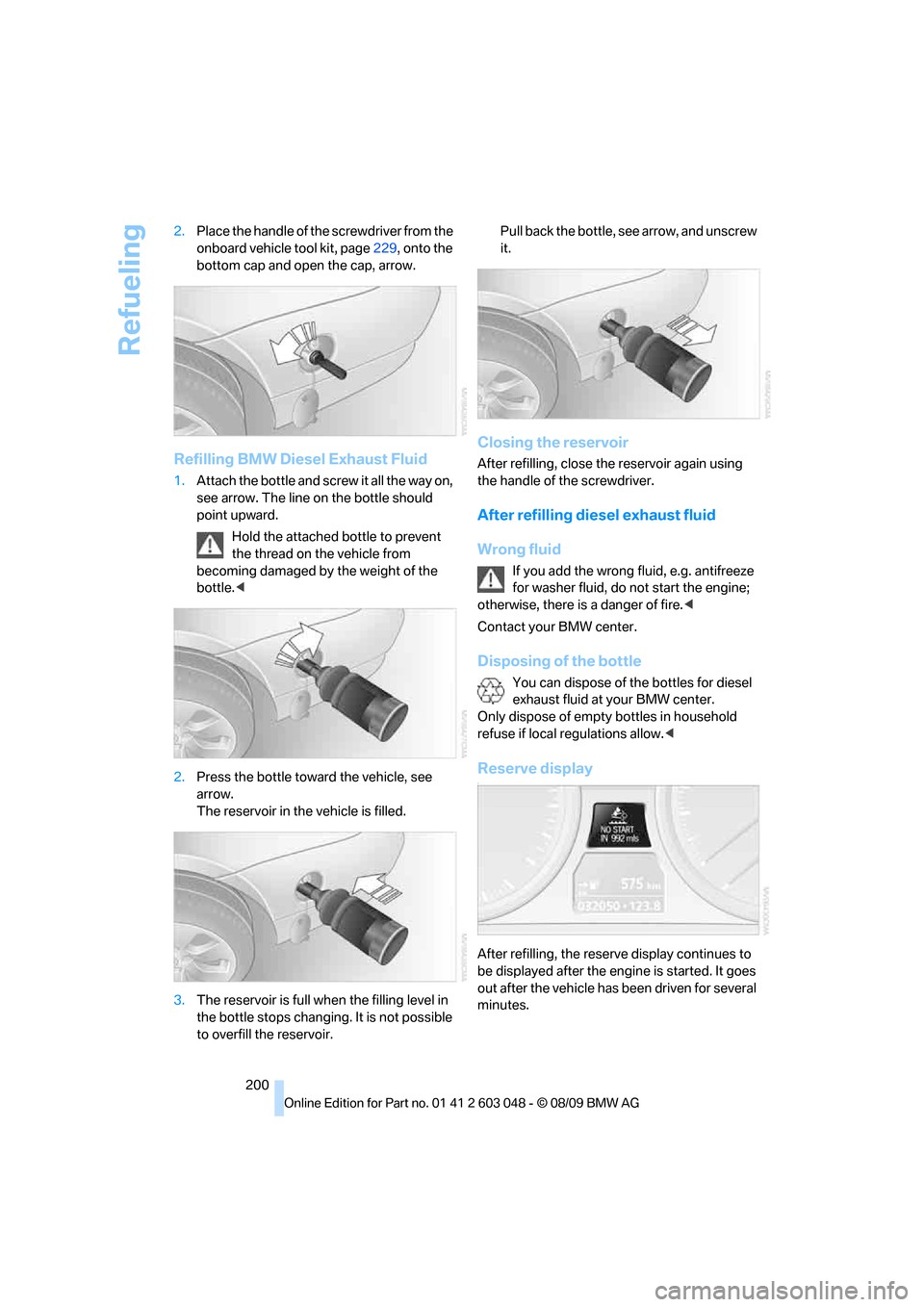
200 2.Place the handle of the screwdriver from the
onboard vehicle tool kit, page229, onto the
bottom cap and open the cap, arrow.
Refilling BMW Diesel Exhaust Fluid
1.Attach the bottle and screw it all the way on,
see arrow. The line on the bottle should
point upward.
Hold the attached bottle to prevent
the thread on the vehicle from
becoming damaged by the weight of the
bottle.<
2.Press the bottle toward the vehicle, see
arrow.
The reservoir in the vehicle is filled.
3.The reservoir is full when the filling level in
the bottle stops changing. It is not possible
to overfill the reservoir. Pull back the bottle, see arrow, and unscrew
it.
Closing the reservoir
After refilling, close the reservoir again using
the handle of the screwdriver.
After refilling diesel exhaust fluid
Wrong fluid
If you add the wrong fluid, e.g. antifreeze
for washer fluid, do not start the engine;
otherwise, there is a danger of fire.<
Contact your BMW center.
Disposing of the bottle
You can dispose of the bottles for diesel
exhaust fluid at your BMW center.
Only dispose of empty bottles in household
refuse if local regulations allow.<
Reserve display-
After refilling, the reserve display continues to
be displayed after the engine is started. It goes
out after the vehicle has been driven for several
minutes.
Page 226 of 274

Maintenance
224
Socket for Onboard
Diagnosis OBD
On the driver's side is an OBD socket for check-
ing components relevant to the composition of
the vehicle's emissions.
Emissions
The warning lamp lights up:
The vehicle is producing higher emis-
sions. The trip can be continued. Have
the car checked as soon as possible.
Canadian models display this warning
lamp.
The lamp flashes under certain conditions. This
indicates excessive misfiring in the engine. If
this happens, you should reduce your speed
and visit your nearest BMW center as soon as
possible. Severe engine misfiring can quickly
lead to serious damage of emissions-related
components, especially the catalytic converter.
The warning lamp comes on if the gas
cap is not properly tightened and the
OBD system assumes that fuel vapor
is escaping. Make sure that the gas cap is cor-
rectly positioned and close it until it audibly
clicks.
Data recorders
Your vehicle may be equipped with one or sev-
eral measuring or diagnostic modules or a
device for recording or sending certain vehicle
data or information. In addition, if you have
signed a service contract for BMW Assist, cer-
tain vehicle data may be transmitted or
recorded in order to facilitate the corresponding
services.