2010 AUDI S8 mirror
[x] Cancel search: mirrorPage 154 of 384

-Audi side assist •m ___________________ _
Notes
Applies to vehicles: w it h side ass ist
Messages in instrument cluster display
If side assist turns off automatically, the indicator light on the button
w ill go out and you w ill see a message in the instrument cluster
display:
Audi s ide ass ist not available: sensors possibly blocked
T he side ass ist senso rs a re bu ilt into the rear bumpe r on the left and
r ight (not v is ible on the outside)=>
page 145, fig. 158 . To ensu re
that yo u do not adversely affect the way side assist functions, foreign
objects (such as st ickers or bicycle racks) should not be attached to
the area on t he rear bumper whe re the sensors are located. If side
ass ist f unctions are adve rsely affec ted, you will see this mes sage in
the instrument cluster d isp lay. Remove anyth ing that may be
blo ckin g the sensors .
If no vehicle is detected for a longer period of t ime w hile driving, side
assist w ill also sw itch
off automatica lly .
Audi s ide ass ist currently not available
If the re is a tempo rary p ro blem (such as the vehicle 's ba tte ry c har ge
being low), s ide assist ca nnot be act ivated temporar ily .
Audi side a ssist: system fault
Have the system checked by an authori zed Audi dealer or qualified
work sho p.•
Ap plies to ve hicles : w it h sid e ass ist
Safety tips
The s ide assist detection may be limited when driving aro und narrow
s tr eet corners, on hilly st ree ts, an d un der poo r wea ther condit ions. It is possib
le that the radar sensors may also detect other objects,
s uch a s high or s taggere d guardrails.
Side assis t does not measure ac tual lane wid th . The system assumes
a fixed la ne w idth . Detection in the left and rig ht lanes is based on
th is assu m ed lane w id th . W hen drivi ng on nar row ro ads or w hen
driving to the left or r ight of the cente r of a t ravel lane, it is possib le
th at vehicles will be de te ct ed tha t are
no t in the la ne next to t he lane
you are us ing.
& WARNING
• Improper reliance on the side assist system can cause collisions
and serious personal injury:
-Never rely only on s ide assist when changing lanes.
- Always check rear view mirrors to make sure that it is safe to
change lanes.
• Side assist cannot detect all vehicles under all conditions
danger of accident!
• Side assist cannot detect vehicles in time to alert you when
they approach from behind at very high speed , or fall drop back
very quickly .
• The radar sensor's
vision can be reduced or entirely blocked by
rain, snow, and heavy spray. This can result in side assist not
adequately detecting vehicles or, in some cases , not detecting
them at all . Always keep an eye on the direction you are traveling
and the relevant area around the vehicle .
• Please note that side assist indicates there are approaching
vehicles , or vehicles in your blind spot , only after your vehicle has
reached a driving speed of at least 19 mph (30 km/h) .
• Side assist signal does not work around tight corners (turning
radius less than 328 feet, or 100 m) .
• Side assist is no replacement for the driver's full attention . The
driv er alone is responsible for lane changes and similar driving
maneuvers . Always keep an eye on the direction you are traveling
and the relevant area around the vehicle .
~
Page 165 of 384

_________________________________________ A_ d_v _ a_ n_ c_e _d _ P_ a_ rk_ in_ g =- S -.:.y_s _t _e _ m ___ _
If you press a fu nction bu tto n on t he M MI termina l, the v is u a l display
dis appea rs. Manu ally sw itchin g th e par king assist on ag ain via the
p,qA
switch s hows th e visual image on the MMI display again . Further
info rmation regarding the MMI term inal is in cl uded in the MMI user's
ma nual.
Rear-view camera (rear view)
The rear-view camera picture~ page 166, fig . 183 appears on the
MM I d is play as a mir ror im age. The re ar-view came ra pic ture has
or ientat ion lines and mar ked surfaces projected into i t as an a id to
the par king process ~
page 164. The red line in the picture
~ pag e 164, fig. 179 or~ page 164, fig. 1 80 indicates the coll is ion
area . You s houl d sto p bac kin g up, prefera bly befo re yo u reac h this
poin t~ & -
lf your vehicle is close to an obstacle , th e visual d istance d isplay also
appe ars in th e pic t ur e fr om t he re ar -view camera. This s uperim posed
display is intended to help d isplay the re levant cr itical ve hicle area .
If the visual dis play is shown on the MMI display and you press the
co ntr ol bu tton wi th the
Rear view funct ion ~ page 161 , fig. 178, the
pict ure from t he rear -view came ra is disp laye d.
If the pic ture from t he re ar-view camera is sh own and yo u pre ss the
cont rol button with the
Graphic f unction~ page 166 , fig. 183, t he
visual displ ay is s hown.
Th e p icture from th e re ar-v iew ca mera can b e sw itche d off o n the
MM I dis play ~
page 173 . The acoust ic distance warning remains
a cti ve.
If you press a function b utton on the MMI term ina l, the rear-v iew
c amera picture d is app ears. The rear -view came ra pictur e re a ppears
the next time you pa rk . But the picture from the rear-view camera can
also be show n ag a in on the MMI display by manua lly switc hing off
and on wi th t he
p,,1 A swi tch. Fu rther in fo rm ation r egard ing the M MI
terminal is incl uded i n th e MM I user 's manual.
Controls and equip
ment Safety first
& WARNING
•
Sensors have dead spaces in which objects cannot be detected .
Be especially careful to check for small children and animals
before backing up. Small children and animals will not always be
detected by the sensors .
• The Audi parking system is not a substitute for being careful
and alert when backing up. Be especially careful during parking
and similar maneuvers . Always watch where you are driving and
make sure that nothing is in the way.
• Remember that low obstacles which have already been
signaled may pass below the system's sensing zone when the
vehicle is backing up. The fact that the signal stops does not mean
that you have cleared the obstacle. When the signal stops, impact is imminent . Objects such as trailer hitches, chains, narrow posts
or fences covered by a thin layer of paint may not always be
detected by the sy stem. They can still damage your vehicle
without warning.
• Always make sure that the volume and frequency of the chimes
is adjusted so that you can easily hear the acoustic distance signal
even if the radio is playing, the air-conditioner blower is on High
or there is a high level of outside no ise.
- Check the settings whenever someone else has driven the
vehicle before you.
• Improper reliance on the Audi parking system can cause colli
sions and serious personal injury.
-Never rely only on parking assist when backing up.
- Always che ck rear view mirrors to make sure it i s safe to back
up.
[ i ] Tips
• The rear -view came ra pict ure is avai lab le as soon as the M MI
D ispl ay or the MMI i s swi tched o n, or the s tart -up ph ase is comple ted. _,.
Vehicle care Technical data
Page 167 of 384

_________________________________________ A_ d_v _a_ n_ c_e _d _ P_ a_ r _k_ , _· n_ g=- S-=- y_s _t _e _m __ ....JIJII
& WARNING
• The rear-view cam era has blind spots, in which objects cannot
be detected. Be especiall y carefu l to check for small children and
animal s before backing up . Small childr en and animals will not
always be detected by the sensor s.
• The Audi parking system is not a subst itute for being careful
and alert when ba cking up. Be e specially careful dur ing parking
and similar maneuvers . Always watch where you are driving and
make sure that nothing is in the way.
• Remember that low obstacles which have already been
s ignaled may pass below the system 's sensing zone when the
vehicle is back ing up . Th e fact that the signal stop s does not mean
that you have cleared the obstacle . When the signal stops , impact
is imminent . Objects su ch as trailer hitches, chains, narrow posts
or fences covered by a thin la yer of paint may not always be
detected by the system. They c an still damage your vehicle
without warning.
• Alway s make sure that the volume and frequency of the chimes
is adjusted so th at you can eas ily hear the acoustic distance s ignal
even if the radio is playing, the air-conditioner blower is on High
or there is a high level of outside noise .
- Che ck the setting s whenever someone el se has driven the
vehicle befo re you.
• Improper reliance on the Aud i parking system can caus e colli
sions and seriou s per sonal injury.
- Never rely only on parking assist when changing ba cking up.
- Alway s check re ar view mirrors to make sure it is safe to back
up.
[ i ) Tips
• Before parking with the rear-view camera, the Adaptive A ir
S uspension stan dard or au tomatic mo de must be swit ched on
=> page 18.
Cont rols a nd e quip
m en t
Vehicle OP-eration
• The rear-view camera pict ure is avai lab le as soon as the MMI
Display or the MMI is sw itched on , or the sta rt-u p ph ase is completed .
• In or der for the rear-view camera to function p roper ly, the came ra
lens =>
page 16 1, fig. 176 mus t be kept clean , a nd free o f snow and
ice . Please follow t he addit ional notes on =>
page 174 .
• The c ame ra cover age angle change s when the t runk lid is o pen.
The refore, the rear-v iew camera pict ure is displayed without orienta
t ion lines and w ithout blu e surfaces.
• Obse rve and fo llow the notes on towing mode on=>
page 171. •
Applies to ve hicles: w it h Advanced Pa rking System w ith rear view camera
Rear -view camera coverage area
0
Vehicle care
I)
Fig. 18 1 Top vie w:
R ear-v iew came ra
c o ve rage a re a
Fi g. 182 Side view :
Cov ered ar ea @ and
u nc overed are a@ of
th e re ar -vi ew c am era ..
Do-it-yourselt service iTechnical data
Page 172 of 384

ffl..__A_ d _ v_a_ n_ c_e _d _ P_ a_ r_ k_ i _n_ g:- S_,,_ y_s _t _e _m ________________________________________ _
& WARN ING (con tin ue d)
• The Audi pa rkin g system is not a substitute for being careful
and alert when backing up. Be especially careful during parking
and similar maneuve rs. Always watch where you are driving and
make sure that nothing i s in the way.
• When maneuvering or parking, do not only use the MMI
Display for or ientation. Certain object s - depending on the screen
resolution - may not , o r not entirely , be displ ayed ; for e xample
trailer hitches, chains , narrow post s, or fences.
• Improper rel iance on the Audi parking sy stem can cau se colli
sions and seriou s personal injury.
- Ne ver rely only on par king assi st when ch anging ba cking up .
- Always check rear view mirrors to make sure it is safe to back
up .•
Applies to vehicles: w it h Advanced Parking System with r ear view camera
Notes on distance information
Fig. 1 88 MMI Di splay:
displayed re d li ne
to uches the bumpe r
Fig. 18 9 Actual
di stanc e from bumpe r
The red line in the MMI Disp lay~ fig. 188 indicates the d ista nce you
should maintain from an obstacle, when park ing. If an obstacle is
located at road level, you can ap proach the obstacle unti l the red line
touches the obstacle ( 1.3
ft, or 40 cm, distance). On the other hand,
if a n obstacle is not located at road level (t he b umper of a vehi cle, for
example), you should not approach this obstacle unti l the red line
to uch es the obsta cle.
For instance, if you back up toward another vehicle , it will appear as
t hough t he guide hel p lines and s urf aces are bein g pushed over the
vehicle behind you~ fig. 188. I n this example, it can be recogn ized
in th e MM I Display that the red line exactly touches the bumpe r of t he
vehicle be hind you. Indeed, however, t he red line @ ~ fig. 189 does
not touch the bumper, but has rather been pushed underneath the
bu mper. The actual d istance (dashed line@) to t he ve hicle beh ind
you is meanwhile less than 1.3 ft (40 cm). Your veh icle b umper must
a lso be taken into con siderat ion fo r the distance ~& .
& WARNING
• Please note that objects not touching the ground can appear to
be further away than they really are (for example , the bumper of
a parked vehicle, a trailer hitch , or the rear of a truck ). In thi s case,
you should not use the guide help lines to measure distance -
danger of accident! .,
Page 173 of 384
Advanced Parking System -
---------------=---:.--
& WARNING (co ntinued )
• Maintain plenty of di stance from an obstacle , so that your
outside mirror or a corner of your vehicle does not collide with any
obstacle s -danger of accident!
• The Audi parking system is not a substitute for being careful
and alert when backing up. Be e specially careful during parking
and similar maneuvers . Always watch where you are driving and
make sure that nothing is in the
w ay.
• When maneuvering or parking, do not only u se the MMI
Di splay for orientation. Certain obje cts -depending on the s creen
resolution -may not , or not entirely, be di splayed; for e xample
trailer hitches , chains , na rrow posts, or fences. •
Applies to vehicles: with Advanced Park ing System w ith rear view camera and a trailer h itch
i nstalled acco rding to fact ory spec ificat ion s
Towing hitch
For vehicles with a tra ile r hitc h installed according to factory spec ifi
cat ions, the rear acoust ic parking senso rs are not activated when the
vehicle is pu t in r everse gear while an e lec trica l connec tion to t he
trai ler socket* is established. No distance ale rt occurs in the rear
~ page 161. T he re ar-view camera picture ~ page 164 is di splayed
without o rientation lines and without blue surfaces .•
Controls and equip
ment Safety first
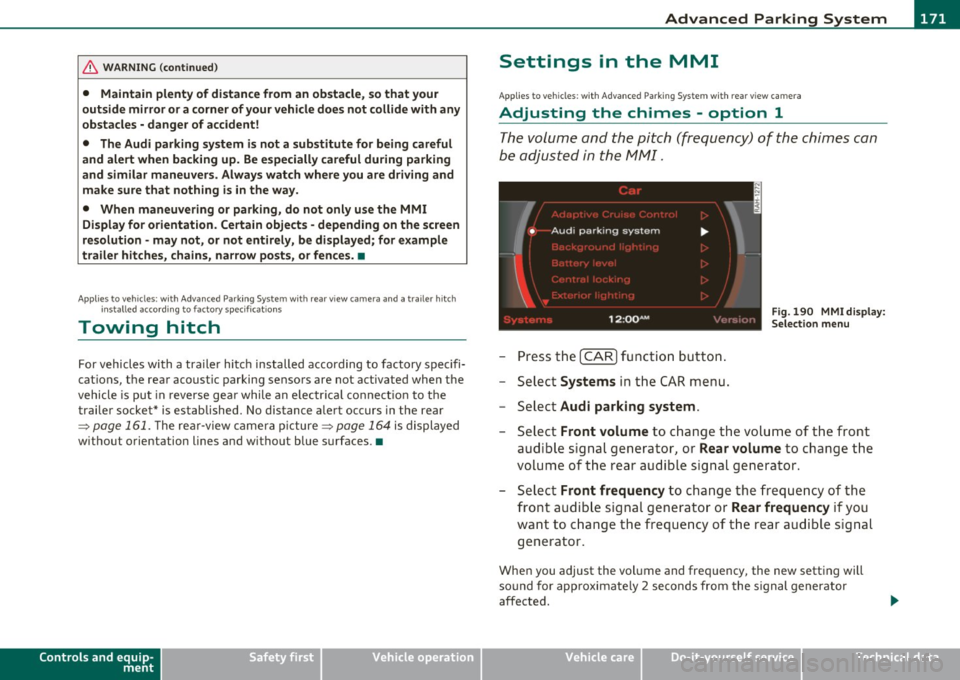
Settings in the MMI
App
lies to vehicles: w ith Advanced Parking System w ith rear view camera
Adjusting the chimes -option 1
The volume and the pitch (frequency) of the chimes can
be adjusted in th e MM I.
Fig. 190 MM I di sp lay :
Selec tion menu
-Press th e [ C A R] fu nctio n bu tto n.
- Selec t
Systems in th e CAR me nu.
- Select
Audi parking system .
-Select Front volume to c hange t he volu me of t he fro nt
aud ible signal generator , or
Rear volume to change t he
volume of t he rea r aud ible s ignal genera tor.
- Selec t
Front frequency to change the freq uen cy of th e
front audib le s ignal gener ato r or
Rear frequency if you
wa nt to c hange t he freque ncy of t he rear a udible s ig nal
generato r.
When you adjust the vol ume and freq uency, the new setti ng will
so und for app roxim ate ly 2 s econds from the s ignal generator
affected.
Vehicle care Technical data
Page 176 of 384

IIII.___A_ d_v_ a_ n _ c_e _d _ P_ a_ rk_ in--= g'-S -=- y_s_t_ e_ m _________________________________________ _
switch PwA flashes when you engage the reverse gear, there is a
ma lf u nct ion in the acous tic p arking ass ist.
T hi s system error is immediately output after:
• Every manua l activat ion via the switch
P '".li => page 161,
• Reverse gear is engaged for the first time duri ng an ignition cycle,
or
• An error is detected during operation .
(I] Tips
If the system reports an error, have an Audi dealer o r an authorized
dea lership correct this system error .•
A pplies to veh icles : wit h Adva nced Park in g S ystem with rear view c amera
Rear-view camera tips
We recommend that you practice parking w ith the rear-v iew camera
in a traffic -free location, o r parking lot, to become familiar with the
system, the or ient atio n lines , and the ir fun ct ion. W hen do ing t his,
there should be good light and weather cond itions.
In the MM I Display, objec ts or vehicles appe ar close r or f urther aw ay
if:
• you are driving in reverse gear from a level surface onto an incline,
or a downwa rd slope,
• you are driv ing in reverse gear towar d prot ruding objects,
• the vehicle is carry ing too much load in the rear .
T he accuracy of the orientatio n lines and blue su rfaces diminishes if :
• t he Ad aptive Air S uspension is defective, o r th e dynamic o r lift
mode is switched on,
• the rear-v iew camera does not provide a reliable image, for
example, in poor visib ility conditions or if the lens is dirty, •
the image on the screen is not v is ib le due to sun glare and reflec
tion .
Caring for the rear-view camera lens:
• Dampen the lens with a household alcoho l-based glass cleaner,
a nd clean the lens wi th
a d ry cl oth.
• Remove snow w ith a hand br ush .
• Remove ice, preferab ly with de-icing spray=>
0 .
& WARNING
• The rea r-view camera does not replace the view to the rear and
the rear view mirror s.
• The rear-view camera -because of technical limitations -does
not show the entire area behind the vehicle=> page
165, fig. 182.
Be especially careful to check for small children and animals
before ba cking up . Small children and animals will not always be
shown in the r ear-view display.
• The Audi parking sys tem is not a sub stitute for being careful
and alert when backing up. Be especially careful during park ing
and similar maneuvers . Always watch where you are driving and
make sure that nothing is in the way.
• Do not allow your self to be distracted from traffi c by the rear
view camera pictures.
• When maneuvering or parking, do not only u se the MMI
Display for orientat ion. Certa in objects -depending on the sc reen
resolution -may not, or not entirely, be di splayed ; for example
trailer hitches , chains, na rrow posts, or fences.
• Only use the rear-view camera for aid if it shows a good, clear
picture. The image may be obscured , for e xample, by the sun
shining into the len s, dirt on the len s, or a s the re sult of a defect -
danger of accident!
• If the imag e is hazy when the MMI Display is swit ched on or the
area behind the vehicle is not vis ible (for example , as the result of .,_
Page 189 of 384

______________________________________________ D_ ri_v _ i_n _,,g ,c.._ S_a_ f_ e_ l..:: y __ __
Important things to do before driving
Safety is everybody's job! Vehicle and occupant safety always depends on the informed and careful driver.
For your safety and the safety of your passengers, before
driving always:
- Make sure that all lights and signals are operating
correctly.
- Make sure that the tire pressure is correct.
- Make sure that all windows are clean and afford good visi-
bility to the outside.
- Secure all luggage and other items carefully::::>
page 98.
-Make sure that nothing can interfere with the pedals.
- Adjust front seat, head restraint and mirrors correctly for your height .
- Instruct passengers to adjust the head restraints according to their height.
- Make sure to use the right child restraint correctly to
protect children ::::,
page 231, "Child Safety".
- Sit properly in your seat and make sure that your passen gers do the same::::,
page 76, "General recommenda
tions".
- Fasten your safety belt and wear it properly. Also instruct
your passengers to fasten their safety belts properly
=:> page 197. •
Controls and equip
ment Safety first Vehicle operation
What impairs driving safety?
Safe driving is directly related to the condition of the
vehicle, the driver as well as the driver's ability to concen
trate on the road without being distracted .
The driver is responsible for the safety of the vehicle and all
of its occupants. If your ability to drive is impaired, safety
risks for everybody in the vehicle increase and you also
become a hazard to everyone else on the road::::,,& . There
fore:
Do not let yourself be distracted by passengers or by using
a cellular telephone.
NEVER drive when your driving ability is impaired (by
medications, alcohol, drugs, etc.).
- Observe all traffic laws, rules of the road and speed limits
and plain common sense .
- ALWAYS adjust your speed to road, traffic and weather
conditions.
- Take frequent breaks on long trips. Do not drive for more than two hours at a stretch.
- Do NOT drive when you are tired, under pressure or when
you are stressed .
& WARNING
Impaired driving safety increases the risk of serious personal
injury and death whenever a vehicle is being used.•
Vehicle care Do-it-yourself service Technical data
Page 268 of 384

Trailer towing
"---------------------------------------------------
Trailer towing
Driving with a trailer
General information
Your Audi was designed primarily for passenger transpor
tation .
If you p lan to tow a t railer, p lease remember that the additional load
w ill affect durability, economy and performance.
Tr ailer towing not on ly p laces mo re s tress on the vehicle, it also calls
for more concentration from the driver.
For this reason, a lways follow the operating and dr iv ing inst ructions
prov ided and use common sense .
0 Note
If you are going to tow a trailer, you must activate the tra iler ope ra
tion mode =>
page 179, "Towing a Trailer".
Technical requirements
Trailer hitch
Use a we igh t-car rying h itch co nform ing to the gross tra iler we ig ht.
The h itch must be suitab le for your vehicle and trailer and must be
mou nted securely o n th e vehi cle's ch assi s at a
techni cally sound loc a
tion . Use only a trailer hitch with a removab le ball mount. Always
check wit h the t railer h itch manufactu rer to make sure that yo u are
using the correct h itch .
Do not use a bumper hitch.
The h itch mus t be installed in such a way t hat it does not in terfe re
w ith t he impact-absorb ing bumper system. No modifications shou ld be made to t
he veh icle exha ust and bra ke systems. From t ime to
time, check that a ll hitch mounting bo lts rema in securely fastened.
W hen you are no t tow in g a tra ile r, remove the t railer hit ch ball
mount. This prevents the hitc h from caus ing damage should your
vehicle be str uck from behind=>& .
Trailer brakes
If your trail er is e quipped w ith a b raking system, che ck to be s ure t hat
it conforms to all regulations.
T he tra ile r hydrau lic brake system m ust not be directly connected to
t he vehicle's hyd raulic b rake sys tem .
Safety chains
Always use safety chains between your veh icle and t he tra ile r.
Trailer lights
Trailer lights must meet all regulations. Be sure to check w ith your
Audi de aler fo r corr ec t wir ing , sw itches and re lays.
Mirrors
If you are unab le to see t he t raff ic be hind you using t he regular
outs ide mirrors, then you
must install extended mi rrors. It is impor
t an t th at yo u
always ha ve clear vi sion to the re ar.
& WARNING
After removing the trailer hitch, do not store it in your vehicle. In
case of sudden braking , the hitch could fly forward and inju re you
or your passengers. •