2010 AUDI S6 trunk
[x] Cancel search: trunkPage 5 of 368

Table of contents
Monitoring the Advanced Airbag Vehicle care .............. 258 Emergency towing with
System ...................... 206 commercial tow truck ........ .
Side airbags ... ......... ...... 211
Cleaning and protection ...... 258 Lift
ing vehicle ............... . 334
336
Side curtain airbags . . . . . . . . . . . . 214
Child Safety .. .. .......... ..... 217
Important things to know . . . . . . 217
Child safety seats . . . . . . . . . . . . . 222
Installing a child safety seat .. .. 227
LATCH Lower anchorages and
tethers for children . . . . . . . . . . . . 230
Additional Information 237
Vehicle operation ...... 240
Intelligent technology ........ 240
Notice abou t data recorded by
vehicle control modules . . . . . . . . 240
E lectronic Stabilization Program
(ESP) ........................ 240
Braking ...................... 243
Servo tronic® -advanced power
steering system . . . . . . . . . . . . . . . 245
Driving with your quattro® . . . . . . 246
Energy management ........... 247
Driving and environment ...... 249
The first 1,000 miles (1,500 km)
and afterwards . . . . . . . . . . . . . . . 249
Avoid damaging the veh icle . . . . . 250
Driving through water on roads . 250
Catalytic converter . . . . . . . . . . . . 250
Operate your vehicle economically
and minimize pollution ......... 251
Trailer towing ................. 254
Driving with a trailer . . . . . . . . . . . 254
T railer towing tips . . . . . . . . . . . . . 256
Controls and equip
ment Safety first
General informa
tion . . . . . . . . . . . 258
Care of exterior . . . . . . . . . . . . . . . 258
Care of interior . . . . . . . . . . . . . . . 265
Fuel supply and filling your fuel
tank ..........................
271
Gasoline . . . . . . . . . . . . . . . . . . . . . 271
Fuel tank . . . . . . . . . . . . . . . . . . . . . 272
Checking and filling . . . . . . . . . . . 276
Technical data
General information
Explanation of technical data .. .
Vehicle ident ification ......... .
Weights ................... . .
Dimensions ............... .. . 338
338
338
338
339
339
Engine hood . . . . . . . . . . . . . . . . . . 276
Data . . . . . . . . . . . . . . . . . . . . . . . . . . 341
Engine oil . . . . . . . . . . . . . . . . . . . . 279 300 hp, 3.0 liter, 6-cylinder
Engine cooling system . . . . . . . . . 284
Brake fluid . . . . . . . . . . . . . . . . . . . 287
Ba ttery . . . . . . . . . . . . . . . . . . . . . . 288
Windshield/headlight washer container . . . . . . . . . . . . . . . . . . . . 292
Tires and wheels . . . . . . . . . . . . . . 293 engine ......................
.
265 hp, 3.2 liter , 6-cylinder
engine ......... ..... ........ .
350 hp, a-cylinder engine ..... .
Consumer Information ...... .
Warranty coverages .......... . 341
342
343
344
344
T ires ........................ 293 Operating your vehicle outside the
T ire pressure monitoring system 312
Do-it-yourself service . 316
What do I do now? ........... 316
Trunk escape handle ........... 316
Jack, tools and spare wheel ..... 316
Changing a wheel . . . . . . . . . . . . . 318
Fuses and bulbs . . . . . . . . . . . . . . 325
F u ses ........... ............. 325 U.S.A
. or Canada ............. .
Audi Service Repair Manuals and
Literature ................... .
Maintenance ................ .
Additional accessories, modifications and parts replacement ............... . .
Declaration of Compliance,
T elecommunications and
Electronic Systems .......... . .
Bulbs ........................ 329
Alphabetical index ....
Emergency situations ......... 331
General . . . . . . . . . . . . . . . . . . . . . . 331
Starting by pushing or towing 331
Starting with jumper cables .... 331
Use of jumper cables . . . . . . . . . . 332
Vehicle operation Vehicle care Do-it-yourself service
344
344
344
346
347
350
Technical data
Page 9 of 368

Instruments and controls
General illustration
(D Power window switches . . . . . . . . . . . . . . . . . . . . . . . . . 50
@ Door handle
@ Memory buttons (driver's seat) . . . . . . . . . . . . . . . . . . . 79
© Power locking switch . . . . . . . . . . . . . . . . . . . . . . . . . . . . 44
® Adjuster control for outside mirrors . . . . . . . . . . . . . . . 71
© Air outlets . . . . . . . . . . . . . . . . . . . . . . . . . . . . . . . . . . . . 101
0 Light switch . . . . . . . . . . . . . . . . . . . . . . . . . . . . . . . . . . . 58
@ Control lever for:
- Turn signal and high beam . . . . . . . . . . . . . . . . . . . . . 62
- Lane assist . . . . . . . . . . . . . . . . . . . . . . . . . . . . . . . . . . 134
® Control lever for:
- Cruise control . . . . . . . . . . . . . . . . . . . . . . . . . . . . . . . 116
- Adaptive Cruise Control . . . . . . . . . . . . . . . . . . . . . . . 119
@ Multifunction steering wheel with:
- Horn
- Driver 's airbag . . . . . . . . . . . . . . . . . . . . . . . . . . . . . . . 199
- Shift buttons ...... .. .. .... ........ .......... 151, 158
- Button for steering wheel heating . . . . . . . . . . . . . . . 104
@ Instrument cluster . . . . . . . . . . . . . . . . . . . . . . . . . . . . . 8
@ Switches for
- Windshield wiper/washer . . . . . . . . . . . . . . . . . . . . . . 66
- Trip computer ............... .. .. .. .. ....... .
@ Steering lock/ignition/starter switch ... .. ......... .
@ Buttons for
- resetting the trip odometer .......... .. .. .. ... .
- !CHECK] .... .... .. .... .. .... ............... .
-Instrument lighting . ....... .... .. .. .... .. .. . .
Controls and equip
ment Safety first
34
108
10
11
11
Instruments and controls
@ MMI Display, see separate manua l
@ Depending on equipment, switches for:
- Electronic Stabili zation Program (ESP)
- Side assist .. ... . .... .. .. .. .. .. .... .. .. .. ... .
- Emergency flashers .. .... .. .. .. ............. .
- Power sunshade . ... ... .. .. .. .. .... .. .. ... .. .
- Valet key function .. .. .. .. .... ....... ...... .. .
@ Buttons for
- Switching MMI display on/off
- Unlocking glove compartment
@ Glove compartment ...... .. .. .. .... .. ......... .
@ Front passenger 's airbag ............... ... .. .. . .
@ Climate controls ... .. .. .. .. .. .... .......... ... .
@ Ashtray .............. .. .... .. .. .. .. .... ..... .
@ Shift lever for automatic transmission
- 6-speed automatic transmission ....... .. ... ... .
- multitronic ® ....................... .. .... .. .
@ MMI contro l console, see separate manua l
@ Storage with cupholder ... .. ... .............. .. .
@) Electromechanical parking brake .............. .. . .
@ ISTAR T]-/ISTOP] button ........ .. ... .......... .
@ Adjustable steering wheel, depending on equipment :
- mechanical ............. .. .. .. ............. .
- electrical . ... ... .. .. .. .. .. .. .. .. .. ....... .. .
@ Data Link Connector for On Board Diagnostics (OBD II)
@ Hood release .......... .. .... .. .. .. .. ......... .
@ Switch for
unlocking the fuel fi ller door .............. .... .
- unlocking the trunk lid . .. ........ .. ... .. .. .. . .
Vehicle care
240
137
61
65
40
94
94
199
98
91
146
154
89
113
110
106
106 23
276
273
46 •
Technical data
Page 23 of 368
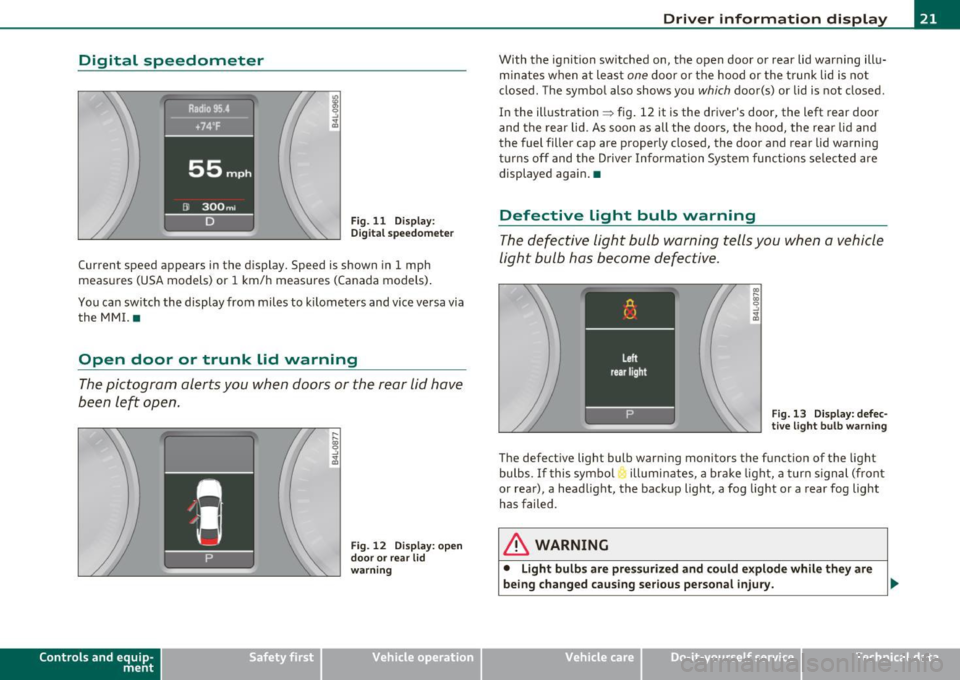
Digital speedometer
Fig. 11 Display:
Digital speedomete r
Current speed appears in the display. Speed is shown in 1 mph
measures (USA models) or 1 km/h measures (Canada models) .
You can switch the display from miles to kilometers and vice versa via
the MMI. •
Open door or trunk lid warning
The pictogram alerts you when doors or the rear lid have
been left open.
Con tro ls a nd e quip
m en t
Fig . 12 Display: open
door or rear lid
warning
Vehicle OP-eration
Driver information display
With the ignition switched on, the open door or rear lid warning illu
minates when at least
one door or the hood or the trunk lid is not
closed . The symbol also shows you
which door(s) or lid is not closed.
In the illustration ~ fig. 12 it is the driver's door, the left rear door
and the rear lid. As soon as all the doors, the hood, the rear lid and
the fuel filler cap are properly closed, the door and rear lid warning
turns off and the Driver Information System functions selected are
displayed again. •
Defective Light bulb warning
The defective light bulb warning tells you when a vehicle
light bulb has become defective.
Fig. 13 Display: defec
tive light bulb warning
The defective light bulb warning monitors the function of the light
bulbs.
If this symbol illuminates, a brake light, a turn signal (front
or rear), a headlight, the backup light, a fog light or a rear fog light
has failed .
& WARNING
• Light bulbs are pressurized and could explode while they are
being changed causing serious personal injury. .._
Vehicle care Do-it-yourselt service iTechnical data
Page 46 of 368
Opening and closing
Settings in the MMI
Selective unlock feature -the driver can determine in the
MMI which doors are unlocked through the central
locking system.
- Select: Function button I CAR]> Systems* > Central
locking .
In the Central locking menu you can determine which doors should
be unlocked when you unlock the vehicle with the remote control. For
example, if you switch the item passenger's door
Off, the passenger's
door is no longer included in the central locking system, and will not
be unlocked by pressing the un lock button on the master key remote
control.
There is also a
side selective unlocking option available that can be
set to fit your needs. You can continue to unlock all the doors and the
rear lid as before . Press the open ing button on the master key twice.
Auto locking can also be switched On and Off.
W Tips
When locking, all doors and the trunk lid are locked automatically .•
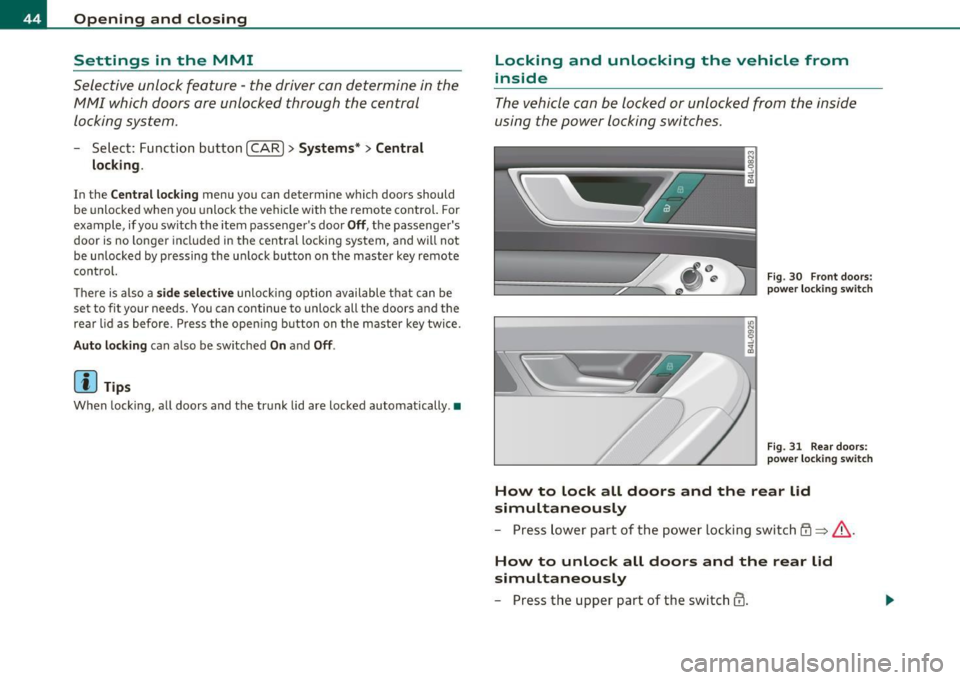
Locking and unlocking the vehicle from
inside
The vehicle can be locked or unlocked from the inside
using the power locking switches.
Fig. 30 Front doors :
power locking switch
Fig. 31 Rear doors :
power lock in g switch
How to lock all doors and the rear lid
simultaneously
- Press lower part of the power locking switch@=> &-
How to unlock all doors and the rear lid
simultaneously
- Press the upper part of the switch@.
Page 49 of 368

• If the central locking system fails (power supply), you can also
open the rear lid using the trunk escape handle from the inside
=>
page 316. •
Child safety lock
Power child safety lock for the rear doors t
The power child safety lock prevents the rear doors from
being opened from the inside.
Fig. 35 Section from
driver's door: controls
The rear doors are equipped with a power child safety lock. It
is operated with the two safety buttons(!) in the driver's door
~ fig. 35.
- Press the left and/or right safety button to disable the
rear power window(s) and prevent the respective rear door
from being opened from the inside. The LED in the button
will light up when the child safety lock is turned
on.
- Press the illuminated button again to turn the child safety
features
off.
When the child safety lock is activated, the interior door opening
lever is inope rative; the door can only be opened from the outside. In
Contro ls a nd e quip
m en t Vehicle
OP-eration
Opening and closing
addition, the window regulator for that door is also inoperative when
the child safety lock is activated.
[ i] Tips
• In order to activate the child safety lock on the left and the right
side, you have to press the two safety buttons in succession.
• Make certain that the check light comes on in the corresponding
safety switch when the child safety lock is activated. •
Convenience key
Applies to veh icles: w ith Con ven ience key
Description
Access and vehicle operation based on: Master key
remains in driver's pocket.
Th e Convenience key vehicle authorization system allows keyless
unlocking, locking and starting of the vehicle . You only have to carry
the master key on your person.
It makes nod ifference whether the master key is in your jacket pocket
or in your brief case. As soon as you approach your vehicle, the Conve
nience key recognizes the request for access , checks for authorization
and enables the following functions:
• Unlocking the vehicle=>
page 48.
• Locking the vehicle=> page 49.
• Switching on ignition and starting the engine by pressing the
[START ) button; the master key does not have to be in the ignition
switch =>
page 110.
& WARNING
• When you lock your vehicle from outside, nobody -especially
children -should remain inside the vehicle. Remember, when you .,_
Vehicle care Do-it-yourselt service iTechnical data
Page 95 of 368
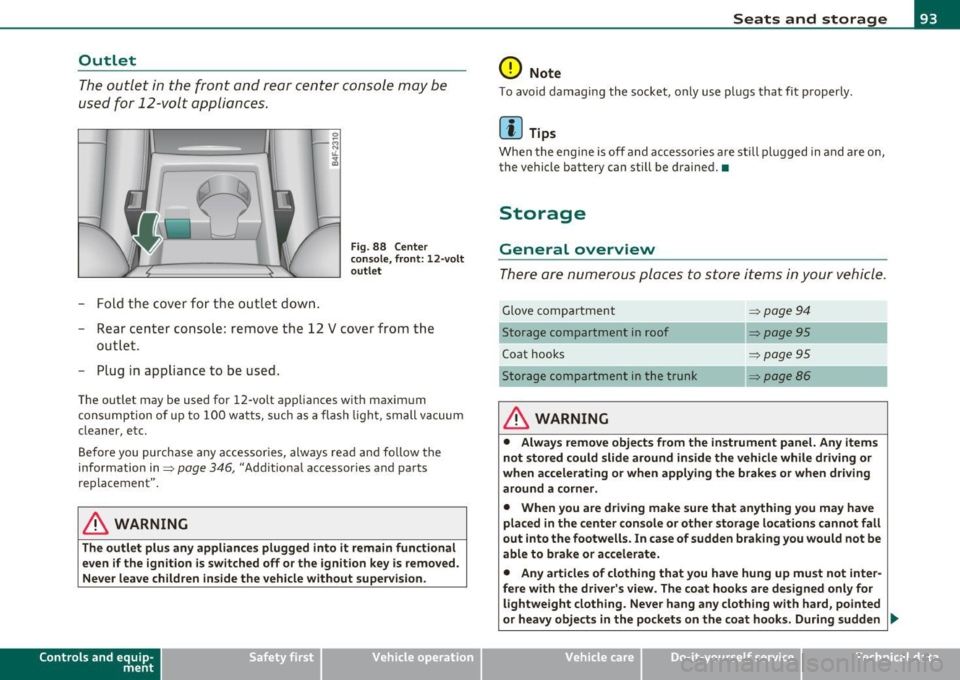
Outlet
The outlet in the front and rear center console may be
used for 12-volt appli ances .
- Fold the cover fo r the outlet down .
Fig. 88 Center
c on sole , fr ont: 12 -vol t
ou tlet
- Rear center console: remove the 12 V cover from the
out le t.
- Plug in appliance to be used.
The outlet may be used for 12-volt appliances with maxim um
consumption of up to 100 wat ts, su ch as a flash light, small vacuum
cleaner, etc.
Be fore you purchase any accessories, always read and fo llow the
information in:::::,
page 346, "Additional accessories and parts
replacement".
& WARNING
The outlet plus any applianc es plugged into it r emain functional
even if the ign ition is switched off or th e ign itio n key is remo ved.
Ne ver leave children in side the vehicle without supervi sion.
Cont rols a nd e quip
m en t Vehicle
OP-eration
Seats and storage
0 Note
To avo id damaging the socket, only use p lugs that fit p roperly.
[ i ] Tips
Whe n the engine is off and accesso ries a re st ill plugged in and a re on,
the vehicle battery can still be drained. •
Storage
General overview
There are numerous places to store items in your vehicle .
Glove compa rtment :::::, page 94
Storage compartment in roof :::::, page 95
Coat hooks :::::, page 95
Storage compartment in the trunk :::::, page 86
& WARNING
• Alwa ys rem ove objects from the in strument panel. Any items
not stor ed could slid e around in side the v ehicle while driv ing or
when a ccelerating o r whe n applying t he br ake s or whe n driv ing
around a corn er.
• When you are dri ving make sure that an ything you ma y have
placed in the center con so le or other sto rage locat ion s cannot fall
out into the footwells . In case of sudden br aking you would not be
able to b rake or acc ele rate.
• An y article s of clothing that you ha ve hung up mu st not inter
f e re with th e driver's view . The co at hooks are d esigne d only for
lightweight clothing. Ne ver ha ng any clothing with ha rd, pointed
or heavy obj ects in the pockets on th e co at hooks . During sudden
~
Vehicle care Do-it-yourselt service iTechnical data
Page 276 of 368
Fuel supply and filling your fuel tank
in. WARNING
Improper refu eling or handling of fuel can cause fire , explosion
and sev ere burns .
• Fuel is highly flammable and can cause seve re burns and other
injuries .
• Failure to shut the engine off while refueling and /or to inse rt
the pump nozzle fully into the fuel fill er n eck could cau se fuel to
spray out of filler neck or to overflow. Fuel sp ray and overflowing
fue l can cau se a fire.
• Never u se a cellula r telephone while refueling. The electromag
netic radiation can cau se spark s that can ign ite fuel vapor s and
cause a fire.
• Never get back into your vehicle while refue ling . If in ex cep
tional circumstances you must get back in your veh icle while refu
eling , make certain that you clo se th e door and touch metal to
discharge static electricity before touching the filler nozzle again .
Static electricity can cause sparks that can ignite fuel vapors
released during refueling.
• N ever smoke or have an open flame anywhere in or near your
vehicle when refueling or filling a portable fuel containe r.
• For your safety, we strongly recommend that you do not travel
with a portable fuel container in your vehicle. The containe r, full
or empty may leak and could cau se a fire, especially in a crash .
• If, under except ional circumstances , you must t ranspo rt a
portable fuel container, please ob serve the following:
- Never fill a portable fuel container while it is anywhere in or
on the vehicle (for example, in the luggage compartment, or
on the trunk ). Static electricity can bu ild up while filling and
can ignite fuel vapors causing a fire .
- Alway s place a portable fuel container on the ground before
fill ing.
- Alway s keep the filler nozzle completely inside the portable
container before and during fill ing.
& WARNING (c on tinued )
-If filling a portable container made of metal , the filler nozzle
must alway s be in contact with the container. This will help
prevent static electricity from dis charging and cause a fire .
- Never spill fuel inside the vehicle or luggage compartment .
Fuel vapor s are highly flammable.
- Always observe local and state /provincial laws regarding the
use , storage and transportation of fuel containers .
-Make certain the fuel container meets industry standards
(ANSI / ASTM F852-86).
0 Note
If any fuel has spilled onto the ca r, it should be remove d immed iate ly
t o prevent damage to t he pa int.
For the sake of the environment
As soo n as t he correct ly operated nozz le switches off automatically
for the first time, the tank is full. Do not try to add more fue l because
fue l may spill out . In addition, the expansion s pace in the fuel tank
w ill b e filled -causing the fue l to overflow when it becomes warm an d
poll ute the e nvironment .
(I] Tips
• Runn ing your e ngine while ref uellin g may cause vapo rs to escape
or even cause fuel to spill out of the tank . This wou ld then shut off the
fue l nozzle before the tank is f ull.
• Do not refuel your vehicle with the ignition turned on. The fuel
gauge may o therwise not ind icate the correc t fu el leve l after
refuell ing .•
Page 318 of 368
lffll.,___W_ h_ a_t _ d_ o_ I_d_ o_ n_o _w_ ? ___________________________________________ _
What do I do now?
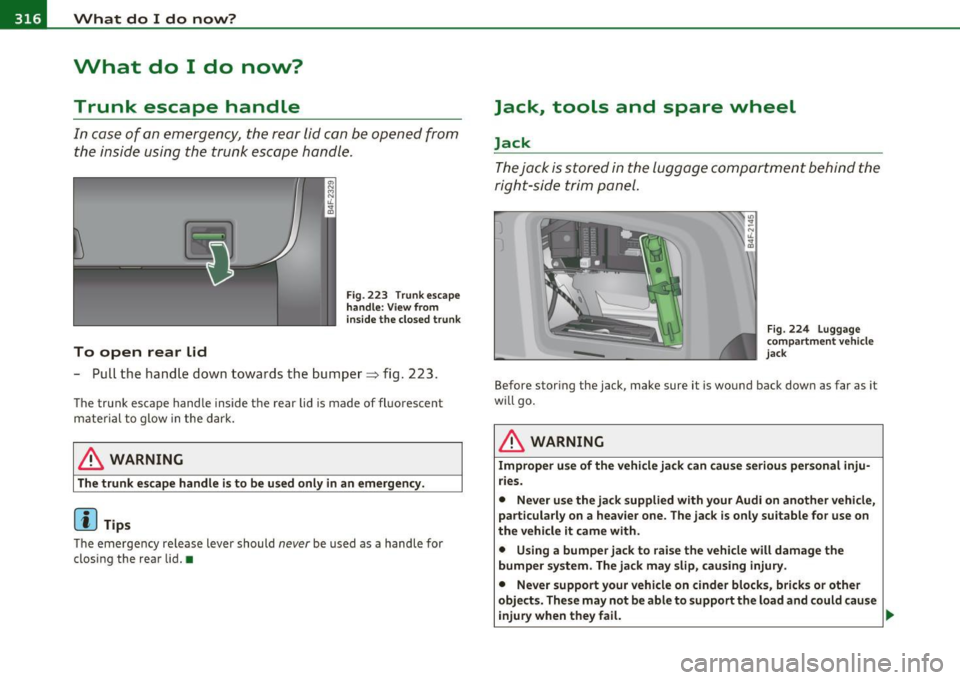
Trunk escape handle
In case of an emergency, the rear lid can be opened from
the inside using the trunk escape handle.
To open rear Lid
Fig . 223 Trunk escape
handle : View from
inside the closed trunk
- Pull the hand le down towards the bumper~ fig. 223.
The trunk escape handle inside the rear lid is made of fl uorescent
material to glow in the dark.
& WARNING
The trunk escape handle is to be used only in an emergency.
(I) Tips
The emergency release lever should never be used as a handle for
closing the rear lid.•
Jack, tools and spare wheel
Jack
The jack is stored in the luggage compartment behind the
right-side trim panel.
Fig . 224 Luggage
c ompartment vehicle
jack
Before stor ing the jack, make sure it is wound back down as far as it
wi ll go .
& WARNING
Improper use of the vehicle jack can cause serious personal inju
ries.
• Never use the jack supplied with your Audi on another vehicle,
particularly on a heavier one. The jack is only suitable for use on
the vehicle it came with.
• Using a bumper jack to raise the vehicle will damage the
bumper system. The jack may slip, causing injury.
• Never support your vehicle on cinder blocks, bricks or other
objects. These may not be able to support the load and could cause
injury when they fail. _,,.