2010 AUDI S6 seats
[x] Cancel search: seatsPage 267 of 368
____________________________________________ C_l_e _a_ n_ in--= g=-- a_n_ d_ p ,__r_o _t_ e_ c_ t _ io_ n __ _
Your authorized Audi dealer can provide cleaning products that have
bee n tested and approved for your veh icle. •
Care of interior
MMI display
- Clean the MMI display with a soft clean cloth and an LCD
cleaner .
The MMI display can be cleaned with a professionally available "LCD
cleaner". The cloth should be slightly dampened with the cleaning
fluid to clean the d isp lay .
0 Not e
To avoid scratching the MMI display, you should never clean it dry. •
MMI control console
- First clean the MMI control console with a brush to
remove dust from the housing.
- Then wipe the MMI control console with a clean, soft,
slightly damp cloth.
T he MM I control console sho uld be cleaned w ith a brush first so that
no dirt is trapped between the buttons and the housing. We recom
mend g iving the MMI contro l conso le a final w ipe with a cloth mois t
ened w ith water and dish washing detergent.
0 Note
To prevent damage, make sure that no fluid ever gets into the MMI
control console .•
Safety first
Aluminum trim
Use only neut ral-pH products to remove spots and deposits from
al uminum surfaces. Ch rome care prod ucts and al kaline cleaners w ill
attack aluminum surfaces and can damage them over t ime .
& WARNING
Alw ay s re ad and heed all WARNING S and other information
~ page 258 . •
Fabrics and fabric coverings
Fabrics and fabr ic coverings (e .g . seats, door trim panels, etc.) should
be clean ed at regular interva ls with a vacuum cl eaner . T his removes
surfa ce di rt pa rt icl es which co uld become embedded in the fabr ic
through use . Steam cleaners should not be used, because the steam
tends to push the d irt deeper into the f abric and lock it there.
Norm al clean ing
Genera lly, we recommend using a soft sponge or a li nt-free
microfiber cloth to the clean fabric. Brushes should on ly be used for
ca rpets and floor mats , since other fab ric surfaces could be ha rmed
by brushes.
No rma l sur face sta ins can be cleaned us ing a commercially avai lab le
foam cleaner. Spread the foam on the surface of the fabr ic with a soft
sponge and work it in gently . Do not saturate the fabric. Then pat the
foam dry using absorbent , dry cloths (e .g. microfiber cloth) and
vacuum it after it has dried comp letely.
Clean ing stains
Sta ins caused by beverages (e .g. coffee, fruit juice, etc.) can be
treated with a mild detergent solut ion. Apply the detergent solut ion
with a sponge . In the case of stubborn stains, a detergent paste can
be applied directly to the stai n and worked into the fabric . After
wards, use copious amo unts of clean water to remove the remaining .,.
Vehicle care Technical data
Page 269 of 368
____________________________________________ C_l_e _a_ n_ i n--= g=--- a_n_ d----' p,__ r_o _t_ e_ c_ t_ i _o_ n __ lffll
consider if childre n, animals or other factors might prove to be partic
ularly hard on the leathe r.
By contrast, leather types that are covered by a colored fin ish layer
are more durable . This has a positive effect on the leath er's resistance
to wear and so iling in daily use. On the othe r hand, the typical charac
teristics of natura l leathe r are barely or not apparent . However, this
does not mean that the leathe r itself is of infer io r quality.
C are and handling
Because of the exclusive nature of the types of leather that Audi uses
and the ir unique p roperties (such as sensitivity to oils, grease, so iling,
etc.), yo u will need to be somewhat ca refu l with these leat he rs , a nd
a certain type of care is required. For example, dark clothing mate
r ials ca n disco lor leather seats (especially if such clothi ng is d amp and
was not dyed correctly) . Dust and dirt particles in pores, folds, and
seams can have an abrasive effect and c an damage the le athe r
surface as well as weaken seams .
The leather s houl d be cleaned regularly as needed . After having been
used for a relatively long time, your leather sea ts w ill acquire a rich
aged finis h. This is a characteristic of natura l leather and a sign of
true quality.
I n order to maintain the value of this natural product over the life of
your vehicle, you sho uld fo llow the recommendations below :
0 Note
• To keep you r leather from b leaching out, do not allow it to be
exposed to bright sunl ight for long periods of time . If you have to
leave t he veh icle parked outside for long pe riods, cover the leather to
protect it from direct exposure to sunlig ht.
• Sharp objects on clothing, such as zippers, rivets or sha rp pieces
on belts can leave permanent scratches or scrape marks on the
s u rface of the leather.
Safety first
(I] Tips
• After each time you clean the leathe r and at regular inte rvals , u se
a leather preservative creme that contains UV-blockers and that
works into the leather. This creme will nou rish and mo istur ize the
leather, helping it to breathe and stay supp le. It also helps to build up
a p ro tect ive coa ting on the surfa ce.
• Clean the leather every 2 -3 months, and clean any areas that get
soiled.
• Remove fresh marks made by ballpoint pens, ink, lipstick, shoe
polish, etc. as soon as poss ible.
• Preserve the color of t he leather as needed by using a specia l
co lored leather ca re creme to touch up areas of uneven color .•
Ap plies to vehi cles : w it h nat ural leat her
Cleaning and caring for leather upholstery
and trim
Natural leather requires special care and attention.
Normal cleaning
- Clean so iled areas wit h a slightly mois tened cotton or
woolen cloth .
More stubborn dirt
-More stubborn d irt can be removed using a clot h satu
rated w ith a mild soap solution (2 ta blespoons m ild liq ui d
soap) .
- Never allow the soap solution to saturate the leather, and
make certa in that no water soaks i nto the seams .
- Wipe off the soap solution w ith a soft, dry c loth. .,,
Vehicle care Technical data
Page 296 of 368
-~_T_ ir_e_ s_ a_ n_ d_ w_ h_e_ e_ ls _______________________________________________ _
& WARNING (conti nu ed )
• Tire s age even if they are not being used and can fail suddenly ,
especially at high speeds . Tires that are more than 6 year s old can
only be used in an emergency and then with special care and at low
s peed .
Glossary of tire and loading terminology
Accessory weight
means the combined we ight (in excess of those sta nda rd items which
may be rep lace d) of automatic transmission, power steering, power
bra kes, powe r w indows , power seats, radio, and heater, to the extent
that these items are avai lab le as factory- installed equipment
(w het he r i nsta lled or no t).
Aspect ratio
me ans the ratio of t he he ight to t he w id th of the tir e in percent .
Numbe rs of 55 o r lower indicate a low sidewa ll for improved steer ing
respo nse an d be tter overa ll handling on dry p avemen t.
Bead
means the part o f the tire that is made of stee l w ires , wrap ped o r
re in forced by ply cords and that is shaped to fit the rim.
Bead separation
means a brea kdown of the bon d between components in the bead .
Cord
means the st rands forming the plies in the tire.
& W ARNING (continued )
• Never mount used tire s on your vehicle if you are not sure of
their "previous hi story ." Old used tires may have been damaged
eventhoughthedamagecannotbeseenthatcanleadtosudden
tire failure and lo ss of vehicle control.
• If you notice unu sual vibration or if the vehicle pull s to one side
when driving, alway s stop as soon as it is safe to do so and check
the wheels and tires for damage. •
Cold tire inflation pressure
means the tire pressure recommended by the vehicle ma nufa cturer
for a tire of a des ignated size t hat has not been driven for more than
a couple of m iles ( kilomete rs) a t low speeds in the t hree ho ur period
before the tire pressure is measured or ad justed.
Curb weight
mea ns the weig ht of a motor vehicle wit h standard equ ipment
including the max imum cap aci ty of f ue l, oil, and coo lan t, air condi
tioning and additiona l weight of optional equipment.
Extra load tire
means a t ire designe d to operate at higher loads and at higher infla
t ion p ressures than the co rrespo nd ing standard t ire. Ext ra load tires
my be identified as "XL", "xl", "EXTRA LOAD", or "RF" on the sidewall.
Gross Axle Weight Rating ( "GAWR ")
means the load -ca rry ing capacity of a s ingle ax le system, measured at
t he t ire-grou nd inte rfaces .
Gross Vehicle Weight Rating ("GVWR")
means the max imum total loaded we ight of the vehicle .
Page 328 of 368

m.___F_ u_ s_e _s _ a _ n_d_ b_ u_ lb_ s _____________________________________________ _
(I) Tips
You are well advised to keep a supply of spare fuses in your vehicle .
Fuses with the proper ampere ratings are available at your Audi
dealer. •
Fuse Location, Instrument Panel left
Fig. 23S Fuse pan el
layout
Some of the equipment items listed a re optiona l or only avai lable on
certain mode l configurat ions.
Note that the following t able i s accu rate at the time of going to
pre ss and is subject to change. In the event of discrepancies, the
label on the in side of the cover alwa ys takes precedence.
T he power seats are p rotected by circuit br eaker s, which a utomat i
cally reset after a few seconds after the overload has been remedied .
No. Equipment
1 Not use d
2 Not used
3 Eng ine management
4 Oil level sensor
Amps
s
5
..
No . Equipment
5
6
7
8
9
10
11
12
1 3
14
1 5
16
17
18
1 9
20
21
22
23
24
25
26
27
28
Climate control, tire pressure mon itoring sys
tem
Electronic Stabilization Program (ESP), clutch
sensor
Di agnost ic co nnector
Homelink control unit
A utom atic dimming in ter ior m irr or
Adaptive Cruise Control
Not used
Diagnostic connector
Sw itch module stee ring col umn
Not used
I ns trumen t cluste r, contro l modu le Gatew ay
Telephone, cell phone Elect ronic Stabilization Program (ESP)
Headlight electronics, left-side
Ra in s ensor
Heated washer nozzles
Se at adjus tment ( drive r)
MMI display
Electromec hanical park ing brake
Not used
N ot used
No t used
No t used
Not used
Amps
5
5
5
5
5
5
10
10
10
5
10
5
5
5
1 0
5
5
-
Page 329 of 368

______________________________________________ F _u_s _e_ s_ a_ n_ d _ b _u_l_b _ s _ ___.9I
No. Equipment
29 Not used
30 Not used
31 Back-up
light switch, transmission, engine com-
ponents
Intelligent power module driver (footwell light
32 and front headlights, horn, wiper system, elec-
trically adjustable steering wheel)
-
33 Intelligent power module dr
iver
(lights left-side)
34 Intelligent power module driver
(lights right-side)
35 Not used
36 Headlight
washer system
37 Electronic Stabilization Program (ESP)
38 Wiper system
39 Door control module
left-side
Horn
41 Heater fan
42 Control module electronic ignition lock/electri-
cally adjustable steering wheel
43 Rear
windshie ld wiper (Avant)
44 Power window opener (left-side)
Amps
15
30
25
25
30
25
30 15
25
40
30
15
-
-
35 •
Vehicle OP-eration
Fuse Location, Instrument Panel right
Fig. 236 Fuse panel
l ayou t
Some of the equipment items listed are optional or only available on
certain model configurations.
Note that the following table is accurate at the time of going to
press and is subject to change. In the event of discrepancies, the
label on the inside of the cover always takes precedence.
The power seats are protected by circuit breakers , which automati
cally reset afte r a few seconds after the overload has been remedied.
No. Equipment Amps
Fuse holder (black)
1 Control module Convenience
key
15
2 Cigarette lighter front 20
3 Tire pressure monitoring system
5
4 Electrical outlet front (center console)
20
-
5 Intelligent power module passenger
15
(glove box lock)
6 Door control module right-s ide
15
Sunroof 20
A/C controls 10
Vehicle care Do-it-yourself service iTechnical data
Page 330 of 368
.,.,___F_ u_ s_e _ s_ a_n_ d_ b_u _ l_ b_ s _______________________________________________ _
No. Equipment Amps
9 Heated seats, front 30
10 MMI
7,5
11 Seat adjustment (passenger) 10
12 Communication 5
Fuse holder (brown)
1 Electric fuel pump 20/30
2 Adaptive Air Suspension
15
3 Lane assist 10
4 Audi side assist
5
5 Adaptive Air Suspension 5
6 Shift gate automatic transmission/clutch switch 5
7 Parking System 5
8 Control module Gateway 5
9
Automatic headlight range control (auxiliary 5
driving lights), headlight electronics, right-side
10 Airbag 5
11 Heated rear seats 5
12 Telephone
5 •
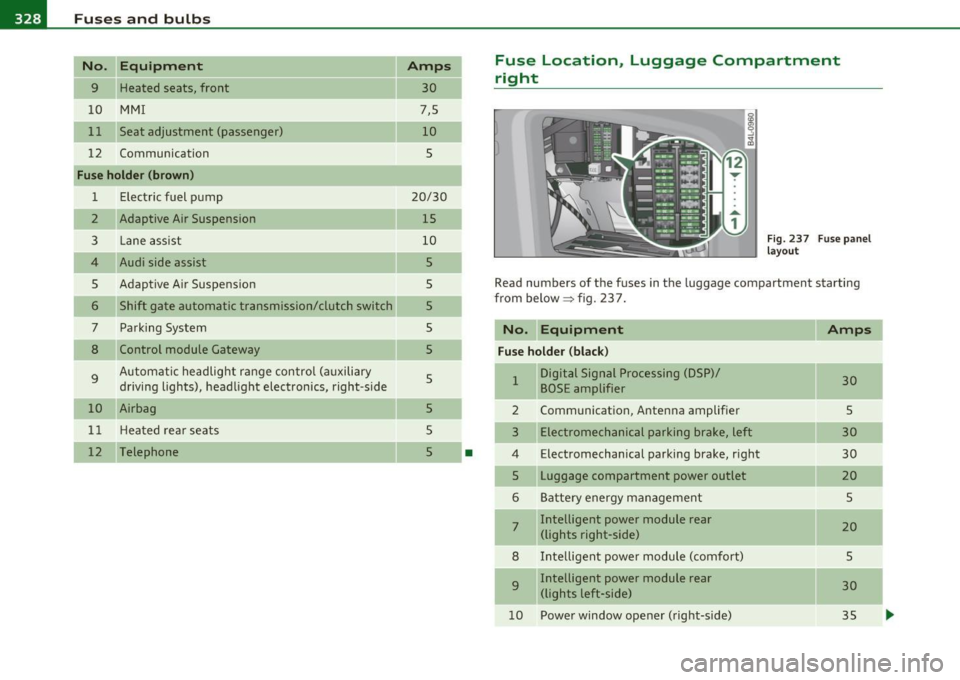
Fuse Location, Luggage Compartment
right
Fig. 237 Fuse panel
layout
Read numbers of the fuses in the luggage compartment starting
from below :::::> fig. 23 7.
No. Equipment
Amps
Fuse holder (black)
1 Digital Signal Processing (DSP)/ 30 BOSE amplifier
2 Communication, Antenna amplifier 5
3 Electromechanical parking brake, left 30
4 Electromechanical parking brake, right
30
5 Luggage compartment power outlet
20
6 Battery energy management 5
7 Intelligent power module rear
20 (lights right-side)
8 Intelligent power module (comfort)
5
9 Intelligent power module rear
30
(lights left-side)
10 Power window opener (right-side)
35
-
-
-
...
Page 352 of 368

-Alphabetical inde x _ ___,_ ______ .::..:....=.:..:..__ __________________________ _
A Temporarily turning off .......... . 124
warning/indicator lights .... ...... . 127
Danger of fitting a child safety seat on the
front passenge r seat ............
197
Accesso ries ..... ...... ............. 346 Adaptive Light ......... ....... .. .. .. 61 Disposal .................. .. .... 209
Adapter for cupholder ................ 89 defective ........................ 32 Front airbags ......... ... .... 199, 200
Adaptive Air Suspension ... .......... 166
Automatic mode .. .. ... .... ...... 167
Comfort mode ................... 167
Description ..................... 166
Dynamic mode ... .. ... ...... .... 167
Jacking mode when changing a flat tire ...
168
Lift mode ....................... 167
Setting the driving modes ...... ... 167
Tr ailer towing mode .............. 168
Warning/indicator lights .... ....... 16
Adaptive Cruise Contro l ...... ...... .. 119
Changing speed ..... ............. 123
Driver information ............ .. .
Driver intervention prompt ...... . . Adding
Engine coolant ........... ...... .
285
Engine oil ............ ...... ..... 282
Windshield washer fluid ........... 292
Additional accessories ............... 346
Additives
Engine oil ............ .. .........
282
Adjusting
Instrument cluster illum ination .....
11
Steering column electrically ........ 107
Steering column manually .. .. .. .. . 106
Adjus ting front seats .......... ... .. .. 75
Air conditioning
See Climate controls ...............
96
Air distribution How do the front airbags work?
.....
204
How many airbags does my vehicle have? .
202
How the Advanced Airbag System compo -
nents work together ............
203
Important things to know ... .. .. .. 195
Indicator light ................... 206
Monitoring ... ................. . 206
PASSENGER AIR BAG OFF light ..... 207
Repairs ............ .. .. .. .... .. 209
Safety instructions .............. . 208
Side airbags .... .... ............. 211
Side curtain airbags .............. 214
Weight-sensing mat ..............
218
When must the system be inspected? 206
All Wheel Drive ... ... .. .......... ... 246 Dr iv ing in traffic ................ .
Driving program .. ...... ........ .
127
130
120
131
Climate controls 100 Alloy wheels ................. .... .. 263
Error messages . .. .. .... ........ .
Open road ... .. .. .. .. ....... ... . 129 Air pollutants filter
120 Climate controls .................. 96
All-wheel drive
Winter tire s .....................
309
Override ...................... .. 120 Airbag
Alternator
Request for driver to assume control
120 Warning/indicator lights ..... ...... 14 Malfunction ..... . .. .............. 26
Save speed . ...... .. .. ........... 122 Airbag system .................. 195,212 Amb ience lighting
Sett ing distance .. ...... ...... .. .
125 Advanced Airbag System .......... 199 Lighting profiles .. .. .............. 64
Sett ing time interval .............. 125 Advanced Airbag System components 202 Anti-freeze
Sett ings ..................... ...
131 Care ... .. .......... ..... .. .. .. . 209 See Engine coolant system ......... 284
Special driving situations .......... 131
Status messages ................. 129
Switching on and off .............. 122
System limits ................ ... 131
Chil d restraints .................. 219
Children ........................ 218
Components (front airbags) ... ..... 202
Anti -glare inside day -night mirror .... 69, 70
Anti-lock brake system
How the ABS system works ...... ..
244
Warning/indicator lights ........... 17
Page 353 of 368

Alphabetical index -________________ f!:VII
Anti-Slip Regulation System (ASR)
How the system works ....... .. .. . 242
Anti-theft systems Anti-theft alarm system ....... ... .. 49
Electronic immobilizer ............. 40
Ashtray Front .............. ...... .. .. .. .. 91
Rea r ........ .... .. .. ... ......... 91
ASR How the Anti-Slip Regulation System works . ...... .. ... .. .. ......... 242
Asterisk What does it mean when something is
marked with an asterisk? ........... S
Audi Service Repair Manuals and Literature
344
AUTO mode AC climate controls ...... .... .. .. .. 99
Auto Safety Hotline .... .. .. .. ....... 183
Auto-Check Control .. ........ .... ... .. 24
Automatic belt retractor ............. 189
Automatic car wash
See Washing ....... .. .... .. .. .. . 259
Automatic Shift Lock (ASL) ..... .. 148, 155
Automatic transmission 6-speed automatic transmission ... . 146
Automatic Shift Lock (ASL) .... 148, 155 Driving ............ .. .. .. .. .... . 146
Dynamic shift program ... .. .. .. .. . 149
Emergency release for selector lever . 152
Emergency release for selector lever
(mu ltitron ic®) .............. .... 159
Fail-safe mode .............. 151, 158
Controls and equip
ment Safety first
Ignition key safety lock
.... ... .. .. . 109
Kick -down . ........ .. .. .. ....... 149
Manual shift program .. ... ... ..... 150
multitronic ® ....... ...... .. .. ... 152
Selector lever .... .. .. .. .. .. . 147, 154
Shift buttons . ........... ... 151, 158
Steering wheel with tiptron ic® . 151, 158
Average speed .. ... .... .. .. .. .... .... 34
Avoid damaging the vehicle ........... 250
B
Battery ... ..... .................... 288
Battery location ins.ide the luggage
compartment . ........ ......... 289
Charging ................ .... .. .. 290
Important warnings when wo rk ing on the
battery . .. .. ..... ....... ... .. .. 289
Jump starting ..... ...... ..... .. .. 331
Low ..... .. ... ..... .. ....... .... 247
Replacing the battery .. .. ......... 292
State of charge .... ... ........... 247
Voltage ................. .. .. .. .. . 31
Winter operation ...... .. .. .. ..... 288
Working on the battery .... ... .. .. . 289
Before driving .. ... ... ... .. .. .. .. .. . 175
Blended gasoline ................... 271
Body cavity seal ing . ...... .. ......... 264
Booster seats . .. .. ........ ......... 225
Brake assistant ...... ............... 245
Brake booster . ........ ... ... .. .. ... 244 Brake fluid
Changing the brake fluid ....... .... 287
Checking the brake fluid level ....... 287
Reservoir . .... .. .. .... ...... ... . 287
What is the correct brake fluid level? . 287
What should I do if the brake fluid warning
light comes on? . ................ 287
Brake light Defective ... .. ................... 21
Brake system . .. .. ... ... ... ..... .. .. 287
Anti-lock brake system ............. 17
Brake fluid ........ ............. . 287
Brake fluid spec ificat ions for refil l and
replacement . .... ....... ... ... . 287
Brake pads .. .. .. .. ...... .. .. .. .. 250
Electromechanical parking brake ... . 113
General informat ion ..... ...... .. . 243
How does moisture or road salt affect the
brakes? ... .................. .. 243
Malfunction ...................... 26
Warning/indicator lights ... .. .. .. .. 18
Worn brake pads symbol ........... 31
Break -in period ... .. .. .............. 249
Brake pads . ... ................ .. 250
Tires ... .... .................... 249
Bulbs ............ .... .. .. .. .. .. ... 329
Bumper cover Caution when parking near a parking barri-er or curb . ................... .. 114
C
California Proposition 65 Warning ..... 278
Battery specific .... .............. 290
Vehicle operation Vehicle care Do-it-yourself service Technical data