2010 AUDI S6 display
[x] Cancel search: displayPage 164 of 368

1111...._ __ P_a _ r_ k_ a_ s_ s_is _ t ____________________________________________________ _
continue to be signaled. Objects such as barrier chains, trailer draw
bars, thin painted vertical poles or fences may not be detected by the
system, posing risk of damage .
• Never use warm or hot water to remove snow or ice from the rear
view camera lens - danger of crack formation on the lens!
• When cleaning the lens, never use products that are abrasive. •
Applies to veh icles: with park ing syste m (rear, with rear view camera)
Switching on/off
The rear view camera switches on automatically together
with the acoustic park assist* when you put the vehicle in
reverse .
Switching on
-Before parking with the rear view camera, the Adaptive Air
Suspension* comfort or automatic mode must be
switched on=>
page 16.
-Put the vehicle in reverse gear, the acoustic parking
system* with rear view camera is activated automatically.
Activation of the acoustic parking system is confirmed by a brief acknowledgement sound.*
Switching off
- Drive faster than 6 mph (10 km/h), or
- take the vehicle out of reverse gear. The acoustic parking
system* is immediately deactivated, and the rear view
camera picture is deactivated automatically after a period
of about 15 seconds, or
- switch off the ignition.
The delay in deactivating the camera prov ides an uninterrupted view
behind the vehicle especially when maneuvering in tight parking spaces and prevents the picture
from turning off the every time you
shift out of reverse.
If the warning message appears in the display but not the rear view
camera picture, read and confirm the warning message. The acoustic
distance signal is always active.*
If you press a function but ton on the MMI control console, the rear
view camera picture disappears. The rear view camera picture reap
pears the next time you park.
Further information on the warning message and the MMI control
console can be found in the MMI instruction booklet.
[I) Tips
• The rear view camera picture is available as soon as the MMI
Display or the MMI is switched on, or the start-up phase is completed.
• Keep the sensors in the rear bumper and the rear view came ra lens
clean and free of snow and ice, so that the parking system can work
properly . Please follow the additional notes on~
page 165. •
Applies to veh icles: with park ing syste m (rear, w ith rear vie w came ra)
Reverse Parking
Parking mode 1 can be used when parking in a garage or
parking space.
Fig. 158 MMI Display:
aiming at a parking
spot
~
Page 165 of 368
___________________________________________________ P_ a _ r_k :...:.; a..::s ...:s...: i..::s ...:t _ ___,J_
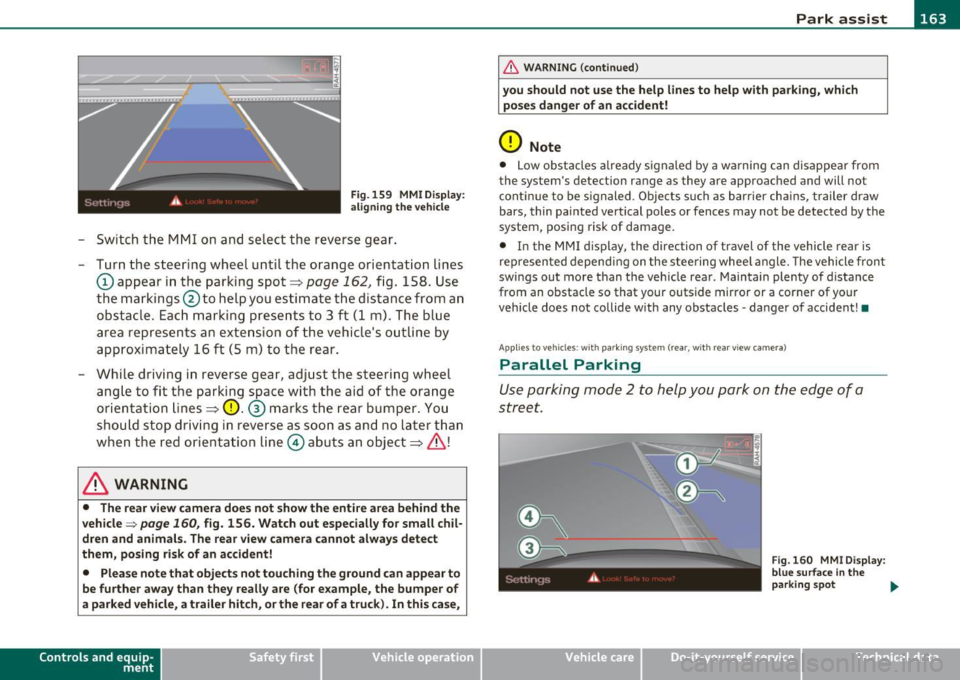
Fig. 159 MMI D isplay:
al igni ng the veh icle
- Switch the MMI on and se lect the reverse gear .
- Turn the steering wheel until the orange orientation lines
(D appear in the parking spot=> page 162, fig. 158 . Use
the markings @to help you estimate the distance from an
obstacle. Each marking presents to 3 f t (1 m) . The blue
area represen ts a n extension of the vehi cle's o utline by
approximately 16 ft (5 m) to the rear .
- While driving in reverse gear, adjust the steering wheel ang le to fit the parking space with the aid of the orange
orientation lines =>
0. ® marks the rear bumper . You
should stop driving in reverse as soon as and no la ter than
when the red orientation line© abuts an object=>& !
& WARNING
• The rear view came ra does not show the enti re area beh ind the
v ehicle =>
page 160, fig. 156. Watch out e spe cially fo r s mall chil ·
dren and animal s. The rear v iew cam era cannot alwa ys dete ct
them , posing ri sk of an accident!
• Plea se note that obje ct s not tou ching the groun d can appear to
be further awa y than th ey reall y are (for example , th e bumpe r of
a parked vehi cle, a trailer hit ch , or the r ear of a truck) . In thi s case ,
Con tro ls a nd e quip ·
m en t Vehicle
OP-eration
& WARNING (con tin ued)
you sh o uld not use the help lin es to help with p arking , whic h
po se s dang er of an accident!
0 Note
• Low obstacles a lready signaled by a wa rning c an disappear from
the sys tem's de te ct ion range as they are app roached and will no t
conti nue to be signaled . Objects such as barrier cha ins, trailer draw
bars, thin painted ve rtica l poles or fences may not be detected by the
system , posing risk of damage.
• In the MMI display , the direc tion o f travel o f the vehicle rear is
represen ted depend ing on the steering whee l angle. The vehicle front
swings out more than the veh icle rear . Maintain plenty of distance
from an obstacle so that your outside mirror or a corner of your
vehicle does not collide with any obstacles -danger of accident !•
Ap plie s to veh icle s: with pa rk ing syst e m (r ea r, wi th rear vie w cam era)
Parallel P arking
Use parking mode 2 to help you park on the edge of a
street.
Vehicle care
Fig. 160 MM I Displ ay :
blue surface In the
p arking s pot
~
Do-it-yourselt service iTechnical data
Page 166 of 368

1111....__P_ a_r_ k_ a_s_ s_ i_ s _t __________________________________________________ _
Fig.161 MMI Display:
Blue curve on the curb
The following steps apply only when there is no obstacle
(such as a wall) near the parking spot. Otherwise, please read
the "Tips on Parking Next to Obstacles".
- Activate the turn signal.
- Switch the MMI on and select the reverse gear. The
parking aid turns on and parking mode 1 appea rs on the
display.
- Position your vehicle parallel to the edge of the street,
approximately 3 ft (1 m) from a parked vehicle.
- Press the control button
(D => page 163, fig. 160 on the
MMI control console. Parking mode 2 appears.
- Back up in reverse gear and align your vehicle so that the
blue area ® borders on the rear end of the vehicle or on
the parking spot line. The blue area represents an exten
sion of the vehicle's outline by approximately 16 ft (5 m)
to the rear. The long side of the blue area should be on the
curb. The entire blue area must fit into the parking spot.
- While the vehicle is stationary, turn the steering wheel to
the right as far as it will go. -
Back into the parking spot until the blue curve touches the
curb => fig. 161. Stop the vehicle.
- While the vehicle is stationary , turn the steering wheel to
the left as far as it will go .
- Continue to back up into the parking spot until the vehicle
is parked parallel to the curb .® marks the rear bumper .
You should stop driving in reverse as soon as and no later
than when the red orientation line© abuts an object
=> & !Keep an eye on the front of your vehicle while doing
this =>
0.
Parking next to obstacles
When there is an obstacle (such as a wall) next to the parking spot,
choose a spot with more space on the sides. Position the long side of
the blue a rea so that the re is sufficient space from the curb. The area
must not be on the curb. You will also need to start turning the
steering wheel much earlier. There should be a sufficient amount of
space between the curb and the blue curve, and the blue curve
=> fig . 161 must not touch the curb.
& WARNING
• The rear view camera does not show the entire area behind the
vehicle => page
160, fig. 156. Watch out especially for small chil
dren and animals. The rear view camera cannot always detect
them, posing risk of an accident!
• Please note that objects not touching the ground can appear to
be further away than they really are (for example, the bumper of
a parked vehicle, a trailer hitch, or the rear of a truck). In this case,
you should not use the help lines to help with parking, which
poses danger of an accident! _,,,
Page 167 of 368

Park assist IIJII _________________________________ _____;.....:;_;_.:..:,____;;_ ____ _
0 Note
In the MMI display, the d irect ion of t ravel of the vehicle rear is rep re
sented depend ing on the steering wheel angle. The vehicle front
swi ngs ou t mo re t han t he ve hicle re ar. M ain tain ple nty of dist ance
from an obstacle so t hat your outs ide mirror or a corner of your
vehicle d oes no t collide with any o bstacles - dange r of accide nt!
[ i ) Tips
Th e left or right or ientat ion lines and s urfaces will be displ aye d,
depending on the tu rn signal being used. •
App lies to veh icles : with park ing syst em (rear, wit h rea r view cam era)
Adjusting the display and warning tones
Th e display and warning tones can be adjusted in the
MM I.
-Select: Funct ion button !CA R]> Systems *> Parking
system .
Display
• Off -when the parking system is switche d off, only audible sig na ls
are given.
• On -when t he pa rking system is swi tched on, the pic ture from the
rear view camera is displayed.
Warning tones (Canada models)
• Rear volume -rear sensor vo lume
• Rear frequency -rear sensor frequency
• In-car entertainment fader -w hen the p ark in g sys tem is switche d
on, t he volume of the active audio source is lowered.
Th e newly adj uste d value is briefly hear d from the signal generator .
Th e set tings are automat ically stored and assigned to the master key
with remote control.
Controls and equip
ment Safety first
& WARNING
•
Canada models: always make sure that the volume and
frequency of the chimes is adjusted so that you can easily hear the
acoustic distance signal even if the radio is playing, the air-condi
tioner blower is on High or there is a high level of outside noise.
• Check the settings whenever someone else has driven the
vehicle before you.
[I] Tips
• Cana da mo dels: the warning tones can a lso be adjusted directly
from t he rear -view came ra image* . Simply press the
!Settings)
control button.
• Cha nged settings are activated w hen parking assist is switched on
again. •
Appli es to ve hicle s: wit h pa rk ing system (rea r, wi th r ear vie w c amer a)
Error messages
If a wa rni ng tone* is aud ible for abo ut five seconds w he n you t urn on
the ignition , the re is a ma lfunction in the system. Have the prob lem
co rrected by yo ur aut ho rized Audi dea ler.
Keep the sensors in the rear b umper clean and free from ice so that
t he a cousti c p ark assis t* sys tem c an fun ction pro perly .•
Vehicle care Technical data
Page 169 of 368
__________________________________________ A _d_ a __,_ p_t_ i_v _e _ A_i_ r _ S_ u_s __,_p _ e_ n_s _ i_ o _n _ __.fflll
A pplie s to veh icles : with Ad aptive Air Su spen sion
Chassis controls
Four different driving modes can be set by the driver.
The automatic control processes are speed- and time-dependent. For
example, it is not possible to raise the suspension to the lift mode
above certain speeds.
Level adjustment
Automatic
Comfort
Dynam ic
Lift
Automatic Ground clearance
about 4
. 7 -4.1 inches
(120 -105 mm)
about 4. 7 inches (120 mm)
about 4.1 inches (105 mm)
about 5.3 inches (135 mm)
Select the automatic mode if you prefer suspens ion and damping
sett ings emphasizing comfort .
• Lowering : When a speed of about 75 mph (120 km/h) is exceeded
for more than 30 seconds, the vehicle is automatically lowered by
about 0 .6 inch (15 mm) to the dynamic level which is more suitable
for highway speeds. Road holding is optimized as a result of the lower
center of gravity and fuel consumption is reduced as a result of
reduced wind resistance.
• Raising: The vehicle is automatically raised again if the speed falls
below about 44 mph (70 km/h) for a period of 2 minutes. The veh icle
is raised immediately when speed falls below about 22 mph (35
km/h).
Comfort
Select the comfort mode if you desire a suspension setting with a
special emphasis on comfort. In the standard mode there is
no
lowering of the suspension. Even at high speeds, the vehicle stays at
the same level. Damping characteristics with a decided emphasis on
comfort are se lected in this mode .
Contro ls a nd e quip
m en t Vehicle
OP-eration
Dynamic
Select the dynamic mode if you prefer a sporty suspension setting . In
this mode, the vehicle is lowered while it is st ill stationary and sporty
damping characteristics are se lected. The wa rning light
cw in the
instrument cluster will come on for a few seconds just to remind you
of the reduced ground clearance.
If you switch off the engine wh ile the vehicle is in the dynamic mode
and then switch on the ignition once again, the
cw warning light will
also come on again for a few seconds as a reminder.
Lift
Select the lift mode when you have to travel over poor sections of
road (e.g. trails) . In the lift mode, the vehicle is raised by 0.6 inch (15
mm) compared to normal level w hile it is still stationary and damping
characteristics are adjusted to emphasize comfort.
Th e lift mode can be activated only at speeds below 50 mph (80
km/h) . When a speed of about 62 mph (100 km/h) is exceeded, the
system automatically leaves lift mode and the mode set previously
(standard, automatic, dynamic) is activated again.•
App lies to veh icles: w ith Adaptive Air Suspens ion
Setting the driving modes
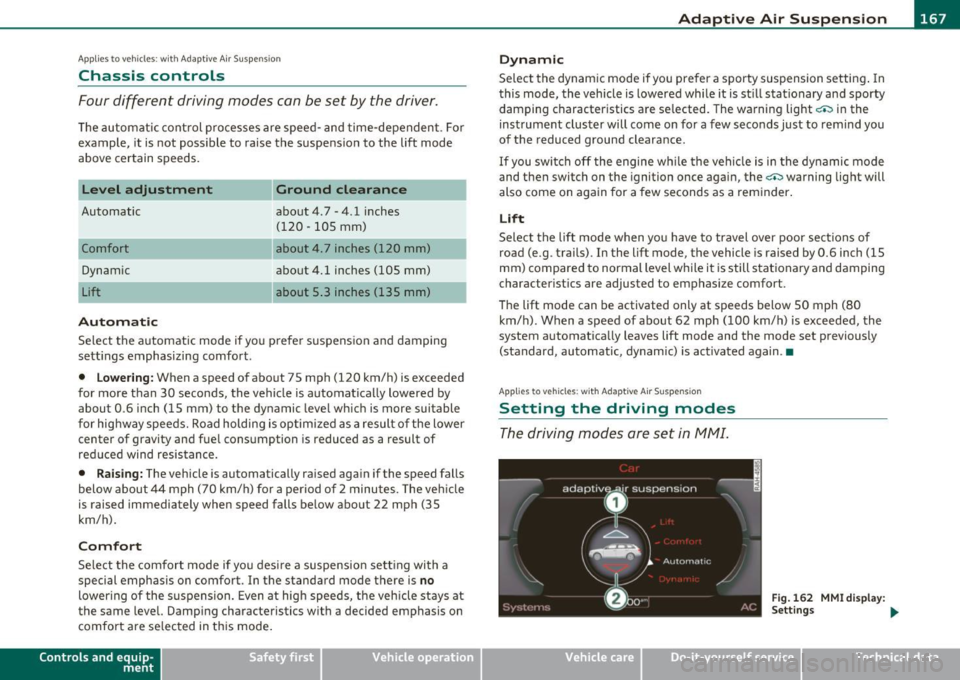
The driving modes are set in fv1fv1I.
Fig. 162 MMI display :
Settings ...
Vehicle care Do-it-yourselt service iTechnical data
Page 170 of 368

lffllL-___:A....:.: d....: a:;£ p..:t :.:.i..:. v ..:e :....:.. A..:.i:.:. r_ S.::..: u....: s~ p!.:..: e:..:.n..:. s::..:.. i o::..:.. n;__ _________________________________________ _
The ignition m ust be sw itche d on to set the driv ing modes .
- Select: Function button
I C A R].
Please note that not every driving mode can be se lected in every
dr iving sit uation . For example, it is not poss ible to switc h to "lift"
mode at speeds above 50 mph (80 km/h) . Th is mode is the n shown
greyed out in the MMI display.
For ad ditio nal info rmation on the driving modes=>
page 167,
"Chass is controls". •
App lies to veh icles: w ith Adaptive Air S uspensio n
Jacking mode when changing a flat tire
This mod e must be activated in the MMI befor e raising
the vehicle with a jack or on a vehicle lift.
- Select: Functio n button [CAR)> function butto n [S ET UP]
> Jacking mode.
The vehicle jac k mode m ust be activated befo re c hanging a whee l so
t hat the automatic contro l processes for the a ir suspens io n do not
make li fting w ith the vehicle jack more difficult.
[ i J Tips
The vehicle jack mode is switched off automat ica lly at speeds above 9
m ph (15 km/h) .•
Ap plies to veh icles : w it h Ad aptive Air Suspens ion
Towing a trailer
A uto ma tic lo wering i s not desira ble when towi ng a
trailer.
- Select: Fu nct ion button [CAR)> function butto n [SETUP ]
> Towing mode .
Level Adjustment when towing a trailer
• Before h itching up the trailer and befo re adjust ing the tongue
we igh t at the trailer, the automatic o r comfort mode
must be
selected, so that the vehicle is at normal leve l=>
page 167, "Sett ing
t he drivi ng modes ".
• If dr iv ing in dynamic mode is desired, th is mode
mu st be selected
befo re hitc hing u p the t rai ler a nd before adjusting t he tongu e
we ight . However, note that yo ur vehicle is lowe red and ground clea r
ance is reduced .
• If you have to drive under diff ic ul t road condi tions, yo u can select
lift mode after hitching up the trailer or after ad justing the to ng ue
we ight .
Restrictions when operating with a trailer
When ope ra ting w ith a trailer, the lift mode can only be selected up
to about 25 mph (40 km/h). The system a utomat ica lly goes out of lift
mode when s peed exceeds about 3 1 mph (S O km/ h).
If t he veh icle is i n automatic, co mfort o r lift m ode before the t railer
towing mode is act ivated, the dynam ic mode cannot be activated .
If the vehicle is in dynam ic mo de before towing operat ion is acti
vated, it can be driven in this mode . If the suspens ion is switched
from t his mode to a utomatic mo de, dy namic mode can not be re
selected .
[I] Tips
If the trailer towing mode has bee n act ivate d, the ve hicle will not si nk
to the dynamic level if se lected. •
Page 200 of 368
........ _A_ ir_ b_ a-=g :..- s.:o.y _s _t _e_ m _______________________________________________ _
defined in the elect ronic contro l unit~ page 207, "PASSE NGER AIR
BA G OFF l ight ".
Always r emembe r, a c hild safety seat o r infa nt ca rr ie r i nsta lled on th e
fro nt seat may be struc k and k noc ke d out of position by t he ra pidly
i nflat ing pass enge r's air ba g in a fr ontal c oll ision. Th e airba g could
g reat ly re duce the effectiveness o f th e ch ild restraint an d even seri
ousl y injur e th e child d uring inf lation .
For this r easo n, and b eca use the back seat is th e sa fest plac e for chil
dre n -whe n pro per ly restra ined acc ordin g to their age and size -we
s tr ong ly r ecommen d that childr en a lways sit in the back s eat
~ pa ge 2 17, "Child S afety".
& WARNING
A child in a rearward -facing child safety seat installed on the front
passenger seat will be seriously injured and can be killed if the
front airbag inflates - even with an Advanced Airbag System.
• The inflating airbag will hit the child safety seat or infant
carrier with great force and will smash the child safety seat and
child against the backrest, center armrest, door or roof .
• Always install rear-facing child safety seats on the rear seat.
• If you must install a rearward facing child safety seat on the
front passenger seat because of exceptional circumstances and
the PASSENGER AIR BAG OFF light does not come on and stay on,
immediately install the rear-facing child safety seat in a rear
seating position and have the airbag system inspected by your
Audi dealer.
• Forward-facing child safety seats installed on the front
passenger's seat may interfere with the deployment of the airbag
and cause serious personal injury to the child.
& WARNING
If , in exceptional circumstances , you must install a forward-facing
child restraint on the front passenger's seat:
& WARNING (continued)
• Always make sure the forward-facing seat has been designed
and certified by its manufacturer for use on a front seat with a
passenger front and side airbag.
• Never put the forward-facing child restraint up against or very
near the instrument panel.
• Always move the passenger seat into its rearmost position in
the seat's fore and aft adjustment range, as far away from the
airbag as possible before installing the forward-facing child
restraint. The backrest must be adjusted to an upright position.
• Make sure that the PASSENGER AIR BAG OFF light comes on
and stays on all the time whenever the ignition is switched on.
& WARNING
To reduce the risk of serious injury, make sure that the PASSENGER AIR BAG OFF light will be displayed whenever a child
restraint is installed on the front passenger seat and the ignition
is switched on .
• If the PASSENGER AIR BAG OFF light does not stay on, perform
the checks described
~ page 206 , "Monitoring the Advanced
Airbag System ".
• Take the child restraint off the front passenger seat and install
it properly at one of the rear seat positions if the PASSENGER AIR
BAG OFF light does not stay on .
• Have the airbag system inspected by your Audi dealer immedi
ately.
• Always carefully follow instructions from child restraint manu
facturers when installing child restraints.
& WARNING
If , in exceptional circumstances , you must install a forward or
rearward-facing child restraint on the front passenger 's seat:
Page 210 of 368
........ _A_ i_rb _ a_,g,:;._ s_, y'- s_ t_e _m ________________________________________________ _
the weight-sensing mat to measure more weight than is actua lly on
t he seat.
If the PASSENGER AIR BAG OFF light still does not come on and
does not stay on cont inuous ly (when the ignition is switched on),
• t ake the child res tra int off the fr ont p assenger seat an d ins ta ll it
properly at one of t he rear seat positions. Have the a irbag system
inspec ted by yo ur Aud i d ea le r imme diat ely.
• move the child to a rea r seat position and ma ke s ure that the child
is properly res trained in a c hild rest rain t th at i s appr opriate fo r its
size and age .
T he
PASSENGER AIR BAG OFF light shou ld NOT come on when the
ignition is on a nd an adult is sitt ing in a proper sea ting pos ition on the
front passenger seat. If the
PASSENGER AIR BAG OFF light comes on
and s tays on o r flashes fo r abo ut 5 seconds while d riving, unde r these
circumstances, make sure that:
• t he adul t on the front passenger se at is pro perly seate d on the
center of the seat cushi on with his or her back up against the backrest
an d t he bac krest is not reclined => page 176, "Proper occ upan t
seating posit ions",
• t he adult is not tak ing weig ht o ff t he sea t by holding on to th e
passenge r assist handle above the front passe nger door or
supporti ng their weight on the armrest,
• the safety belt is be ing properly wor n and that there is not a lot of
s la ck in th e s afe ty be lt webb ing,
• accessory seat cove rs or cushions o r othe r th ings that may ca use
an in co rre ct re ading o r impre ss io n on th e weigh t-sensin g m at un der
the upholstery of the seat have been removed from the front
p as senge r se at,
• a sa fety be lt extender has not been left in th e safety belt latch for
th e fr ont pas senger se at.
In addit io n to t he
PASSENGER AIR BAG OFF light in t he center of the
instrument pane l, the message
PASSENGER AIR BAG OFF o r
PASSENGER AIR BAG ON w ill briefly appea r in th e inst rument cluster display
. This is to inform the dr ive r of the current front passenger
a irb ag st atus .•
Important safety instructions on
monitoring the Advanced Airbag System
& WARNING
An airbag system that is not functioning properly cannot provide
supplemental protection in a frontal crash.
• If the airbag indicator light comes on, it means that there may
be something wrong with the Advanced Airbag System.
It is
possible that the airbag will inflate when it is not supposed to, or
will not inflate when it should.
• Have the airbag system inspected immediately by your Audi
dealer.
& WARNING
• If the front airbag inflates, a child without a child restraint , or
in a rearward-facing child safety seat, or in a forward-facing child
restraint that has not been properly installed will be seriously
injured and can be killed.
• Even though your vehicle is equipped with an Advanced Airbag
System, make certain that all children, especially 12 years and
younger, always r ide on the back seat properly restrained for their
age and size.
• Always install forward or rear-facing child safety seats on the
rear seat -even with an Advanced Airbag System.
• If you must install a rearward-facing child safety seat on the
front passenger seat because of exceptional circumstances and
the PASSENGER AIR BAG OFF light does not appear and stay on, immediately install the rear-facing child safety seat in a rear
~