2010 AUDI S6 light
[x] Cancel search: lightPage 316 of 368

_L_T.:...:..: i r~ e:.: s~ a:::. n:..:..:: d:.....: w..:...:. h::e:.: e::.:: ls::::._ ______________________________________________ _
The tire pressure monitoring must be reset via MMI each t ime the
pressures are adjus ted (e.g. w hen swi tching between p art ial an d full
load pressure) or after chang ing o r replacing a tire o n your veh icle
~ page 314. Yo u can fi nd the recommended tire press ures for yo ur
veh icle on the label on the driver 's door pillar~ page 297.
Tire tread circ umference and vibrat ion characteristics can change and
c a u se a tir e pressure war ning if:
• the t ire pressure in one o r more tires is too low,
• t he tire ha s structur al dam age,
• the tire press ure was changed, wheels rotated or rep laced but the
TPM S was no t reset~ page
314.
Warning symbols
1..1' Loss of press ure in at least one tire~ &. Check the tire or tires
and replace or repair if necessary. The indicator light (• in the instru
me nt clust er also illuminates~ page
12. Check/correct th e p res
sures o f all four tires and reset TPMS via MMI.
rr :; (T ire Pressu re M on itor ing System) Tire pres sure! System
malfunction.
If T ,.;> appears a fter switching the ignition on or w hile
dr iv ing ~ page
313, fig . 2 22 a nd t he indica to r lig ht 'in th e instr u
me nt clus ter b links for approx ima tely one m inute and the n stays on,
there is a system ma lf u nct io n. See your authorized Audi dealer as
soon as poss ible.
& WARNING
• If the tir e pres sure indicator appears in the instrument cluster
display, one or more of your tires i s significantly under-inflated.
Reduce your speed immediately and avoid any hard steering or
braking maneuvers. Stop as soon a s possible and check the tires
and their pressures . Inflate the tire pressure to the proper pres
sure as indicated on the vehicle 's tire pressure label~
page 297.
Driving on a significantly under -inflated tire causes the tire to
overheat and can lead to tire failure. Under -inflation also is likely
to impair the vehicle's handling and stopping ability.
& WARNING (co ntinued )
• The driver is re sponsible for maintaining the correct tire pres
sures . You must check the tire pres sures regularly .
• Under certain conditions (such as a sporty driving style , winter
conditions or unpaved roads) , the pressure monitor indicator may
be delayed.
• Ask your authorized Audi dealer if run-flat tires may be used on
your vehicle . Your vehicle registration becomes invalid if you u se
the se tires when not permitted. Damage to your vehicle or acci
dents could also result.
[ i ] Tips
• T he tire pressure monito ring system stops wor king when there is
an ES P/ABS malf u nctio n.
• Using snow cha ins may res ult in a system ma lf u n ct ion .
• The tire pressure mon itor ing system on your Au di was calibrated
using t ires with the "AO" or "RO " id ent ificat ion . We re comme nd
using these tires. •
Applies to vehicles: with tire p ressure monito ring system
Reset tire pressure monitoring system
I f the tire pressure is adjus ted, wheels are rotated or
changed, th e TPfvf S must b e re set via
fv1fv1 I.
-Turn on the ign it ion .
- Sele ct : Fu nct ion butt on
[C AR ]> Systems* > Tire pressure
monitoring
> Store now.
[ i ] Tips
Before resett ing the TPMS, the current pressures of all four t ires
mus t co rrespo nd to the specifie d val ues. A djust the tire pre ssure and
~
Page 321 of 368
_____________________________________________ W __ h_a_ t_ d_o_ I_ d_o _ n_ o_ w _ ? __ _
& WARN ING (con tinued)
Trans missio n in "P " (Pa rk) w ill not pre ve nt the vehicle from
mo ving .
• Befo re you ch an ge a wheel , be s ure the ground i s le ve l an d
firm . If ne cess ary, us e a sturdy b oard und er the jack.
• Aft er in st a llin g the sp are wheel , make sure that you repl ace
the flat tire /wheel in it s storage area prop erly and tight en the
knurled ret ain ing s crew se cu rel y.•
Changing a wheel
When you change a wheel, follow the sequence described
below step-by-step and in exactly that order .
1. Activate the vehicle jack mode (only vehicles with Adaptive
Air Suspension) =>
page 168.
2. Remove the decorative wheel cover *. For more details see
also =>
page 320, "Decorative wheel covers" .
3 . Loosen the
wheel bolts => page 320.
4. Locate the proper mo unti ng point for the jack and align
the jack below that point=>
page 321.
5. Lift the car with the jack => page 321.
6. Remove the wheel with the flat tire and then install the
spare =>
page 322.
7. Tighten all wheel bolts lightly.
8 .
Lower the vehicle with the jack.
9. Use the wheel bolt wrench and
firmly t ighten all wheel
bolts =>
page 320.
10. Replace the decorative wheel cover *.
Safety first
1 1. Deactivate the vehicle jack mode (only vehicles with
Adaptive Air Suspens ion)=>
page 168 .
& WARNING
Alwa ys re ad and f ollow all WARNINGS and information ~ & in
" Ra ising the vehicl e" on pag e
321 and ~ pag e 323. •
After changing a wheel
A wheel change is not complete without the doing the
following .
-Store and secure the wheel you replaced in the spare
wheel well .
- Replace the tools and the jack in the ir proper location.
- Check the tir e pr essur e on the spare wheel immediately
after mounting it .
- As soon as possib le, have the
tighten ing torques on a ll
wheel bolts checked with a torque wrench . The correct
tightening torque is 90 ft lb (120 Nm) .
- Have the flat tire
replaced as soon as possible.
[ i ] Tips
• If you not ic e that the wheel bolts are corroded and difficu lt to turn
wh ile chang ing a tire, they should be replaced before you check the
tightening torque .
• Drive at reduced speed until you have the tighten ing torques
checked. •
Vehicle care Do-it-yourself service Technical data
Page 325 of 368
What do I do now? -________________ PfWII
- Screw the threaded end of the alignment pin from the
tool kit hand-tight into the empty bo lt hole~
page 322,
fig. 232.
- Then re m ove the o ther wheel bolts as described above.
- Take off t he w heel leaving the alignment pin i n the bolt
hole.
Putting on the spare wheel
- Lift the spare wheel and carefully slide it over the alig n
ment pi n to guide it in p lace .
- Use the hexagona l socket in the screwdriver handle to
screw in and tighte n all w heel bolts
slightly.
- Remove the alig nment pi n and inse rt an d tighten the
remaining wheel bolt slig htly like the rest.
- Turn the jac k han dle counter-c lockwise to lower the
ve hicle u ntil the jack is fully released.
- Use the wheel bolt wrench to t ighten all whee l bolts firmly
~ page 320 . Tighten them crosswise, from one bolt to
the (approximately) opposite one, to keep the w heel
centered.
[I] Tips
Never use the hexagonal socket i n the handle of the screwdriver to
loosen or tighten the wheel bolts.
• Pull the reve rsible blade from the screwdriver before yo u use the
hexagonal socket in the handle to t urn the whee l bolts.
• When mounting tires with
unidirectional tread design make sure
t he tread pa ttern is po inted the right way~
page 323.
Safety first
• The wheel bolts should be clea n and easy to turn. Check for dirt
and cor rosion on the mat ing surfa ces o f bo th the whee l and the hub.
Remove all d irt from these surfaces before remounting the wheel. •
Tires with unidirectional tread design
Tires with unidirectional tread design must be mounted
with their trea d pattern pointed in the right direction .
Using a spare tire with a tread pattern intended for
use in a specific direction
When using a spare tire w ith a tread pattern intended for use in a
specific direction, p lease note the fo llow ing:
• T he direct ion of rotation is marked by an ar row on the s ide of the
tire.
• If the spare tire has to be installed in the incor rect d irect ion, use
the spare tire only tempo rari ly since the tire wi ll not be ab le to
achieve its optimum pe rforma nce charact erist ics with rega rd to
aquaplaning, noise and wear.
• We recommend that you pay particular attention to this fact
during wet weather and that you adjust your speed to match road
condit ions.
• Replace the flat t ire with a new one and have it installed on your
vehicle as soon as possible to restore the handling advantages of a
unidirect iona l tire .•
Notes on wheel changing
Please read the information~ page 305, "New tires and replacing
t ires and wheels" if yo u are go ing to use a spa re t ire wh ich is d iffe rent
from the tires on yo ur vehicle .
After you c hange a ti re:
• Check the tire pressure on the spa re immediately after installa-
tion. ..,
Vehicle care Do-it-yourself service Technical data
Page 328 of 368

m.___F_ u_ s_e _s _ a _ n_d_ b_ u_ lb_ s _____________________________________________ _
(I) Tips
You are well advised to keep a supply of spare fuses in your vehicle .
Fuses with the proper ampere ratings are available at your Audi
dealer. •
Fuse Location, Instrument Panel left
Fig. 23S Fuse pan el
layout
Some of the equipment items listed a re optiona l or only avai lable on
certain mode l configurat ions.
Note that the following t able i s accu rate at the time of going to
pre ss and is subject to change. In the event of discrepancies, the
label on the in side of the cover alwa ys takes precedence.
T he power seats are p rotected by circuit br eaker s, which a utomat i
cally reset after a few seconds after the overload has been remedied .
No. Equipment
1 Not use d
2 Not used
3 Eng ine management
4 Oil level sensor
Amps
s
5
..
No . Equipment
5
6
7
8
9
10
11
12
1 3
14
1 5
16
17
18
1 9
20
21
22
23
24
25
26
27
28
Climate control, tire pressure mon itoring sys
tem
Electronic Stabilization Program (ESP), clutch
sensor
Di agnost ic co nnector
Homelink control unit
A utom atic dimming in ter ior m irr or
Adaptive Cruise Control
Not used
Diagnostic connector
Sw itch module stee ring col umn
Not used
I ns trumen t cluste r, contro l modu le Gatew ay
Telephone, cell phone Elect ronic Stabilization Program (ESP)
Headlight electronics, left-side
Ra in s ensor
Heated washer nozzles
Se at adjus tment ( drive r)
MMI display
Electromec hanical park ing brake
Not used
N ot used
No t used
No t used
Not used
Amps
5
5
5
5
5
5
10
10
10
5
10
5
5
5
1 0
5
5
-
Page 329 of 368

______________________________________________ F _u_s _e_ s_ a_ n_ d _ b _u_l_b _ s _ ___.9I
No. Equipment
29 Not used
30 Not used
31 Back-up
light switch, transmission, engine com-
ponents
Intelligent power module driver (footwell light
32 and front headlights, horn, wiper system, elec-
trically adjustable steering wheel)
-
33 Intelligent power module dr
iver
(lights left-side)
34 Intelligent power module driver
(lights right-side)
35 Not used
36 Headlight
washer system
37 Electronic Stabilization Program (ESP)
38 Wiper system
39 Door control module
left-side
Horn
41 Heater fan
42 Control module electronic ignition lock/electri-
cally adjustable steering wheel
43 Rear
windshie ld wiper (Avant)
44 Power window opener (left-side)
Amps
15
30
25
25
30
25
30 15
25
40
30
15
-
-
35 •
Vehicle OP-eration
Fuse Location, Instrument Panel right
Fig. 236 Fuse panel
l ayou t
Some of the equipment items listed are optional or only available on
certain model configurations.
Note that the following table is accurate at the time of going to
press and is subject to change. In the event of discrepancies, the
label on the inside of the cover always takes precedence.
The power seats are protected by circuit breakers , which automati
cally reset afte r a few seconds after the overload has been remedied.
No. Equipment Amps
Fuse holder (black)
1 Control module Convenience
key
15
2 Cigarette lighter front 20
3 Tire pressure monitoring system
5
4 Electrical outlet front (center console)
20
-
5 Intelligent power module passenger
15
(glove box lock)
6 Door control module right-s ide
15
Sunroof 20
A/C controls 10
Vehicle care Do-it-yourself service iTechnical data
Page 330 of 368
.,.,___F_ u_ s_e _ s_ a_n_ d_ b_u _ l_ b_ s _______________________________________________ _
No. Equipment Amps
9 Heated seats, front 30
10 MMI
7,5
11 Seat adjustment (passenger) 10
12 Communication 5
Fuse holder (brown)
1 Electric fuel pump 20/30
2 Adaptive Air Suspension
15
3 Lane assist 10
4 Audi side assist
5
5 Adaptive Air Suspension 5
6 Shift gate automatic transmission/clutch switch 5
7 Parking System 5
8 Control module Gateway 5
9
Automatic headlight range control (auxiliary 5
driving lights), headlight electronics, right-side
10 Airbag 5
11 Heated rear seats 5
12 Telephone
5 •
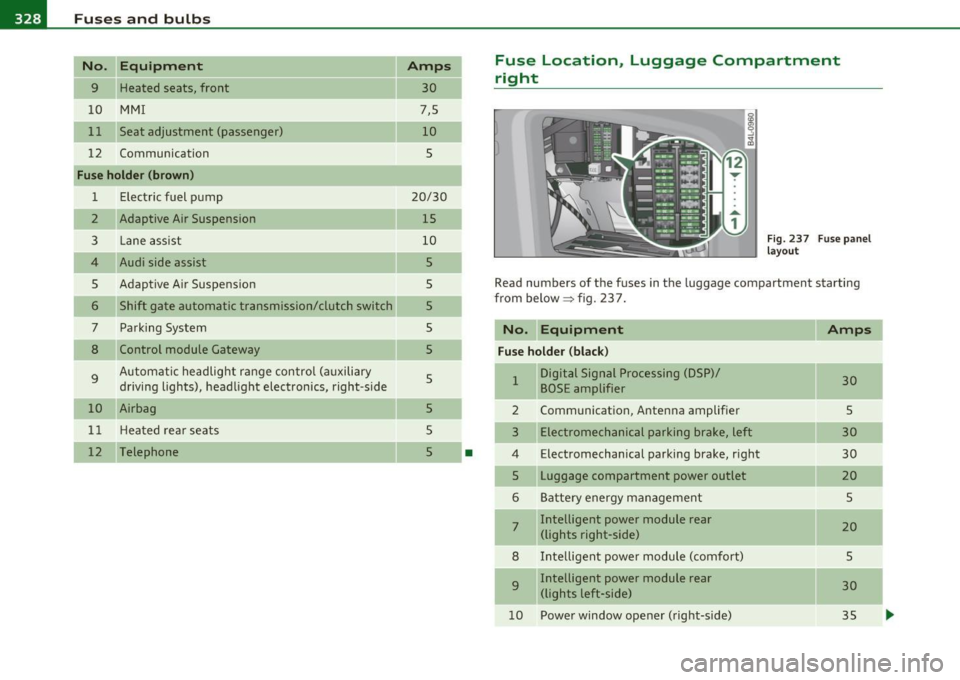
Fuse Location, Luggage Compartment
right
Fig. 237 Fuse panel
layout
Read numbers of the fuses in the luggage compartment starting
from below :::::> fig. 23 7.
No. Equipment
Amps
Fuse holder (black)
1 Digital Signal Processing (DSP)/ 30 BOSE amplifier
2 Communication, Antenna amplifier 5
3 Electromechanical parking brake, left 30
4 Electromechanical parking brake, right
30
5 Luggage compartment power outlet
20
6 Battery energy management 5
7 Intelligent power module rear
20 (lights right-side)
8 Intelligent power module (comfort)
5
9 Intelligent power module rear
30
(lights left-side)
10 Power window opener (right-side)
35
-
-
-
...
Page 331 of 368
_______________________________________________ F_u _s_ e_ s_ a_ n_ d_ b_u _ l_ b _ s __ _
No. Equipment
11 Pa rk in g System
12 Cigare tt e lig ht er r ea r
Fuse holder (brown)
1 Rear view
2 El ectr ic re ar lid (A va nt)
3 Electric rear lid (Avant)
4 Electric rear lid (Avant)
5 Co mmuni cation, An te n na amplifie r
6 Not used
7 M MI
8 Not used
9 Digital Tuner
10 Not used
11 Not used
12 No t used
Bulbs
Replacing Light bulbs
Amps
5
20
5
30
30
20
5
5
5
5
For your safety, we recommend that you have your autho
rized Audi dealer replace burned out bulbs for you.
It is becoming increas ingly more and mo re difficu lt to replace veh icle
light b ulbs since in many cases, other parts of t he car must first be
removed before yo u are able to get to the bu lb. This ap plies espe cially
to the light bu lbs in the front of your car which you can on ly reach
through the engi ne compa rtment.
Safety first
•
Sheet metal and bulb holders can have sharp edges that can cause
ser io us c uts, and parts mus t be cor re ct ly ta ken apar t and the n prop
erly put back together to he lp prevent breakage of parts and long
term damage from water t hat ca n enter housings that have not been
properly resealed .
For your safety, we recommend that you have your a uthorized Audi
dealer replace any bulbs fo r yo u, since yo ur dealer has t he pr oper
too ls, the correct bu lbs and t he expertise.
Gas discharge lamp s (Xenon lights) *:
Due to the high electr ica l voltage, have the bulbs replaced by a qual
ified technician. Headlights with Xenon light can be identified by the
high vol tage s ticker.
& WARNING
Contact with high-voltage components of the electrical system
and improper repla cement of g as discharge (Xenon ) headlight
bulb s can cause serious personal injury and dea th .
• Xenon bulbs are pres surized and can e xplode when being
c hanged.
• Changing Xenon lamp s requires the special training , instruc
tions and equipm ent .
• Only an authorized Audi dealer
or oth er qualified work shop
should change the bulbs in gas discharge lamps .
& WARNING
There are parts with sharp edge s on the opening s and on the bulb
holder s that can cau se serious cuts.
• If you are unce rtain about what to do, have the work
performed by an authorized Audi dealer or other qualified work
shop . Se rious personal injury m ay result from improperly
performed work. ..
Vehicle care Do-it-yourself service Technical data
Page 332 of 368
![AUDI S6 2010 Owners Manual lffl!I.___F_ u_ s_e _s_ a_n_ d_ b_u _ l_ b_ s _______________________________________________ _
(I] Tips
• If you must rep lace the light bulbs yourself, a lways remember
that the eng](/manual-img/6/57594/w960_57594-331.png "AUDI S6 2010 Owners Manual lffl!I.___F_ u_ s_e _s_ a_n_ d_ b_u _ l_ b_ s _______________________________________________ _
(I] Tips
• If you must rep lace the light bulbs yourself, a lways remember
that the eng")
lffl!I.___F_ u_ s_e _s_ a_n_ d_ b_u _ l_ b_ s _______________________________________________ _
(I] Tips
• If you must rep lace the light bulbs yourself, a lways remember
that the engine compartment of any vehicle is a hazardous area to
work in. Always read and heed all WARNINGS~
page 269, "Engine
compartment"~
& -
• It is best to ask your author ized Audi dea le r w henever you need to
change a bulb. •