2010 AUDI Q7 mirror
[x] Cancel search: mirrorPage 84 of 390

Clear vision
Applies to veh icles : w ith d ig ita l compass
Calibrating the compass
The compass has to be recalibrated if the display is wrong
or inaccurate .
-Hold the@ button down until the letter C is displayed on
the interior rear view mirror .
- Drive in a circle at a speed of about 5 mph (10 km/h) until
a direction is shown on the interior rear view mirror.
& WARNING
The digital compass is to be used as a directional aid only. Even
though you may want to look at it while you are driving, you must
still pay attention to traffic, road and weather conditions as well
as other possible hazards. •
Page 89 of 390

Seat memory
Applies to veh icles: with seat memory
Driver's seat memory
The seat adjustment settings for two drivers can be
stored using the memory buttons in the driver's door.
Fig . 76 Driver's door:
Seat memory
In addition to the setting for the driver's seat, the settings for the
steering column* and both exterior mirrors can be stored.
Storing and re calli ng setting s
Using the memory buttons 1 and 2, you can store and recall the
settings for two different drivers => fig . 76 .
T he current settings are also automatically stored on the remote
control key being used when the vehicle is locked. When the vehicle is
unlocked, the settings stored on the remote contro l key being used
a re automatically recalled. This function has to be activated in the
MMI
=> page 88, "Activat ing remote control key memory ".
T urning se at m em ory on and off
If the [ ON/OFF] switch is depressed , the seat memory is inoperative .
The word
OFF next to the [ ON/OFF] switch illuminates.
All the stored settings are retained. We recommend using the
[ ON/OFF ] switch and deact ivat ing the seat memory if the vehicle is
Con tro ls a nd e quip
m en t Vehicle
OP-eration
Seats and storage
only going to be used temporarily by a driver whose settings are not
going to be stored .•
App lies to vehi cles : w it h seat memo ry
Storing and recalling a seat position
Before you can store or recall your seat position, the
(ON/OFF) button must be engaged (down) .
Storing settings
-Adjust the driver 's seat => page 84.
- Adjust the steering column*=> page 123.
Adjust both outside mirrors=> page 79. In the tilt -down
position, the passenger mirror can be adjusted to the
preferred position and saved in the seat memory.
- Press the
(SET) button and hold it down. At the same
time, press one of the memory buttons for at least one second.
- Release the buttons. The settings are now stored under
the corresponding memory button.
Rec alling settings
- Driver's door open -press the desired memory button.
- Driver's door closed -press the corresponding memory
button until the stored position is reached .
Successful storage is confirmed audib ly and by the light in the [ SET]
button illuminating.
When the vehicle is
loc ked , the current settings are stored and
assigned to the remote control key. But the settings stored on
memory buttons 1 and 2 are not deleted. They can be recalled at any
~
Vehicle care Do-it-yourselt service iTechnical data
Page 154 of 390

-Audi side assist .n,..__ ______________ _
Audi side assist
Lane Change Assistant
Applies to vehicles : w ith s ide ass ist
Description
The side assist helps you when changing lanes.
AUDr Q7
Fig . 149 Rear
bumper: Position of
radar sensors (not
visible on outside)
Fig . 150 Signal light
on the outside mirror -
driver's side
Side ass ist uses radar sensors (not visible on outside)=> fig. 149 to
help the driver check blind spots, and see what is happening in traffic
behind the vehicle=>
page 154, fig. 152.
Signal lights are built into both outside mirrors=> fig. 150. The s ignal
light on the left outside mirror assists when moving ove r into the left lane and
the signal light on the r ight outside mirror assists when
moving over into the right lane.
Th e sig nal light comes on to tell you that side assist has detected a
vehicle on that side and that the position of this other vehicle should
be taken into account if you were to change lanes. Thi s is called the
informational stage signal =>
page 154. The informationa l stage
signal is designed so that you not ice it only when you are looking in
the outside m irror.
When you activate the turn s ignal and side assist detects a vehicle in
a notable location, the correspo nding signal on the outside mirror
flashes briefly and brightly several times. This is the alert stage
signal =>
page 154. •
Applies to veh icles: w ith side ass ist
Activating and deactivating
Activating
Fig . 151 Driver's
door: Side assist
button
- Press the=> fig. 151 button. The indicator on the button
lights up. ..,
Page 155 of 390

Audi side assist Ill
----------------
Deactivating
-Pre ss th e b utton again . Th e ind icator light on the button
goes o ut.
The system works at speeds faster than 19 mph (30 km/h) .
& WARNING
• Improper reliance on the side assist system can cause collisions
and seriou s per sonal injury:
- Never rely only on side assist when changing lanes.
- Alway s check rear view mirrors to make sure that it is safe to
change lanes.
• Side assist cannot detect all vehicles under all condition s
danger of accident!
• Side a ssist cannot detect vehicle s in time to alert you when
they approach from behind at very high speed , or fall drop bac;k
very quickly .
• The radar sensor's
vision can be reduced o r entirely blocked by
rain, snow, and heavy spray . Thi s can result in side a ssist not
adequately detecting vehicles o r, in some cases , not detecting
them at all. Always keep an eye on the direction you are traveling
and the relevant area around the vehicle.
• Plea se note that side assi st indi cates there are approaching
veh icles, or vehicles in your blind spot, only after your vehicle has
reached a driving speed of at lea st 19 mph (30 km/h).
• Side assist signal does not work around tight corners (turning
radius le ss than 328 feet, or 100 m ).
• Side assist is no replacement for the driver's full attention. The
driver alone is respon sible for lane changes and similar driving
maneuvers. Always keep an eye on the direction you are traveling
and the relevant area around the vehicle .
Controls and equip
ment Safety first
0 Note
• T
o ens ure t hat you do not adve rsely affec t side assist, do not blo ck
the area on the rear bumper where the radar sensors are located with
foreign obje cts (s uch as stickers or bicy cle ra cks).
• Make s ure that the s ignal light on the outside mirror is not
blo cked by st ickers or o ther ite ms.
W Tips
• Side assist a utoma tically deact iva tes if it de tects that the rada r
sensors are blocked=>
page 159. The indicator light on the button
goe s out.
• Th e area on the bumpe r w here the ra dar sensors are located must
c o nsistent ly remain free of snow, i ce, a nd heavy soiling so tha t side
assist can funct ion p roper ly. Follow the add itiona l notes on
=>
page 160 .
• F or vehicles with a factory installed towing hitc h* or a tra ile r
hi tc h* that was i nstalled late r according to f actory specifications,
side ass ist is automat ically deact ivated as soon as the electrical
c o nne ct io n to the tra ile r electr ical socket is made=>
page 15 9.
• For vehicles with a trai le r h itch that was not installed accor ding to
fac tory spe cifica tions, sw itch off the s ide ass ist whe n tow ing a tra iler.
• Additiona l t int ing on the front si de windows can make it ha rder to
se e and co rrectly unde rs tand t he signa l light o n the outs ide m irro r.
• For Declaration of Compliance to United States FCC an d Industry
Canada regulations=>
page 369 . •
Vehicle care Technical data
Page 157 of 390

Audi side assist Ill _______________ ____.
you look in the outside ·mirror, you can clearly see the informational
stage signal.
Alert stage signal
When you act ivate the turn signal , and side assist has detected a
vehicle in a notable location on that part icular side, the signal light on
this side mirror flashes brightly. The repeated brief and bright
flashing of the alert stage signal reminds you to carefully check
traff ic to the rear in the outside mirror and over your shoulder, so that
you can safely complete the lane change~
& in "Safety tips" on
pag e 160.
[ i ] Tips
The brightness of the signal light on the outside mirrors can be
adjusted with the MMI
~ page 158. •
Con tro ls a nd e quip
m en t Vehicle
OP-eration
Applies to vehicles : with side assist
Driving situation: Fast approaching
vehicles
Fig . 153 Side assist: Fast approaching vehicles
(D Signal on outside mirror does not light up
No vehicle was detected by the sensors. The signal on the outside
mirror does not light up~
& in "Safety tips" on page 160 .
@ Informational stage signal lights up
A fast approaching vehicle -in the left-hand lane for example -was
de tected by the sensors. A lthough this vehicle is still far away, it
should be taken into account if you were to change lanes, due to the
considerable difference in speed . The informational stage signal on
the outside mirror lights up~
page 154. _,,,
Vehicle care Do-it-yourselt service iTechnical data
Page 158 of 390

1111..__A_ u_d_ i _s _id _ e_ a_s _ s_ i_ s _t _______________________________________________ _
@ Alert stage signal flashes
If you activate your turn signal in driving situation @, the signal
briefly flashes repeatedly. Side assist is alerting you to a veh icle that
you may not have noticed .
l i] Tips
• The faster a vehicle approaches from the rear, the sooner the
signal on the outs ide mirror lights up. S ide assist will signa l, at the
latest, when a detected vehicle enters your "blind spot" .
• When vehicles approach very quickly, changing lanes can be
dangerous even if the signal on the outside mirror does not light up.•
Applies to vehicles : w ith side a ssist
Driving situation: Slowly approaching
vehicles
Fig. 154 Side assist: Slowly approaching vehicles and vehicles in your blind
spot
(D Signal on outside mirror does not light up
A vehicle approaching s lowly -in the left-hand lane for examp le -was
detected by the sensors . Because of the small difference in speed and
the considerable distance from your vehicle, the signa l on the outside
mirror will not light up:::::,
& in "Safety t ips" on page 160 .
@ Informational stage signal lights up
The distance between your vehicle and that of the slowly approaching
vehicle has narrowed. The informational stage signal on the outside
m irror lights up.
As soon as the difference in speed and distance is registered as
notable if you were to change lanes, a signal on the mirror lights up.
Side assist will signal at the latest when a detected vehicle enters
your "blind spot".
@ Alert stage signal flashes
If you activate your turn signal in driving situation@, the signal light
briefly flashes repeatedly . Side assist is alerting you of a vehicle that
you may not have noticed.
[ i ] Tips
• Th e faste r a vehicle approaches from the rear, the sooner the
signal on the outside mirror lights up. Side assist will signal, at the
latest, when a detected vehicle enters your "blind spot".
• When vehicles approach very quickly, changing lanes can be
dangerous even if the s ignal on the outside m irror does not light up.•
Page 159 of 390
_________________________________________________ A_ u _ d_ i_ s_ id_ e_ a _ s_s _ i_s _t _ __.fflll
A ppli es to vehicles : w ith side assist
Driving situation: Vehicles dropping back
slowly
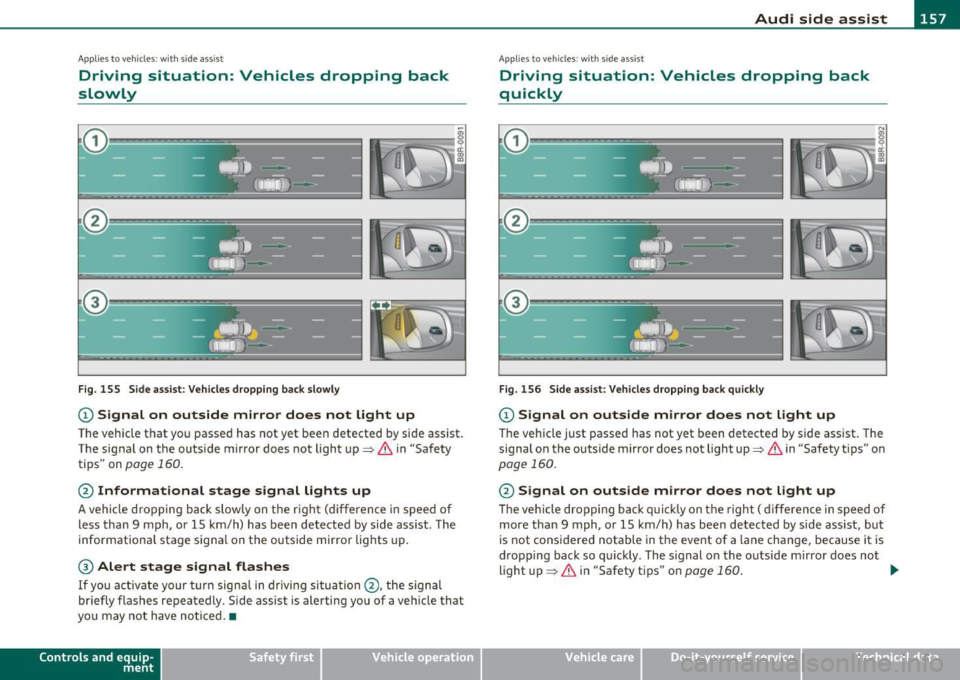
Fig . 155 Side assist : Vehicles dropping back slowly
CD Signal on outside mirror does not light up
The vehicle that you passed has not yet been detected by side assist .
The signal on the outside mirror does not light up~
& in "Safety
tips" on
page 160.
@ Informational stage signal lights up
A vehicle dropping back slowly on the rig ht (difference in speed of
less than 9 mph, or 15 km/h) has been detected by side ass ist. The
informationa l stage signa l on the outside mirror lights up.
® Alert stage signal flashes
If you activate your turn signal in driving situation @, the signal
briefly flashes repeatedly. Side assist is alerting you of a vehicle that
you may not have noticed. •
Contro ls a nd e quip
m en t Vehicle
OP-eration
App lies to vehicles : w it h sid e assist
Driving situation: Vehicles dropping back
quickly
Fig . 156 Side assist: Vehicles dropping back quickly
CD Signal on outside mirror does not light up
The vehicle just passed has not yet been detected by side assist. The
signal on the outside mirror does not light up~
& in "Safety tips" on
page 160.
@ Signal on outside mirror does not light up
The veh icle dropping back quickly on the right ( difference in speed of
more than 9 mph, or 15 km/h) has been detected by side assist, but
is not cons idered notable in the event of a lane change , because it is
dropping back so quickly . The s ignal on the outside m irror does not
light up~
& in "Safety tips" on page 160 . tJ,,,
Vehicle care Do-it-yourselt service iTechnical data
Page 160 of 390

1111....__A_ u_ d_i_ s_ id_ e_ a_s _s_ i_ s _t _________________________________________________ _
@ Signal on outside mirror does not light up
If you activate your turn signa l in driving situation @, the signal still
does not light up on the outside mirror~
& in "Safety tips" on
page 160. •
Applies to vehicles : w ith side assist
MMI settings
The basic brightness setting of the signal on the outside
mirror can be adjusted via the MMI.
-Select: Function button ( CAR j > Systems * > Audi side
assist .
The brightness of the signal l ight for both the info rmationa l and alert
stages is automatically adjusted to ambient light conditions . In addi
tion , you can adjust the
basic brightness separate ly, via the bright
ness function.
Whi le mak ing the adjustment, the new brightness setting is
displayed briefly . The br ightness d isplayed is that of the informa
tional stage signal. The alert stage signal br ightness is linked to the
info rmational stage signal brightness.
The informational stage signal brightness should be adjusted so that
you notice the signal illumination when you look in the outside
mirror, but not when you look forward through the windshield.
In very dark or light surroundings, the automatic brightness setting
adjusts signal light brightness to maximum or minimum intensity, as
needed. In circumstances such as these, you may not notice any
change in the brightness on the outside mirror when adjusting the
basic brightness.
You may not notice the change until lighting conditions are normal
again.
W Tips
• Side assist is not active when the basic br ightness is adjusted. The
signal light comes on brief ly to help you make the adjustment.
• Your settings are automatically stored and ass igned to the remote
control key being used. •
Appli es to vehicles: w it h si de assis t
General information
Side ass ist has limits and cannot detect vehicles under all road and
weather conditions . Please remember system limitations and never
rely on the system, especially when:
• driving through curves~
page 158,
• lanes a re of different width s~ page 159 . •
Ap plies to vehicles: w ith side ass ist
When driving through curves
Side assist cannot detect vehicles in curves with a turning radius of
less than 328 feet (100 m).
When driving through a curve, it is poss ible that side assist may
registe r a vehicle two lanes over, and the signal on the outside mir ror
will light up.•