2010 AUDI A5 COUPE light
[x] Cancel search: lightPage 123 of 360

Adaptive cruise control -____________ ____,_ __ ___.
Applies to vehic les : w ith ada ptive cru ise cont rol
How is the speed stored ?
Fig. 125 Control lever:
Storing speed
With the system switched on the speed is stored as follows:
- Drive at the speed you want. The speed must be between
20 and 95 mph (30 and 150 km/hl.
- Press the
I SET I button ~ fig. 125 to store the desired
speed.
After the I SET j button is released , the current speed is stored and
maintained .
The saved speed is now shown in the LED display in the speedom
eter by one or two illuminated red light diodes=>
page 125. At the
same time, the saved spe ed is also shown for a short time in the
Information line::::>
page 127.
[ i J Tips
For safety reasons, the stored speed is deleted when the ignition is
turned o ff . •
Con tro ls and eq uip
ment
A pp lies to veh ic les: with ada ptive cru ise cont rol
Changing stored speed
The speed can be changed without touching the acceler
ator or brake pedal.
Increasing speed
,... 0
~
ill
Fig . 126 Control lever:
Changing speed
- Press the lever briefly upwards G) ~ fig. 126. USA
models: the speed increases by about 2.5 mph . Canada
models : speed will increase by one mark o n the speed
ometer scale.
- Press the leve r upwards
0 and hold it. As long as you
hold the control switch down , the light diode display in
the speedometer LED display in the speedometer moves
forward and the speed is increased .
Reducing speed
- Press the lever downwards briefly Q. USA models: the
speed decreases by 2.5 mph. Canada models: speed will
decrease by one mark on the speedometer scale. _,.
Vehicle care I I irechnical data
Page 124 of 360

-Adaptive
cruise control "----'-----------------
- Press the lever downwards Q and hold it. As long as you
hold the control sw itch down, the light diode dis play in
the speedometer L ED display moves backward and the
speed is reduced.
After releasing the c ontro l switch, the system regulates the speed to
the value just set .
After each adjustment, the newly -set speed is shown for a short
t ime in the Information line => page 127.
[ i ] Tips
You can increase your speed at any time by stepping on the acceler
ator pedal. After you re leas e the accel erator pedal, the system
adjusts back down to the speed you previously se t.
A new desired
spe ed can be stored at any time by pressing th e [SET] button
~ page 121, fig. 125. •
A pplies to v ehi cles : with ada ptive cruis e contro l
Turning adaptive cruise control off
temporarily
In some situations it makes sense to turn ad aptive cruise
control off temporarily.
Fig . 127 C ontrol l ever :
T urnin g ad aptiv e
c rui se con trol off
temporari ly
Turning control off temporarily
- To shut off the control wit h the save function, either
depress the brake pedal, or
- Press the lever in the direction of the arrow
0 =} fig. 127 .
Reactivating control
- To resume t he save d speed, re lease t he brake peda l and
p ress the lever in the directio n of the arrow
G) .
& WARNING
Improper u se o f the adaptive crui se control can cau se collision s,
other ac cidents and serious personal injur ie s. Never r esume the
s tored speed i f the speed i s too hig h for prevail ing road, traffic or
weathe r cond iti ons.
[ i ] Tip s
When the system is turned off tempo rari ly, the speed stored at the
time is retai ned .•
Page 126 of 360
• ..__A_ d_ a-'- p_t _iv _ e_ c_r _u _ i_s _e _ c_o_ n_t _r _o _l _____________________________________________ _
Driving pro
gram
Di sta nce 1
Distance 2
D ist an ce 3
& WARNING
dynamic
1
2
2
3
standard
2
3
3
4
comfort
3
4
4
5
-
When setting the distance , the driver is responsible for adhering
to the respective national and country -specific regulations.
• Following other vehicles too closely increases the risk of colli
sions and serious personal injury .
• Setting short distances to the traffic ahead reduces the time
and distance available to bring your vehicle to a safe stop and
makes it even more necessary to pay close attention to traffic .
• Always use good judgment and select a safe following distance
for the traffic , road and weather conditions.
[ i J Tips
T he di stance se tting is re set to the factory defa ult DISTANCE 3 the
next time the ignition is turned on. •
Driver information
Applies to vehic les: with adapt ive cruise contro l
Displays in the instrument cluster
Dependin g o n the driving si tuati on, driver inform ation is
dis pla yed in the i nstr umen t clus ter.
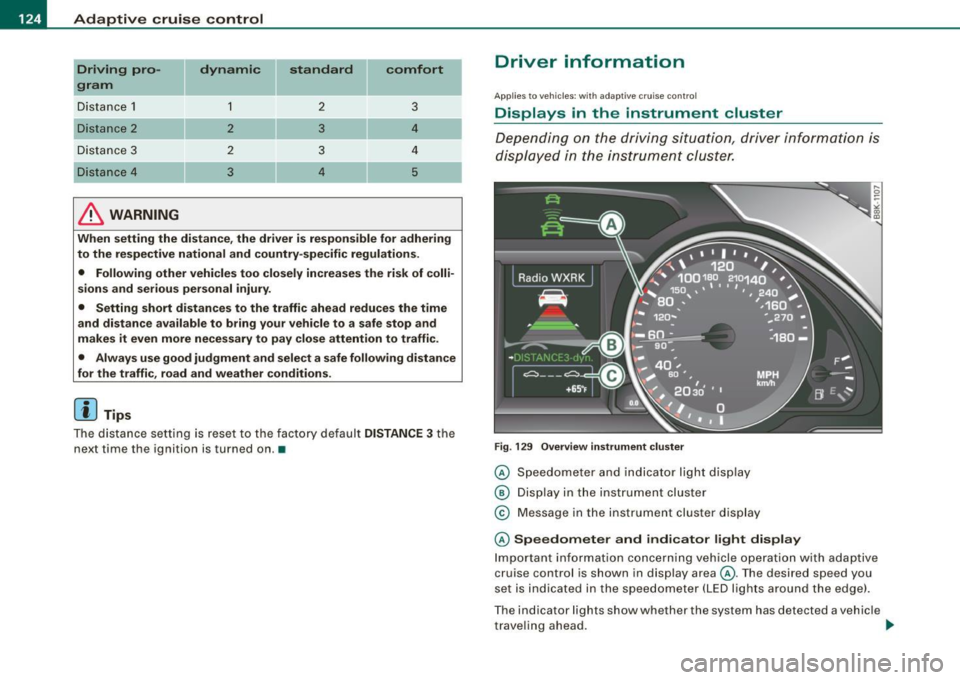
F ig . 129 Overview instrument clu ste r
© Speedome ter and indicator lig ht dis play
® Displ ay in the instru ment clus ter
© M essage in the instr ument clus ter disp lay
© Speedometer and indicator light display
Im port ant inf orm ati on c once rning v ehicle opera tion with a daptiv e
cruise control is shown in display area@. T he desired speed you
s et is in dica ted in the sp eedometer ( LED l igh ts a rou nd th e e dge).
T he indicator lig hts show whether the system has detected a v ehic le
t rave ling ahead . ..,
Page 127 of 360

Adaptiv e c ruis e co ntrol -
--------------=-----
@ Displ ay i n th e instrum ent clu ste r
In disp lay area @information from the navigation system * and the
trip computer is displayed in addi tion to informa tion about adaptive
cruise cont rol.
You can select among the different informat ion by repeated brief
taps on th e [
RESET) button on the w indshi eld wiper lever
=:> page 25 , "Operation" .
© Sta tus in dica tor
The information in area © is not displayed permanently. Informa
tion is displayed only if you set or change the sp eed setting , change
the time interval, when messages are disp layed or if the adaptive
cruise control is turned off for safety reasons. •
Applies to veh ic les: w ith ada ptive cru ise cont ro l
Speedometer and indicator light display
----
- -
- -
@ ®
Desir ed speed
- -
--
Fig . 130 I nstrum ent
c lus ter : Ind icato r ligh t
The desired speed set by the driver is displayed by a red LED in the
LED display in the speedometer.
If the desired speed was set between two lines on the speedometer
using th e
[S ET) button , the two closest light diodes will come on
=>
page 124 , fig. 129 .
Controls and equip
ment
The system al lows only speeds from 20 to 95 mph (30 to 150 km/h)
to be set. This speed range is faintly i lluminated in the speedometer
(LED ligh ts).
Indicator light s (symbols )
• © Open road : The indicator l ight shows that adaptiv e cruise
control is active and that no object is ahead o f the vehicle. A stored
speed requested is maintained .
• @ Driv ing in traffic : The indicator light indicates tha t an objec t
has been detected traveling in front. Your speed is adjusted
according to the speed of the vehicle in front . The adap tive cruise
control acce lerates and brakes automatical ly within the system's
operat ion parameters.
• ©
Driver inter venti on prompt : The red flashing warning l ight
means
Reque st for driver t o assume control. You as the driver must
slow the vehic le with the foot brake. The symbol tells you that the
adaptive cr uise control is not able to slow the vehicle down enough
to keep a enough distance to the vehicle in front of you . An warning
tone wi ll a lso sound when the symbol appears . For more informa
tion about the driver intervention prompt =>
page 128.
[ i ] Tip s
• If you use the acce lerato r to go faster than the speed of the
object ahead of you, the
dri ver intervent ion prompt wi ll not be
accompanied by a wa rning signal.
• I f the speed you previous ly set is exceeded, the indicator light in
the speedomete r wi ll switch off. •
I • •
Page 129 of 360

_____________________________________________ A_d_ a __,_ p_t_iv _ e_ c_r _u _is _ e_ c _ o_n_ t_ r_ o _ l __ !II
Ap plies to vehic les: with adapt ive cruise cont rol
System status indicator
The text messages and symbols shown in this area of the
display are not displayed perm anently.
T ime in ter va ls (s uch a s c::;, __ __ c::;, }
Fig . 132 System
sta tus i ndicator
The different symbols for the time intervals appear if you change the
settings ::::> fig. 132 .
The text message ... (three whi te dots) appears if a setting cannot be
implemented with the operating lever . The following are possib le
reasons :
• If you pull the control lever towards you to resume speed but no
requested speed was set .
• If you push the lever up to increase (or down to reduce) speed
when no speed has been set previously .
• I f you push the lever up to increase (or down to reduce) speed
and this speed is outside the range from 20 to 95 mph (Canada
models : 30 to 150 km/h) .
ACC functi onal it y limited
The text message ACC fun ctio na lit y lim ited appears when the ACC
system does not detect any objects over an extended time period.
For the time being, the distance to vehicles up ahead is not being
Controls and equip
ment
controlled . The ACC system is not switched off, so increased alert
ness is required. The following may be reasons for the text message
ACC Functiona lly limited:
• The ACC sensor is dirty. The ACC system is not reacting, or is not
react ing correctly, to veh ic les traveling ahead.
• I t is possible that you are driving on a road with very light traffic
without anything at the side of the road (e.g. guard rai ls, traffic
signs, trees). As soon as a vehicle is detected by the system again,
it returns to its control range and the text message disappears .
The ACC sensor is located in the right front trim grille::::>
page 118,
fig. 122 . If there is a loss of operation due to heavy contamination,
this area should cleaned to restore proper operation .
ACC not available
The text message ACC not available appears , for example, if the
temperature of the brakes is excessive. Adaptive cruise control is
temporarily not availab le . A warning tone sounds as a reminder .
ACC not a vailable !
The text message ACC not ava ila ble! appears in the event of a
malfunction . Adaptive cru ise control is turned off . A warning tone
sounds as a reminder. Have the system inspected by a qua lified
dea lership .
ACC sensor blo cked !
The text message ACC s ensor blocked ! appears when the ACC
system can no longer guarantee safe detection of objects. Adaptive
cruise control is turned off . A warning tone sounds as a reminder.
To decide whether it is necessary to switch off the ACC (ACC sensor
b locked
!) or if it is only a temporary condition (ACC F unctionally
limited), the system wi ll a lso takes into consideration the outside
temperature and/or the windshield wiper operation.
The ACC senso r is dirty or b locked (e .g . leaves, snow).
The sensor should be cleaned to restore proper sensor function
::::>
page 118, fig. 122 .
I • •
Page 131 of 360

_______________________________________________ A_ d_ a ---=- p_t_ i_v _e_ c_ r_ u_ i_ s _e_ c_ o_ n_t_ r _o _ l __ llJIII
• A red vehicle is shown in the instrument cluster disp lay
~ page 128, fig. 133 .
• T he text DISTANCE! appears in the status line.
• The indicator light in the Instrument cluster blinks red.
• A warning tone sounds.
[ i] Tip s
• I f the adaptive cruise control initiates braking, the hydraulic
brake system is under pressure. Therefore, the brake peda l distance
is shorter and the pedal "feels" harder.
• Adaptive cruise control is switched off after pressing the foot
brake . The speed saved up this point can be resumed.
• To resume the saved speed, release the brake pedal and press
the control lever~
page 122, "Turning adaptive cruise control off
temporarily".
• I f you use the accelerator t o go faster than the speed of the
object ahead of you, the
dri ver inter vention prompt will not be
accompanied by a wa rning signal.
• I f the speed you previously set is exceeded, the indicator light in
the speed ometer will switch off .•
Controls and equip
ment
App lies to vehic les: with adaptive crui se cont rol
MMI settings
Individual settings for adaptive cruise control can be
selected in the
MM/*.
F ig . 134 MMI Di spl ay:
adapt ive cruise control
Sett ings fo r th e driving program can be adjusted individu
a lly t o th e part ic ul ar user and save d in the MM I* .
- Press the
I CAR] function button.
- Select
Adaptive Cruise Control . The Adaptive Cruise
Control
men u appears => fig. 134.
Selec t
driving program .
Select the desired driving program .
Setting the dri ving program
In the driv ing program menu you can adjust the characteristics of
adaptive cruise control to what you want using
dynamic , standard
or comfort .
Sav ing setting s
Your individual settings are automatically saved and assigned to the
re mote contro l key being used (remote key storage). If the key is
given to another person, the saved settings remain as they are .•
I • •
Page 137 of 360

Audi sid e as sis t -
-------------------'
Audi side assist
Lane change assistant
Applies to veh icles: w it h s id e ass is t
Description
The side assist helps you when changing lanes.
A UD I
•
a F ig . 14 4 Rea r bump er:
P os it io n of ra dar
se ns ors ! not vis ible on
out side)
Fi g. 14 5 Signa l lig ht
o n th e ou tsid e mirr or -
d riv er's s ide
Side assist uses radar sensors (not visible on outside)=> fig. 144 to
help the driver check blind spots, and see what is happening in
traff ic behind the vehicle=>
page 137, fig. 147 .
Signal lights are built into both outside mirrors
G) => fig. 145 . The
signa l light on the left outside mirr or assists when moving over in to
Con tro ls and eq uip
ment
the left lane and the signal light on the right outside mirror assists
when moving over into the right lane.
The signa l ligh t comes on to te ll you that s ide assist has detected a
vehicle on that side and tha t the position of this o ther vehicle
should be taken into account i f you we re to change lanes . This is
called the
inform ati onal sta ge sign al=> page 137 . The informational
stage signal is designed so that you notice it only when you are
looking in the outside mirror .
When you activate th e turn signal and side assist detects a vehicle
in a notable location, the corresponding signa l on the outside
mirror flashes briefly and brightly sev eral tim es. This is the
al ert
s tage sign al=>
page 137. •
Applie s to v eh ic les : wi th si de assi st
Activating and deactivating
Fig . 146 Driv er's doo r:
Si de assis t bu tton
Activating
Press the ~ fig. 146 butt on. The indic ator on the button
lig hts up.
~
Vehicle care I I Technical data
Page 138 of 360

• .___A_ u_ d_ i_s_ i_ d _e_ a_ s_ s_is _ t __________________________________________________ _
Deactivating
- Press t he bu tton again. The in dicato r ligh t on the but to n
g oes ou t.
The system works at speeds faster than 19 mph (30 km/h) .
& WARNING
• Improper reliance on the side assist system can cause colli
sions and serious personal injury :
- Never rely only on side assist when changing lanes .
- Always che ck rear view mirrors to make sure that it is safe to
change lane s.
• Side assist cannot detect all vehicles under all conditions
danger of ac cident!
• Side assist cannot detect vehicles in time to alert you when
they approach from behind at very high speed, or f all drop back
very quickly.
• The radar sensor 's
vision can be reduced or entirely blocked by
rain , snow , and heavy spray . This can result in side assist not
adequately detecting vehicles or , in some cases, not dete cting
them at all . Always keep an eye on the direction you are traveling
and the relevant area around the vehicle .
• Please note that side assist indicates there a re approaching
vehicles , or vehicles in your blind spot , only after your vehicle has
reached a driving speed of at least 19 mph (30 km /h).
• Side assist s ignal does not work around tight corners (turning
radius less than 328 feet or 100 m l.
• Side assist is no replacement for the driver's full attention . The
driver alone is responsible for lane changes and similar driving
maneuvers . Always keep an eye on the direction you are traveling
and the relevant area around the vehicle.
0 Note
• T o ensure t hat you do n ot adve rsely affect side ass is t, do not
block the area on the rear b umper whe re the radar sensors a re
lo cate d with for eign objects (suc h as st ic ke rs or b icycle racks).
• M ake s ure that the s igna l lig ht on the outside mi rror is not
blocked by st ickers o r other it em s.
[ i ] Tips
• Side ass ist auto matical ly deact ivates if it det ects that t he radar
sensors are blocked => page
142. The indicator light on the button
goes out .
• T he area on the b umpe r where the rada r senso rs are located
m ust co nsistently rema in fr ee o f snow, ice, a nd hea vy soiling so t hat
side assist can function properly. Fo llow the additiona l notes on
=> page
143.
• Additiona l tinting on the front side windows can make it harde r
t o see and co rrect ly u nderstand the si gna l lig ht o n th e outs ide
mirror.
• For Declarat ion o f Compl iance to Un ited States FCC and Ind ustry
Canada regulations => page
342 . •