Page 82 of 612

�Î
CONT INUED
In the multi-information display, the
system message is also displayed
(see page ) and you can
customize your vehicle control
settings (see page ).In the normal display mode, the
upper segment displays trip
computer inf ormation, such as f uel
economy or average speed. The
lower segment displays the
odometer/trip meter (A/B), outside
temperature, and engine oil lif e and
maintenance item code(s).
The multi-inf ormation display
consists of an upper segment and a
lower segment. You will see some keyless access
system messages until you select the
ON mode by operating the engine
start/stop button. These messages
canbecustomized(seepage ).
Models equipped with the
keyless access system have an
engine start/stop button instead
of an ignition switch. ON Mode
is the equivalent of ON (II). For
more inf ormation, see pages
and . 87
:
178 181 92
106
On models with keyless access system
Multi-Inf ormation Display
Inst rument s and Cont rols
79
LOWER
SEGMENT
UPPER
SEGMENT
U.S. model is shown.
09/07/29 16:55:46 31TK4610_084
2010 TL
Page 99 of 612

�Î
�Î �Î
�Î
�Î
�Î
�Î
�Î
�Î
Page
Description
Menu Item
Group Setup Setting Option
122
123
125
126
127
129
Changes when the doors automatically lock.
Changes when the doors automatically unlock.
Changes which doors unlock with the remote
transmitter/keyless access remote on the first
push.
The exterior lights flash each time you press the
LOCK or UNLOCK button. A beeper will also
sound when you press the LOCK button twice.
Changes how long it takes (in seconds) for the
doors to relock and the security system to set after
you unlock but do not open the door.
Set/Cancel all the customized settings as default.
AUTO DOOR LOCK
AUTO DOOR UNLOCK
KEY AND REMOTE
UNLOCK MODE
KEYLESS LOCK
ACKNOWLEDGMENT
SECURITY RELOCK
TIMER
DOOR/WINDOW
SETUP
(P.121)
DEFAULT ALL
(P.129) SHIFT FROM P (A/T only)
WIT H VEHICLE SPEED
OFF
SHIFT TO P/DRIVER
DOOR (A/T only)
SHIFT TO P/ALL DOORS
(A/T only)
IGN OFF/DRIVER DOOR
IGN OFF/ALL DOORS
OFF
DRIVER DOOR
ALL DOORS
ON
OFF
90 sec
60 sec
30 sec
CANCEL
SET
Default setting
1:
2:
3: Default setting for automatic transmission
Default setting for manual transmission1
2 3
1
1
1
Multi-Inf ormation Display
96
09/07/29 16:58:44 31TK4610_101
2010 TL
Page 124 of 612
�Û
�Ý
�Û�Ý
�Û�Ý
AUTO DOOR LOCK
Here are the five custom settings for
the door setup:
AUTO DOOR UNLOCK
While ‘‘DOOR/WINDOW SETUP’’
is shown, press the SEL/RESET
button to enter the customize mode.
Each time you press the INFO ( / ) button, the screen changes as
shown in the illustration. Press the
INFO ( / ) button until you see
the setting you want to customize,
then press the SEL/RESET button
to enter your selection. SECURITY RELOCK TIMER KEYLESS LOCK
ACKNOWLEDGMENT KEY AND REMOTE UNLOCK
MODE
CONT INUED
Door/Window Setup
Multi-Inf ormation Display
Inst rument s and Cont rols
121
: Press the SEL/RESET button. : Press the INFO button ( / ). Seepage123
.
Seepage125 .
See page 126.
See page 127.
Seepage122
.
09/07/29 17:02:41 31TK4610_126
2010 TL
Page 129 of 612

�Û
�Ý You can choose this item to
customize f rom ‘‘DOOR/WINDOW
SETUP’’ by pressing the INFO ( / ) button repeatedly.
When you push the LOCK button on
the remote transmitter or the
keyless access remote, some
exterior lights f lash, and a beeper
sounds when you push the LOCK
button again within 5 seconds to
verify that the doors and the trunk
arelockedandthesecuritysystem
has set (see page ). You can
customize the exterior lights not to
f lash and the beeper not to sound.
When you press the UNLOCK
button on the remote transmitter or
the keyless access remote to unlock
the driver’s door/all the doors
(depending on the customize
setting), the exterior lights blink
twice to verif y that the door(s) is
unlocked and the security system is
turned off.
To turn this feature on or off, follow
these instructions.
If the ‘‘SETTING INCOMPLETE’’
message appears, go back to ‘‘KEY
AND REMOTE UNLOCK MODE’’
and repeat the procedure again. When your selection is successf ully
completed, the display changes as
shown above, and then goes back to
the customize item screen. 376
Keyless Lock Acknowledgment
Multi-Inf ormation Display
126
09/07/29 17:03:31 31TK4610_131
2010 TL
Page 130 of 612

�Û�Ý
CONT INUED
When you unlock the doors by
touching either f ront door handle
while carrying the keyless access
remote, the relock time is f ixed in 30
seconds. You can change this relock time
f rom 30 seconds to 60 or 90 seconds. If you unlock the doors with the
remote transmitter or the keyless
access remote, but do not open any
of the doors within 30 seconds, the
doors automatically relock, and the
security system sets.
When your selection is successf ully
completed, the display changes as
shown above, and then goes back to
the customize item screen.
If the ‘‘SETTING INCOMPLETE’’
message appears, go back to
‘‘KEYLESS LOCK
ACKNOWLEDGMENT’’ and repeat
the procedure again.
Press the SEL/RESET button to
enter the selecting mode.
Select ON or OFF by pressing the
INFO ( / ) button, then enter
your selection by pressing the SEL/
RESET button.
Security Relock Timer
On models with keyless access system
Multi-Inf ormation Display
Inst rument s and Cont rols
127
09/07/29 17:03:42 31TK4610_132
2010 TL
Page 131 of 612
�Û�Ý
�Û
�Ý
If the ‘‘SETTING INCOMPLETE’’
message appears, go back to
‘‘SECURITY RELOCK TIMER’’ and
repeat the procedure again. When your selection is successf ully
completed, the display changes as
shown above, and then goes back to
the customize item screen.
Press the SEL/RESET button to
enter the selecting mode.
Select the desired setting by
pressing the INFO ( / ) button,
then enter your selection by pressing
the SEL/RESET button.
You can choose this item to
customize f rom ‘‘DOOR/WINDOW
SETUP’’ by pressing the INFO ( /
) button repeatedly.
Multi-Inf ormation Display
128
09/07/29 17:03:50 31TK4610_133
2010 TL
Page 143 of 612
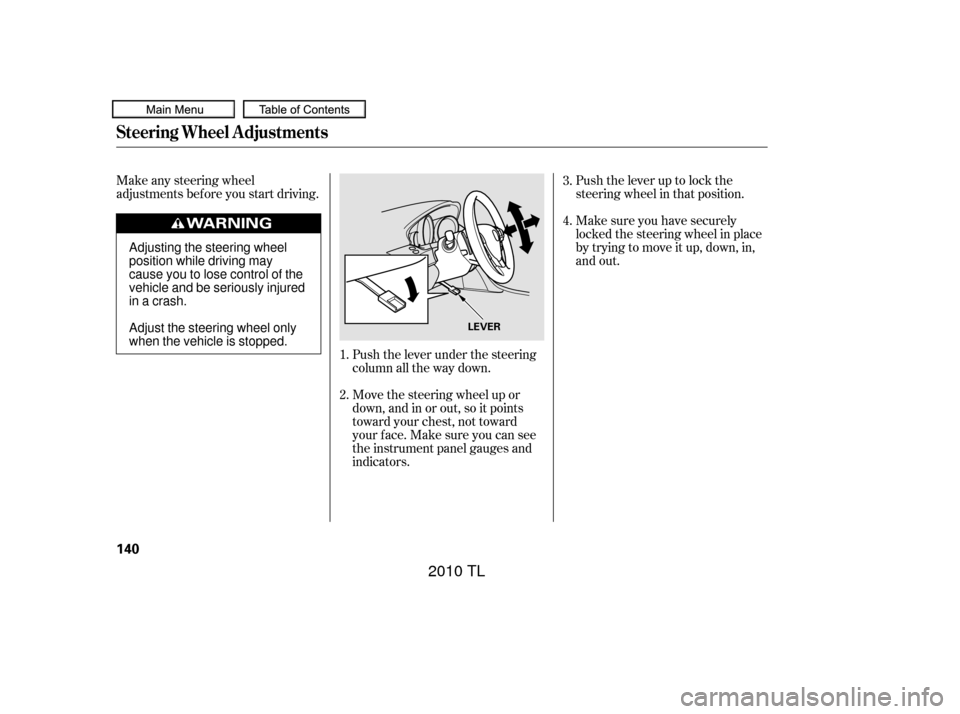
Push the lever up to lock the
steering wheel in that position.
Make any steering wheel
adjustments before you start driving.
Push the lever under the steering
column all the way down.
Move the steering wheel up or
down, and in or out, so it points
toward your chest, not toward
your f ace. Make sure you can see
the instrument panel gauges and
indicators.Make sure you have securely
locked the steering wheel in place
by trying to move it up, down, in,
and out.
1.
2. 3.
4.
Steering Wheel A djustments
140
LEVER
Adjusting the steering wheel
position while driving may
cause you to lose control of the
vehicle and be seriously injured
inacrash.
Adjust the steering wheel only
when the vehicle is stopped.
09/07/29 17:05:46 31TK4610_145
2010 TL
Page 145 of 612

Always make sure the key is f ully
extended when you insert it to the
ignition switch. If the key is not f ully
extended, the immobilizer system
may not operate properly and
prevent the engine f rom starting.
The master key can be retracted into
theremotetransmitter.Tousethe
key, push the release button to
release the key f rom the transmitter.
The key should be f ully extended.
To retract the key, push the release
buttonandatthesametimepushthe
key into the remote transmitter until
it is securely latched. Thekeymaycomeincontactwith
your f inger while being retracted or
extended. Make sure your f ingers do
not touch the pivot of the key when
retracting or extending it.
Each keyless access remote has a
built-in key. This key is used to lock/
unlock the doors when the remote
battery becomes weak and the
power door lock/unlock operation is
disabled. You cannot start the engine
with this key.
The built-in key (see page ) f its
all the locks on your vehicle.195On models with keyless access system
Retractable Master Key
Keys and Locks
142
Push
RELEASE BUTTON
KEY NUMBER TAG
BUILT-IN KEYS
09/07/29 17:06:05 31TK4610_147
2010 TL