2010 ACURA RDX clock
[x] Cancel search: clockPage 441 of 514
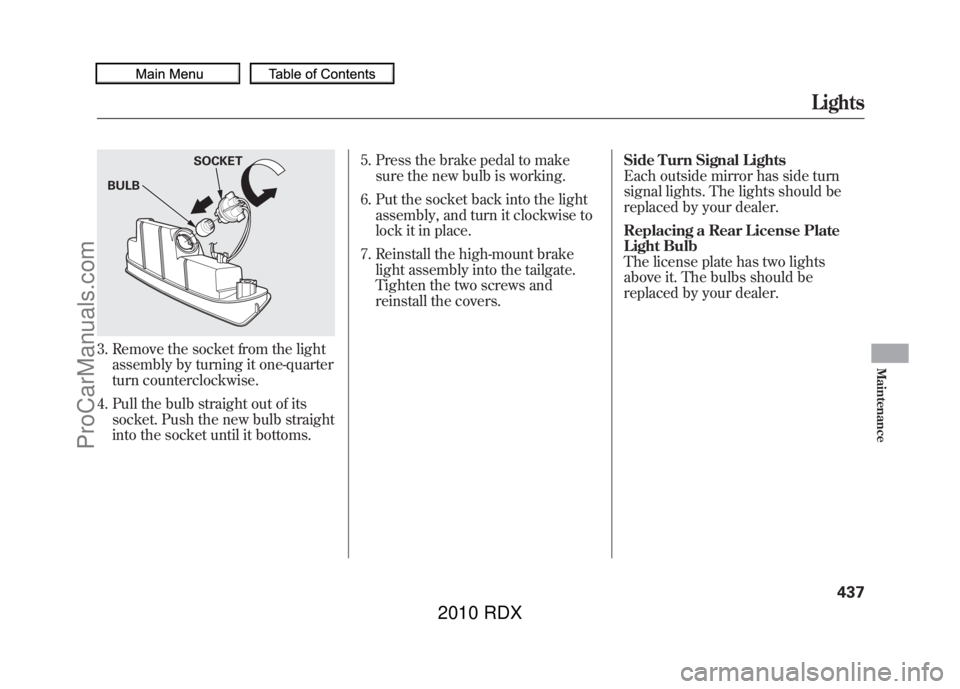
3. Remove the socket from the lightassembly by turning it one-quarter
turn counterclockwise.
4. Pull the bulb straight out of its socket. Push the new bulb straight
into the socket until it bottoms. 5. Press the brake pedal to make
sure the new bulb is working.
6. Put the socket back into the light assembly, and turn it clockwise to
lock it in place.
7. Reinstall the high-mount brake light assembly into the tailgate.
Tighten the two screws and
reinstall the covers. Side Turn Signal Lights
Each outside mirror has side turn
signal lights. The lights should be
replaced by your dealer.
Replacing a Rear License Plate
Light Bulb
The license plate has two lights
above it. The bulbs should be
replaced by your dealer.BULB
SOCKET
Lights
437
Maintenance
09/07/07 15:02:04 10 ACURA RDX MMC North America Owner's M 50 31STK630 enu
ProCarManuals.com
2010 RDX
Page 442 of 514
Cleaning the Seat BeltsIf your seat belts get dirty, use a soft
brush with a mixture of mild soap
and warm water to clean them. Do
not use bleach, dye, or cleaning
solvents. Let the belts air-dry before
you use the vehicle.
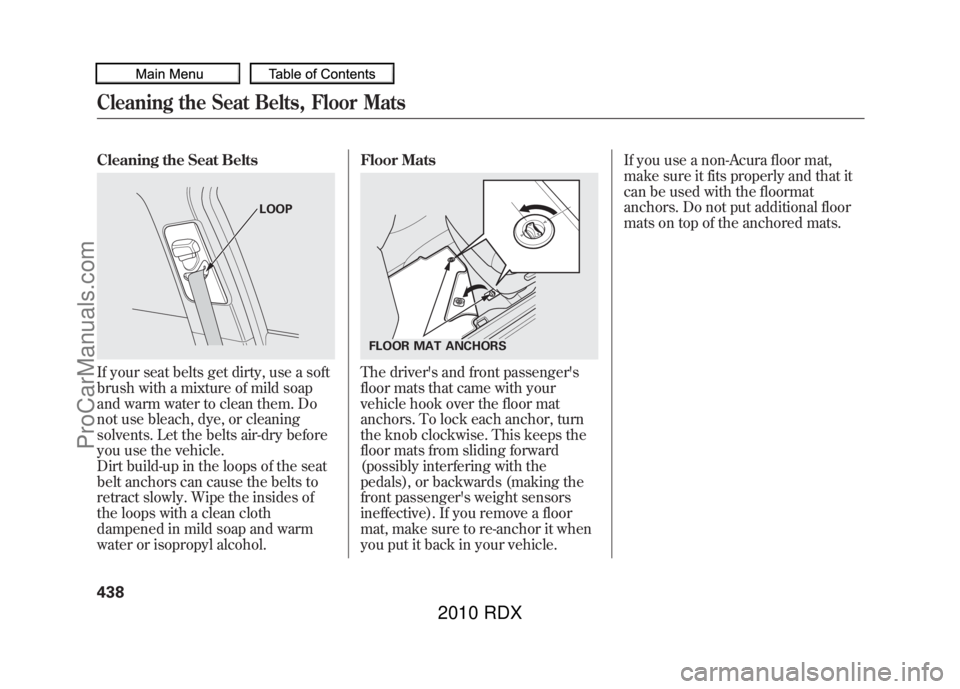
Dirt build-up in the loops of the seat
belt anchors can cause the belts to
retract slowly. Wipe the insides of
the loops with a clean cloth
dampened in mild soap and warm
water or isopropyl alcohol.Floor Mats
The driver's and front passenger's
floor mats that came with your
vehicle hook over the floor mat
anchors. To lock each anchor, turn
the knob clockwise. This keeps the
floor mats from sliding forward
(possibly interfering with the
pedals), or backwards (making the
front passenger's weight sensors
ineffective). If you remove a floor
mat, make sure to re-anchor it when
you put it back in your vehicle.If you use a non-Acura floor mat,
make sure it fits properly and that it
can be used with the floormat
anchors. Do not put additional floor
mats on top of the anchored mats.
LOOP
FLOOR MAT ANCHORS
Cleaning the Seat Belts, Floor Mats43809/07/07 15:02:04 10 ACURA RDX MMC North America Owner's M 50 31STK630 enu
ProCarManuals.com
2010 RDX
Page 460 of 514

5. Remove the tools, wing bolt andthe jack. To remove the jack, turn
the jack's end bracket
counterclockwise to loosen it.
6. Loosen the five wheel nuts 1/2turn with the wheel nut wrench.
7. Place the jack under the jackingpoint nearest the tire you need to
change. Turn the end bracket
clockwise until the top of the jack
contacts the jacking point. Make
sure the jacking point tab is
resting in the jack notch.
WING BOLT for normal tire
JACK TOOLS
WHEEL NUTS
WHEEL NUTS
WHEEL NUT WRENCH
JACKING POINT
Changing a Flat Tire45609/07/07 15:02:04 10 ACURA RDX MMC North America Owner's M 50 31STK630 enu
ProCarManuals.com
2010 RDX
Page 468 of 514

5. Look for any obvious coolantleaks, such as a split radiator hose.
Everything is still extremely hot,
so use caution. If you find a leak, it
must be repaired before you
continue driving (see Emergency
Towing on page 475).
6. If you do not find an obvious leak, check the coolant level in the
radiator reserve tank. Add coolant
if the level is below the MIN mark.
7. If there was no coolant in the reserve tank, you may need to add
coolant to the radiator. Let the
engine cool down until the reading
reaches the middle of the
temperature gauge or lower before
checking the radiator.
Removing the radiator cap
while the engine is hot can
cause the coolant to spray out,
seriously scalding you.
Always let the engine and
radiator cool down before
removing the radiator cap.
8. Using gloves or a large heavy cloth, turn the radiator cap
counterclockwise, without pushing
down, to the first stop. After the
pressure releases, push down on
the cap, and turn it until it comes
off. 9. Start the engine, and set the
temperature to maximum heat
(climate control to AUTO at
‘‘
’’). Add coolant to the radiator
up to the base of the filler neck. If
you do not have the proper coolant
mixture available, you can add
plain water. Remember to have the
cooling system drained and refilled
with the proper mixture as soon as
you can.
10. Put the radiator cap back on tightly. Run the engine, and watch
the temperature gauge. If it goes
back to the H mark, the engine
needs repair (see Emergency
Towing on page 475).
11. If the temperature stays normal, check the coolant level in the
radiator reserve tank. If it has gone
down, add coolant to the MAX
mark. Put the cap back on tightly.
If the Engine Overheats46409/07/07 15:02:04 10 ACURA RDX MMC North America Owner's M 50 31STK630 enu
ProCarManuals.com
2010 RDX
Page 476 of 514

Replacing a fuse with one that has a
higher rating greatly increases the
chances of damaging the electrical
system. If you do not have a
replacement fuse with the proper rating
for the circuit, install one with a lower
rating.6. If the replacement fuse of the same
rating blows in a short time, there
is probably a serious electrical
problem in your vehicle. Leave the
blown fuse in that circuit and have
your vehicle checked by a
qualified technician.
On models without navigation systemWhen the audio system is disabled,
the clock setting in the audio system
will be canceled. You will need to
reset the clock (see page 293).
On models with navigation systemIf the navigation system fuse is
removed, the navigation system will
disable itself. The next time you turn
on the ignition switch, the system
will require you to enter a PIN before
it can be used. Refer to the
navigation system manual.
Fuses47209/07/07 15:02:04 10 ACURA RDX MMC North America Owner's M 50 31STK630 enu
ProCarManuals.com
2010 RDX
Page 503 of 514

Bulb ReplacementBack-up Lights
........................
433
Brake Lights
...........................
433
Fog Lights
...............................
435
Front Parking Lights
...............
432
Front Side Marker Lights
........
432
Headlights
..............................
431
High-mount Brake Light
.........
436
Rear Bulbs
......................
433, 434
Rear License Plate Lights........
437
Specifications
..........................
481
Taillights
.........................
433, 434
Turn Signal Lights
..........
432, 433
Bulbs, Halogen
..........................
431
C
Capacities Chart
.........................
480
Carbon Monoxide Hazard
............
57
Cargo
.........................................
364
Cargo Area Cover
.......................
160
Cargo Area Light
........................
153
Cargo, How to Carry
..................
364
Carrying Cargo
..........................
364
CAUTION, Explanation of
............
iii CD Care
.....................................
257
Ceiling Lights
.............................
151
Certification Label
......................
478
Chains, Tires
..............................
449
Changing a Flat Tire
..................
455
Changing Oil How to
....................................
422
When to
..................................
411
Charging System Indicator
...........................
65, 465
Checklist, Before Driving
...........
373
Child Safety
..................................
36
Booster Seats
...........................
54
Child Seats
....................
41, 42, 44
Important Safety Reminders
.....
40
Infants
......................................
41
Larger Children
.......................
53
LATCH
.....................................
46
Risks with Airbags
...................
37
Small Children
.........................
42
Tethers
....................................
51
Warning Labels
........................
38
Where Should a Child Sit?
........
37
Child Seats
...................................
44
LATCH Anchorage Points
........
46
Tether Anchorage Points
.........
51 Childproof Door Locks
...............
127
Cleaning the Seat Belts
..............
438
Client Service Information
..........
494
Climate Control Sensors
............
171
Climate Control System
.............
164
Clock
..........................................
293
CO in the Exhaust
................
57, 487
Code, Audio System
...................
292
Cold Weather, Starting in
...........
374
Compact Spare Tire
....................
454
Compass Operation
..................
295
Console Compartment
...............
158
Consumer Information
...............
494
Controls, Instruments and
............
61
Coolant Adding
....................................
424
Checking
................................
357
Proper Solution
.......................
424
Courtesy Lights
..........................
153
Crankcase Emissions Control System
...................................
487
Cruise Control Indicator
...............
69
Cruise Control Operation
...........
300
Cruise Main Indicator
..................
69
Cup Holders
...............................
156
Customized Settings
....................
82
IndexII09/07/07 15:02:04 10 ACURA RDX MMC North America Owner's M 50 31STK630 enu
ProCarManuals.com
2010 RDX
Page 510 of 514

Service Intervals
.........................
411
Service Station Procedures
........
353
Setting the Clock
........................
293
SH-AWD
®...................................
384
Indicator
...................................
70
Torque Distribution Monitor
...
384
Shift Lever Position Indicators
...
376
Shift Lock Release
......................
379
Shifting the Automatic Transmission
..........................
376
Side Airbags
.................................
30
How the Side Airbag Off
Indicator Works
...................
32
How Your Side Airbags Work..30
Side Curtain Airbags
....................
31
How Your Side Curtain Airbags Work
....................................
31
Side Marker Lights, Bulb Replacement in
.......................
432
Signaling Turns
............................
69
Snow Tires
.................................
448
Sound System
.....................
172, 216
Spare Tire
..................................
454
Inflating
...........................
444, 454
Specifications
..........................
481
Spark Plugs
................................
480 Specifications
.............................
480
Speed Control
............................
300
Speed Limiter
.............................
378
Speedometer
................................
73
SRS Indicator
.........................
32, 65
SRS, Additional Information
.........
24
Additional Safety Precautions
...
35
Airbag Service
..........................
34
Airbag System Components
.....
24
How the Side Airbag Off Indicator Works
...................
32
How the SRS Indicator Works..32
How Your Front Airbags Work
....................................
26
How Your Side Airbags Work..30
How Your Side Curtain Airbags Work
....................................
31
START (Ignition Key Position)
.................................
125
Starting the Engine
....................
374
Auto Control Mode
.................
375
In Cold Weather at High Altitude
................................
374
With a Dead Battery
................
461
State Emissions Testing
.............
490
Steam Coming from Engine
.......
463 Steering Wheel
Adjustments
............................
122
Anti-theft Column Lock
...........
125
Buttons
...........................
289, 300
Position Memory
....................
148
Stereo Sound System
..........
172, 216
Storing Your Vehicle
..................
452
Sun Visor
...................................
157
Super Handling-All Wheel Drive ™
(SH-AWD
®) System
................
384
Supplemental Restraint System
............................
10,24
Servicing
..................................
34
SRS Indicator
......................
32, 65
System Components
................
24
System Messages
........................
79
T
Tachometer
..................................
73
Tailgate
......................................
128
Open Monitor
..........................
12
Opening the
............................
128
Taillights, Changing Bulbs in
.....
433
CONTINUED
Index
IX
INDEX
09/07/07 15:02:04 10 ACURA RDX MMC North America Owner's M 50 31STK630 enu
ProCarManuals.com
2010 RDX