Page 97 of 514
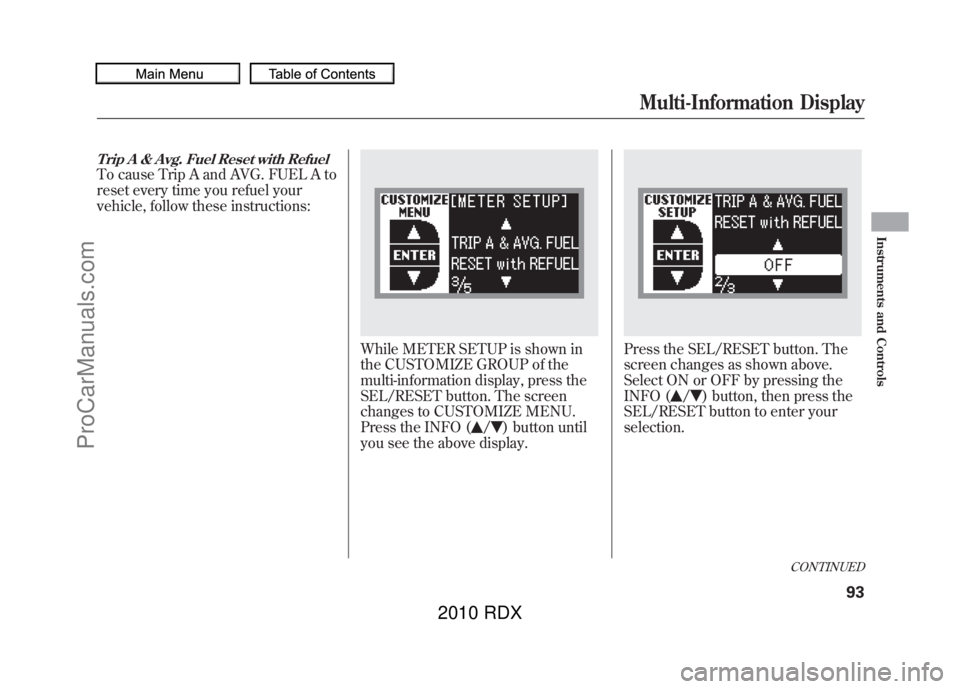
Trip A & Avg. Fuel Reset with RefuelTo cause Trip A and AVG. FUEL A to
reset every time you refuel your
vehicle, follow these instructions:
While METER SETUP is shown in
the CUSTOMIZE GROUP of the
multi-information display, press the
SEL/RESET button. The screen
changes to CUSTOMIZE MENU.
Press the INFO (
/
) button until
you see the above display.
Press the SEL/RESET button. The
screen changes as shown above.
Select ON or OFF by pressing the
INFO (
/
) button, then press the
SEL/RESET button to enter your
selection.
CONTINUED
Multi-Information Display
93
Instruments and Controls
09/07/07 15:02:04 10 ACURA RDX MMC North America Owner's M 50 31STK630 enu
ProCarManuals.com
2010 RDX
Page 99 of 514
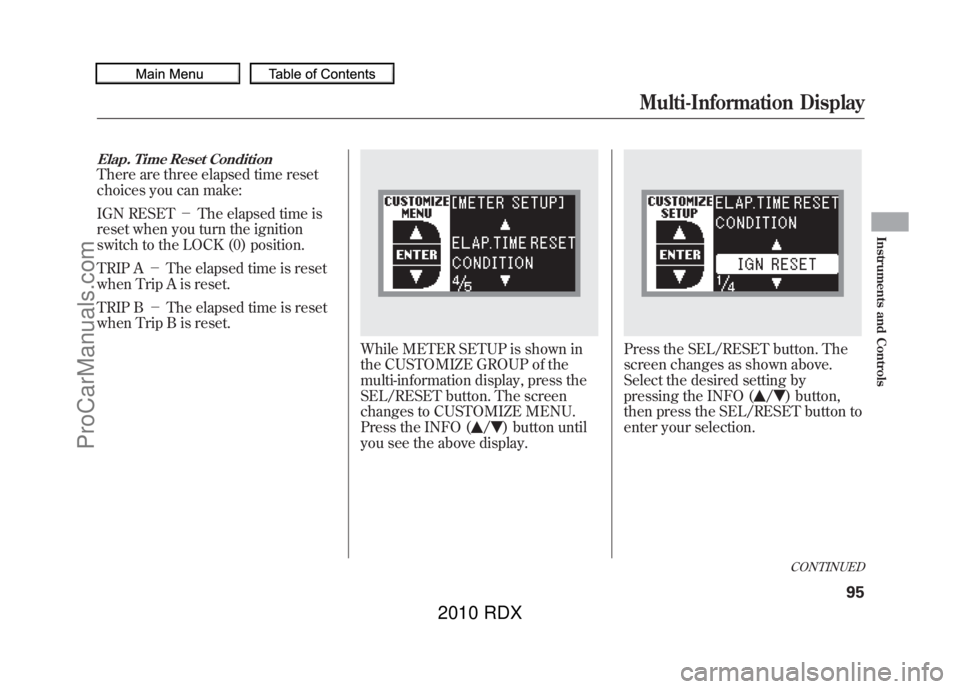
Elap. Time Reset ConditionThere are three elapsed time reset
choices you can make:
IGN RESET-The elapsed time is
reset when you turn the ignition
switch to the LOCK (0) position.
TRIP A -The elapsed time is reset
when Trip A is reset.
TRIP B -The elapsed time is reset
when Trip B is reset.
While METER SETUP is shown in
the CUSTOMIZE GROUP of the
multi-information display, press the
SEL/RESET button. The screen
changes to CUSTOMIZE MENU.
Press the INFO (
/
) button until
you see the above display.
Press the SEL/RESET button. The
screen changes as shown above.
Select the desired setting by
pressing the INFO (
/
) button,
then press the SEL/RESET button to
enter your selection.CONTINUED
Multi-Information Display
95
Instruments and Controls
09/07/07 15:02:04 10 ACURA RDX MMC North America Owner's M 50 31STK630 enu
ProCarManuals.com
2010 RDX
Page 101 of 514
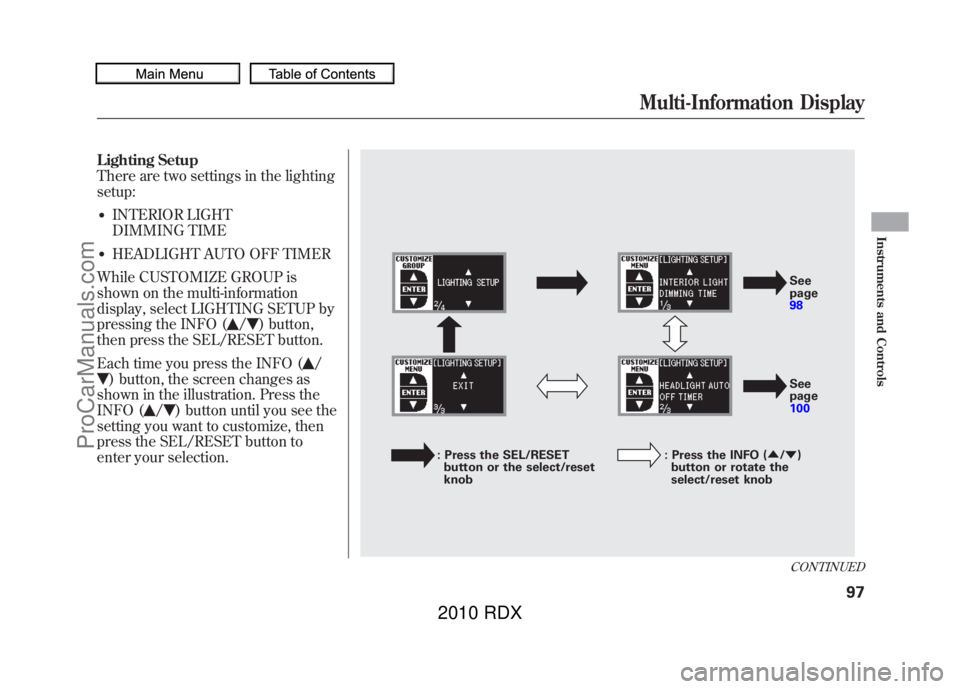
Lighting Setup
There are two settings in the lighting
setup:●INTERIOR LIGHT
DIMMING TIME●HEADLIGHT AUTO OFF TIMER
While CUSTOMIZE GROUP is
shown on the multi-information
display, select LIGHTING SETUP by
pressing the INFO (
/
) button,
then press the SEL/RESET button.
Each time you press the INFO (
/
) button, the screen changes as
shown in the illustration. Press the
INFO (
/
) button until you see the
setting you want to customize, then
press the SEL/RESET button to
enter your selection.
See
page
98
See
page
100
: Press the SEL/RESET : Press the INFO (▲/▼ )
button or the select/reset
knob button or rotate the
select/reset knobCONTINUED
Multi-Information Display
97
Instruments and Controls
09/07/07 15:02:04 10 ACURA RDX MMC North America Owner's M 50 31STK630 enu
ProCarManuals.com
2010 RDX
Page 102 of 514
Interior Light Dimming TimeThe interior lights fade out when you
close all doors. You can change the
time that the interior lights fade out.
While LIGHTING SETUP is shown
in the CUSTOMIZE GROUP of the
multi-information display, press the
SEL/RESET button. You will see the
above display.
Press the SEL/RESET button. The
screen changes as shown above.
Select how long you want the lights
to stay on before they fade out (15,
30, or 60 seconds) by pressing the
INFO (
/
) button, then press the
SEL/RESET button to enter your
selection.
Multi-Information Display9809/07/07 15:02:04 10 ACURA RDX MMC North America Owner's M 50 31STK630 enu
ProCarManuals.com
2010 RDX
Page 104 of 514
Headlight Auto Off TimerThe headlights, parking lights, side
marker lights, taillights, and license
plate lights go off after the selected
time when you close the driver's
door and take the remote with you.
To change how long the lights stay
on before they go off, follow these
instructions:
While LIGHTING SETUP is shown
in the CUSTOMIZE GROUP of the
multi-information display, press the
SEL/RESET button. The screen
changes to CUSTOMIZE MENU.
Press the INFO (
/
) button until
you see the above display.
Press the SEL/RESET button. The
screen changes as shown above.
Select how long you want the lights
to stay on before they go off (0, 15,
30, or 60 seconds) by pressing the
INFO (
/
) button, then press the
SEL/RESET button to enter your
selection.
Multi-Information Display10009/07/07 15:02:04 10 ACURA RDX MMC North America Owner's M 50 31STK630 enu
ProCarManuals.com
2010 RDX
Page 106 of 514
Door Setup
Here are the five custom settings for
the door setup:●AUTO DOOR LOCK●DOOR LOCK MODE●KEYLESS LOCK
ACKNOWLEDGEMENT●SECURITY RELOCK TIMER●AUTO DOOR UNLOCK
While CUSTOMIZE GROUP is
shown on the multi-information
display, select DOOR SETUP by
pressing INFO (
/
) button, then
press the SEL/RESET button.
Each time you press the INFO (
/
) button, the screen changes as
shown in the illustration. Press the
INFO (
/
) button until you see the
setting you want to customize, then
press the SEL/RESET button to
enter your selection.
: Press the SEL/
: Press the INFO See page
103
See page 105
See page 107
See page 109
See page 111
RESET button
or the select/
reset knob
( ▲ /▼ ) button or
rotate the
select/reset knob
Multi-Information Display10209/07/07 15:02:04 10 ACURA RDX MMC North America Owner's M 50 31STK630 enu
ProCarManuals.com
2010 RDX
Page 107 of 514
Auto Door LockThere are three settings you can
choose from:
OFF-
The auto door lock is deactivated all
the time.
WITH VEH SPD -
The doors lock when the vehicle
speed reaches about 9 mph (about 15
km/h).
SHIFT FROM P -
The doors lock whenever you move
the shift lever out of Park.
While DOOR SETUP is shown in the
CUSTOMIZE GROUP of the multi-
information display, press the SEL/
RESET button. You will see the
above display.
Press the SEL/RESET button. The
screen changes as shown above.
Select the desired setting by
pressing the INFO (
/
) button,
then press the SEL/RESET button to
enter your selection.CONTINUED
Multi-Information Display
103
Instruments and Controls
09/07/07 15:02:04 10 ACURA RDX MMC North America Owner's M 50 31STK630 enu
ProCarManuals.com
2010 RDX
Page 113 of 514
Security Relock TimerIf you unlock the doors and the
tailgate with the remote transmitter,
but do not open any of the doors or
the tailgate within 30 seconds, the
doors and the tailgate automatically
relock and the security system sets.
You can change this relock time from
30 seconds to 60 or 90 seconds.
While DOOR SETUP is shown in the
CUSTOMIZE GROUP of the multi-
information display, press the SEL/
RESET button. The screen changes
to CUSTOMIZE MENU. Press the
INFO (
/
) button until you see the
above display.
Press the SEL/RESET button. The
screen changes as shown above.
Select the relock time you want (30,
60, or 90 seconds) by pressing the
INFO (
/
) button, then press the
SEL/RESET button to enter your
selection.
CONTINUED
Multi-Information Display
109
Instruments and Controls
09/07/07 15:02:04 10 ACURA RDX MMC North America Owner's M 50 31STK630 enu
ProCarManuals.com
2010 RDX