Page 321 of 514
To make a call using the navigationdisplay (on models with navigation
system):1. Press the INFO button, and the INFO screen will be shown.
2. From the INFO screen, select‘‘Cellular Phone,’’ then select
‘‘ Dial. ’’
3. The navigation display will change
as shown above. Enter a phone
number.
4. To make a call, press the selector on the interface dial to the right.
5. To end the call, press the HFL Back button.
CONTINUED
Bluetooth
®HandsFreeLink
®
317
Features
09/07/07 15:02:04 10 ACURA RDX MMC North America Owner's M 50 31STK630 enu
ProCarManuals.com
2010 RDX
Page 327 of 514

To store a specific phone numberfrom your cell phone directly to the
HFL phonebook (available on somephones):Press and release the HFL Talk
button before a command.
1. Say ‘‘Phonebook .’’
2. Say ‘‘Receive contact’’ after the
prompts.
3. Follow the HFL prompts, select a number from your cell phone, and
send it to HFL.
4. Follow the HFL prompts and name the number, or say ‘‘Discard ’’if it
is not the number you want to
store.
5. Follow the HFL prompts if you want to store another number.
On models with navigation systemCellular Phone Options(available on some phones)If you select Cellular Phone from
the INFO screen menu, you will see
five HFL options.
For a list of cell phones that are
compatible with this feature:
In the U.S., visit
www.acura.com/
handsfreelink,or call (888) 528-7876.
In Canada, visitwww.acura.ca,
or call
(888) 9-ACURA-9.
Import Cellular Phonebook:The entire phonebook data of the cell
phone that is linked to HFL can be
imported to the navigation system.Select ‘‘Import Cellular
Phonebook, ’’and HFL will begin
importing the phonebook. Select
‘‘ OK’’ after the import is completed.
CONTINUED
Bluetooth
®HandsFreeLink
®
323
Features
09/07/07 15:02:04 10 ACURA RDX MMC North America Owner's M 50 31STK630 enu
ProCarManuals.com
2010 RDX
Page 336 of 514

On models with navigation systemexcept Alaska, Hawaii, and Puerto RicoAcuraLink enhances your ownership
experience by providing a direct
communication link between your
vehicle and the Acura Server.
Working through the XM radio
satellite, AcuraLink works in
conjunction with the navigation
system,
Bluetooth
®HandsFreeLink
®
(HFL), and audio system in your
vehicle. It displays and receives
several kinds of messages, including:●Operating tips and information on
your vehicle's features.●Important recall and safety
information.●Maintenance information to keep
your vehicle in top condition.●Diagnostic information to provide
information about any problems
with your vehicle. Interface Dial
Most AcuraLink functions are
controlled by the interface dial. The
interface dial has two parts, a knob
and a selector.
The knob turns left and right. Use it
to make selections or adjustments to
a list or menu on the screen.
The selector can be pushed left,
right, up, down, and in. Use the
selector to scroll through lists, to
select menus, and to highlight menu
items. When you make a selection,
push the center of the selector
(ENTER) to go to that selection.
KNOB
ENTER
SELECTOR
AcuraLink
®(U.S. models only)
33209/07/07 15:02:04 10 ACURA RDX MMC North America Owner's M 50 31STK630 enu
ProCarManuals.com
2010 RDX
Page 337 of 514
Reading MessagesIf you have new messages, an
envelope icon appears in the top
right corner of the navigation screen.
To open a message:●Press ENTER on the interface
selector, then select New
Messages from the navigation
system map menu. If there is more
than one message stored in the
system, you will see a list of
message titles.
●Select‘‘Messages ’’to display the
‘‘ Select a message category:’’
screen. Then, select ALL
MESSAGES.●Scroll up or down, and select the
message you want to read by
pressing ENTER on the interface
selector. To view previously read messages:
Press the INFO button, and the
INFO screen will be shown.
ENVELOPE ICON
CONTINUED
AcuraLink
®(U.S. models only)
333
Features
09/07/07 15:02:04 10 ACURA RDX MMC North America Owner's M 50 31STK630 enu
ProCarManuals.com
2010 RDX
Page 340 of 514

Delete-Select this option to delete
the current message.
Voice -Select this option to hear a
voice read the entire message. This
gives you more information than the
screen can display at one time. When
you select the Voice option, it
changes to a Stop Reading option.
Select the option again to stop the
voice.
Call -Select this button to call a
phone number embedded in the
message. When you select Call,theBluetooth
®HandsFreeLink
®(HFL)
dials the number for you.
To make a call, your
Bluetooth
®
compatible phone must be paired to
your vehicle's HandsFreeLink
system, have its power on, and be
inside the vehicle (see page 313).Find Nearest Acura Dealer
-
Select this option to find the nearest
Acura dealer using the navigation
system.
Call Your Acura Dealer -Select
this button to call the Acura dealer
you purchased your vehicle from.
AcuraLink also directs you to this
dealer so you can schedule a
maintenance appointment or receive
information about a message. If you
visit another dealer for service two
times within a 14-month period,
AcuraLink will reset to call that
dealer.
Diagnostic Info -Select this
button to get more information about
the current diagnostic message. To
use this option, your cell phone must
be linked to the HFL and have a
compatible data service available.
Access the Owner Link website to
find out which data services are
currently compatible with AcuraLink. Message Preferences
To set your AcuraLink preferences
(the types of messages you want to
receive, if any), visit the My Acura
website at
www.owners.acura.com
If you do not have internet access,
call Acura Client Services at
(800) 382-2238; they can set your
message preferences for you.
AcuraLink
®(U.S. models only)
33609/07/07 15:02:04 10 ACURA RDX MMC North America Owner's M 50 31STK630 enu
ProCarManuals.com
2010 RDX
Page 341 of 514
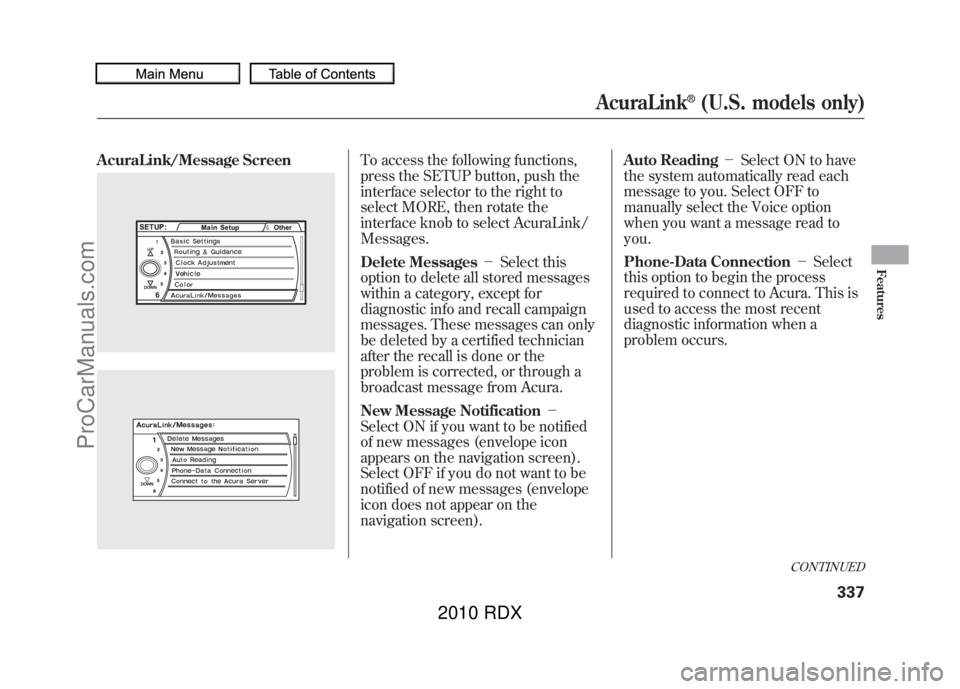
AcuraLink/Message Screen
To access the following functions,
press the SETUP button, push the
interface selector to the right to
select MORE, then rotate the
interface knob to select AcuraLink/
Messages.
Delete Messages-Select this
option to delete all stored messages
within a category, except for
diagnostic info and recall campaign
messages. These messages can only
be deleted by a certified technician
after the recall is done or the
problem is corrected, or through a
broadcast message from Acura.
New Message Notification -
Select ON if you want to be notified
of new messages (envelope icon
appears on the navigation screen).
Select OFF if you do not want to be
notified of new messages (envelope
icon does not appear on the
navigation screen). Auto Reading
-Select ON to have
the system automatically read each
message to you. Select OFF to
manually select the Voice option
when you want a message read to
you.
Phone-Data Connection -Select
this option to begin the process
required to connect to Acura. This is
used to access the most recent
diagnostic information when a
problem occurs.
CONTINUED
AcuraLink
®(U.S. models only)
337
Features
09/07/07 15:02:04 10 ACURA RDX MMC North America Owner's M 50 31STK630 enu
ProCarManuals.com
2010 RDX
Page 344 of 514
You can use the following message
options:●Make an appointment from the
schedule at the dealer.●Reschedule the appointment with
the dealer.●Call your dealer for an
appointment.●Find the nearest dealer.
Automated AppointmentYou can make an appointment with
your dealer through the AcuraLink
when you receive a maintenance
minder message.
To use the automated appointment
function, you should visit the Owner
Link website at
www.owners.acura.
com,
register some required settings,
and complete the Phone-Data
Connection set-up (see page 337).
YourBluetooth
®compatible phone
should also be paired and linked to
your vehicle ’s
Bluetooth
®HFL (see
page 313).
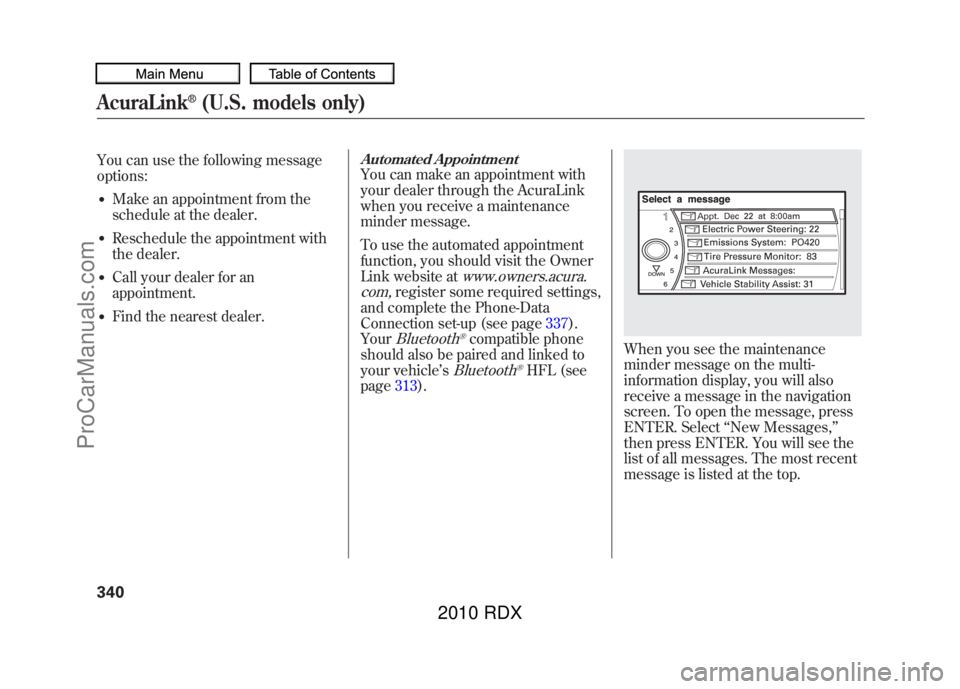
When you see the maintenance
minder message on the multi-
information display, you will also
receive a message in the navigation
screen. To open the message, press
ENTER. Select ‘‘New Messages, ’’
then press ENTER. You will see the
list of all messages. The most recent
message is listed at the top.
AcuraLink
®(U.S. models only)
34009/07/07 15:02:04 10 ACURA RDX MMC North America Owner's M 50 31STK630 enu
ProCarManuals.com
2010 RDX
Page 345 of 514
Select the received message, then
press ENTER. You will see the
message as shown. To make an
appointment, select‘‘Schedule
Dealer Appt. ’’then press ENTER.
The system will automatically
connect to the Acura server, then
show you an appropriate
appointment date and time on the
navigation screen. If you accept this
appointment, select ‘‘Confirm
Appointment, ’’then press ENTER.
The confirmation message will be
displayed on the screen. Make sure
to confirm the appointment date,
time and dealer. If it is OK, press
ENTER.
If you want to change or reschedule
the appointment date, select
‘‘Cancel,’’ then press ENTER.
CONTINUED
AcuraLink
®(U.S. models only)
341
Features
09/07/07 15:02:04 10 ACURA RDX MMC North America Owner's M 50 31STK630 enu
ProCarManuals.com
2010 RDX


