Page 442 of 514
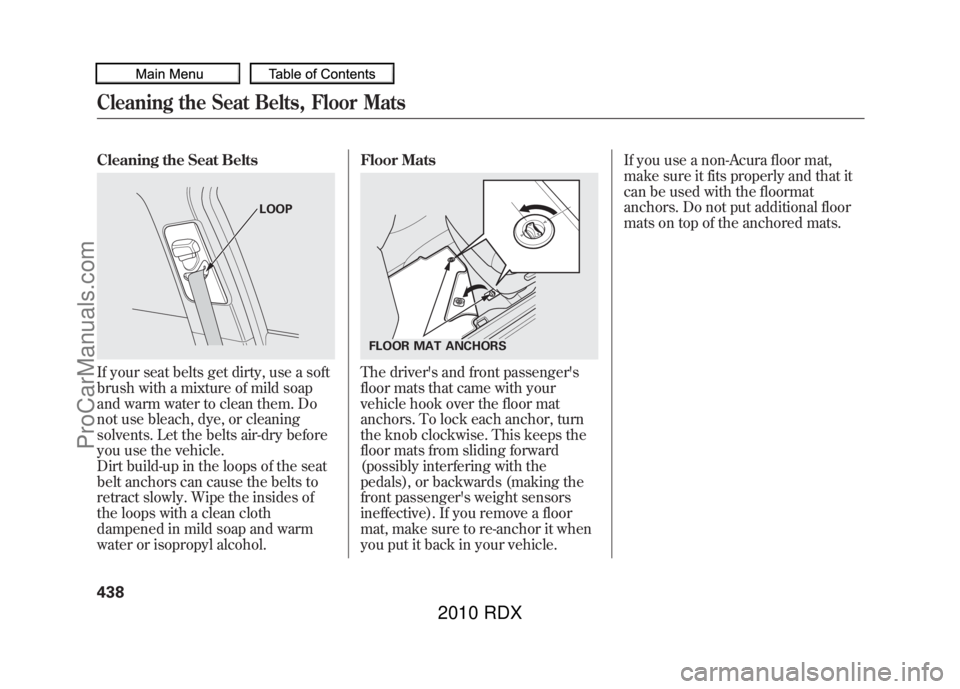
Cleaning the Seat BeltsIf your seat belts get dirty, use a soft
brush with a mixture of mild soap
and warm water to clean them. Do
not use bleach, dye, or cleaning
solvents. Let the belts air-dry before
you use the vehicle.
Dirt build-up in the loops of the seat
belt anchors can cause the belts to
retract slowly. Wipe the insides of
the loops with a clean cloth
dampened in mild soap and warm
water or isopropyl alcohol.Floor Mats
The driver's and front passenger's
floor mats that came with your
vehicle hook over the floor mat
anchors. To lock each anchor, turn
the knob clockwise. This keeps the
floor mats from sliding forward
(possibly interfering with the
pedals), or backwards (making the
front passenger's weight sensors
ineffective). If you remove a floor
mat, make sure to re-anchor it when
you put it back in your vehicle.If you use a non-Acura floor mat,
make sure it fits properly and that it
can be used with the floormat
anchors. Do not put additional floor
mats on top of the anchored mats.
LOOP
FLOOR MAT ANCHORS
Cleaning the Seat Belts, Floor Mats43809/07/07 15:02:04 10 ACURA RDX MMC North America Owner's M 50 31STK630 enu
ProCarManuals.com
2010 RDX
Page 444 of 514
Check the condition of the wiper
blades at least every six months.
Replace them if you find signs of
cracking in the rubber, areas that are
getting hard, or if they leave streaks
and unwiped areas when used.
To replace a front wiper blade:
1. Raise each wiper arm off thewindshield, lifting the driver's side
first, then the passenger's side.Do not open the hood when the wiper
arms are raised, or you will damage the
hood and the wiper arms.
2. Disconnect the blade assemblyfrom the wiper arm:
●Press and hold the lock tab.●Slide the blade assembly toward
the lock tab until it releases
from the wiper arm.
When replacing a wiper blade,
make sure not to drop the wiper
blade or wiper arm down on the
windshield.
WIPER ARMS
Wiper Blades44009/07/07 15:02:04 10 ACURA RDX MMC North America Owner's M 50 31STK630 enu
ProCarManuals.com
2010 RDX
Page 445 of 514
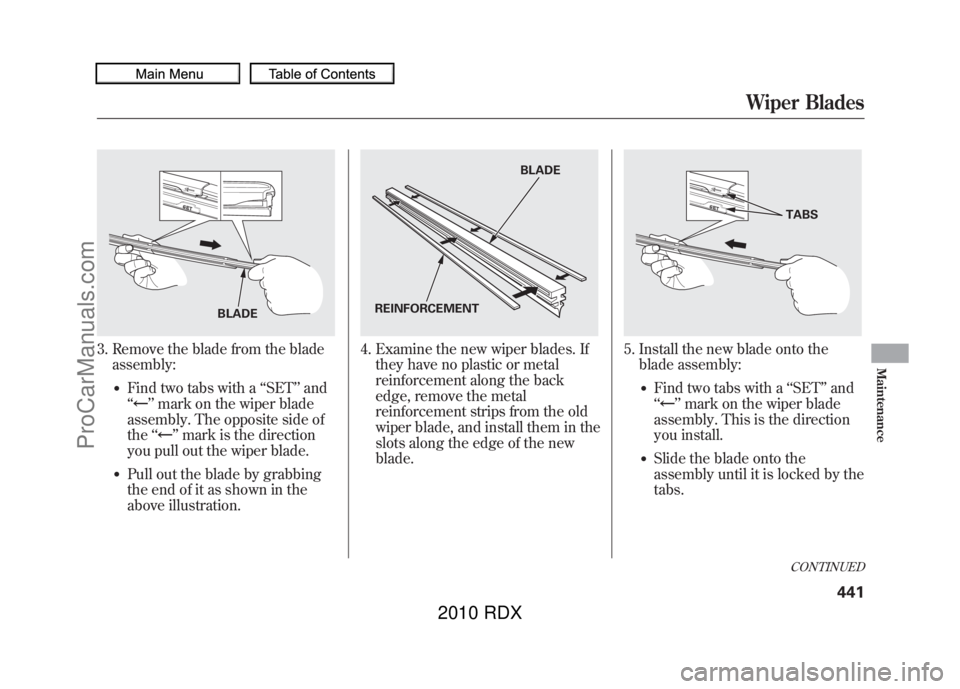
3. Remove the blade from the bladeassembly:
●Find two tabs with a ‘‘SET ’’and
‘‘
’’ mark on the wiper blade
assembly. The opposite side of
the ‘‘
’’mark is the direction
you pull out the wiper blade.
●Pull out the blade by grabbing
the end of it as shown in the
above illustration.
4. Examine the new wiper blades. If they have no plastic or metal
reinforcement along the back
edge, remove the metal
reinforcement strips from the old
wiper blade, and install them in the
slots along the edge of the new
blade.
5. Install the new blade onto theblade assembly:
●Find two tabs with a ‘‘SET ’’and
‘‘
’’ mark on the wiper blade
assembly. This is the direction
you install.
●Slide the blade onto the
assembly until it is locked by the
tabs.
BLADE
BLADE
REINFORCEMENT
TABSCONTINUED
Wiper Blades
441
Maintenance
09/07/07 15:02:04 10 ACURA RDX MMC North America Owner's M 50 31STK630 enu
ProCarManuals.com
2010 RDX
Page 446 of 514
6. Slide the wiper blade assemblyonto the wiper arm. Make sure it
locks in place.
7. Make sure the blade is completely installed and that its edge is not
bunched up.
8. Lower the wiper arm down against the windshield, the passenger's
side first, then the driver's side.
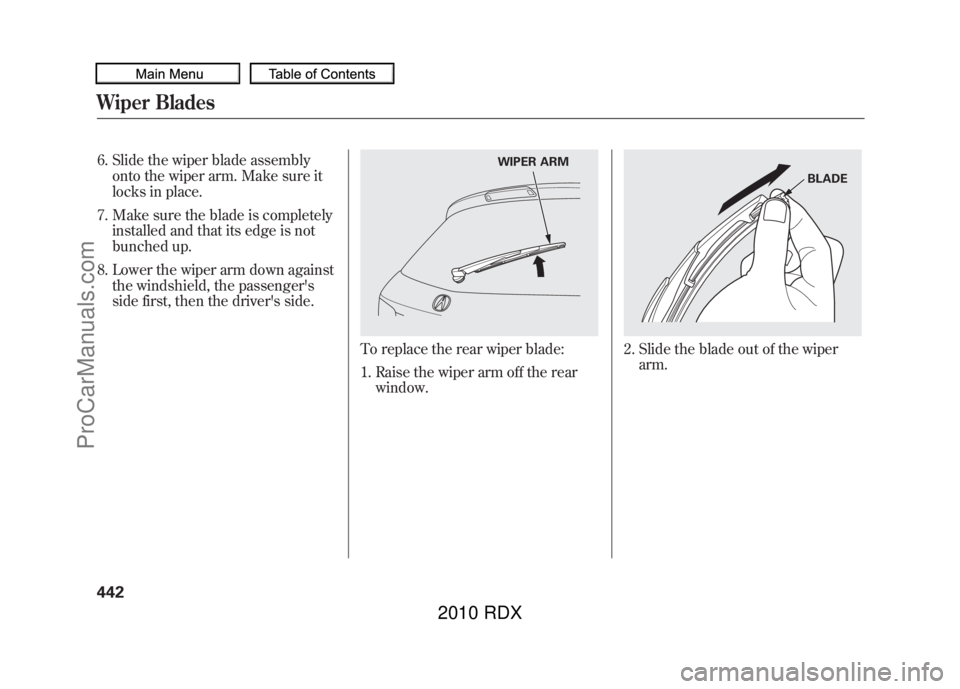
To replace the rear wiper blade:
1. Raise the wiper arm off the rearwindow.
2. Slide the blade out of the wiperarm.
WIPER ARM
BLADE
Wiper Blades44209/07/07 15:02:04 10 ACURA RDX MMC North America Owner's M 50 31STK630 enu
ProCarManuals.com
2010 RDX
Page 456 of 514
If you need to park your vehicle for
an extended period (more than 1
month), there are several things you
should do to prepare it for storage.
Proper preparation helps prevent
deterioration and makes it easier to
get your vehicle back on the road. If
possible, store your vehicle indoors.●Fill the fuel tank.●Wash and dry the exterior
completely.●Clean the interior. Make sure the
carpeting, floor mats, etc., are
completely dry.●Leave the parking brake off. Put
the transmission in Park.
●Block the rear wheels.●If the vehicle is to be stored for a
longer period, it should be
supported on jackstands so the
tires are off the ground.●Leave one window open slightly (if
the vehicle is being stored
indoors).●Disconnect the battery.●Support the front and rear wiper
blade arms with a folded towel or
rag so they do not touch the
windshield.●To minimize sticking, apply a
silicone spray lubricant to all door
and tailgate seals. Also, apply a
vehicle body wax to the painted
surfaces that mate with the door
and tailgate seals.
●Cover the vehicle with a
‘‘breathable’’ cover, one made from
a porous material such as cotton.
Non-porous materials, such as
plastic sheeting, trap moisture,
which can damage the paint.●If possible, periodically run the
engine until it reaches full
operating temperature (the cooling
fans cycle on and off twice).
Preferably, do this once a month.
Vehicle Storage45209/07/07 15:02:04 10 ACURA RDX MMC North America Owner's M 50 31STK630 enu
ProCarManuals.com
2010 RDX
Page 459 of 514

If you have a flat tire while driving,
stop in a safe place to change it.
Drive slowly along the shoulder until
you get to an exit or an area that is
far away from the traffic lanes.
The vehicle can easily roll off
the jack, seriously injuring
anyone underneath.
Follow the directions for
changing a tire exactly, and
never get under the vehicle
when it is supported only by the
jack.1. Park the vehicle on firm, level, and
non-slippery ground. Put the
transmission in Park. Apply the
parking brake.
If you are towing a trailer, unhitch
it.
2. Turn on the hazard warning lights, and turn the ignition switch to the
LOCK (0) position. Have all
passengers get out of the vehicle
while you change the tire.
3. Open the tailgate. Raise the cargoarea floor lid by lifting it up with
the strap, then remove the lid.
The spare tire, jack, and tools are
under the cargo area floor.
4. Unscrew the wing bolt. Use the hooked end of the wheel nut
wrench extension as a wrench if
the wing bolt is hard to loosen.
Then take the spare tire out of the
cargo area.WING BOLT
JACK SPARE TIRELID
CONTINUED
Changing a Flat Tire
455
Taking Care of the Unexpected
09/07/07 15:02:04 10 ACURA RDX MMC North America Owner's M 50 31STK630 enu
ProCarManuals.com
2010 RDX
Page 460 of 514
5. Remove the tools, wing bolt andthe jack. To remove the jack, turn
the jack's end bracket
counterclockwise to loosen it.
6. Loosen the five wheel nuts 1/2turn with the wheel nut wrench.
7. Place the jack under the jackingpoint nearest the tire you need to
change. Turn the end bracket
clockwise until the top of the jack
contacts the jacking point. Make
sure the jacking point tab is
resting in the jack notch.
WING BOLT for normal tire
JACK TOOLS
WHEEL NUTS
WHEEL NUTS
WHEEL NUT WRENCH
JACKING POINT
Changing a Flat Tire45609/07/07 15:02:04 10 ACURA RDX MMC North America Owner's M 50 31STK630 enu
ProCarManuals.com
2010 RDX
Page 462 of 514

13. Tighten the wheel nuts securely inthe same crisscross pattern. Have
the wheel nut torque checked at
the nearest automotive service
facility.
Tighten the wheel nuts to:
80 lbf·ft (108 N·m, 11 kgf·m)
14. Store the jack in its holder. Turn the jack's end bracket to lock it in
place. Store the tools.
15. Remove the center cap from theflat tire, and store it in the cargo
area.
16. Place the flat tire face up in the cargo area.
17. Secure the flat tire by screwing the wing bolt back into its hole.
Loose items can fly around the
interior in a crash and could
seriously injure the occupants.
Store the wheel, jack, and tools
securely before driving.
18. Reinstall the cargo area floor, and close the tailgate.
19. Your vehicle's original tire has a tire pressure monitoring system
sensor. To replace a tire, refer to
Changing a Tire with TPMS (see
page 394).
For spare
tire For normal
tire
Changing a Flat Tire45809/07/07 15:02:04 10 ACURA RDX MMC North America Owner's M 50 31STK630 enu
ProCarManuals.com
2010 RDX