Page 274 of 345

241
07
2
ABC 3
DEF
5
JKL
4
GHI 6
MNO8
TUV
7
PQRS 9
WXYZ0
* #
1
RADIO MEDIA
NAV ESC TRAFFIC
SETUP
ADDR
BOOK
1
4
5
6
2
ABC 3
DEF
5
JKL
4
GHI 6
MNO8
TUV
7
PQRS 9
WXYZ0
* #
1
RADIO MEDIA
NAV ESC TRAFFIC
SETUP
ADDR
BOOK
2
ABC 3
DEF
5
JKL
4
GHI 6
MNO8
TUV
7
PQRS 9
WXYZ0
* #
1
RADIO MEDIA
NAV ESC TRAFFIC
SETUP
ADDR
BOOK
32
ABC 3
DEF
5
JKL
4
GHI 6
MNO8
TUV
7
PQRS 9
WXYZ0
* #
1
RADIO MEDIA
NAV ESC TRAFFIC
SETUP
ADDR
BOOK
RADIO
NAV ESC TRAFFICMEDIAMEDIA
2
ABC 3
DEF
5
JKL
4
GHI 6
MNO8
TUV
7
PQRS 9
WXYZ0
* #
1
RADIO MEDIA
NAV ESC TRAFFIC
SETUP
ADDR
BOOK
2
ABC 3
DEF
5
JKL
4
GHI 6
MNO
8
TUV
7
PQRS 9
WXYZ
0
* #
1
RADIO MEDIA
NAV ESC TRAFFIC
SETUP
ADDR BOOK
2
7
SELECTING/PLAYING
CD, MP3/WMA CD, MP3/WMA
SD CARD/USB PLAYER
The playing and displaying of an MP3/WMA compilation may depend on the recording programme and/or the parameters used. We recommend the ISO 9660 recording standard. Press the MEDIA button.
Select the "Select media" function and press OK to confi rm.
Press this button.
Select the music source required. Press OK to confi rm. Play begins.
Select media
Press the MEDIA button again or select the "Media" Menu function and press OK to confi rm.
When the "MEDIA" screen is displayed, turn the ring up or down to select the previous or next compatible source.
"Media" Menu
The list of tracks or MP3/WMA fi les appears under "Media" Menu.
Insert the audio or MP3 CD in the player, the SD card in the card reader or the USB peripheral in the USB port. Play begins automatically.
MP3 CDs, SD cards or USB peripherals are the compatible sources.
MUSIC MEDIA PLAYERS
Page 275 of 345

242
07
1
3
42
ABC 3
DEF
5
JKL
4
GHI 6
MNO8
TUV
7
PQRS 9
WXYZ0
* #
1
RADIO MEDIA
NAV ESC TRAFFIC
SETUP
ADDR
BOOK
2
ABC 3
DEF
5
JKL
4
GHI 6
MNO8
TUV
7
PQRS 9
WXYZ0
* #
1
RADIO MEDIA
NAV ESC TRAFFIC
SETUP
ADDR
BOOK
2
ABC 3
DEF
5
JKL
4
GHI 6
MNO8
TUV
7
PQRS 9
WXYZ0
* #
1
RADIO MEDIA
NAV ESC TRAFFIC
SETUP
ADDR
BOOK
2
ABC 3
DEF
5
JKL
4
GHI 6
MNO8
TUV
7
PQRS 9
WXYZ0
* #
1
RADIO MEDIA
NAV ESC TRAFFIC
SETUP
ADDR
BOOK
2
2
ABC 3
DEF
5
JKL
4
GHI 6
MNO8
TUV
7
PQRS 9
WXYZ0
* #
1
RADIO MEDIA
NAV ESC TRAFFIC
SETUP
ADDR
BOOK
5
7
8
6
9
RADIO
NAV ESC TRAFFICMEDIAMEDIA
2
ABC 3
DEF
5
JKL
4
GHI 6
MNO
8
TUV
7
PQRS 9
WXYZ
0
* #
1
RADIO MEDIA
NAV ESC TRAFFIC
SETUP
ADDR BOOKRADIO
NAV ESC TRAFFICMEDIA
2
ABC 3
DEF
5
JKL
4
GHI 6
MNO8
TUV
7
PQRS 9
WXYZ0
* #
1
RADIO MEDIA
NAV ESC TRAFFIC
SETUP
ADDR
BOOK
2
ABC 3
DEF
5
JKL
4
GHI 6
MNO8
TUV
7
PQRS 9
WXYZ0
* #
1
RADIO MEDIA
NAV ESC TRAFFIC
SETUP
ADDR
BOOK
Select "Jukebox management" then "Add fi les" and press OK at each step to confi rm.
Press the MEDIA button. Press the MEDIA button again or select Media Menu and press OK to confi rm.
Insert an audio/MP3 CD, a USB memory stick or an SD card.
JUKEBOX
Add fi les
Check that the active MEDIA source is that of the medium used (CD, USB or SD card).
Select "Add fi les from MP3-Disc" for example and press OK to validate.
Select the tracks required then "Rip selection" or select all of the tracks using "Rip all".
Select "[New folder]" to create a new folder or select an existing folder (created previously).
Add fi les from MP3-Disc
[New folder][New folder]
"Do you want to change the names of the tracks th
at will be ripped?": select "Yes" to change them or "No".
To copy an MP3 CD, then select "Real time ripping", "Fast ripping"/"High quality (192 kbit/sec)" or "Standard quality(128 kbit/sec)" then select "Start ripping".
Confi rm the warning message by pressing "OK" to start the copy.
OK
YesNo
When copying is in progress, switching off the ignition wil l interrupt the process but it will resume directly when the ignition is switche d on again.
MUSIC MEDIA PLAYERS
COPYING A CD, A USB MEMORY STICK OR AN SD CARD ONTO THE HARD DISK
Page 283 of 345
250
10
MEDIA
TRAFFIC
SCREEN MENU MAP
MAIN FUNCTION
OPTION A
OPTION B...
option A1
option A2
1
2
3
2
3
"Traffic" Menu
Messages on route
Select preferred list
1
2
3
Deactivate PIN 4
Only warnings on route3
All warning messages3
All messages3
Geo. Filter3
Within 2 miles (3 km) 4
Within 3 miles (5 km) 4
Within 6 miles (10 km) 4
Within 30 miles (50 km) 4
On confi rmation
Read out settings 2
3
Incoming messages3
TMC station information 2
"Media" Menu
Audio CD/MP3-Disc / DVD-Audio / DVD-Video
Select media
1
2
3
Jukebox (Folders & Files)3
SD-Card3
USB3
External device (audio/AV)3
Add fi les
Jukebox management 2
3
Folders & Files 4
Create folder3
Modify content3
Edit playlist3
Play options3
Playlists 4
Memory capacity3
Refer to the "Sound settings" menu details of which are shown on the next page.
Sound settings 2
3
Aspect ratio
Video settings 2
3
Menu language3
Display3
Brightness 4
Contrast 4
Colour 4
Page 292 of 345

259
QUESTIONANSWERSOLUTION
The system does not receive SMS. The Bluetooth mode does not permit sending of the SMS to the system. Use your SIM card and the internal telephone.
The SIM card used is a twin card. Use the original SIM card to receive the SMS.
I cannot update the risk area POIs. The Navigation Menu - "Update personal POI" is not displayed. Check that the medium used for the update (SD card or USB memory stick) is inserted correctly.
An error message is displayed at the end of the procedure. - Start the procedure again in full.
- Consult a PEUGEOT dealer if the problem persists.
- Check that the data on the MEDIUM is supplied by an offi cial partner of PEUGEOT.
The voice frequencies (DTMF) are not active when I am communicating and I press numbers onthe keypad.
The numeric buttons on the keypad are only active for calls if the display is in telephone mode. To activate them, press the MODE button untilthe telephone is displayed on the screen.
An accident area which does not concern me is displayed on the screen.
The accident areas are displayed near a point defi ned on the map and in relation to a direction of travel. The alert may be triggered when travelling under a road or near a road which has a speed camera.
Page 312 of 345
07
43
1
2
280
MUSIC MEDIA PLAYERS
Connect the portable device (MP3/WMA player…) to the auxiliary JACK socket or to the USB port, using a suitable audio cable.
Press the MUSIC button then press it again or select the Music Menu function and press the dial to confi rm.
Select the AUX music source and press the dial to confi rm. Play begins automatically.
Select the "External device" function and press the dial to activate it.
External device
The display and management of the controls is via the porta
ble device.
USING THE EXTERNAL INPUT (AUX)
Music Menu
JACK/USB AUDIO CABLE NOT SUPPLIED
Page 325 of 345
293
PEUGEOT CONNECT SOUND
Your Peugeot Connect Sound is coded in such a way that it will only operate in your vehicle. If it is to be installed in another vehicle, contact your PEUGEOT dealer for confi guration of the system.
For safety reasons, the driver must carry out operations which require prolonged attention while the vehicle is stationary.
When the engine is switched off and to prevent discharging of the battery, the audio equipment may switch off after a few minutes.
AUDIO SYSTEM/BLUETOOTH 01 First steps
02 Steering mounted controls
03 Main menu
04 Audio
05 Peugeot Connect USB
06 Bluetooth
07 Configuration
08 Trip computer
09 Screen menu map p.
p.
p.
p.
p.
p.
p.
p.
p.
294
295
296
297
300
303
305
306
307
CONTENTS
Frequently asked questions
p. 312
Page 326 of 345
294
01
1
22
10101111
131314141515
33445566778899
1212
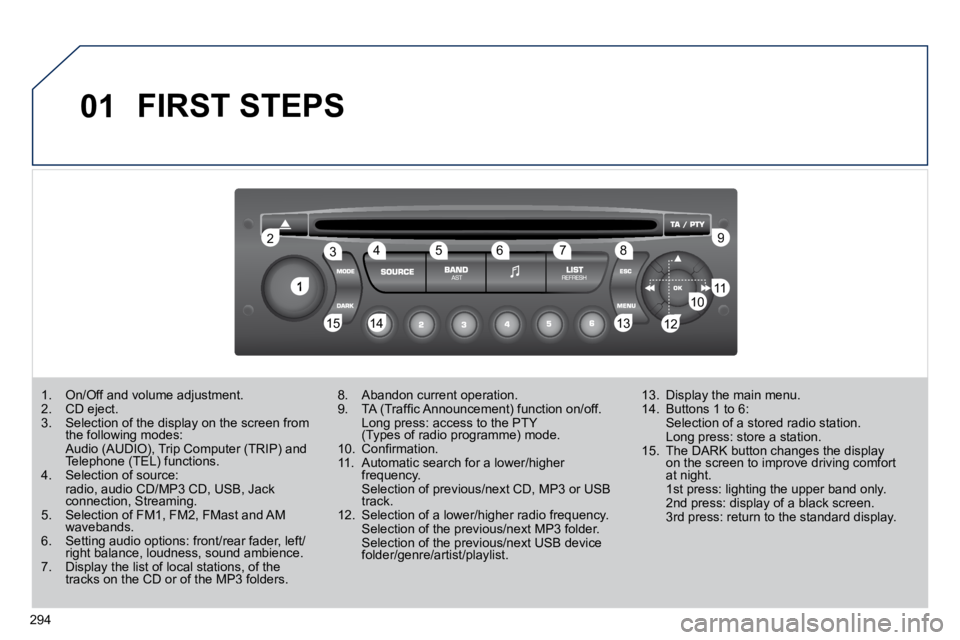
FIRST STEPS
1. On/Off and volume adjustment. 2. CD eject. 3. Selection of the display on the screen from the following modes: 3. Selection of the display on the screen from 3. Selection of the display on the screen from
Audio (AUDIO), Trip Computer (TRIP) and Telephone (TEL) functions. Audio (AUDIO), Trip Computer (TRIP) and Audio (AUDIO), Trip Computer (TRIP) and
4. Selection of source: radio, audio CD/MP3 CD, USB, Jack connection, Streaming. 5. Selection of FM1, FM2, FMast and AM wavebands. 6. Setting audio options: front/rear fader, left/right balance, loudness, sound ambience. 7. Display the list of local stations, of the tracks on the CD or of the MP3 folders. 7. Display the list of local stations, of the Display the list of local stations, of the
8. Abandon current operation. 9. TA (Traffi c Announcement) function on/off. Long press: access to the PTY (Types of radio programme) mode. Long press: access to the PTY Long press: access to the PTY
10. Confi rmation. 11. Automatic search for a lower/higher frequency. 11. Automatic search for a lower/higher 11. Automatic search for a lower/higher
Selection of previous/next CD, MP3 or USB track. 12. Selection of a lower/higher radio frequency. Selection of the previous/next MP3 folder. Selection of the previous/next USB device folder/genre/artist/playlist.
13. Display the main menu. 14. Buttons 1 to 6: Selection of a stored radio station. Long press: store a station. 15. The DARK button changes the display on the screen to improve driving comfort 15. The DARK button changes the display 15. The DARK button changes the display
at night. 1st press: lighting the upper band only. 2nd press: display of a black screen. 3rd press: return to the standard display.
Page 328 of 345
296
03 MAIN MENU
AUDIO FUNCTIONS : radio, CD, USB, options.
> MONOCHROME SCREEN C
For a detailed global view of the menus available, refer to the "Screen menu map" section.
TELEPHONE : Bluetooth hands-free, pairing, management of a call.
PERSONALISATION-CONFIGURATION : vehicle parameters, display, languages.
TRIP COMPUTER : entering of distances, alerts, status of functions.
> MONOCHROME SCREEN A


