Page 59 of 342
stowed position (down). They can also be removed. To remove a head restraint: release the backrest using control 1 , tilt the backrest 2 slightly for wards,
pull the head restraint upwards to the stop, then, press the lug A .
Rear head restraints
Never drive with the head restraints removed; they must be in place and correctly adjusted.
Steering wheel adjustment
When stationar y , pull the control lever to When stationar yWhen stationar yrelease the steering wheel. Adjust the height and reach to suit your driving position. Push the control lever to lock the steering wheel.
As a safety precaution, these operations should only be carried out while the vehicle is stationary.
Page 76 of 342

Deactivate the interior volumetric and anti-tilt
monitoring to avoid unwanted triggering of the alarm in cer tain cases such as: - leaving a pet in the vehicle, - leaving a window par tially open, - washing your vehicle, - changing a wheel, - having your vehicle towed, - transpor t by sea.
Locking the vehicle
with exterior perimeter
monitoring only
Deactivation of the interior volumetric and anti-tilt monitoring
Switch off the ignition. Within ten seconds, press the button until the indicator lamp is on continuously.
Get out of the vehicle. Press the locking button on the remote control immediately.
The exterior perimeter monitoring alone is activated: the indicator lamp in the button flashes once per second.
To be effective, this deactivation must
be carried out each time the ignition is switched off.
Reactivation of the interior volumetric and anti-tilt monitoring
Press the unlocking button on the remote control to deactivate the exterior perimeter
monitoring. Press the locking button on the remote control to activate all the monitoring
functions. The indicator lamp in the button again flashes once per second.
Page 99 of 342
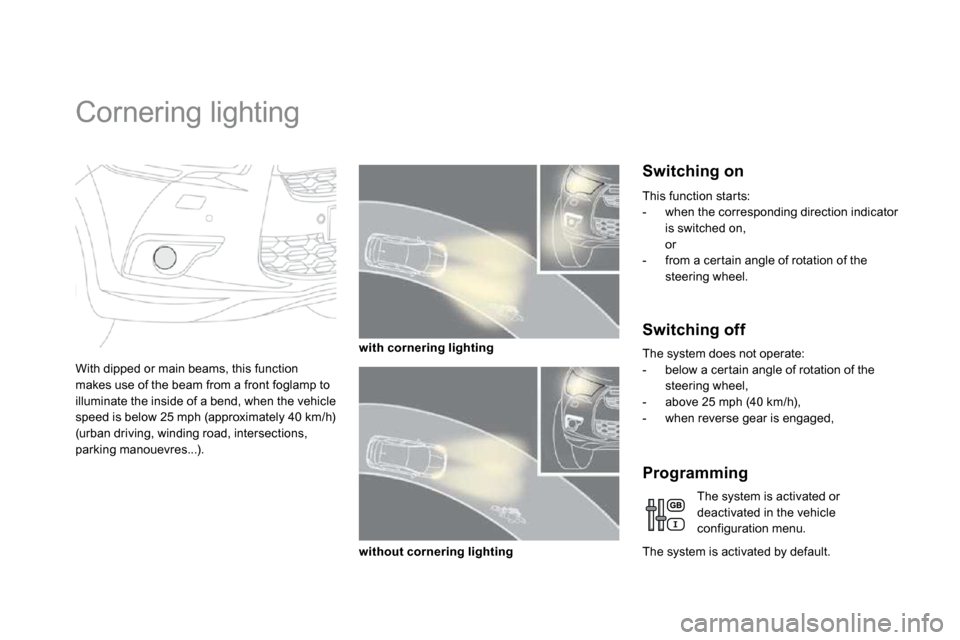
Cornering lighting
With dipped or main beams, this function makes use of the beam from a front foglamp to illuminate the inside of a bend, when the vehicle speed is below 25 mph (approximately 40 km/h)
(urban driving, winding road, intersections, parking manouevres...).
Switching on
with cornering lighting
without cornering lighting
Switching off
The system does not operate: - below a cer tain angle of rotation of the steering wheel, - above 25 mph (40 km/h), - when reverse gear is engaged,
The system is activated by default.
Programming
The system is activated or deactivated in the vehicle configuration menu.
This function star ts: - when the corresponding direction indicator is switched on, or - from a cer tain angle of rotation of the steering wheel.
Page 130 of 342
To remove the shelf: unhook the two cords, raise the shelf slightly, then remove it.
There are several options for storing the shelf: - either upright behind the front seats, - or flat at the base of the boot.
Rear parcel shelf
The hooks can be used to secure shopping bags.
Hooks
Access to the storage box
An additional hook under the shelf is used to hold up the boot floor using its cord, to facilitate access to the tools
and spare wheel or the temporary puncture repair kit...
Page 132 of 342
Use
Extract the torch from its location pulling it upwards.
Press the switch, located on the back, to switch the torch on or off. Unfold the suppor t, located on the back, to set down and raise the torch; for example, when changing a wheel.
Storing
Put the torch back in place in its location star ting with the lower par t.
If you have forgotten to switch off the torch, this switches it off automatically.
Storage box
Raise the boot carpet for access to the storage box. This has areas for the storage a box of spare bulbs, a first aid kit, two warning triangles... It also contains the vehicle tools, the temporary tyre repair kit...
It the torch is not engaged correctly, it may not charge and may not come on when the boot is opened.
Page 134 of 342
Use
Extract the torch from its location pulling it upwards.
Press the switch, located on the back, to switch the torch on or off. Unfold the suppor t, located on the back, to set down and raise the torch; for example, when changing a wheel.
Storing
Put the torch back in place in its location star ting with the lower par t.
If you have forgotten to switch off the torch, this switches it off automatically.
Storage box
Raise the boot carpet for access to the storage box. This has areas for the storage a box of spare bulbs, a first aid kit, two warning triangles... It also contains the vehicle tools, the temporary tyre repair kit...
It the torch is not engaged correctly, it may not charge and may not come on when the boot is opened.
Page 147 of 342
171Safety
Automatic operation of hazard warning lamps
When braking in an emergency, depending on
the deceleration, the hazard warning lamps come on automatically. They switch off automatically the first time you accelerate. You can also switch them off by pressing the button.
Horn
Audible warning system to aler t other road users to an imminent danger. Press the central par t of the steering wheel with integrated controls.
Use the horn moderately and only in the following circumstances: - immediate danger, - over taking a cyclist or pedestrian, - approaching a location lacking visibility.
Emergency or
assistance call
This system allows you to make an emergency or assistance call to the emergency ser vices or to the dedicated CITROËN ser vice. For more information on the use of this
function, refer to the "Audio and telematics" section.
Page 148 of 342
171Safety
Automatic operation of hazard warning lamps
When braking in an emergency, depending on
the deceleration, the hazard warning lamps come on automatically. They switch off automatically the first time you accelerate. You can also switch them off by pressing the button.
Horn
Audible warning system to aler t other road users to an imminent danger. Press the central par t of the steering wheel with integrated controls.
Use the horn moderately and only in the following circumstances: - immediate danger, - over taking a cyclist or pedestrian, - approaching a location lacking visibility.
Emergency or
assistance call
This system allows you to make an emergency or assistance call to the emergency ser vices or to the dedicated CITROËN ser vice. For more information on the use of this
function, refer to the "Audio and telematics" section.