Page 19 of 98

INSTRUMENT AND CONTROL FUNCTIONS
3-5
2
34
5
6
7
8
9
TIP
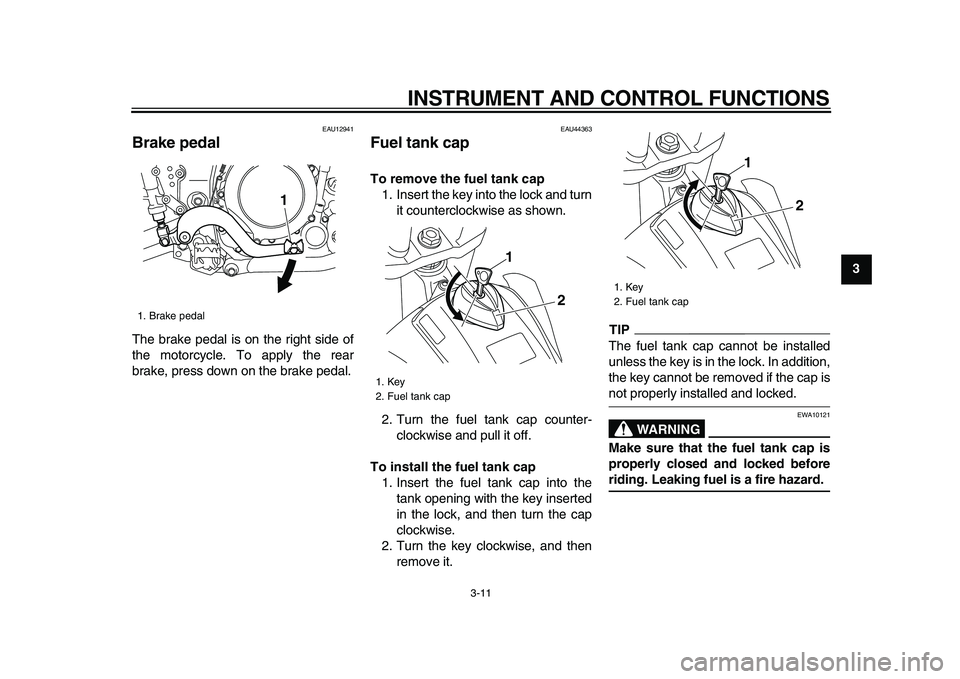
Indicator “ ” comes on when tripmeter
A is selected, and indicator “ ” comes
on when tripmeter B is selected.
If the fuel level warning light comes on(see page 3-2), the display will auto-
matically change to the fuel reserve
tripmeter mode “F” and start counting
the distance traveled from that point. In
this case, push the “SELECT 2” button
to switch the display between the vari-
ous tripmeter and odometer modes in
the following order:
fuel reserve tripmeter “F”
→
odometer
→
tripmeter A
→
tripmeter B
→
fuel re-
serve tripmeter “F”
TIP
The fuel level warning light may not
function accurately while riding off road
as the fuel level reading changes due to
the movement and inclination of the ve-
hicle.
If the fuel level warning light comes on
while riding in the measurement mode,
change to the basic mode and push the
“SELECT 2” button to display the fuel
reserve tripmeter.
TIP
To change from the measurement
mode to the basic mode, the stopwatch
and the distance-compensation tripme-
ter must be stopped.To reset a tripmeter, select it by push-
ing the “SELECT 2” button, and then
push the “RESET” button for at least
one second. If you do not reset the fuel
reserve tripmeter manually, it will reset
itself automatically and the display will
return to the prior mode after refueling
and traveling 5 km (3 mi).
Clock
The clock displays when the key is
turned to “ON”.
To set the clock1. Push the “SELECT 1” button for at
least two seconds.
2. When the hour digits start flashing,
1. Tripmeter A indicator “ ”
1. Tripmeter B indicator “ ”
11
1. Fuel reserve tripmeter “F”
1
Page 22 of 98

INSTRUMENT AND CONTROL FUNCTIONS
3-8
1
2
3
4
5
6
7
8
9
operation.
Resetting the distance-compensa-
tion tripmeter or the distance-com-
pensation tripmeter in combination
with the stopwatch
TIP
Resetting can be made only to the dis-
tance-compensation tripmeter or to the
distance-compensation tripmeter in
combination with the stopwatch.
Resetting the distance-compensation
tripmeter1. Check that the stopwatch mea-
surement is in operation.
2. Reset the distance-compensation
tripmeter to zero by pushing the
“RESET” button for at least two
seconds.
Resetting the distance-compensationtripmeter in combination with the stop-watch1. Stop the stopwatch.
2. Reset the distance-compensationtripmeter and the stopwatch to
zero by pushing the “RESET” but-
ton for at least two seconds.
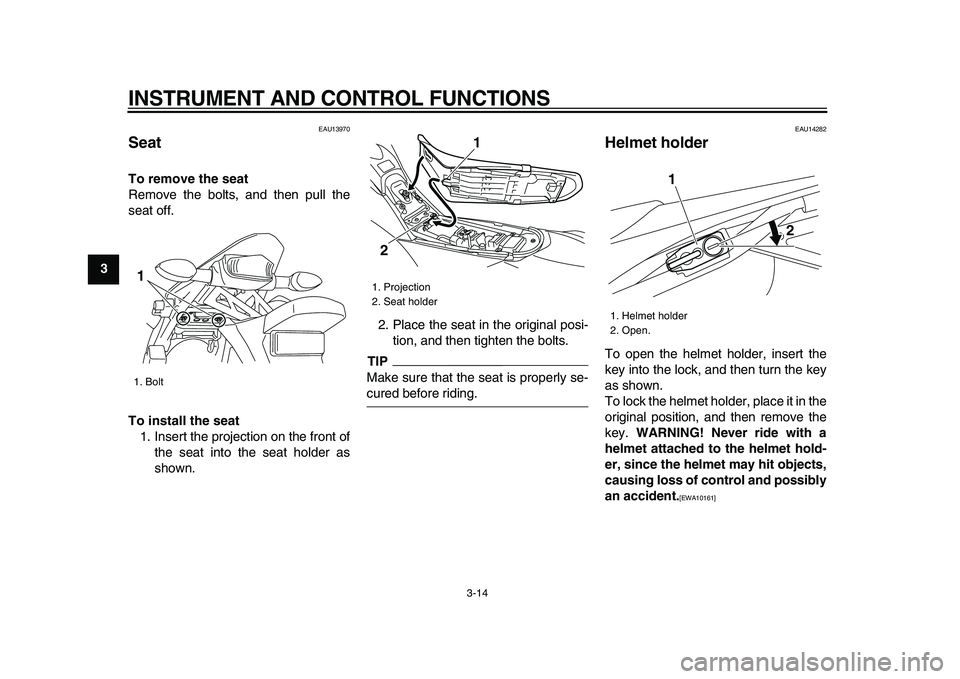
Self-diagnosis device
This model is equipped with a self-diag-
nosis device for various electrical cir-
cuits.
If a problem is detected in any of those
circuits, the engine trouble warning light
will come on and the display will indi-
cate an error code.
If the display indicates any error codes,
note the code number, and then have a
Yamaha dealer check the vehicle.
NOTICE
ECA11590
If the display indicates an error
code, the vehicle should be checked
as soon as possible in order to avoid
engine damage.
1. Error code display
1
Page 23 of 98

INSTRUMENT AND CONTROL FUNCTIONS
3-9
2
34
5
6
7
8
9
EAU12347
Handlebar switches
LeftRight
EAU12400
Dimmer switch “/”
Set this switch to “ ” for the high
beam and to “ ” for the low beam.
EAU12460
Turn signal switch “/”
To signal a right-hand turn, push this
switch to “ ”. To signal a left-hand
turn, push this switch to “ ”. When re-
leased, the switch returns to the center
position. To cancel the turn signal
lights, push the switch in after it has re-
turned to the center position.
EAU12500
Horn switch “”
Press this switch to sound the horn.
EAU12660
Engine stop switch “/”
Set this switch to “ ” before starting
the engine. Set this switch to “ ” to
stop the engine in case of an emergen-
cy, such as when the vehicle overturns
or when the throttle cable is stuck.
EAU12711
Start switch “”
Push this switch to crank the engine
with the starter. See page 5-1 for start-
ing instructions prior to starting the en-
gine.
EAU41700
The engine trouble warning light will
come on when the key is turned to “ON”
and the start switch is pushed, but this
does not indicate a malfunction.
1. Dimmer switch “ / ”
2. Turn signal switch “ / ”
3. Horn switch “ ”
1
2
3
1. Engine stop switch “ / ”
2. Start switch “ ”
1
2
Page 25 of 98
INSTRUMENT AND CONTROL FUNCTIONS
3-11
2
34
5
6
7
8
9
EAU12941
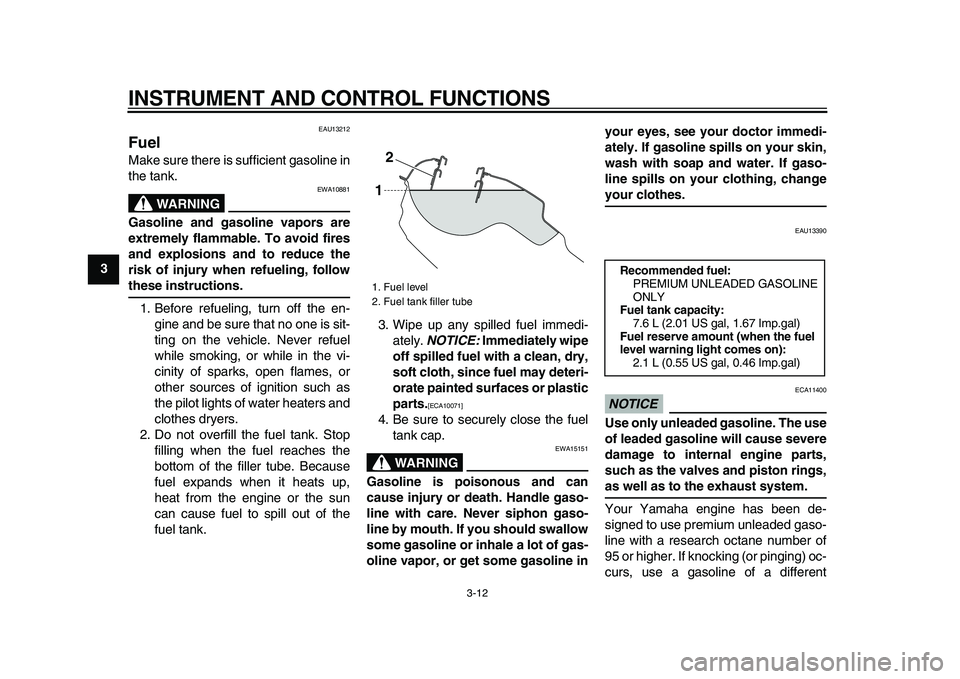
Brake pedal
The brake pedal is on the right side of
the motorcycle. To apply the rear
brake, press down on the brake pedal.
EAU44363
Fuel tank cap
To remove the fuel tank cap
1. Insert the key into the lock and turn
it counterclockwise as shown.
2. Turn the fuel tank cap counter-
clockwise and pull it off.
To install the fuel tank cap
1. Insert the fuel tank cap into the
tank opening with the key inserted
in the lock, and then turn the cap
clockwise.
2. Turn the key clockwise, and then
remove it.
TIP
The fuel tank cap cannot be installed
unless the key is in the lock. In addition,
the key cannot be removed if the cap is
not properly installed and locked.
WARNING
EWA10121
Make sure that the fuel tank cap is
properly closed and locked before
riding. Leaking fuel is a fire hazard.
1. Brake pedal
1
1. Key
2. Fuel tank cap1
2
1. Key
2. Fuel tank cap
1
2
Page 26 of 98
INSTRUMENT AND CONTROL FUNCTIONS
3-12
1
2
3
4
5
6
7
8
9
EAU13212
Fuel
Make sure there is sufficient gasoline in
the tank.
WARNING
EWA10881
Gasoline and gasoline vapors are
extremely flammable. To avoid fires
and explosions and to reduce the
risk of injury when refueling, follow
these instructions.
1. Before refueling, turn off the en-
gine and be sure that no one is sit-
ting on the vehicle. Never refuel
while smoking, or while in the vi-
cinity of sparks, open flames, or
other sources of ignition such as
the pilot lights of water heaters and
clothes dryers.
2. Do not overfill the fuel tank. Stop
filling when the fuel reaches the
bottom of the filler tube. Because
fuel expands when it heats up,
heat from the engine or the sun
can cause fuel to spill out of the
fuel tank.3. Wipe up any spilled fuel immedi-
ately.
NOTICE:
Immediately wipe
off spilled fuel with a clean, dry,
soft cloth, since fuel may deteri-
orate painted surfaces or plastic
parts.
[ECA10071]
4. Be sure to securely close the fuel
tank cap.
WARNING
EWA15151
Gasoline is poisonous and can
cause injury or death. Handle gaso-
line with care. Never siphon gaso-
line by mouth. If you should swallow
some gasoline or inhale a lot of gas-
oline vapor, or get some gasoline inyour eyes, see your doctor immedi-
ately. If gasoline spills on your skin,
wash with soap and water. If gaso-
line spills on your clothing, change
your clothes.
EAU13390
NOTICE
ECA11400
Use only unleaded gasoline. The use
of leaded gasoline will cause severe
damage to internal engine parts,
such as the valves and piston rings,
as well as to the exhaust system.
Your Yamaha engine has been de-
signed to use premium unleaded gaso-
line with a research octane number of
95 or higher. If knocking (or pinging) oc-
curs, use a gasoline of a different
1. Fuel level
2. Fuel tank filler tube
2
1
Recommended fuel:
PREMIUM UNLEADED GASOLINE
ONLY
Fuel tank capacity:
7.6 L (2.01 US gal, 1.67 Imp.gal)
Fuel reserve amount (when the fuel
level warning light comes on):
2.1 L (0.55 US gal, 0.46 Imp.gal)
Page 27 of 98
INSTRUMENT AND CONTROL FUNCTIONS
3-13
2
34
5
6
7
8
9
brand. Use of unleaded fuel will extend
spark plug life and reduce maintenance
costs.
EAU13433
Catalytic converter
This model is equipped with a catalytic
converter in the exhaust system.
WARNING
EWA10862
The exhaust system is hot after op-
eration. To prevent a fire hazard or
burns:
�
Do not park the vehicle near
possible fire hazards such as
grass or other materials that
easily burn.
�
Park the vehicle in a place
where pedestrians or children
are not likely to touch the hot
exhaust system.
�
Make sure that the exhaust sys-
tem has cooled down before do-
ing any maintenance work.
�
Do not allow the engine to idle
more than a few minutes. Long
idling can cause a build-up of
heat.
NOTICE
ECA10701
Use only unleaded gasoline. The use
of leaded gasoline will cause unre-pairable damage to the catalytic
converter.
Page 28 of 98
INSTRUMENT AND CONTROL FUNCTIONS
3-14
1
2
3
4
5
6
7
8
9
EAU13970
Seat
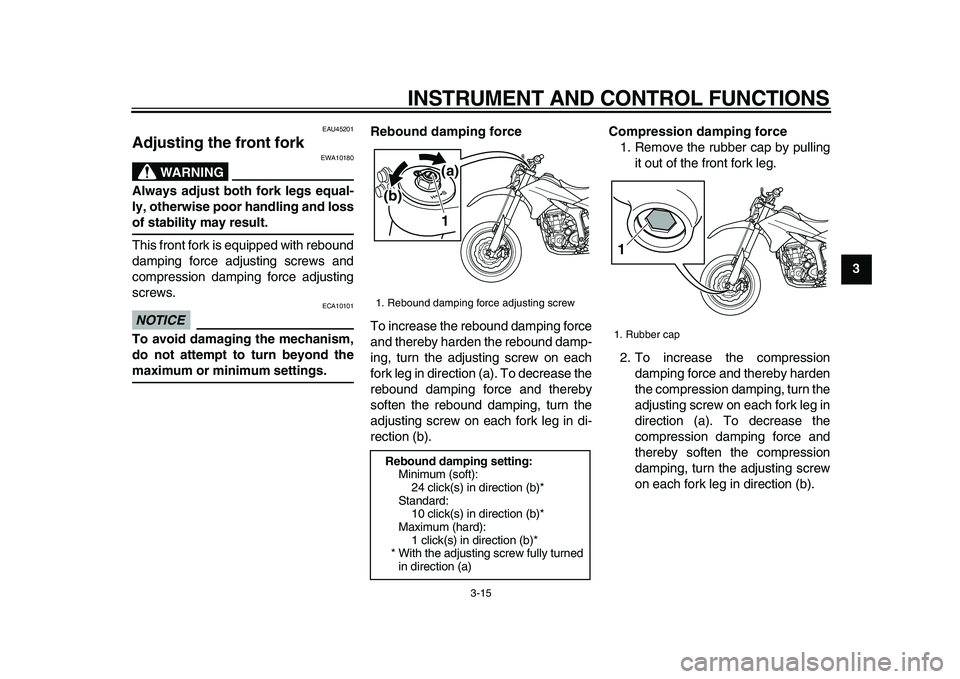
To remove the seat
Remove the bolts, and then pull the
seat off.
To install the seat
1. Insert the projection on the front of
the seat into the seat holder as
shown.2. Place the seat in the original posi-
tion, and then tighten the bolts.
TIP
Make sure that the seat is properly se-
cured before riding.
EAU14282
Helmet holder
To open the helmet holder, insert the
key into the lock, and then turn the key
as shown.
To lock the helmet holder, place it in the
original position, and then remove the
key.
WARNING! Never ride with a
helmet attached to the helmet hold-
er, since the helmet may hit objects,
causing loss of control and possibly
an accident.
[EWA10161]
1. Bolt
1
1. Projection
2. Seat holder
1
2
1. Helmet holder
2. Open.
1
2
Page 29 of 98
INSTRUMENT AND CONTROL FUNCTIONS
3-15
2
34
5
6
7
8
9
EAU45201
Adjusting the front fork
WARNING
EWA10180
Always adjust both fork legs equal-
ly, otherwise poor handling and loss
of stability may result.
This front fork is equipped with rebound
damping force adjusting screws and
compression damping force adjusting
screws.
NOTICE
ECA10101
To avoid damaging the mechanism,
do not attempt to turn beyond the
maximum or minimum settings.Rebound damping force
To increase the rebound damping force
and thereby harden the rebound damp-
ing, turn the adjusting screw on each
fork leg in direction (a). To decrease the
rebound damping force and thereby
soften the rebound damping, turn the
adjusting screw on each fork leg in di-
rection (b).
Compression damping force
1. Remove the rubber cap by pulling
it out of the front fork leg.
2. To increase the compression
damping force and thereby harden
the compression damping, turn the
adjusting screw on each fork leg in
direction (a). To decrease the
compression damping force and
thereby soften the compression
damping, turn the adjusting screw
on each fork leg in direction (b).
1. Rebound damping force adjusting screw
Rebound damping setting:
Minimum (soft):
24 click(s) in direction (b)*
Standard:
10 click(s) in direction (b)*
Maximum (hard):
1 click(s) in direction (b)*
* With the adjusting screw fully turned
in direction (a)
1
(b)
(a)
1. Rubber cap
1