Page 135 of 166
8-50
8 4. Tighten the locknut.
5. After adjusting, there should be slight play at
the brake pedal cable joint as shown. If there
is no play, repeat steps 2 to 4.6. Install the panel.
If the correct free play cannot be obtained, have a
Yamaha dealer adjust it.
TIPWhen adjusting the rear brake pedal free play:�Be sure not to step on the brake pedal.�Make sure the rear brake lever and brake pedaldo not move.
1. Locknut
2. Brake pedal free play adjusting nut
1. Brake pedal cable joint
2. Slight play
1
2
U43P60E0.book Page 50 Tuesday, May 20, 2008 5:33 PM
Page 143 of 166
8-58
8
The main fuse, the fuel injection system fuse, the
EPS fuse, and the fuse box are located under pan-
el A. (See page 8-8.)
If a fuse is blown, replace it as follows.
1. Turn the key to “OFF” and turn off all electrical
circuits.
NOTICEECB00640To prevent accidental short-circuiting, turn off
the main switch when checking or replacing afuse.
2. Remove the blown fuse, and then install a
new fuse of the specified amperage.
1. Ignition fuse
2. Headlight fuse
3. Four-wheel-drive motor fuse
4. Radiator fan fuse
5. Signaling system fuse
6. Auxiliary DC jack fuse
7. Spare fuseU43P60E0.book Page 58 Tuesday, May 20, 2008 5:33 PM
Page 144 of 166
8-59
8
WARNING
EWB02171Always use a fuse of the specified rating, and
never use a substitute object in place of the
proper fuse. An improper fuse or a substitute
object can cause damage to the electrical sys-tem, which could lead to a fire.
3. Turn the key to “ON” and turn on the electrical
circuits to check if the devices operate.
4. If the fuse immediately blows again, have a
Yamaha dealer check the electrical system.EBU27440Replacing a headlight bulb If a headlight bulb burns out, replace it as follows.
1. Remove the cover at the rear of the headlight
by pulling it off. Specified fuses:
Main fuse:
40.0 A
Headlight fuse:
15.0 A
Ignition fuse:
15.0 A
Four-wheel-drive motor fuse:
15.0 A
Signaling system fuse:
5.0 A
Auxiliary DC jack fuse:
15.0 A
Radiator fan fuse:
20.0 A
Fuel injection system fuse:
15.0 A
EPS fuse:
40.0 A
U43P60E0.book Page 59 Tuesday, May 20, 2008 5:33 PM
Page 145 of 166
8-60
8 2. Remove the headlight bulb cover.
3. Disconnect the headlight coupler.4. Unhook the headlight bulb holder, and then
remove the defective bulb.
1. Cover at the rear of the headlight
1. Headlight bulb cover
1. Headlight coupler
U43P60E0.book Page 60 Tuesday, May 20, 2008 5:33 PM
Page 146 of 166
8-61
8
WARNING
EWB02220A headlight bulb is hot when it is on and imme-
diately after it is turned off. Wait for the bulb to
cool before touching or removing it. You can
be burned or a fire could start if the bulb touch-es something flammable.
5. Place a new headlight bulb into position, and
then secure it with the bulb holder.
NOTICEECB00650Do not touch the glass part of the headlight
bulb to keep it free from oil, otherwise the
transparency of the glass, the luminosity of the
bulb, and the bulb life will be adversely affect-
ed. Thoroughly clean off any dirt and finger-
prints on the headlight bulb using a clothmoistened with alcohol or thinner.
6. Connect the headlight coupler.
7. Install the headlight bulb cover.
8. Install the cover at the rear of the headlight.
1. Headlight bulb holder
2. Headlight bulb
1. Do not touch the glass part of the bulb.
U43P60E0.book Page 61 Tuesday, May 20, 2008 5:33 PM
Page 147 of 166
8-62
8
NOTICEECB00670Make sure the headlight bulb holder cover is
securely fitted over the bulb holder and seatedproperly.
9. Adjust the headlight beam if necessary.EBU25551Adjusting a headlight beam NOTICEECB00690It is advisable to have a Yamaha dealer makethis adjustment.
To raise a headlight beam, turn the headlight beam
adjusting screw in direction (a).
To lower a headlight beam, turn the adjusting
screw in direction (b).
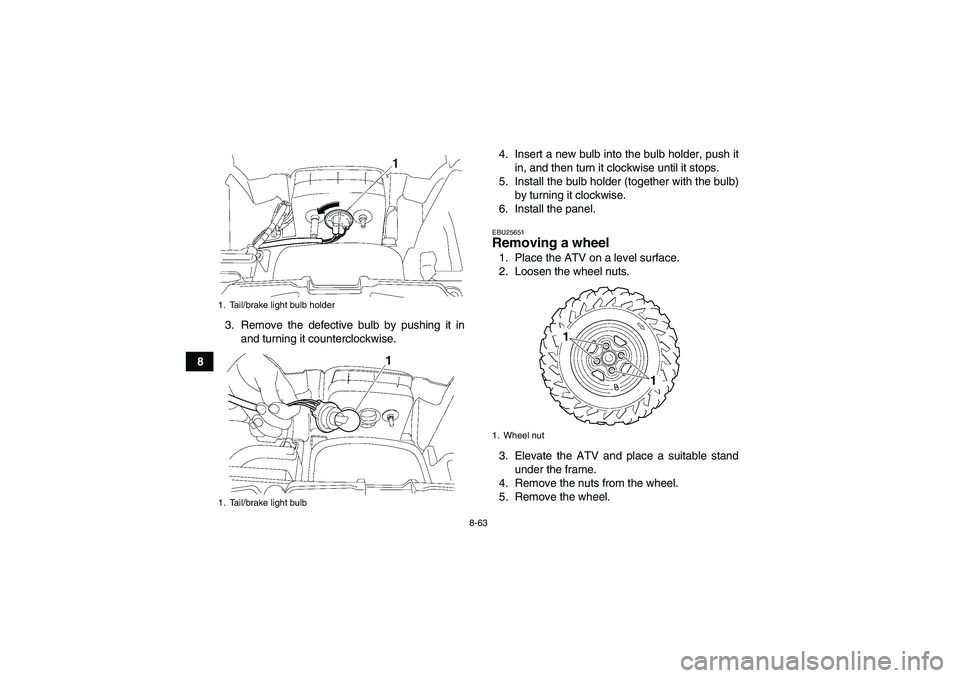
EBU25640Replacing the tail/brake light bulb If the tail/brake light bulb burns out, replace it as
follows.
1. Remove panel I. (See page 8-8.)
2. Remove the bulb holder (together with the
bulb) by turning it counterclockwise.1. Headlight beam adjusting screw
U43P60E0.book Page 62 Tuesday, May 20, 2008 5:33 PM
Page 148 of 166
8-63
83. Remove the defective bulb by pushing it in
and turning it counterclockwise.4. Insert a new bulb into the bulb holder, push it
in, and then turn it clockwise until it stops.
5. Install the bulb holder (together with the bulb)
by turning it clockwise.
6. Install the panel.
EBU25651Removing a wheel 1. Place the ATV on a level surface.
2. Loosen the wheel nuts.
3. Elevate the ATV and place a suitable stand
under the frame.
4. Remove the nuts from the wheel.
5. Remove the wheel.
1. Tail/brake light bulb holder
1. Tail/brake light bulb
1. Wheel nut
U43P60E0.book Page 63 Tuesday, May 20, 2008 5:33 PM
Page 150 of 166

8-65
8
EBU25740Troubleshooting Although Yamaha ATVs receive a thorough in-
spection before shipment from the factory, trouble
may occur during operation. Any problem in the fu-
el, compression, or ignition systems, for example,
can cause poor starting and loss of power.
The following troubleshooting charts represent
quick and easy procedures for checking these vital
systems yourself. However, should your ATV re-
quire any repair, take it to a Yamaha dealer, whose
skilled technicians have the necessary tools, expe-
rience, and know-how to service the ATV properly.
Use only genuine Yamaha replacement parts. Im-
itation parts may look like Yamaha parts, but they
are often inferior, have a shorter service life and
can lead to expensive repair bills.
WARNING
EWB02280Do not smoke when checking the fuel system.
Fuel can ignite or explode, causing severe inju-
ry or property damage. Make sure there are no
open flames or sparks in the area, including pi-lot lights from water heaters or furnaces.U43P60E0.book Page 65 Tuesday, May 20, 2008 5:33 PM