2009 VOLVO XC90 remote control
[x] Cancel search: remote controlPage 121 of 282
05 Locks and alarmKeys and remote controls
05
121
G027011
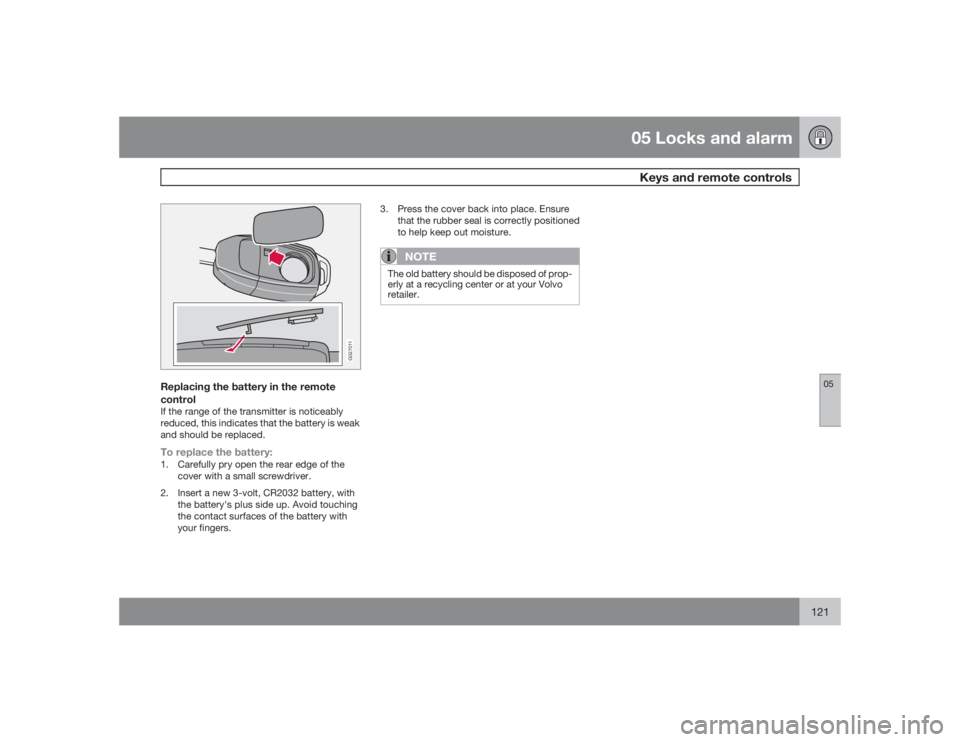
Replacing the battery in the remote
controlIf the range of the transmitter is noticeably
reduced, this indicates that the battery is weak
and should be replaced.To replace the battery:1. Carefully pry open the rear edge of the
cover with a small screwdriver.
2. Insert a new 3-volt, CR2032 battery, with
the battery's plus side up. Avoid touching
the contact surfaces of the battery with
your fingers.3. Press the cover back into place. Ensure
that the rubber seal is correctly positioned
to help keep out moisture.
NOTE
The old battery should be disposed of prop-
erly at a recycling center or at your Volvo
retailer.
Page 122 of 282

05 Locks and alarmLocking and unlocking
05122
G029646
Locking and unlocking the vehicle from
the insideThe switch on the driver's door armrest can be
used to lock or unlock all doors and the tail-
gate, and to set the alarm.
Each door can also be locked with the lock
button on the respective door and opened by
pulling the door handle on the door.Automatic lockingThe function locks the doors automatically
when the vehicle's speed exceeds approxi-
mately 5 mph (7 km/h). The doors will then
remain locked until a door in opened from the
inside or if all of the doors are unlocked from
the control panel in the driver's door.This function can be activated/deactivated
from the control panel in the driver's door.
Activating/deactivating automatic
locking1.
Turn the ignition key to position I or II.
2.
Press the READ button on the left-side
steering wheel lever to erase any mes-
sages that may be displayed in the infor-
mation display.
3. Depress the central locking button on the
control panel until a new message about
the locking status is displayed.
The message
AUTOLOCK ON
(the doors will
be locked when the vehicle begins to move) or
AUTOLOCK OFF
will be displayed.
ATTENTIONPakjdskdl ioiuip kjöpp opoodidåuswi
CSOUNDMENU80ENTERLSEEEXITMY KEYRTO
AIRBAG
G027025
Locking the glove compartmentThe glove compartment can be locked with the
master key.
G028485
Unlocking the tailgateThe tailgate lock is incorporated in the central
locking system and is locked or unlocked when
all doors are locked/unlocked.
The tailgate can be unlocked by:•
PressingUNLOCK on the remote control
twice.
•
Using the central locking button on the
driver's door.
Page 123 of 282
05 Locks and alarm
Locking and unlocking
05
123
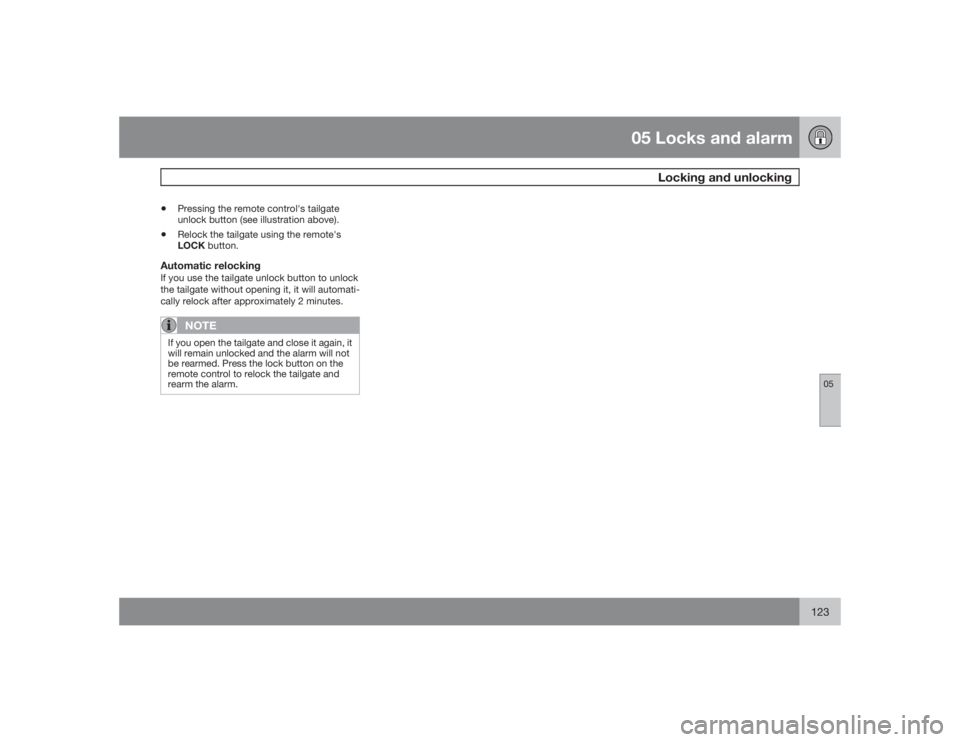
•
Pressing the remote control's tailgate
unlock button (see illustration above).
•
Relock the tailgate using the remote's
LOCK button.
Automatic relockingIf you use the tailgate unlock button to unlock
the tailgate without opening it, it will automati-
cally relock after approximately 2 minutes.
NOTE
If you open the tailgate and close it again, it
will remain unlocked and the alarm will not
be rearmed. Press the lock button on the
remote control to relock the tailgate and
rearm the alarm.
Page 125 of 282

05 Locks and alarm
Alarm
05
125
The alarm is automatically armed whenever
you lock your vehicle.
When armed, the alarm continuously monitors
a number of points on the vehicle. The follow-
ing conditions will set off the alarm:•
The hood is forced open.
•
The tailgate is forced open.
•
A door is forced open.
•
The ignition switch is tampered with.
•
If there is movement in the passenger com-
partment (if the vehicle is equipped with
the optional movement sensor).
•
The vehicle is lifted or towed (if the vehicle
is equipped with the optional inclination
sensor).
•
The battery is disconnected (while the
alarm is armed).
•
The siren is disconnected when the alarm
is disarmed.
Arming the alarmPress the LOCK button on the remote control,
lock the vehicle using the key in the driver's
door or press the central lock button on the
driver's door with the door open. One long
flash of the turn signals will confirm that the
alarm is armed.
Disarming the alarmPress the UNLOCK button on the remote con-
trol or unlock the doors with the key.Turning off (stopping) the alarmIf the alarm is sounding, it can be stopped by
pressing the UNLOCKbutton on the remote
control or by unlocking the driver's door with
the key.Visual alarm signalThe visual alarm signal is given by flashing all
turn signals and turning on the interior lighting
for approximately 5 minutes.Audible alarm signalAn audible alarm signal is given by a battery
powered siren. One alarm cycle lasts for
25 seconds."Panic" buttonIn an emergency situation, this feature can be
used to attract attention.
Activate the "panic" button by pressing the red
button on the remote control ( see page 119 for
illustration) for at least 3 seconds or by press-
ing this button twice within 3 seconds. The turn
signals will flash, and the vehicle's horn will
sound.
The function can be turned off by pressing any
of the buttons on the remote control or will stopautomatically after 25 seconds. When a button
is pressed, there is a 5 second delay before the
panic alarm is deactivated.
NOTE
This button will NOT unlock the vehicle.LED alarm status signalsThe status of the alarm system is indicated by
the red LED at the top of the dash:•
LED off – the alarm is not armed
•
LED flashes once per second – the alarm
is armed
•
LED flashes rapidly before the ignition is
switched on – the alarm has been triggered
•
Fault in the alarm system: If a fault has
been detected in the alarm system, a mes-
sage will be displayed in the text window.
Contact a trained and qualified Volvo serv-
ice technician.
Automatic re-lock/re-arm systemIf the vehicle is unlocked with the remote, the
vehicle will re-lock and the alarm will re-arm
after 2 minutes unless a door or the tailgate has
been opened.
Page 133 of 282

06 Starting and driving
Starting the vehicle
06``133 Starting the engine
WARNING
Before starting, check that the seat, steering
wheel and mirrors are adjusted properly.
Make sure the brake pedal can be
depressed completely. Adjust the seat if
necessary, see page 100.1. Fasten the seat belt.
2. Apply the parking brake (hand brake) if not
already set. The gear selector is locked in
theP position (SHIFTLOCK).
3. Without touching the accelerator pedal,
turn the ignition key
1 to the starting posi-
tion. Allow the starter to operate for up to
10 seconds. Release the key as soon as
the engine starts
2. If the engine fails to
start, repeat this step.
NOTE
•
If the key blade section of the remote is
not fully folded out when starting the
vehicle, the immobilizer function may
make it impossible to start the engine.
•
After a cold start, idle speed may be
noticeably higher than normal for a
short period. This is done to help bring
components in the emission control
system to their normal operating tem-
perature as quickly as possible, which
enables them to control emissions and
help reduce the vehicle's impact on the
environment.
•
To release the gear selector from the P
(Park) position, the engine must be run-
ning (or the ignition key must be in posi-
tionII) and the brake pedal must be
depressed.
•
Select the desired gear. The gear
engages after a very slight delay which
is especially noticeable when selecting
R.
NOTE
Your vehicle is equipped with a KEYLOCK
system. When the engine is switched off,
the gear selector must be in the P position
before the key can be removed from the
ignition switch.
When starting in cold weather, the trans-
mission may shift up at slightly higher
engine speeds than normal until the auto-
matic transmission fluid reaches normal
operating temperature.
NOTE
Do not race a cold engine immediately after
starting. Oil flow may not reach some lubri-
cation points fast enough to prevent engine
damage.
WARNING
An extra mat on the driver's floor can cause
the accelerator pedal to catch. Check that
the movement of the accelerator pedal is
not impeded. No more than one protective
floor covering may be used at one time.
1If two of the keys to your vehicle are close together, e.g. on the same key ring when you try to start the vehicle, this could cause interference in the immobilizer system and result in the vehicle not
starting. If this should occur, remove one of the keys from the key ring before trying to start the vehicle again.2On vehicles equipped with the autostart feature, release the key immediately. See also page 135.
Page 216 of 282

09 Maintenance and servicingBattery
09216
1. Switch off the ignition.
2.
Wait at least 5 minutes after switching
off the ignition before disconnecting the
battery so that all information in the vehi-
cle's electrical system can be stored in the
control modules.
3. Remove the retaining bracket and unscrew
the cover over the battery. Wait at least
5 minutes after switching off the ignition
before disconnecting the battery so that all
information in the vehicle's electrical sys-
tem can be stored in the control modules.
4. Disconnect the negative (ground) cable
first.
G027075
5. Disconnect the positive cable and pull the
ventilation hose from the battery.
6. Lift out the old battery and put a new bat-
tery into place.
7. Connect the positive cable first.
8. Connect the negative (ground) cable.
9. Be sure that the ventilation hose (see right
column) is securely connected to the bat-
tery and that the other end of the hose is
properly routed through the ventilation
opening in the floor of the battery compart-
ment.
G030884
Ventilation hose
10. Reinstall the cover and retaining bracket
and screw it securely in place.
NOTE
After the battery has been disconnected or
replaced, lock and unlock the vehicle with
the central locking system's remote control
to reactivate such features as the power
windows, moonroof, courtesy lighting, etc.
WARNING
•
The battery generates hydrogen gas,
which is flammable and explosive. The
battery is fitted with a ventilation hose
which vents hydrogen gas out of the
battery compartment through a ventila-
tion opening in the bottom of this com-
partment. If the battery must be
replaced, it is essential that the ventila-
tion hose is properly connected to the
battery and that it is routed through the
ventilation opening provided (see illus-
tration).
•
Be sure the ventilation hose is free of
debris.
•
Only use replacement batteries equip-
ped with a ventilation hose. Consult a
trained and qualified Volvo service tech-
nician.
Page 236 of 282

10 AudioAudio system overview
10236
G027144
On/OffVolumeCD playerAM/FM – for switching between FM1, FM2
and AMDisplay - clean with a dry, soft, lint-free
cloth.ENTER – select in the menu or activate a
selectionMY KEY – programmable key for your
favorite function from the menuSELECTOR – select sound sourceSOUND – make sound settings
EXIT/CLEAR – step back in the menu or
cancel a selectionMenu selections/navigationCD ejectCD slot, CD changer (option)Storage compartmentSCANAUTO – search for and store the strongest
radio stations in the area in which you are
drivingStation preset buttons/CD changer discs
(1 – 6)
Infrared (IR) port – for the optional naviga-
tion system remote controlSeek/change tracks or stations
Page 253 of 282

10 Audio
Rear Seat Entertainment - Dual Screen (RSE)–option
10``253 Introduction
The RSE system can be used at the same time
as the vehicle’s audio system.
When the rear seat passengers play a DVD,
connect an external device to the RSE AUX
connectors, etc., and listen to the audio
through the cordless headphones, the driver
and front seat passenger can still use the vehi-
cle's audio system to listen to the radio, a CD,
music stored on an MP3 player, etc.
Please also refer to the Quick Guide provided
with the RSE system for additional information.Electrical current - ignition keyThe RSE system can be activated with the igni-
tion in position I or II (see page 135 for infor-
mation on the ignition positions), or when the
engine is running. While the engine is being
started, a film or music that is currently being
played will pause momentarily and resume
playing when the engine has started.
When the RSE system has been used once
when the ignition is switched off, it will be then
be blocked for further use. RSE can be restar-
ted by turning the ignition key to position I.
NOTE
Using RSE for more than approximately
10 minutes with the engine switched off may
drain the vehicle’s battery and make it diffi-
cult or impossible to start the engine.
If this occurs, a message will be displayed
on the RSE system’s screens.MusicListening to a music CD1. Insert a CD into the RSE player’s slot with
the disc’s label facing upward.
> The CD will begin to play automatically.
2. Switch on the cordless headphones and
selectCH A for the left screen or CH B for
the right screen.
> This will direct the sound to the head-
phones.
3. Adjust the headphone volume by using the
thumb wheel on the headphones.
To listen through the vehicle’s audio sys-
tem speakers, press MODE on the audio
system control panel and select
AUX
.
Press
A B
on the RSE remote to route
the sound through the speakers.
Selecting a folder on the CD1. Insert the CD in the player.
2.
Press
.
3. Use the navigation buttons (the arrow keys
surrounding the OK button on the RSE
remote control) to highlight a folder and/or
a specific track.
4.
Press to select a sub-folder.
Playback alternativesThe CD can be played in several different ways.
Use the navigation buttons to select one of the
alternatives.
With the dialogue box displayed:
1. Press the right navigation button to access
the menu to the right..
2. Use the navigation keys to select one of the
alternatives.
3.
Confirm your choice by pressing
.
Changing tracks on the CD±
Change tracks on the CD by pressing
or
. Hold the respective
buttons down for fast forward or reverse.