Page 229 of 282
09 Maintenance and servicing
Fuses
09``229 Fuse box in the passenger compartment, behind the plastic cover, driver's side
G028412
This fuse box is located behind the plastic
cover below the steering wheel. When replac-
ing a blown fuse, be sure to replace it with a
new one of the same color and amperage (writ-
ten on the fuse).No
A
1
Heated passenger's seat
15
2
Heated driver's seat
15
3
Horn
15
4
–
No
A
5
Audio system
10
6
–
7
–
8
Alarm siren (option)
5
9
Break light switch feed
5
10
Instrument panel, climate sys-
tem, power driver's seat,
Occupant Weight Sensor
10
No
A
11
12-volt sockets – front and rear
seats
15
12
–
13
–
14
–
15
ABS, DSTC
5
16
Power steering, Active Bi-
Xenon headlights (option)
10
Page 232 of 282
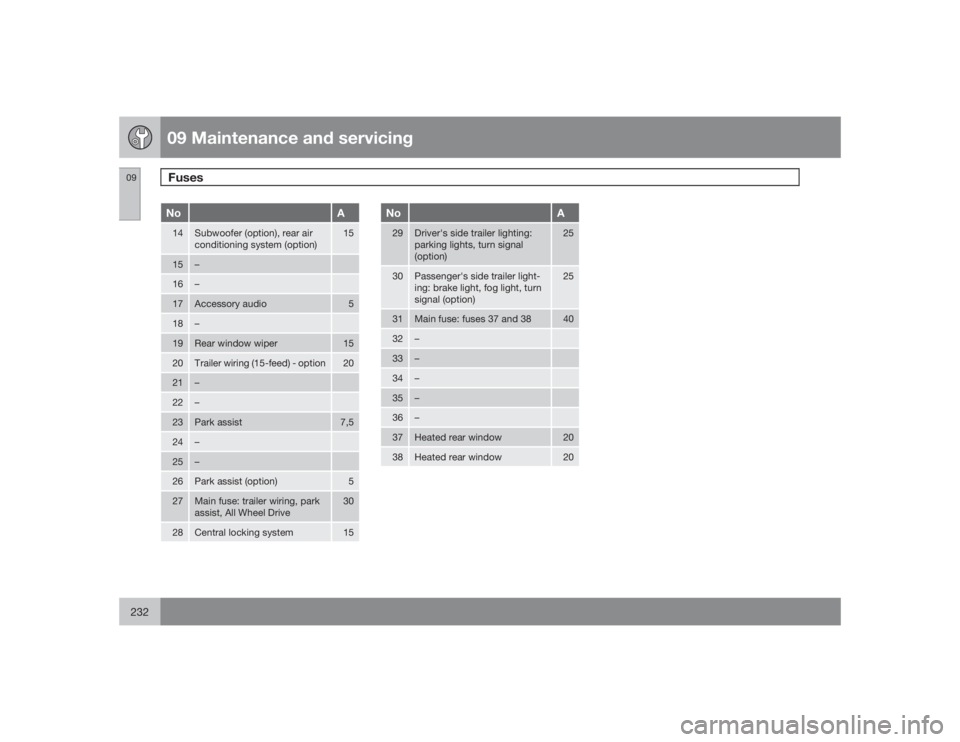
09 Maintenance and servicingFuses
09232
No
A
14
Subwoofer (option), rear air
conditioning system (option)
15
15
–
16
–
17
Accessory audio
5
18
–
19
Rear window wiper
15
20
Trailer wiring (15-feed) - option
20
21
–
22
–
23
Park assist
7,5
24
–
25
–
26
Park assist (option)
5
27
Main fuse: trailer wiring, park
assist, All Wheel Drive
30
28
Central locking system
15
No
A
29
Driver's side trailer lighting:
parking lights, turn signal
(option)
25
30
Passenger's side trailer light-
ing: brake light, fog light, turn
signal (option)
25
31
Main fuse: fuses 37 and 38
40
32
–
33
–
34
–
35
–
36
–
37
Heated rear window
20
38
Heated rear window
20
Page 234 of 282
G020924
234
Audio system overview......................................................................... 236
Audio system controls.......................................................................... 237
Radio functions..................................................................................... 242
Sirius satellite radio............................................................................... 244
Auxiliary equipment............................................................................... 248
CD player/changer................................................................................ 249
Menu structure...................................................................................... 252
Rear Seat Entertainment - Dual Screen (RSE)–option ......................... 253
Page 235 of 282
Page 236 of 282
10 AudioAudio system overview
10236
G027144
On/OffVolumeCD playerAM/FM – for switching between FM1, FM2
and AMDisplay - clean with a dry, soft, lint-free
cloth.ENTER – select in the menu or activate a
selectionMY KEY – programmable key for your
favorite function from the menuSELECTOR – select sound sourceSOUND – make sound settings
EXIT/CLEAR – step back in the menu or
cancel a selectionMenu selections/navigationCD ejectCD slot, CD changer (option)Storage compartmentSCANAUTO – search for and store the strongest
radio stations in the area in which you are
drivingStation preset buttons/CD changer discs
(1 – 6)
Infrared (IR) port – for the optional naviga-
tion system remote controlSeek/change tracks or stations
Page 237 of 282

10 Audio
Audio system controls
10``237 Steering wheel keypad
G027135
The four buttons on the steering wheel keypad
can be used to control the audio system. The
steering wheel keypad can be used to adjust
volume, shift between preset stations and
change CD tracks.•
Press the
or
buttons briefly
to search for a radio station, or to go to the
next/previous track on a CD.
•
Press and hold down these buttons to
search within a track.
Accessing and using menus
G027112
In menu mode, you can change settings and
program new functions in the audio system.
The various menu alternatives are shown in the
display, and the current level in the menu struc-
ture is shown at the upper right corner of the
display.
Press the MENU button to enter menu mode.
Use the menus as follows:•
Use the menu arrow keys
to navigate
up or down in the menus. Dots in the dis-
play indicate that there are more menu
selections from which to choose.
•
PressENTER to confirm or cancel a menu
selection.
•
One long press on EXIT/CLEAR exits
menu mode.
•
A short press on the EXIT/CLEAR enables
you to cancel, undo, or answer no to a
menu selection, or to go back in the menu
structure.
ShortcutThe menu alternatives are numbered and can
be accessed directly by pressing the respec-
tive keys on the numbered keypad on the left
side of the audio panel.MY KEY – programming a shortcutUse the MY KEY button to program a favorite
function from the menu, such as RANDOM,
etc.
1.
Use the MENU buttons to scroll among the
functions.
2. Select the desired function from the menu
by pressing the MY KEY button for more
than two seconds.
3.
When
MY KEY STORED
is shown in the
display, the function has been stored.
4. Activate the function by briefly pressing the
MY KEY button.
Repeat steps 1 – 4 to store new functions on
theMY KEY buttons.
Page 238 of 282

10 AudioAudio system controls
10238
NOTE
TheMY KEY buttons can only be pro-
grammed for one shortcut function at a
time.Rear headphone connectors and
controls (option)
G026982
The door panels behind the second row of
seats can be equipped with headphone con-
nectors for passengers in the second and
optional third row of seats. Several people can
listen to different sound sources, such as CDs
or the radio at the same time without disturbing
each other.Two sets of headphones can be plugged into
each connector.
1. With the audio system switched on, use
theSEL button to select a sound source.
2. Press the arrow keys briefly to change CD
tracks or switch between preset stations.
3. Hold down the arrow keys to fast forward/
reverse, or search for the previous/next
strong radio station.
4.
Hold down the SEL button to turn off the
sound.
NOTE
For the best sound reproduction, we rec-
ommend headphones with impedance
between 16 – 32 ohm. The sensitivity of
these should be equal to or greater than
102 dB. The headphone connections are
intended for 3.5 mm contacts and are
located under the lower edge of the socket.All headphones are automatically turned off
when the ignition is switched off. They must be
manually restarted when the ignition is
switched on again.
Headphones – limitations•
The headphones will only work when the
ignition key is in position I or higher.
•
If a set of headphones is connected to the
same source that is being sent through the
speakers, the headphone controls cannot
be used to change track or station. This is
to prevent the driver from being distracted
by an unexpected change in music.
•
If the driver selects the same sound source
as someone listening to this source
through headphones, the driver takes con-
trol of the sound source.
•
Only one disc in the optional CD changer,
and one track on the CD can be played at
a time.
•
Headphone users can choose from among
the preset radio stations (AM, FM1, FM2)
previously set by the driver.
•
If FM is played in the speakers, AM is not
available and vice versa.
Page 239 of 282

10 Audio
Audio system controls
10``239 On/Off button
G027146
To activate the system:
1.
Turn the ignition key to position I.
NOTE
If you switch off the ignition while the audio
system is on, the system will be on when the
ignition is switched on again.2.
Press the POWER button
to switch the
audio system on or off.
Volume controlTurn the knob
clockwise or counterclock-
wise to raise or lower the volume. The volume
control is electronic and has no end position.
Volume can also be raised (+) or lowered (–)
using the steering wheel keypad.
Pause modeIf the volume is turned off, the CD player will go
into pause mode. Re-activate the player by
turning up the volume.Selecting a sound source•
PressAM/FM
repeatedly to toggle
between FM1, FM2, and AM
•
Press the CD button
to change to the
CD player or optional CD changer
•
Turn the SELECTOR control
to choose
FM1, FM2, AM, CD, CD changer (option),
AUX (option), or the optional Sirius satellite
radio.
The selected sound source will be shown in the
display.
Sound settings
G027147
1.
Press the SOUND button
repeatedly
until you come to the setting that you wish
to change. Choose
BASS, TREBLE,
FADER, BALANCE, SUBWOOFER
(option),
CENTER
(option) or
SURROUND
(option).
2.
Use the SELECTOR control
to adjust
the level of the setting you have selected.
The display shows a scale from min. to
max. position. The center indicates the
normal position.