2009 VOLVO XC60 clock
[x] Cancel search: clockPage 57 of 297

02 Locks and alarm
Remote key and key blade02
}}
55
Heartbeat Sensor
The heartbeat sensor function is a comple-
ment to the vehicle\fs standard alarm, and indi-
cates at a distance of up to 300 ft (100 m) that
someone may be in the vehicle. The heartbeat
sensor only functions if the alarm has been
triggered.
NOTE The heartbeat sensor registers a person\fs
heartbeat in the form of vibrations in the
vehicle\fs chassis. For this reason, the sen-
sor\fs function may be impaired in areas with
high levels of noise or vibrations.
Keyless driveVehicles equipped with the optional Personal
Car Communicator have the keyless drive
function, see page 58 for detailed informa-
tion.
Detachable key blade
The key blade can be removed from the remote
control. When removed, the key blade can be
used as follows:
\b
To lock/unlock the driver\fs door
\b To lock/unlock the glove compartment,
see page 198.
Unlocking the doors with the detached
key blade
Insert the key blade as far as possible in the
driver\fs door lock. Turn the key blade clock-
wise approximately one-quarter turn to unlock
the driver\fs door only.
NOTE After unlocking the driver\fs door with the
key blade, opening the door will trigger the
alarm.
To disable the alarm:Insert the remote key in the ignition slot.
Locking the doors with the detached key
blade
1.
Lock the rear doors and the front passeng-
er\fs door by pressing the lock button on
each door.
2. Turn the key blade one-quarter turn coun- ter-clockwise to lock the driver\fs door.
Removing the key blade Slide the spring loaded catch to the side.
Pull the key blade straight out of the remote
control.
Reinserting the key blade in the remote
control
1.
Hold the remote control with the slot for the
key blade up.
2. Carefully slide the key blade into its groove.
3. Gently press the key blade in the groove until it clicks into place. G02108
2
Page 63 of 297

02 Locks and alarm
Locks02
}}
61
Locking and unlocking the vehicle
From outside the vehicleThe remote key locks all of the doors and the
tailgate.
The first press on the unlock button unlocks the
driver\fs door and a second press unlocks the
other doors and the tailgate, (see page 52).
NOTE
The vehicle cannot be locked if a door is
open.
From inside the vehicle
The central locking button on the front door
panels can be used to lock or unlock all doors
and the tailgate at the same time.
UnlockingPress the unlock (left) section of the button.
LockingPress the lock (right) section of the button after
the front doors have been closed.
\b
Each door can be locked individually with
the lock button on the respective doors.
The door must be closed first.
\b The door can be unlocked by pulling the
door handle once and opened by pulling
the handle again.
Automatic relockingIf the doors are unlocked, the locks will auto-
matically reengage (re-lock) and the alarm will
rearm after 2 minutes unless a door or the tail-
gate has been opened.
Automatic lockingWhen the vehicle starts to move, the doors and
tailgate can be locked automatically. This fea-
ture can be turned on or off under Car settings Lock settings Doors automatic lock.
See page 122 for a description of the menu
system.
Glove compartment The glove compartment can only be locked
and unlocked using the detachable key
blade in the remote key. See page 55 for
information on removing the key blade
from the remote key. Insert the key blade
in the glove compartment lock.
Turn the key blade 90 degrees clockwise.
Remove the key blade from the lock. G019216 G031378
Page 80 of 297

03 Your driving environmentInstruments and controls 03
78 ance with the message in the display. Clear
the message using
READ.
Reminder – doors not closedIf one of the doors, the hood or tailgate is not
closed properly, the information or warning
symbol comes on together with an explanatory
text message in the instrument panel. Stop the
vehicle in a safe place as soon as possible and
close the door, hood or tailgate.
If the vehicle is driven at a speed
lower than approximately 5 mph
(7 km/h), the information symbol comes on. If the vehicle is driven at a speed
higher than approximately 5 mph
(7 km/h), the warning symbol comes on. Trip odometers
Trip odometers and reset button
Odometer display
Button for toggling between T1 and T2,
and for resetting the odometer
The trip odometers are used to measure short
distances. A short press the button toggles
between the two trip odometers T1 and T2. A
long press (more than 2 seconds) resets an
active trip odometer to zero. The distance is
shown in the display. Clock
Clock and setting control
Display
Control for setting the clock
Turn the control clockwise/counterclockwise
to set the time. The set time is shown in the
information display.
The clock may be temporarily replaced by a
symbol in conjunction with a message, see
page 122. G010608 G01060
9
Page 81 of 297

03 Your driving environment
Ignition modes03
}}
79
Functions
Ignition slot with remote key, start/stop button
Inserting and removing the remote keyThe various ignition modes are accessed by
inserting the remote key into the ignition slot.
The remote key can be removed from the igni-
tion slot by pressing the key in. It will then be
ejected slightly and can be removed from the
slot. The gear selector must be in position
P
(Park).
NOTE The brake pedal must not be depressed
when accessing ignition modes
I or II.
CAUTION Foreign objects in the ignition slot can
impair function or damage the lock.
Ignition mode 0–
Insert the remote key in the ignition slot.
Ignition mode I–Press the remote key into the ignition slot
and press START/STOP ENGINE.
Ignition mode II–Press the remote key into the ignition slot
and press START/STOP ENGINE for
approx. 2 seconds.
Ignition mode III (engine start)Start the engine, see page 105.
Stopping the engine–
Press START/STOP ENGINE. (If the
engine is running and the vehicle is mov-
ing, keep the button depressed until the
engine stops).
Return to ignition mode 0–Press START/STOP ENGINE to return
from I, II, or III to ignition mode 0. Posi-
tion Function
0 Odometer, clock and tempera-
ture gauge are illuminated. Steer-
ing lock is deactivated. The audio
system can be used.
I Moonroof, power windows, cli-
mate system blower, ECC, wind-
shield wipers can be used.
II The headlights come on. Warn-
ing/indicator lights come on for
5 seconds. All equipment oper-
ates apart from heated seats and
rear window defroster, which
only work when the engine is run-
ning.
III The starter motor will operate
until the engine has started.
Functions with timerThe audio system can be operated without a
key for 15 minutes at a time by pressing the
POWER button. The power windows work for
several minutes after the key has been
removed, although not after the door has been
opened.
Page 130 of 297
04 Comfort and driving pleasureClimate system 04
128
* Option/accessory, for more information, see Introduction.
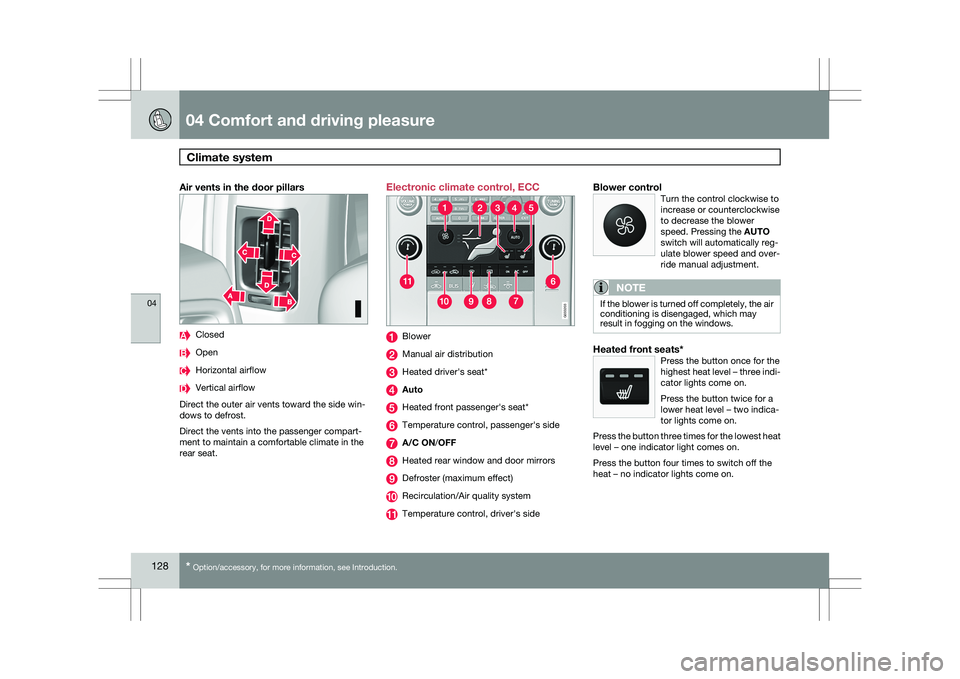
Air vents in the door pillars Closed
Open
Horizontal airflow
Vertical airflow
Direct the outer air vents toward the side win-
dows to defrost.
Direct the vents into the passenger compart-
ment to maintain a comfortable climate in the
rear seat. Electronic climate control, ECC
Blower
Manual air distribution
Heated driver\fs seat*
Auto
Heated front passenger\fs seat*
Temperature control, passenger\fs side
A/C ON/OFF
Heated rear window and door mirrors
Defroster (maximum effect)
Recirculation/Air quality system
Temperature control, driver\fs sideBlower controlTurn the control clockwise to
increase or counterclockwise
to decrease the blower
speed. Pressing the AUTO
switch will automatically reg-
ulate blower speed and over-
ride manual adjustment.
NOTE If the blower is turned off completely, the air
conditioning is disengaged, which may
result in fogging on the windows.
Heated front seats*Press the button once for the
highest heat level – three indi-
cator lights come on.
Press the button twice for a
lower heat level – two indica-
tor lights come on.
Press the button three times for the lowest heat
level – one indicator light comes on.
Press the button four times to switch off the
heat – no indicator lights come on. G033202 G033203
Page 136 of 297

04 Comfort and driving pleasureAudio system 04
134 Please note that these functions are also avail-
able through the audio system controls on cen-
ter console.
USB/iPod connector
An iPod or MP3 player can be connected to the
audio system via the AUX or USB sockets in the
center storage compartment
An auxiliary device, such as an iPod, MP3
player or a USB flash drive can be connected
to the audio system via the sockets in the cen-
ter console storage compartment. A standard
cable from an iPod or MP3 player can be
routed under the cover to the AUX connector
in the storage compartment.
The USB socket provides current to or charges
the device connected (depending on the
device). A sound source must be chosen, depending on
the device that has been connected:
1.
Use MODE to select iPod or USB. The text
CONNECT DEVICE will be displayed.
2. Connect the device to the connector in the
center console storage compartment.
The text LOADING will be displayed while the
system loads the files (folder structure) on the
device. This may take a short time.
When information about the files (the folder
structure) on the device has been loaded, the
resulting list includes information on the artist,
genre and song title if this information is
included on the device.
To navigate in the folder structure, press
ENTER and scroll up and down the folders
using the arrow buttons (on the audio system
control panel or on the steering wheel keypad).
Press the right arrow button to select a folder.
Press the left arrow button to go up a level in
the folder structure. Press ENTER to go down
a level in the folder structure.
Tracks can be selected in two ways:
\b Turn the Tuning knob clockwise or coun-
terclockwise
\b Use the right or left arrow keys on the nav-
igation control to select the desired track. The arrow keys on the steering wheel key-
pad can also be used in the same way.
NOTE The system supports playback of files in the
most common versions of formats such as
mp3, wma, and wav. However, there may be
versions of these formats that the system
does not support.
The system also supports a number of
iPod® models produced in 2005 or later.
iPod® Shuffle is not supported.
USB flash driveTo simplify the use of a USB flash drive, it is
advisable to only store music files on the drive.
It will take considerably longer for the system
to index the files on the drive if it contains any-
thing other than compatible music files.
NOTE
The system supports removable media that
uses the USB 2.0 standard and the FAT32
file system and can index up to 500 folders
and a maximum of 64,000 files. The device
must have at least 256 Mb of memory.
MP3 playerMany mp3 players have a file indexing system
that is not supported by the vehicle\fs audio
system. In order to use an mp3 player, the sys- G031959
Page 139 of 297

04 Comfort and driving pleasure
Audio system04
}}
* Option/accessory, for more information, see Introduction. 137
Sound settingsPress the control (3) repeatedly to toggles
among the sound settings. Adjustments are
made by turning the control (3).
\b
Bass – Bass level.
\b Treble – Treble level.
\b Fader – Balance between the front and
rear speakers.
\b Balance – Balance between the right and
left speakers.
\b Subwoofer* – Level for the bass speaker.
The subwoofer can be switched off by
turning control (3) counterclockwise to
MIN. The location of the subwoofer is
shown in the illustration. \b
Surround* – Surround settings.
Under Surround, 3 channel stereo or Dolby
Surround Pro logic II can be activated by
selecting 3-ch or Dpl2 respectively. This ena-
bles the following options:
\b Center level 2
– Level for the center
speaker.
\b Surround level 2
– Level for surround
sound.
EqualizerSound levels for different frequency bands can
be adjusted separately using the equalizer 3
. 1.
Go to Audio settings and select
Equalizer Front or Equalizer Rear.
The sound level for the frequency band is
adjusted with / on the navigation but-
ton. Press / to select another fre-
quency band.
2. Use ENTER to save or EXIT to close.
Sound stage 4The sound experience can be optimized for the
driver\fs seat, both front seats or the rear seat.
Select one of the options under
Audio settings Soundstage.
Optimal sound reproductionThe audio system is calibrated for optimal
sound reproduction using digital signal pro-
cessing.
This calibration takes into account factors such
as the speakers, amplifier, cabin acoustics, the
listeners\f seating positions, etc., for each com-
bination of vehicle/audio system.
There is also a dynamic calibration that takes
into consideration the volume level, radio
reception, and the speed of the vehicle.
The settings that are described in this manual,
such as Bass,
Treble, and Equalizer are only2
Premium Sound
3 Certain audio systems
4Certain markets only. G031960
Page 210 of 297

05 During your tripRefueling 05
208
Opening/closing the fuel filler door The fuel filler door is located on the right rear
fender (indicated by an arrow beside the fuel
tank symbol on the information display
)
With the ignition switched off, press the button
on the lighting panel to unlock the fuel filler
door. Please note that the fuel filler door will
remain unlocked until the vehicle begins to
move forward. An audible click will be heard
when the fuel filler door relocks.
\b If you intend to leave your vehicle while it
is being refueled, this feature enables you
to lock the doors/tailgate while leaving the
fuel filler door unlocked.
\b You can also keep the vehicle locked if you
remain inside it during refueling. The cen-
tral locking button does not lock the fuel
filler door. \b
Be sure the fuel filler door is not obstructed
and is completely closed after refueling.
\b Open the fuel filler cap slowly during hot
weather.
Close the fuel filler door by pressing it. A click
indicates that it is closed.
CAUTION \b
Avoid spilling gasoline during refueling.
In addition to causing damage to the
environment, gasolines containing
alcohol can cause damage to painted
surfaces, which may not be covered
under the New Vehicle Limited War-
ranty.
Manually opening the fuel filler door If necessary, the fuel filler door can be opened
manually:
1.
Open the side hatch in the cargo compart-
ment (on the same side as the fuel filler
door).
2. Grasp the green cord with a handle.
3. Pull the cord straight rearward until the fuel
filler door clicks open.
Opening/closing the fuel cap Fuel vapor expands in hot weather. Open the
filler cap slowly.
After refueling, close the fuel filler cap by turn-
ing it clockwise until it clicks into place. G000000 G022915