2009 VOLVO XC60 mirror
[x] Cancel search: mirrorPage 101 of 297

03 Your driving environment
Mirrors03
99
to the neutral position for electric retracting/
extending to work.
\b
Retract the mirrors with the L and R but-
tons.
\b Fold them out again with the
L and R but-
tons.
The mirrors are now reset in neutral position.
Home safe and approach lightingThe light on the door mirrors comes on when
approach lighting or home safe lighting is
selected, see page 91.
Rear window and door mirror
defrosters Use the defroster to quickly remove misting
and ice from the rear window and the door mir-
rors. Press the button once to start simultaneous
rear window and door mirror defrosting. The
light in the button indicates that the function is
active. Defrosting is deactivated automatically
and its duration is controlled by the outside
temperature.
The rear window is demisted/de-iced automat-
ically if the vehicle is started in an outside tem-
perature lower than 45 °F (7 °C).
Defrosting can be selected under
Climate
settings Auto. rear defroster. Select
between On or Off.
Interior rearview mirror
Auto-dim functionAn integrated sensor reacts to headlights from
following traffic and automatically reduces
glare in the mirror. G031426
Page 102 of 297
03 Your driving environmentPower panorama moonroof* 03
100
* Option/accessory, for more information, see Introduction.
Introduction
The panorama moonroof is divided into two
sections.
\b
The rear glass section is fixed in place and
cannot be moved.
\b The front glass section can be slid hori-
zontally to the open or closed positions or
its rear edge can be raised and lowered to
allow ventilation.
All references in this section to opening or clos-
ing the panorama moonroof pertain to the front
glass section.
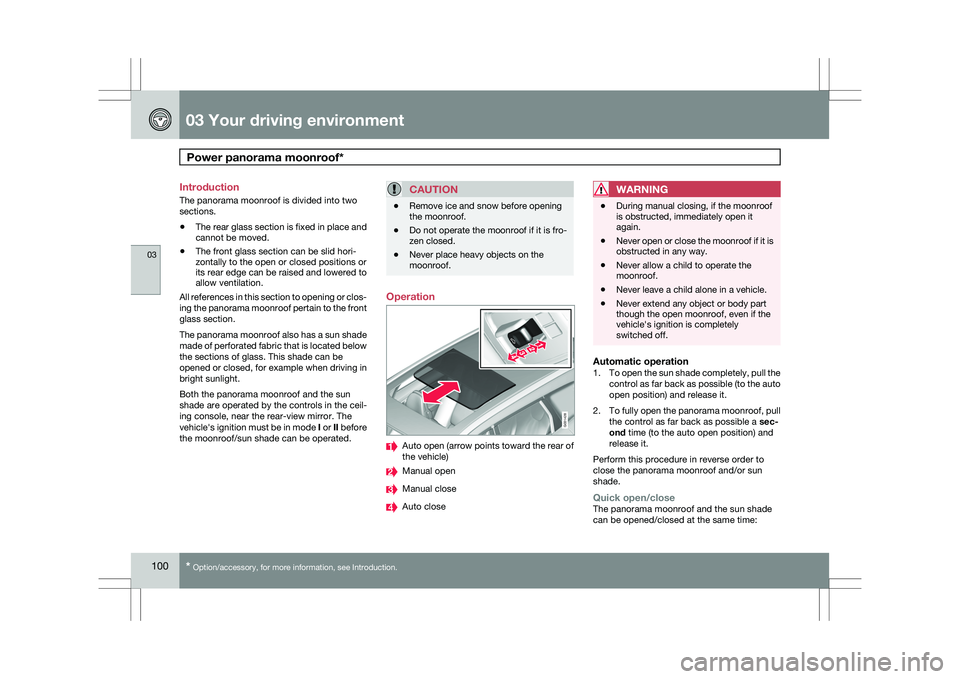
The panorama moonroof also has a sun shade
made of perforated fabric that is located below
the sections of glass. This shade can be
opened or closed, for example when driving in
bright sunlight.
Both the panorama moonroof and the sun
shade are operated by the controls in the ceil-
ing console, near the rear-view mirror. The
vehicle\fs ignition must be in mode I or II before
the moonroof/sun shade can be operated.
CAUTION \b
Remove ice and snow before opening
the moonroof.
\b Do not operate the moonroof if it is fro-
zen closed.
\b Never place heavy objects on the
moonroof. Operation
Auto open (arrow points toward the rear of
the vehicle)
Manual open
Manual close
Auto closeWARNING \b
During manual closing, if the moonroof
is obstructed, immediately open it
again.
\b Never open or close the moonroof if it is
obstructed in any way.
\b Never allow a child to operate the
moonroof.
\b Never leave a child alone in a vehicle.
\b Never extend any object or body part
though the open moonroof, even if the
vehicle\fs ignition is completely
switched off.
Automatic operation1.
To open the sun shade completely, pull the
control as far back as possible (to the auto
open position) and release it.
2. To fully open the panorama moonroof, pull
the control as far back as possible a sec-
ond time (to the auto open position) and
release it.
Perform this procedure in reverse order to
close the panorama moonroof and/or sun
shade.
Quick open/closeThe panorama moonroof and the sun shade
can be opened/closed at the same time: G031428
Page 107 of 297

03 Your driving environment
Starting the engine03
}}
105
Starting the engine
Ignition switch with remote key inserted ( see
page 79for more information on ignition modes)
WARNING
Before starting the engine:
\b
Fasten the seat belt.
\b Check that the seat, steering wheel and
mirrors are adjusted properly.
\b Make sure the brake pedal can be
depressed completely. Adjust the seat
if necessary. 1. Insert the remote key into the ignition slot
with the buttons upward and the metallic
key blade pointing outward (not inserted
into the slot) 1
. 2. Push lightly on the remote key. It will be
automatically drawn into the ignition slot in
the correct position. 3.
Depress the brake pedal 2
. Press and
release the START/STOP ENGINE button.
The autostart function will operate the
starter motor until the engine starts.
The starter motor operates for a maximum
of 10 seconds. If the engine has not
started, repeat the procedure.
WARNING An extra mat on the driver\fs floor can cause
the accelerator and/or brake pedal to catch.
Check that the movement of these pedals is
not impeded. Not more than one protective
floor covering may be used at one time.
1
On vehicles with the optional keyless drive, it is only necessary to hav\
e a remote key in the passenger’s compartment.
2 If the vehicle is moving, it is only necessary to press the START/STOP E\
NGINE button to start the vehicle.
Page 124 of 297

04 Comfort and driving pleasureMenus and messages 04
122
* Option/accessory, for more information, see Introduction.
Center console
Certain functions are controlled from the cen-
ter console via the menu system or from the
optional keypad in the steering wheel. Each
function is described under its respective sec-
tion.
The current menu level is shown at the top right
of display in the center console.
Center console controls
Center console with information display and con-
trols for menus
Menu navigation button – scrolls and
selects among menu options
MENU – selects menu options
EXIT – accesses the menu system ENTER – leads back one step in the menu
structure. A long press exits the menu sys-
tem.
Numerical keypad 1–9
Steering wheel keypad
ENTER
EXIT
Navigation buttons.
If the steering wheel keypad has ENTER and
EXIT, the buttons to have the same
function as those in the center console.
Search pathsAccess to some functions is provided directly
via the function buttons and others are access
through the menu system. Search paths to the menu system functions are
listed as follows: Car settings Lock
settings, if the following steps have been taken
first:
1. Press MENU.
2. Scroll to Menu and press ENTER.
3. Scroll to Submenu and press ENTER.
The navigation button can be used instead of
ENTER and EXIT when navigating the menu
hierarchy. The right arrow is equal to ENTER
and the left arrow to EXIT.
The menu options are numbered and can also
be selected directly with the numerical keypad
(1 – 9 only).
Menu overview
NOTE Menu selections will not be available (will be
"grayed out") when the vehicle is moving.
Car key memory
Seat & mirror positions
Car settings Fold mirr. when locking*
Collision warning settings*
Page 128 of 297

04 Comfort and driving pleasureClimate system 04
126
* Option/accessory, for more information, see Introduction.
Introduction
Air conditioningThe vehicle is equipped with Electronic Climate
Control (ECC). The climate control system
cools, heats or dehumidifies the air in the pas-
senger compartment.
NOTE
\b
The air conditioning can be switched
off, but to ensure the best possible cli-
mate comfort in the passenger com-
partment and to prevent the windows
from misting, it should always be on.
\b In warm weather, a small amount of
water may accumulate under the car
when it has been parked. This water is
condensation from the A/C system and
is normal.
Sensor location
\b
The sunlight sensor is located on the top
side of the dashboard.
NOTE The sunlight sensor monitors which side of
the car that is most exposed to sunlight.
This can mean that the temperature may
differ between the right and left-side air
vents, even if the temperatures set for both
sides of the passenger compartment are the
same.
\b
The temperature sensor for the passenger
compartment is located below the climate
control panel.
\b The outside temperature sensor is located
on the door mirror.
\b The humidity sensor
* is located in the inte-
rior rearview mirror.
NOTE Do not cover or block the sensors with
clothing or other objects.
Side windows and moonroofTo ensure that the air conditioning works opti-
mally, the side windows, and the optional
moonroof should be closed.
Fog on the inside of the windowsThe defroster function should be used to
remove fog or mist from the inside of the win-
dows. Keeping the windows clean with a com-mercially available window washing spray will
also help prevent fogging or misting.
Temporary shut-off of the air
conditioning
The air conditioning is momentarily disen-
gaged during full-throttle acceleration or when
driving uphill with a trailer. This may result in a
temporary increase in cabin temperature.
Ice and snowAlways keep the air intake grille at the base of
the windshield free of snow.
Climate system maintenanceSpecial tools and equipment are required to
maintain and carry out repairs on the climate
system. Work of this type should only be done
by a trained and qualified Volvo service tech-
nician.
RefrigerantVolvo cares about the environment. The air
conditioning system in your car contains a
CFC-free refrigerant – R134a. This substance
will not deplete the ozone layer. The air condi-
tioning system contains 1.8 lbs (800 g) of
R134a. The systems uses PAG oil.
Passenger compartment filterReplace the cabin air filter with a new one at
the recommended intervals. Please refer to
Page 130 of 297
04 Comfort and driving pleasureClimate system 04
128
* Option/accessory, for more information, see Introduction.
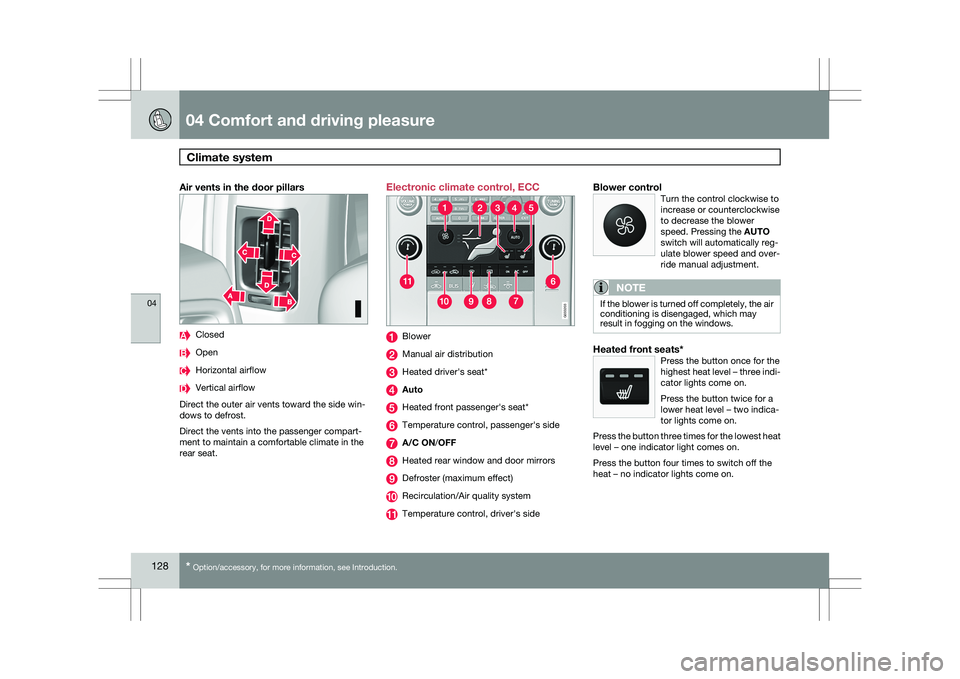
Air vents in the door pillars Closed
Open
Horizontal airflow
Vertical airflow
Direct the outer air vents toward the side win-
dows to defrost.
Direct the vents into the passenger compart-
ment to maintain a comfortable climate in the
rear seat. Electronic climate control, ECC
Blower
Manual air distribution
Heated driver\fs seat*
Auto
Heated front passenger\fs seat*
Temperature control, passenger\fs side
A/C ON/OFF
Heated rear window and door mirrors
Defroster (maximum effect)
Recirculation/Air quality system
Temperature control, driver\fs sideBlower controlTurn the control clockwise to
increase or counterclockwise
to decrease the blower
speed. Pressing the AUTO
switch will automatically reg-
ulate blower speed and over-
ride manual adjustment.
NOTE If the blower is turned off completely, the air
conditioning is disengaged, which may
result in fogging on the windows.
Heated front seats*Press the button once for the
highest heat level – three indi-
cator lights come on.
Press the button twice for a
lower heat level – two indica-
tor lights come on.
Press the button three times for the lowest heat
level – one indicator light comes on.
Press the button four times to switch off the
heat – no indicator lights come on. G033202 G033203
Page 138 of 297

04 Comfort and driving pleasureAudio system 04
136
* Option/accessory, for more information, see Introduction.
1. Select the function in the menu to be
stored. Only certain functions can be
stored.
2. Press and hold MY KEY for more than two
seconds.
Activate the stored function by pressing MY
KEY briefly.
The following functions can be pro-
grammed using MY KEY:
FM
Radio text on/off
Audio settings Sound stage (front/driver/rear)
Auto. volume control (off/low/medium/
high)
Sirius satellite radio* Add song to memory
Direct channel entry
Song seek (on/off)
Sirius settings – Song memory (show
memory list)
CD/CD changer Random (CD changer)
Disc text (on/off) Track information (on/off)
Car settings Fold mirror when locking
Audio functions Center console, controls for audio functions
Internal audio sources:
AM, FM and CD External audio source or Sirius satellite
radio*. For connection, see page 134
Push button and knob controls for adjust-
ing sound settings
Menu navigation button
Volume and on/off
Audio volume and automatic volume
control
The audio system compensates for disrupting
noises in the passenger compartment by
increasing the volume according to the speed
of the vehicle. The level of sound compensa-
tion can be set at low, medium or high. Select
the level under Audio settings Auto
volume control in the menu system.
External audio source volumeExternal devices such as an MP3 player can be
connected to the AUX input, see page 134. The
volume of the external sound source AUX may
be different from the volume of the internal
sound sources such as the CD player or the
radio. Before connecting an external device, it
may be advisable to adjust the device to
approximately 2/3 of its maximum volume. If
the external sound source\fs volume is too high,
the quality of the sound may be impaired. To
help prevent this, adjust the input volume of the
external audio source:
1. Set the audio system in AUX mode using MODE and use (4) to navigate to Volume,
AUX input.
2. Turn the control (3) or press / the nav-
igation button. G031440
Page 156 of 297

04 Comfort and driving pleasureCompass 04
154 Operation
Rearview mirror with compass.
The rearview mirror has an integrated display
that shows the compass direction in which the
vehicle is pointing. Eight different directions
are shown with the abbreviations: N (north),
NE (north east), E (east), SE (southeast), S
(south), SW (southwest), W (west) and NW
(northwest).
The compass is displayed automatically when
the vehicle is started or in ignition mode II. To
switch the compass on/off use a pen or similar
object and press in the button on the rear side
of the mirror.
CalibrationThe compass may need to be calibrated if, for
example, the vehicle is driven into a new mag-
netic zone. 1.
Stop the vehicle in a large open area, safely
out of traffic and away from steel structures
and high-tension electrical wires.
2. Start the vehicle.
NOTE For best results from calibration, switch off
all electrical equipment in the vehicle (cli-
mate system, windshield wipers, audio sys-
tem, etc.) and make sure that all doors are
closed.
3. Using a pen or similar object, press and
hold the button on the rear side of mirror
until C is shown again in the mirror(after
approx. 6 seconds).
4. Drive as usual. C disappears from the dis-
play when calibration is complete.
Alternative calibration method:
Drive slowly in a circle at a speed of no
more than 5 mph (8 km/h) until C disap-
pears from the display when calibration is
complete.
Selecting a magnetic zone Magnetic zones.
The earth is divided into 15 magnetic zones.
The correct zone must be selected for the com-
pass to work correctly.
1.
Put the ignition in mode II.
2. Using a pen or similar object, press and hold the button on the rear side of mirror
for at least 3 seconds. The number for the
current area will be shown.
3. Press the button repeatedly until the num-
ber for the required geographic area
(1 – 15) is shown.
4. The display will revert to showing the com-
pass direction after several seconds. G031611
15
14
13
12
1198
76
5
4
3
2
1
10
G018632