2009 VOLVO XC60 ECU
[x] Cancel search: ECUPage 104 of 297
03 Your driving environmentHomeLink® Wireless Control System* 03
102
* Option/accessory, for more information, see Introduction.
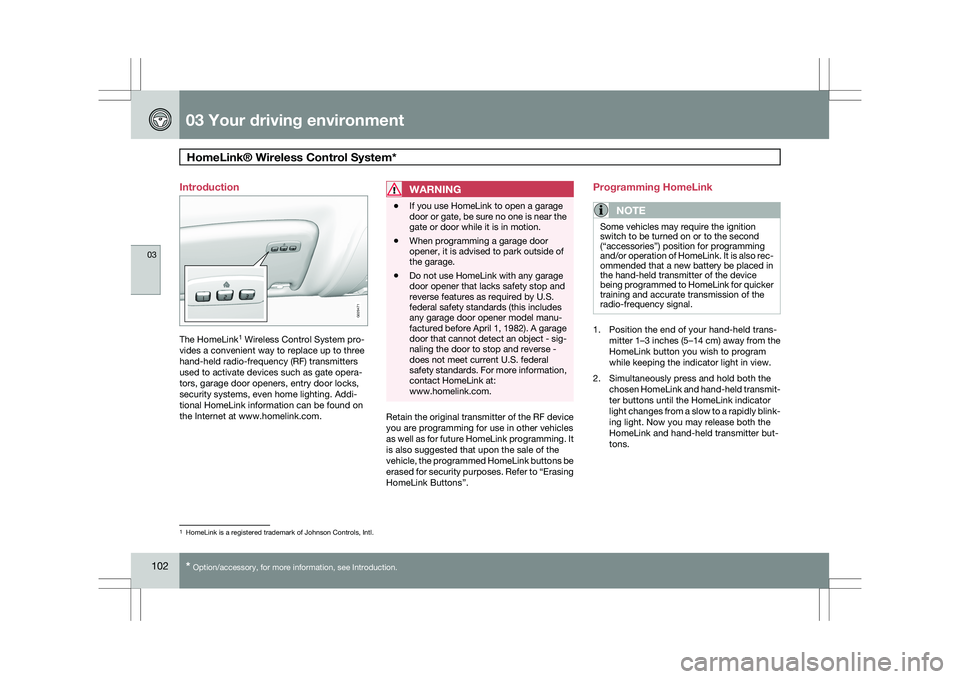
Introduction
The HomeLink
1
Wireless Control System pro-
vides a convenient way to replace up to three
hand-held radio-frequency (RF) transmitters
used to activate devices such as gate opera-
tors, garage door openers, entry door locks,
security systems, even home lighting. Addi-
tional HomeLink information can be found on
the Internet at www.homelink.com.
WARNING \b
If you use HomeLink to open a garage
door or gate, be sure no one is near the
gate or door while it is in motion.
\b When programming a garage door
opener, it is advised to park outside of
the garage.
\b Do not use HomeLink with any garage
door opener that lacks safety stop and
reverse features as required by U.S.
federal safety standards (this includes
any garage door opener model manu-
factured before April 1, 1982). A garage
door that cannot detect an object - sig-
naling the door to stop and reverse -
does not meet current U.S. federal
safety standards. For more information,
contact HomeLink at:
www.homelink.com. Retain the original transmitter of the RF device
you are programming for use in other vehicles
as well as for future HomeLink programming. It
is also suggested that upon the sale of the
vehicle, the programmed HomeLink buttons be
erased for security purposes. Refer to “Erasing
HomeLink Buttons”.Programming HomeLink
NOTE Some vehicles may require the ignition
switch to be turned on or to the second
(“accessories”) position for programming
and/or operation of HomeLink. It is also rec-
ommended that a new battery be placed in
the hand-held transmitter of the device
being programmed to HomeLink for quicker
training and accurate transmission of the
radio-frequency signal.
1. Position the end of your hand-held trans-
mitter 1–3 inches (5–14 cm) away from the
HomeLink button you wish to program
while keeping the indicator light in view.
2. Simultaneously press and hold both the chosen HomeLink and hand-held transmit-
ter buttons until the HomeLink indicator
light changes from a slow to a rapidly blink-
ing light. Now you may release both the
HomeLink and hand-held transmitter but-
tons. 1
HomeLink is a registered trademark of Johnson Controls, Intl. G029471
Page 105 of 297
03 Your driving environment
HomeLink® Wireless Control System*03
}}
* Option/accessory, for more information, see Introduction. 103
NOTESome devices may require you to replace
this Programming Step 2 with procedures
noted in the “Gate Operator / Canadian Pro-
gramming” section. If the HomeLink indica-
tor light does not change to a rapidly blink-
ing light after performing these steps, con-
tact HomeLink at www.homelink.com
.3.
Firmly press, hold for five seconds and
release the programmed HomeLink but-
ton up to two separate times to activate the
door. If the door does not activate, press
and hold the just-trained HomeLink button
and observe the indicator light.
\bIf the indicator light
stays on con-
stantly, programming is complete
and your device should activate when
the HomeLink button is pressed and
released.
\b If the indicator light blinks
rapidly for
two seconds and then turns to a con-
stant light continue with “Program-
ming” steps 4-6 to complete the pro-
gramming of a rolling code equipped
device (most commonly a garage door
opener).
4. At the garage door opener receiver (motor-
head unit) in the garage, locate the “learn”
or “smart” button. This can usually be found where the hanging antenna wire is
attached to the motor-head unit.
5. Firmly press and release the “learn” or “smart” button. (The name and color of the
button may vary by manufacturer.) There
are 30 seconds to initiate step 6.
6. Return to the vehicle and firmly press, hold
for two seconds and release the pro-
grammed HomeLink button. Repeat the
“press/hold/release” sequence a second
time, and, depending on the brand of the
garage door opener (or other rolling code
equipped device), repeat this sequence a
third time to complete the programming
process.
HomeLink should now activate your rolling
code equipped device.
Gate Operator/Canadian ProgrammingCanadian radio-frequency laws require trans-
mitter signals to “time-out” (or quit) after sev-
eral seconds of transmission – which may not
be long enough for HomeLink to pick up the
signal during programming. Similar to this
Canadian law, some U.S. gate operators are
designed to “time-out” in the same manner.
If you live in Canada or you are having difficul-
ties programming a gate operator or garage
door opener by using the “Programming” pro- cedures, replace “Programming HomeLink”
step 2 with the following:
\b
Continue to press and hold the HomeLink
button while you press and release -
every two seconds (“cycle”) your hand-
held transmitter until the HomeLink indica-
tor light changes from a slow to a rapidly
blinking light. Now you may release both
the HomeLink and hand-held transmitter
buttons.
Proceed with “Programming” step 3 to com-
plete.
Using HomeLink
To operate, simply press and release the pro-
grammed HomeLink button. Activation will
now occur for the trained device (i.e., garage
door opener, gate operator, security system,
entry door lock, home/office lighting, etc.). For
convenience, the hand-held transmitter of the
device may also be used at any time. In the
event that there are still programming difficul-
ties or questions, contact HomeLink at:
www.homelink.com.
Page 212 of 297
05 During your tripLoading 05
210
* Option/accessory, for more information, see Introduction.
Introduction
The load carrying capacity of your vehicle is
determined by factors such as the number of
passengers, the amount of cargo, the weight
of any accessories that may be installed, etc.
To increase loading space, the rear seat backr-
ests can be folded down, see page 83.
When loading the cargo area, keep the follow-
ing in mind:
\b
Load objects in the cargo area against the
backrest whenever possible.
\b Unstable loads can be secured to the load
anchoring eyelets with straps or web lash-
ings to help keep them from shifting.
\b Stop the engine and apply the parking
brake when loading or unloading long
objects. The gear selector can be knocked
out of position by long loads, which could
set the vehicle in motion.
WARNING \b
Stop the engine, put the gear selector in
P, and apply the parking brake when
loading or unloading long objects.
\b The vehicle\fs driving characteristics
may change depending on the weight
and distribution of the load.
\b A 44-pound (20 kg) object produces a
force of 2,200 pounds (1,000 kg) in a
headon collision at 30 mph (50 km/h).
\b The cargo area and rear seat should not
be loaded to a level higher than 2 in.
(5 cm) below the upper edge of the rear
side windows. Objects placed higher
than this level could impede the func-
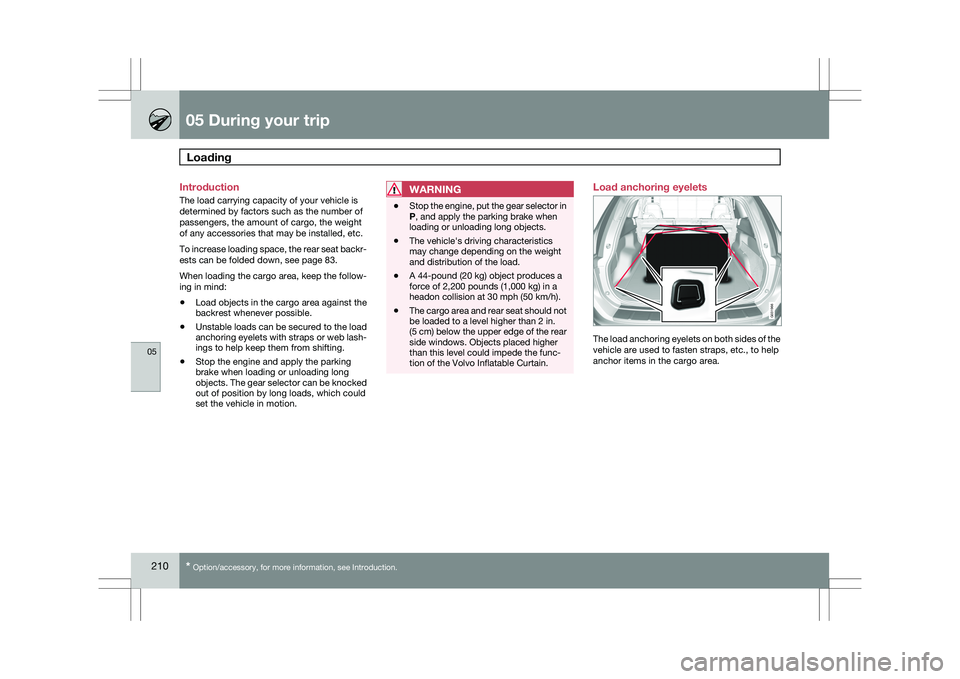
tion of the Volvo Inflatable Curtain. Load anchoring eyelets
The load anchoring eyelets on both sides of the
vehicle are used to fasten straps, etc., to help
anchor items in the cargo area. G031966
Page 213 of 297
05 During your trip
Loading05
}}
211
WARNING\b
Cover sharp edges on long loads to help
prevent injury to occupants. Secure the
load to help prevent shifting during sud-
den stops.
\b Always secure large and heavy objects
with a seat belt or cargo retaining
straps.
\b Always secure the load to help prevent
it from moving in the event of sudden
stops.
\b Switch off the engine, apply the parking
brake and put the gear selector in P
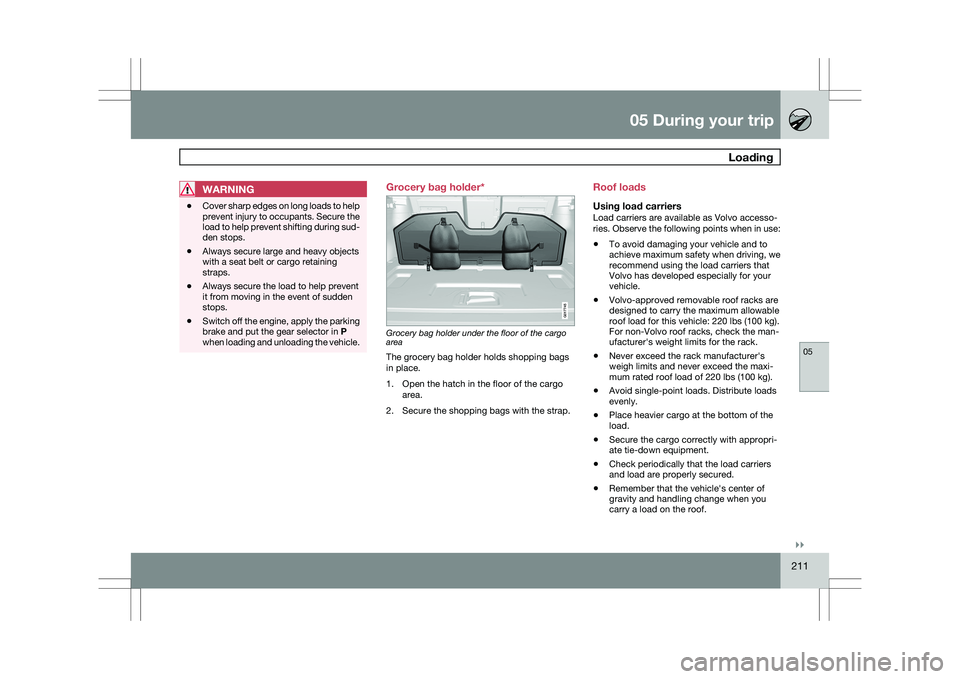
when loading and unloading the vehicle. Grocery bag holder*
Grocery bag holder under the floor of the cargo
area
The grocery bag holder holds shopping bags
in place.
1. Open the hatch in the floor of the cargo
area.
2. Secure the shopping bags with the strap. Roof loads
Using load carriersLoad carriers are available as Volvo accesso-
ries. Observe the following points when in use:
\b
To avoid damaging your vehicle and to
achieve maximum safety when driving, we
recommend using the load carriers that
Volvo has developed especially for your
vehicle.
\b Volvo-approved removable roof racks are
designed to carry the maximum allowable
roof load for this vehicle: 220 lbs (100 kg).
For non-Volvo roof racks, check the man-
ufacturer\fs weight limits for the rack.
\b Never exceed the rack manufacturer\fs
weigh limits and never exceed the maxi-
mum rated roof load of 220 lbs (100 kg).
\b Avoid single-point loads. Distribute loads
evenly.
\b Place heavier cargo at the bottom of the
load.
\b Secure the cargo correctly with appropri-
ate tie-down equipment.
\b Check periodically that the load carriers
and load are properly secured.
\b Remember that the vehicle\fs center of
gravity and handling change when you
carry a load on the roof. G017745
Page 216 of 297
05 During your tripCargo area 05
214
* Option/accessory, for more information, see Introduction.
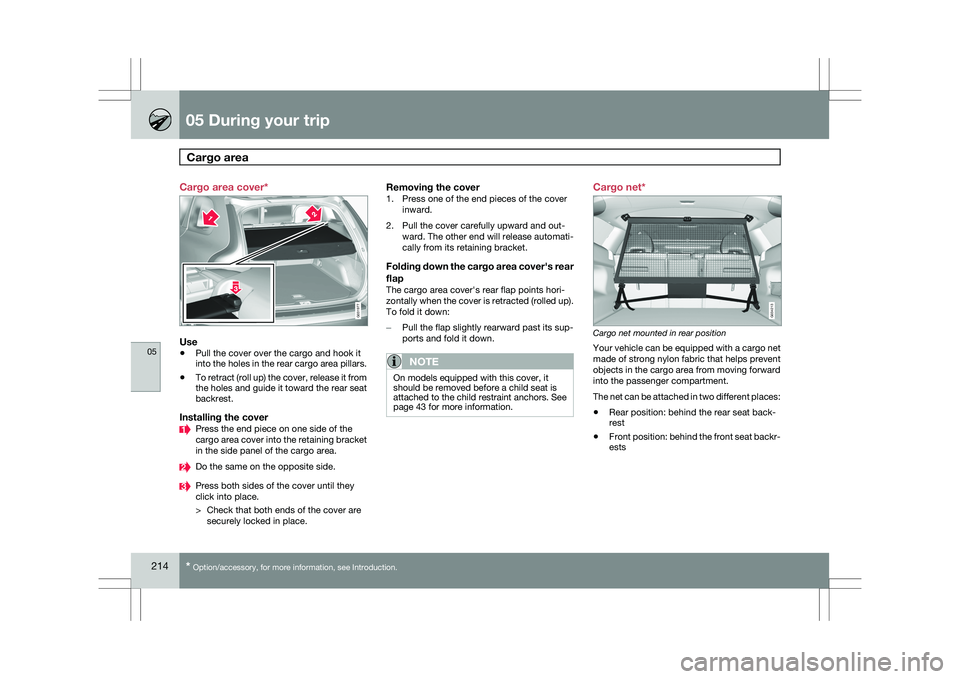
Cargo area cover*
Use
\b
Pull the cover over the cargo and hook it
into the holes in the rear cargo area pillars.
\b To retract (roll up) the cover, release it from
the holes and guide it toward the rear seat
backrest.
Installing the cover Press the end piece on one side of the
cargo area cover into the retaining bracket
in the side panel of the cargo area.
Do the same on the opposite side.
Press both sides of the cover until they
click into place.
> Check that both ends of the cover are
securely locked in place.
Removing the cover1. Press one of the end pieces of the cover inward.
2. Pull the cover carefully upward and out- ward. The other end will release automati-
cally from its retaining bracket.
Folding down the cargo area cover\fs rear
flap
The cargo area cover\fs rear flap points hori-
zontally when the cover is retracted (rolled up).
To fold it down:
–Pull the flap slightly rearward past its sup-
ports and fold it down.
NOTE On models equipped with this cover, it
should be removed before a child seat is
attached to the child restraint anchors. See
page 43 for more information. Cargo net*
Cargo net mounted in rear position
Your vehicle can be equipped with a cargo net
made of strong nylon fabric that helps prevent
objects in the cargo area from moving forward
into the passenger compartment.
The net can be attached in two different places:
\b
Rear position: behind the rear seat back-
rest
\b Front position: behind the front seat backr-
ests G031977 G034213
Page 217 of 297
05 During your trip
Cargo area05
}}
215
WARNING\b
Be sure that the cargo net\fs upper
attachment hooks are properly inserted
in the brackets and that the lower straps
are correctly attached and pulled taut.
\b A damaged cargo net should never be
used.
\b Objects in the cargo area should be
securely anchored, even if the cargo net
is correctly installed and in use.
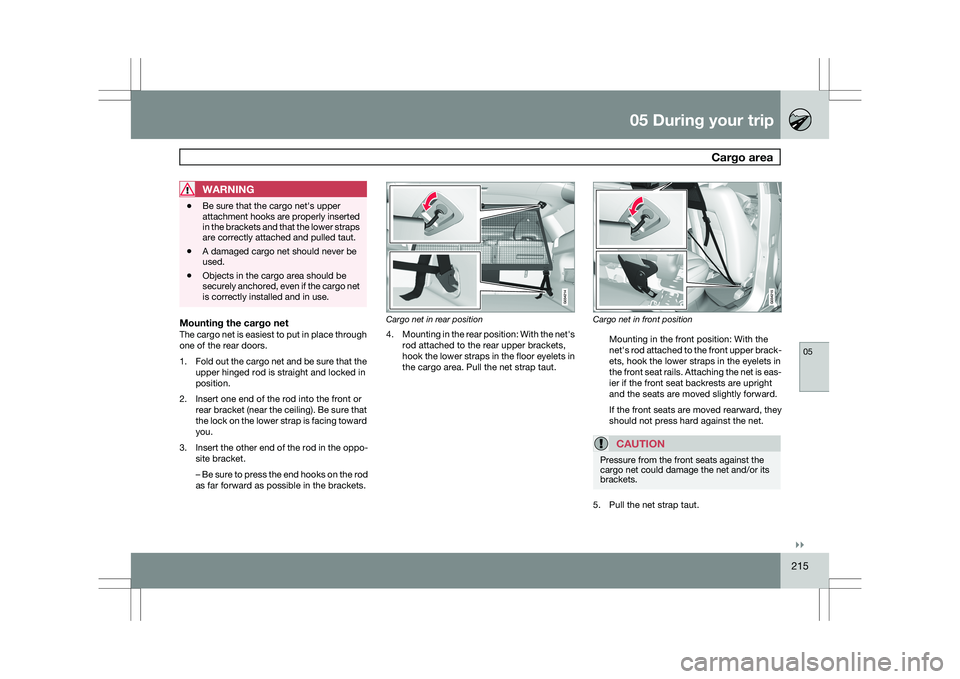
Mounting the cargo netThe cargo net is easiest to put in place through
one of the rear doors.
1.
Fold out the cargo net and be sure that the
upper hinged rod is straight and locked in
position.
2. Insert one end of the rod into the front or rear bracket (near the ceiling). Be sure that
the lock on the lower strap is facing toward
you.
3. Insert the other end of the rod in the oppo-
site bracket.
– Be sure to press the end hooks on the rod
as far forward as possible in the brackets. Cargo net in rear position
4.
Mounting in the rear position: With the net\fs
rod attached to the rear upper brackets,
hook the lower straps in the floor eyelets in
the cargo area. Pull the net strap taut. Cargo net in front position
Mounting in the front position: With the
net\fs rod attached to the front upper brack-
ets, hook the lower straps in the eyelets in
the front seat rails. Attaching the net is eas-
ier if the front seat backrests are upright
and the seats are moved slightly forward.
If the front seats are moved rearward, they
should not press hard against the net.
CAUTION Pressure from the front seats against the
cargo net could damage the net and/or its
brackets.
5. Pull the net strap taut.
Page 222 of 297

05 During your tripEmergency towing 05
220 Towing eyelet
Location of the towing eyelet
Attaching the towing eyelet
The towing eyelet is located under the floor of
the cargo area, with the spare tire. This eyelet
must be screwed into the positions provided on the right sides of either the front or rear
bumper (see illustration).
CAUTION If the vehicle is being towed on a flat bed
truck, the towing eyelets must not be used
to pull the vehicle up onto the flat bed.
NOTE
On certain models equipped with a trailer
hitch, the towing eyelet cannot be screwed
into the hole in the rear bumper. The towing
rope should be attached to the trailer hitch
instead. For this reason, the detachable
section of the trailer hitch should be safely
stowed in the vehicle at all times.
Attaching the towing eyelet
Use a coin to pry open the lower edge of
the cover.
Screw the towing eyelet in place, first by
hand and then using the tire iron until it is
securely in place.
After the vehicle has been towed, the eyelet
should be removed and returned to its storage
location. Press the cover for the attachment point back
into position.
WARNING If the vehicle has no electrical current and
must be towed, the power steering and
brake systems will not function normally. It
will still be possible to steer the vehicle and
apply the brakes. However, keep in mind
that greater effort will be required to turn the
steering wheel and depress the brake pedal.
Precautions when the vehicle is in tow
\b
The steering wheel must be unlocked. The
remote key must be in the ignition slot 1
.
\b Attach jumper cables (see page 107) to
provide current for releasing the optional
electric parking brake and to move the gear
selector from the
P position.
\b The gear selector must be in position
N.
\b Maximum speed: 50 mph (80 km/h). Do not
exceed the maximum allowable towing
speed.
\b Maximum distance with front wheels on
ground: 50 miles (80 km).
\b While the vehicle is being towed, try to
keep the tow rope taut at all times.
\b The vehicle should only be towed in the
forward direction. 1
On vehicles with the optional keyless drive, the remote key must be in t\
he passenger compartment. G031971
Page 223 of 297

05 During your trip
Emergency towing05
221
NOTEDuring towing, ignition mode
II should be
used so that the lighting can be switched on.
CAUTION Vehicles with AWD (All Wheel Drive) with the
front wheels off the ground should not be
towed at speeds above 50 mph (70 km/h) or
for distances longer than 30 miles (50 km).
CAUTION
\b
Please check with state and local
authorities before attempting this type
of towing, as vehicles being towed are
subject to regulations regarding maxi-
mum towing speed, length and type of
towing device, lighting, etc.
\b If the vehicle\fs battery is dead, do not
attempt to start the vehicle by pushing
or pulling it as this will damage the
three-way catalytic converter(s). The
engine must be jump started using an
auxiliary battery (see page 107).
\b If the vehicle is being towed on a flat bed
truck, the towing eyelets must not be
used to pull the vehicle up onto the flat
bed or to secure the vehicle on the flat
bed. Consult the tow truck operator.
Towing vehicles with front wheel drive/
All Wheel Drive
Volvo recommends the use of flat bed equip-
ment.
\b
If wheel lift equipment must be used,
please use extreme caution to help avoid
damage to the vehicle.
In this case, the
vehicle should be towed with the rear
wheels on the ground if at all possible.
\b If it is absolutely necessary to tow the vehi-
cle with the front wheels on the ground,
please refer to the towing information on
page 220.
CAUTION \b
Sling-type equipment applied at the
front will damage radiator and air con-
ditioning lines.
\b It is equally important not to use sling-
type equipment at the rear or apply lift-
ing equipment inside the rear wheels;
serious damage to the rear axle may
result.
\b If the vehicle is being towed on a flat bed
truck, the towing eyelets must not be
used to secure the vehicle on the flat
bed. Consult the tow truck operator.