2009 VOLVO XC60 fog light
[x] Cancel search: fog lightPage 133 of 297

04 Comfort and driving pleasure
Climate system04
}}
131
\b
The left orange light comes on – the air
quality sensor is disengaged.
\b The center green light comes on – recircu-
lation not engaged, providing it is not
required for cooling in hot weather.
\b The right orange light comes on – recircu-
lation is engaged.
NOTE \b
The air quality sensor should always be
engaged in order to obtain the best air
in the passenger compartment.
\b Recirculation is limited in cold weather
to avoid fogging. \b
If the insides of the windows start fog-
ging, disengage the air quality sensor.
Use the defroster function to increase
airflow to the front, side, and rear win-
dows. Air distribution table
Air distribution Use Air distribution Use
Air to windows. Some air
flows from the dashboard
air vents. The air is not
recirculated. Air condition-
ing is always engaged. To remove de-fog/de-
ice the front side win-
dows and windshield
quickly. Air to the floor and windows.
Some air flows from the
dashboard air vents. To ensure comfortable
conditions and good de-
fogging in cold or humid
weather.
Air to windshield and side
windows. Some air flows
from the air dashboard
vents. In cold or humid
weather (blower
speed should be
moderate to high). Air to floor and from dash-
board air vents. In sunny weather with
cool outside tempera-
tures.
Page 165 of 297

04 Comfort and driving pleasure
Collision warning with Auto-brake*04
}}
* Option/accessory, for more information, see Introduction. 163
WARNING\b
The camera has the same limitations as
the human eye. In other words, its
“vision is impaired” by adverse weather
conditions such as heavy snowfall,
dense fog, etc. These conditions may
reduce the function of systems that
depend on the camera or cause these
systems to temporarily stop function-
ing.
\b Never place any objects, decals, etc.,
on the windshield in front of the camera.
This could reduce or block the camera’s
function, and could cause one or more
of the systems that utilize the camera to
stop functioning.
\b Strong sunlight, reflections from the
road surface, ice or snow covering the
road, a dirty road surface, or unclear
lane marker lines may drastically reduce
the camera’s capacity to detect the side
of a lane or another vehicle.Fault tracing and actions
If the message Windshield sensors
blocked is displayed, this means that the cam-
era is obscured and cannot detect vehicle or
road marker lines in front of the vehicle.
This, in turn, means that Collision Warning with
Auto-brake, Lane Departure Warning, and
Driver Alert Control will not have full function-
ality.
The table lists possible causes for this mes-
sage being displayed, and suitable actions. Cause Action
The surface of the windshield in front of the camera is dirty or covered\
with ice or snow. Clean or clear the section of the windshield in front of the camera.
Fog, heavy rain or snow is interfering with the function of the camera. No action possible. Heavy precipitation may affect the function of the
camera.
Page 170 of 297

04 Comfort and driving pleasureCity Safety™ 04
168 1.
Use the thumb wheel to scroll until City
Safety is displayed.
2. Press the RESET button for approximately
1 second until Off is displayed.
WARNINGThe laser sensor emits light when the igni-
tion is in mode II or higher, even if City
Safety™ has been switched off.
To switch City Safety™ on again:
\b
Follow the same procedure as for switch-
ing City Safety™ off but select On by
pressing RESET.
or
\b Vehicles not equipped with keyless
drive: Press lightly on the remote key to
release it partially from the ignition slot.
Press the remote key into the ignition slot
again. Depress the brake pedal and press
the START/STOP ENGINE button to start
the engine. This restarts City Safety™
.
\b Vehicles equipped with the optional
keyless drive: Press the START/STOP
ENGINE button to switch off the engine.
Depress the brake pedal and press the
START/STOP ENGINE button to start the
engine. This restarts City Safety™.
See page 79 for information on ignition modes. City Safety™ will be automatically switched on
the next time the engine is started, even if it was
off when the engine was switched off.
Limitations
The sensor used by City Safety™ is designed
to detect cars and other larger motor vehicles
ahead of your vehicle in both daylight and dark-
ness.
However, there are certain limitations and the
laser sensor’s function may be reduced by, for
example, heavy rain or snowfall, or by dense
fog or thick, blowing dust or snow. Condensa-
tion, dirt, ice or snow on the windshield may
also interfere with the sensor’s function.
Objects such as warning flags hanging from
long objects on the roof or accessories such as
auxiliary lights or protective arches on the front
of the vehicle that are higher than the hood may
also impede the sensor’s function.
Braking distance to the vehicle ahead increa-
ses on slippery road surfaces, which may
reduce City Safety’s capacity to avoid a colli-
sion. In situations like this, the DSTC system
(see page 155) will help provide the best pos-
sible braking capacity and stability.
City Safety™ emits infrared light and measures
the way in which the light is reflected. There-
fore, vehicles or objects with low-reflective sur-faces may not be detected. Normally, the
license plate and taillight reflectors give the
rear section of a vehicle ahead sufficient reflec-
tive surfaces to be detected.
NOTE
\b
Keep the windshield in front of the laser
sensor free of ice, snow, dirt, etc. See
the illustration on page
167
\b Snow or ice on the hood deeper than
2 inches (5 cm) may obstruct the sen-
sor. Keep the hood free of ice and snow.
\b Do not mount or in any way attach any-
thing on the windshield that could
obstruct the laser sensor. Troubleshooting
If Windshield sensors blocked appears in
the information display, this indicates that the
City Safety™ laser sensor is obstructed in
some way and cannot detect vehicles ahead of
you, which means that the system is not func-
tioning.
However, this message will not be displayed in
all situations in which the sensor is obstructed.
For this reason, the driver must ensure that the
area of the windshield in front of the sensor is
always kept clean.
Page 196 of 297

04 Comfort and driving pleasureBlind Spot Information System* 04
194
* Option/accessory, for more information, see Introduction.
When does BLIS function
The system functions when your vehicle is
moving at speeds above 6 mph (10 km/h).
When you pass another vehicle:The system reacts when you pass another
vehicle at a speed of up to 6 mph (10 km/h)
faster than that vehicle.
When you are passed by another vehicle:The system reacts if your vehicle is passed by
another vehicle at a speed of up to 43 mph
(70 km/h) faster than your vehicle.
WARNING
\b
BLIS does not function in sharp curves.
\b BLIS does not function when your vehi-
cle is backing up.
\b If you are towing a wide trailer, this may
prevent the BLIS cameras from detect-
ing other vehicles in adjacent lanes.
How BLIS functions in daylight and
darkness
Daylight
BLIS reacts to the shape of surrounding vehi-
cles. The system is designed to help detect
motor vehicles such as cars, trucks, buses,
motorcycles, etc.
DarknessBLIS reacts to the headlights of surrounding
vehicles. In order to be detected by BLIS, a
vehicle in the blind area must have its head-
lights on. This means, for example, that the
system will not detect a trailer without head-
lights that is being towed behind a car or truck.WARNING \b
BLIS does not react to cyclists or
mopeds.
\b BLIS does not react to vehicles that are
standing still.
\b The function of the BLIS cameras may
be affected by intense light, or when
driving at night in areas where there are
no external sources of light (e.g., street
lights, other vehicles, etc.). In such
cases, the system may react as if the
cameras were obscured.
\b In both of the above mentioned condi-
tions, a message will appear in the infor-
mation display.
\b When driving in such conditions, the
system\fs function will be limited or it
may be temporarily switched off, see
page 195 for instructions.
\b When the message is no longer dis-
played, BLIS will return to normal func-
tion.
\b The BLIS cameras have the same limi-
tation as the human eye. In other words,
their "vision is impaired" by adverse
weather conditions such as heavy
snowfall, dense fog, etc.
Page 198 of 297

04 Comfort and driving pleasureBlind Spot Information System* 04
196
* Option/accessory, for more information, see Introduction.switched off, and a text message is dis-
played.
\b BLIS can be switched on again by pressing
the button. The indicator light in the button
will illuminate and a new text message will
be displayed. Press the READ button (
see
page 123) to erase the message.
BLIS system messages Text in the dis-
play System status
Blind spot syst.
service required BLIS not functioning
properly. Contact an
authorized Volvo
service technician.
Blind spot syst.
camera blocked BLIS camera
obscured. Clean the
lenses.
Blind-spot info
system ON BLIS system on Text in the dis-
play System status
Blind-spot info
system off BLIS system off
Blind spot syst.
reduced function The BLIS cameras\f
function has been
reduced by e.g., fog,
or strong sunlight
directly into the
camea. The camera
will reset itself when
these conditions
have changed. have
been function
reduced
Page 234 of 297

06 Maintenance and specificationsReplacing bulbs 06
232
* Option/accessory, for more information, see Introduction.
Introduction
All bulb specifications are listed on page 238.
The following bulbs should only be replaced by
a trained and qualified Volvo service techni-
cian:
\b
Dome lighting
\b Reading lights
\b Glove compartment lighting
\b Turn signals in the door mirrors
\b Approach lighting in the door mirror
\b Parking lights
\b Rear side parking lights
\b Active Dual Xenon and LED bulbs
NOTE For information regarding any other bulbs
not mentioned in this section, please con-
tact your Volvo retailer or a trained and
authorized Volvo service technician.
WARNING \b
Active Dual Xenon headlights* – due to
the high voltage used by these head-
lights, these bulbs should only be
replaced by a trained and qualified
Volvo service technician.
\b Turn off the lights and remove the
remote key from the ignition before
changing any bulbs. Headlight housing
WARNING
\b
The engine should not be running when
changing bulbs.
\b When changing in the headlight hous-
ing, if the engine has been running just
prior to replacing bulbs, please be
aware that components in the engine
compartment will be hot. The entire headlight housing must be lifted out
when replacing all front bulbs (except for the
fog lights). G031935 G031936
Page 238 of 297
06 Maintenance and specificationsReplacing bulbs 06
236 1. Remove the headlight housing from the
vehicle (see page 233).
2. Remove the bulb holder by turning it coun-
terclockwise and pulling it out of the head-
light housing.
3. Pull out the burned out bulb and install a new one. It can only be inserted in one
position.
4. Reinsert the bulb holder into the headlight housing and turn it clockwise.
5. Reinstall the headlight housing.
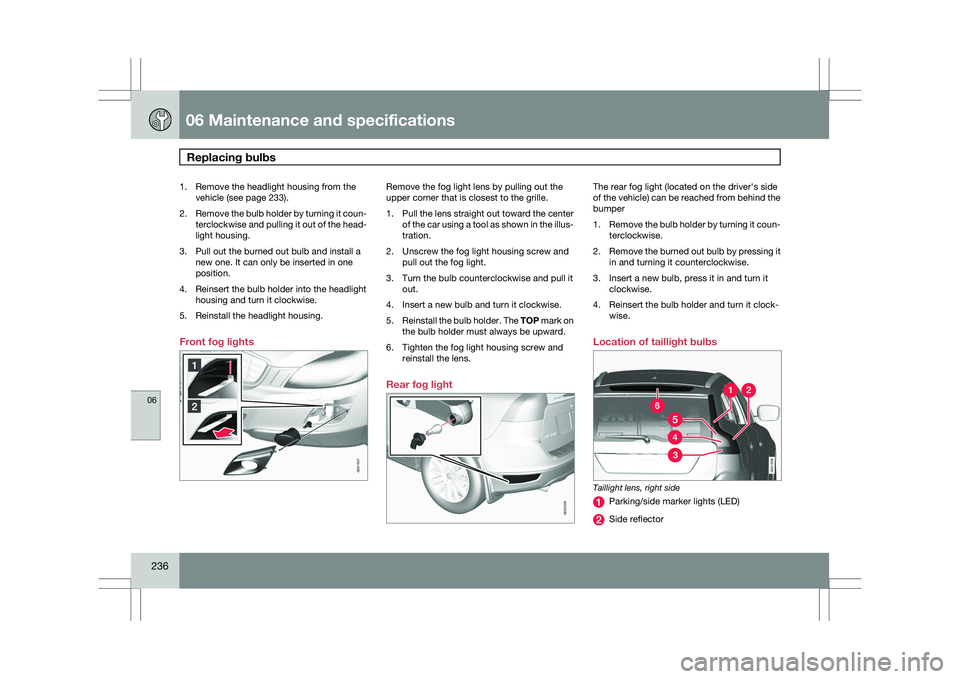
Front fog lights Remove the fog light lens by pulling out the
upper corner that is closest to the grille.
1.
Pull the lens straight out toward the center
of the car using a tool as shown in the illus-
tration.
2. Unscrew the fog light housing screw and pull out the fog light.
3. Turn the bulb counterclockwise and pull it out.
4. Insert a new bulb and turn it clockwise.
5. Reinstall the bulb holder. The TOP mark on
the bulb holder must always be upward.
6. Tighten the fog light housing screw and reinstall the lens.
Rear fog light The rear fog light (located on the driver\fs side
of the vehicle) can be reached from behind the
bumper
1.
Remove the bulb holder by turning it coun-
terclockwise.
2. Remove the burned out bulb by pressing it
in and turning it counterclockwise.
3. Insert a new bulb, press it in and turn it clockwise.
4. Reinsert the bulb holder and turn it clock- wise.
Location of taillight bulbs Taillight lens, right side
Parking/side marker lights (LED)
Side reflector G031937 G032359 G031939
Page 240 of 297
06 Maintenance and specificationsReplacing bulbs 06
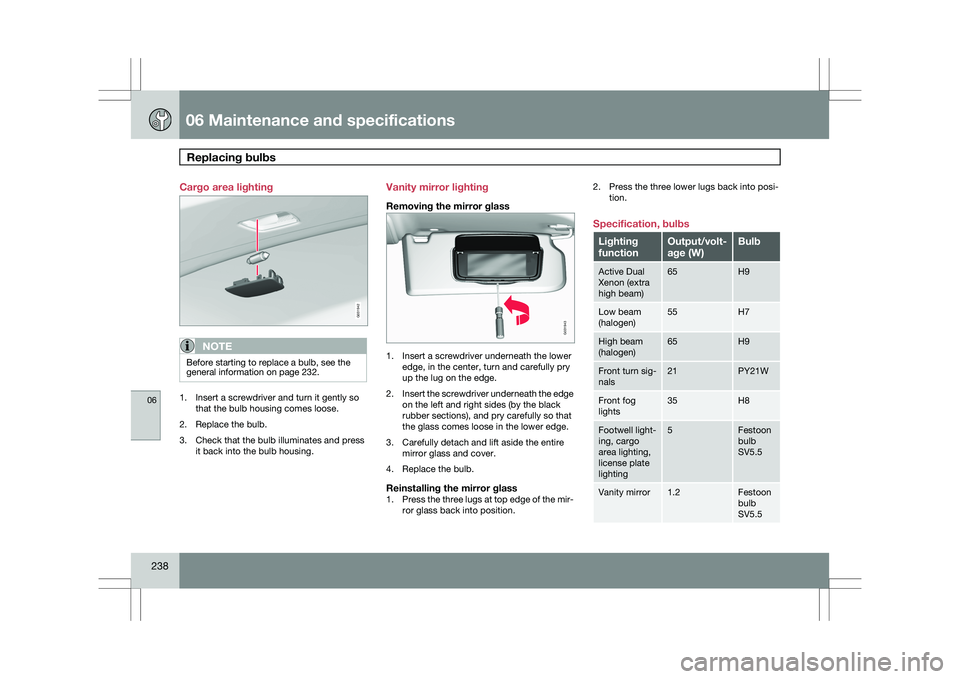
238 Cargo area lighting
NOTE
Before starting to replace a bulb, see the
general information on page 232.
1. Insert a screwdriver and turn it gently so
that the bulb housing comes loose.
2. Replace the bulb.
3. Check that the bulb illuminates and press it back into the bulb housing. Vanity mirror lighting
Removing the mirror glass
1. Insert a screwdriver underneath the lower
edge, in the center, turn and carefully pry
up the lug on the edge.
2. Insert the screwdriver underneath the edge
on the left and right sides (by the black
rubber sections), and pry carefully so that
the glass comes loose in the lower edge.
3. Carefully detach and lift aside the entire mirror glass and cover.
4. Replace the bulb.
Reinstalling the mirror glass1. Press the three lugs at top edge of the mir-
ror glass back into position. 2. Press the three lower lugs back into posi-
tion.
Specification, bulbs Lighting
function Output/volt-
age (W) Bulb
Active Dual
Xenon (extra
high beam) 65 H9
Low beam
(halogen) 55 H7
High beam
(halogen) 65 H9
Front turn sig-
nals 21 PY21W
Front fog
lights 35 H8
Footwell light-
ing, cargo
area lighting,
license plate
lighting 5 Festoon
bulb
SV5.5
Vanity mirror 1.2 Festoon
bulb
SV5.5 G031942 G031943