Page 3 of 392
1
2
3
4
5
6
7
3
2-4. Using other driving systems
Cruise control ...................... 152
Driving assist systems ........ 155
2-5. Driving information Cargo and luggage ............. 157
Vehicle load limits ............... 160
Winter driving tips ............... 161
Trailer towing (except Canada) ............................ 164
Trailer towing (Canada) ...... 165
Dinghy towing (vehicles with an automatic
transmission) .................... 173
Dinghy towing (vehicles with a manual
transmission) .................... 174
3-1. Using the air conditioning system and defogger
Air conditioning system ....... 178
Rear window and outside rear view mirror
defoggers .......................... 185
3-2. Using the audio system Audio system type............... 187
Using the radio .................... 189
Using the CD player ............ 195
Playing back MP3 and WMA discs ........................ 200
Optimal use of the audio system .............................. 207
Using the AUX adapter ....... 209 3-3. Using the interior lights
Interior lights list ................. 210
• Interior light ...................... 211
• Personal lights................... 211
3-4. Using the storage features List of storage features ....... 212
• Glove boxes ..................... 212
• Cup holders ...................... 214
• Bottle holders ................... 215
• Auxiliary boxes ................. 217
3-5. Other interior features Sun visors........................... 219
Vanity mirrors ..................... 220
Clock .................................. 221
Power outlet ....................... 223
Floor mat ............................ 224
Luggage compartment features ............................ 225
4-1. Maintenance and care Cleaning and protecting the vehicle exterior ........... 228
Cleaning and protecting the vehicle interior ............ 230
4-2. Maintenance Maintenance requirements .................... 233
General maintenance ......... 235
Emission inspection and maintenance (I/M)
programs .......................... 238
3Interior features
4Maintenance and care
Page 14 of 392
14
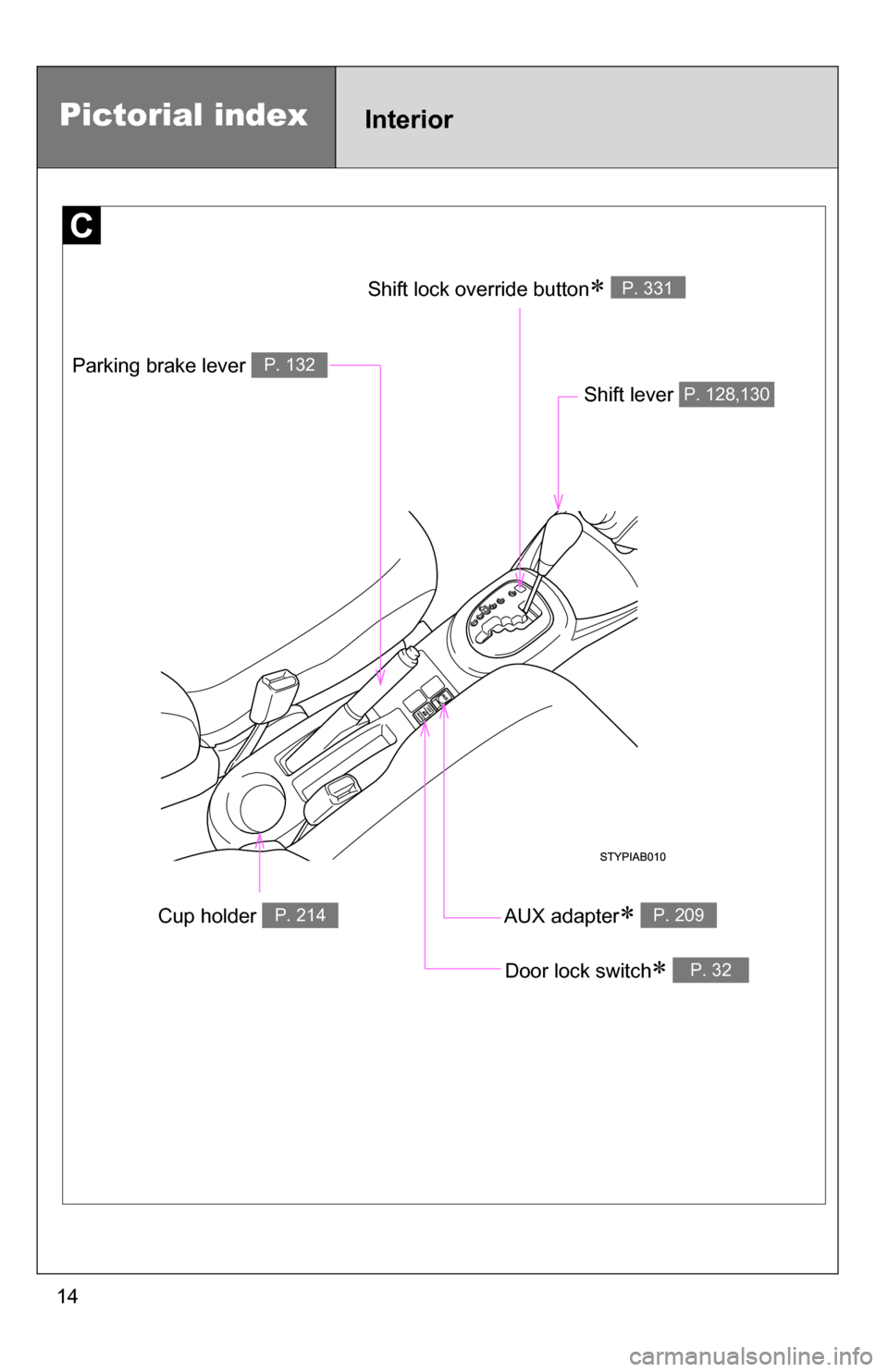
Cup holder P. 214
Parking brake lever P. 132
Shift lever P. 128,130
Door lock switch P. 32
AUX adapter P. 209
Shift lock override button P. 331
Pictorial indexInterior
Page 15 of 392
15
Pictorial indexInstrument panel
Fog light switch P. 147Rear window wiper
and washer switch
P. 151
Tilt steering lock release lever P. 62
Hood opener P. 242
Gauges and meters
P. 135
Audio system P. 187
Glove boxes P. 212
Fuel filler door
opener
P. 70
Auxiliary boxes
P. 217
Bottle holder
P. 215
Windshield wipers and
washer switch
P. 148Turn signal lever P. 131
Headlight switch P. 145
: If equipped
Page 109 of 392
109
1-7. Safety information
1
Before driving
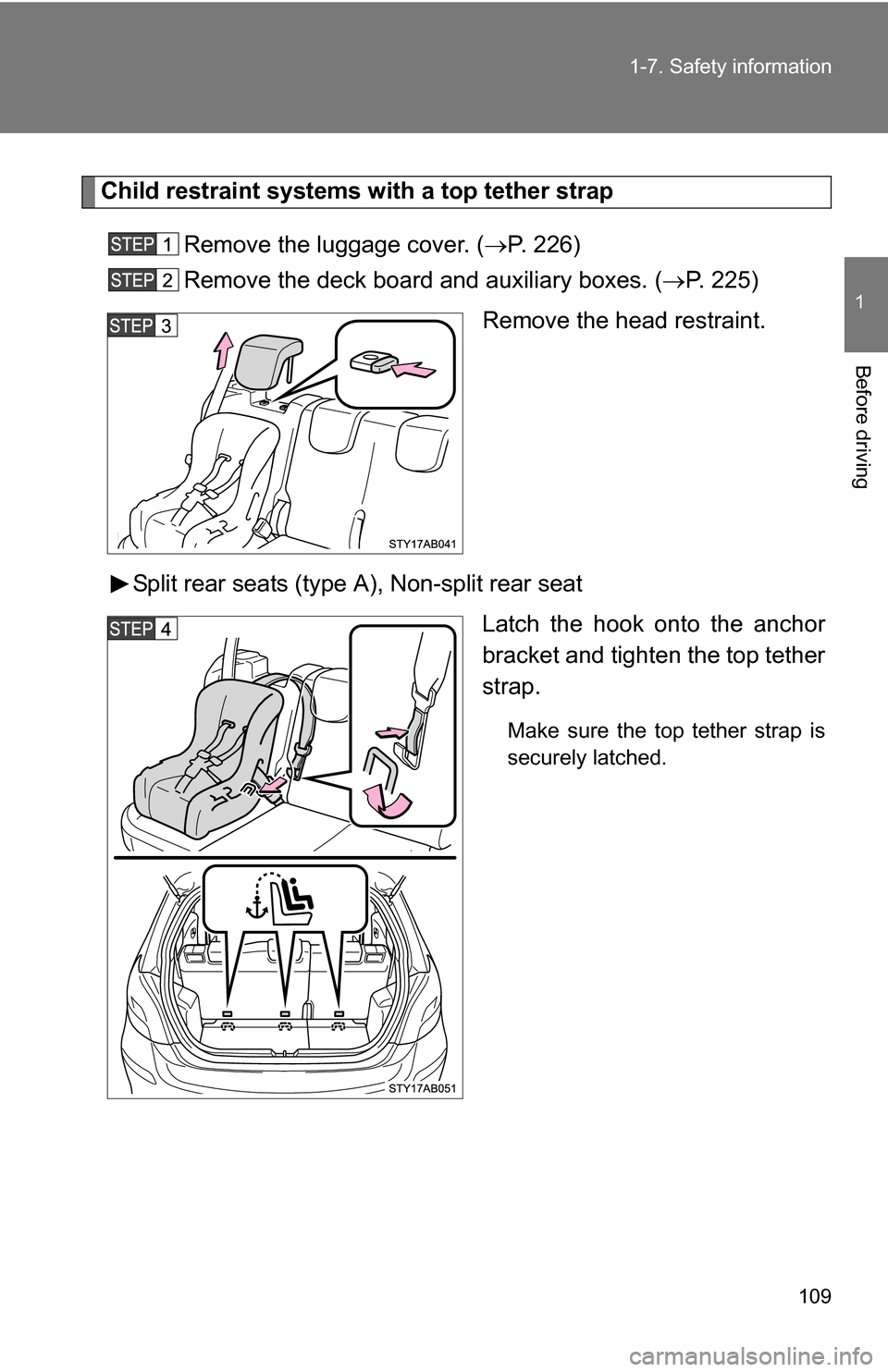
Child restraint systems with a top tether strap
Remove the luggage cover. ( P. 226)
Remove the deck board and auxiliary boxes. ( P. 225)
Remove the head restraint.
Split rear seats (type A), Non-split rear seat Latch the hook onto the anchor
bracket and tighten the top tether
strap.
Make sure the top tether strap is
securely latched.
Page 110 of 392
110 1-7. Safety information
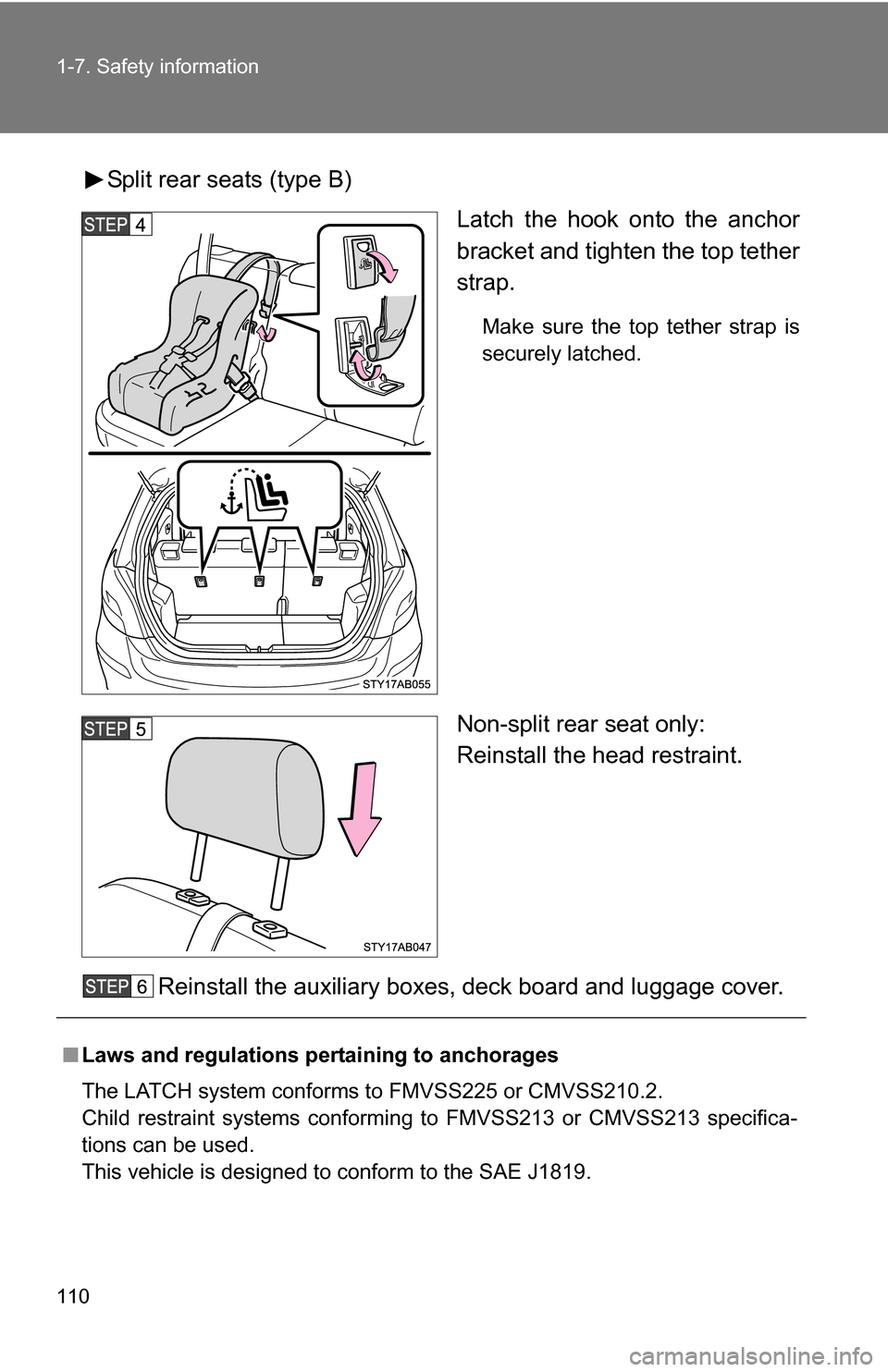
Split rear seats (type B)Latch the hook onto the anchor
bracket and tighten the top tether
strap.
Make sure the top tether strap is
securely latched.
Non-split rear seat only:
Reinstall the head restraint.
Reinstall the auxiliary boxes, deck board and luggage cover.
■ Laws and regulations pertaining to anchorages
The LATCH system conforms to FMVSS225 or CMVSS210.2.
Child restraint systems conforming to FMVSS213 or CMVSS213 specifica-
tions can be used.
This vehicle is designed to conform to the SAE J1819.
Page 177 of 392
Interior features3
177
3-1. Using the air conditioning system and defogger
Air conditioning system .... 178
Rear window and outside rear view mirror
defoggers ....................... 185
3-2. Using the audio system Audio system type............ 187
Using the radio ................. 189
Using the CD player ......... 195
Playing back MP3 and WMA discs ..................... 200
Optimal use of the audio system ........................... 207
Using the AUX adapter .... 209
3-3. Using the interior lights Interior lights list ............... 210
• Interior light .................... 211
• Personal lights ............... 211 3-4. Using the storage features
List of storage features .... 212
• Glove boxes ................... 212
• Cup holders ................... 214
• Bottle holders ................. 215
• Auxiliary boxes ............... 217
3-5. Other interior features Sun visors ........................ 219
Vanity mirrors ................... 220
Clock ................................ 221
Power outlet ..................... 223
Floor mat .......................... 224
Luggage compartment features .......................... 225
Page 187 of 392
187
3
Interior features
3-2. Using the audio system
Audio system type
■Using cellular phones
Interference may be heard through the audio system's speakers if a cellular
phone is being used inside or close to the vehicle while the audio syste\
m is
operating.
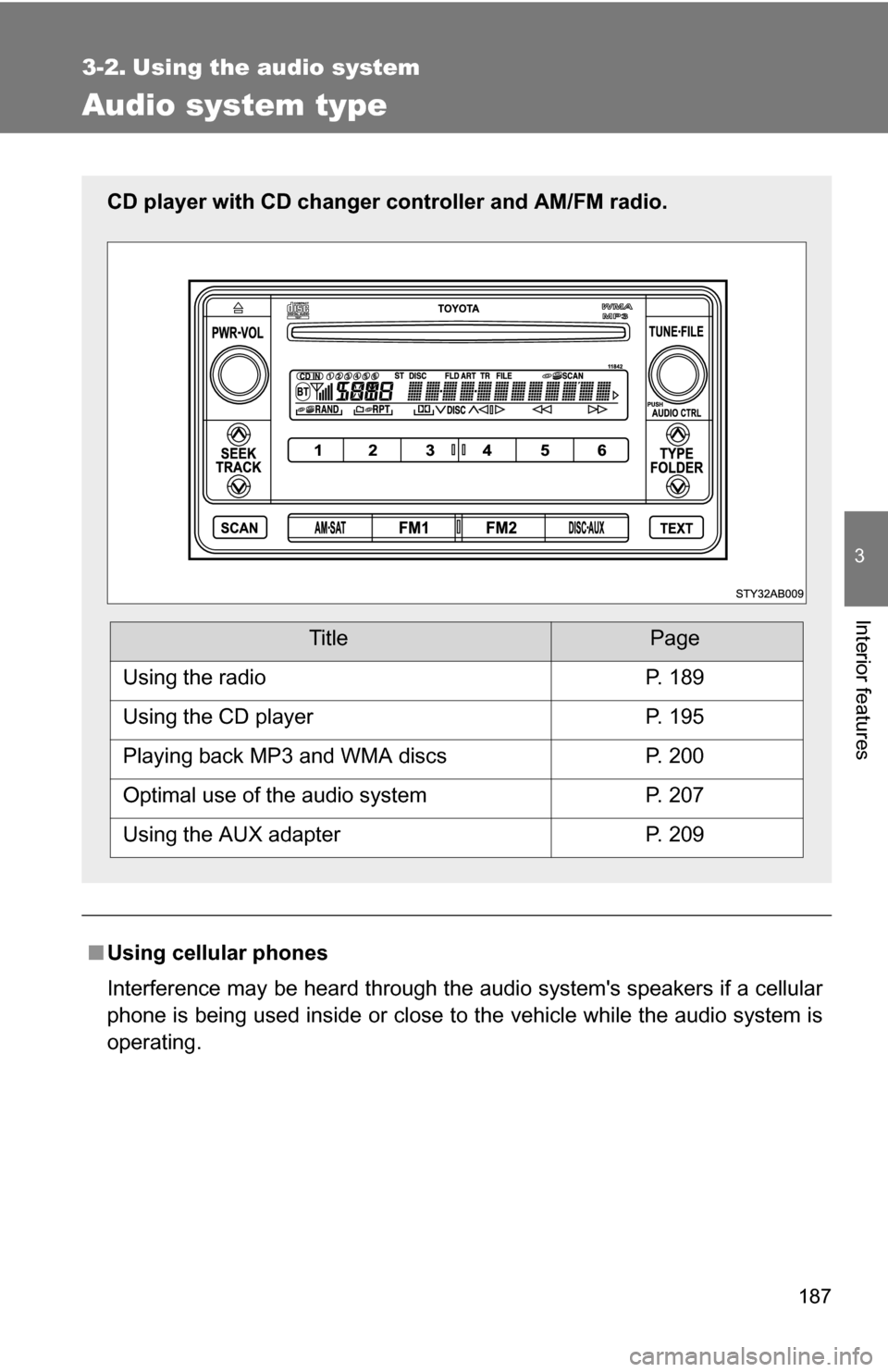
CD player with CD changer controller and AM/FM radio.
TitlePage
Using the radioP. 189
Using the CD playerP. 195
Playing back MP3 and WMA discsP. 200
Optimal use of the audio systemP. 207
Using the AUX adapterP. 209
Page 209 of 392
209
3-2. Using the audio system
3
Interior features
Using the AUX adapter (if equipped)
■Operating portable audio devices connected to the audio system
The volume can be adjusted using the vehicle’s audio controls. All other
adjustments must be made on the portable audio device itself.
■ When using a portable audio devi ce connected to the power outlet
Noise may occur during playback. Use the power source of the portable
audio device.
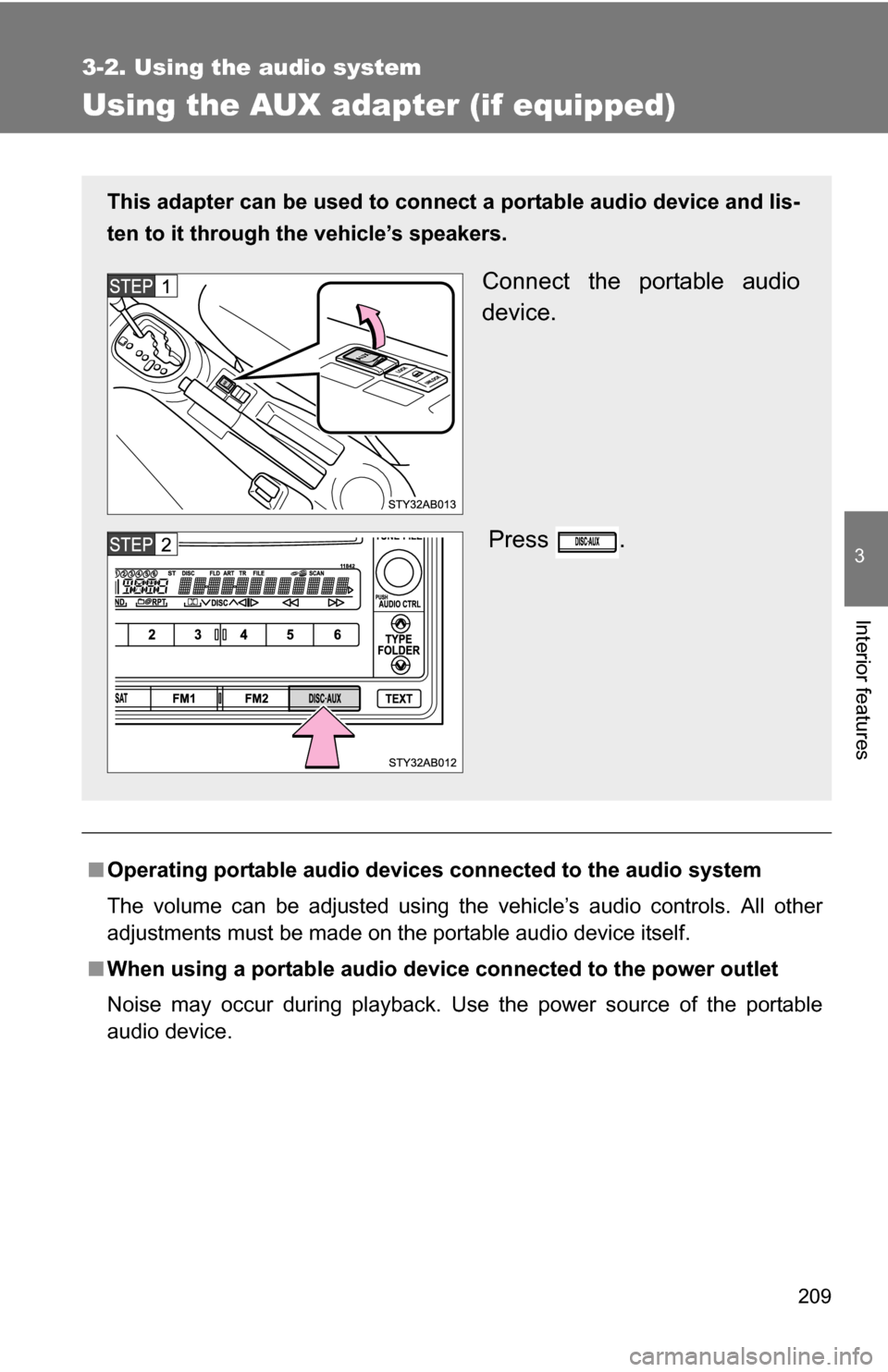
This adapter can be used to connect a portable audio device and lis-
ten to it through the vehicle’s speakers.
Connect the portable audio
device.
Press .